Week 10 – Reading Reflection

A Brief Rant on the Future of Interaction Design:

When I was reading Bret Victor’s “A Brief Rant on the Future of Interaction Design” I thought about how I perceive technology and design. I realized how easily I accept “innovations” like touchscreens as the peak of progress, even though, as Victor argues, they often limit our potential rather than expand it. His critique of “pictures under glass” especially resonated with me, because I use my phone and laptop every day, but I rarely think about how numb those interactions actually are. There is no real feeling, no texture, no sense of connection between my hands and what I’m creating.

I think, this reading challenged me to imagine interfaces that feel alive, that respond to our touch and movement in meaningful ways. Victor’s idea that tools should “amplify human capabilities” made me wonder whether I am designing for convenience or for human expression. I started thinking about how interaction could involve more of the body, maybe through gestures, pressure, or sound, so that users could experience technology in a fuller, more emotional way. I also liked Victor’s reminder that “the future is a choice.” It gave me a sense of agency and responsibility as a future designer. Instead of waiting for big tech companies to define how we interact, I can be part of shaping alternatives that are more tactile, intuitive, and human-centered. This reading did not just critique existing designs, it inspired me to dream bigger and to treat design as a way of expanding what people can truly feel and do.

A follow-up article

These responses challenged the way I think about technology and its relationship to the human body. His insistence that our current interfaces are “flat and glassy” made me realize how limited most digital experiences truly are. I started questioning how often I accept these limitations without noticing them. The idea that our tools should adapt to us not the other way around feels both radical and necessary.What I found most striking was his defense of our hands and bodies as essential to understanding and creativity. It made me see touch not as something trivial, but as a form of intelligence. The thought that we could lose part of that richness by constantly interacting with lifeless screens feels unsettling.

As someone studying Interactive Media, I see this as a call to design technologies that reconnect people with the physical world. Instead of chasing the newest gadget, I want to think about how digital experiences could feel more alive, how they could move, resist, or respond in ways that make us aware of our own presence. The reflections did not just critique modern design, they opened a space for imagining interaction as something deeply human, sensory, and expressive.
Week 10 – Reading Reflection

Bret Victor’s rant made me rethink what we even mean when we call something “the future.” He argues that touchscreens, gesture controls, and all these “advanced” interfaces are actually making us less connected to our own abilities. Our hands are one of the deepest ways we understand the world. They know tension, pressure, texture. They think with us. But we’ve decided progress means tapping around on cold glass. When I read that, the first thing I thought of was LEGO. There is this unspoken language when you build: the way your fingers already know which brick fits, the tiny resistance before a perfect click. That sound. That feeling. It’s not just play; it is intelligence happening through the body. No screen has ever replicated that.

I’ve tried the digital LEGO builders before, and they always feel wrong. You can assemble something on the screen, sure, but there is no weight, no friction, no small ritual of digging through pieces and recognizing one by touch alone. Same with crocheting. The yarn runs differently through your fingers depending on tension, mood, the hook, your posture. You feel progress. You feel mistakes. Your hands correct before your mind catches up. Victor’s point clicked for me here: creativity is not just in the mind. It is in the wrists, fingertips, joints, and muscle memory. When interfaces ignore the body, they are not futuristic. They are incomplete.

The responses page made it clear he is not saying we need to go backwards. He is saying we should refuse a future that flattens our senses. There are richer, more human possibilities if we let our full selves participate in the interaction. For me, the future I want is textured, clickable, tuggable, threaded, snapped together. A future that feels like LEGO: discovery through touch, play, accident, correction, and joy. Innovation that doesn’t just live on a screen, but lives in your hands.

W10: Instrument

Inspiration

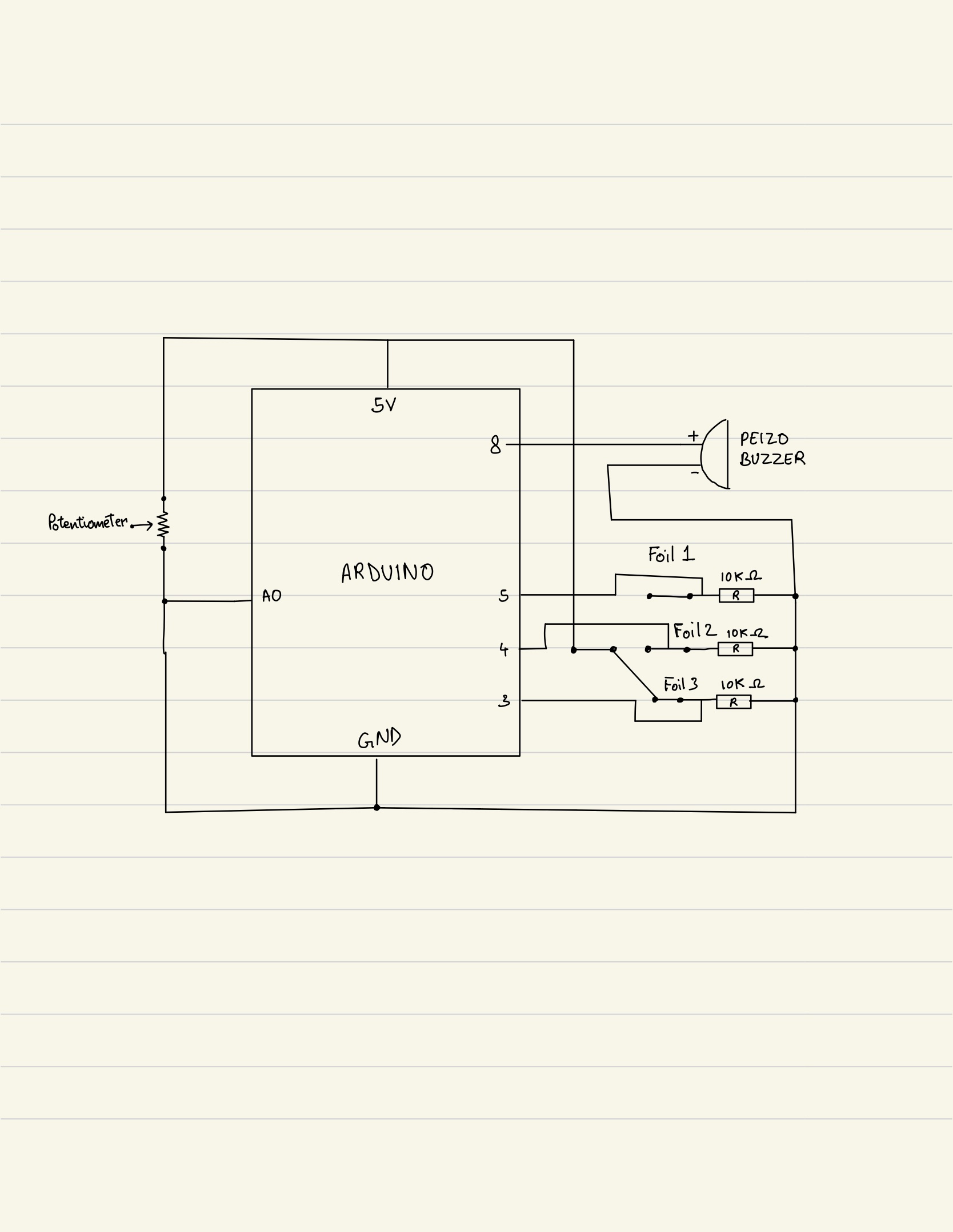
The xylophone has always fascinated me. I loved watching the vibrant melodies come to life as each bar was tapped. This inspired me to create a digital version using everyday materials, giving the classic xylophone a modern, interactive twist.

Concept

The idea was simple yet playful: use Aluminum foil as the xylophone buttons. Each strip of foil represents a note, and tapping on it triggers a sound. To bring in the concept of tuning (something I deeply appreciate from my experience playing the violin) we incorporated a potentiometer. This allows the user to adjust the pitch of each note in real-time, just as a musician tunes their instrument before performing. By combining tactile interaction with the flexibility of pitch control, we aimed to create an instrument that feels both familiar and innovative.


Code I’m Most Proud Of

int potVal = analogRead(potPin);
float multiplier = map(potVal, 0, 1023, 60, 180) / 100.0;

if (activeIndex >= 0) {
    int freq = int(baseFreqs[activeIndex] * multiplier);
    freq = constrain(freq, 100, 5000);

    tone(buzzerPin, freq);
    delay(50);
} else {
    noTone(buzzerPin);
}

What makes this snippet special is how it turns a simple analog input into musical expression. By mapping the potentiometer to a frequency multiplier, each foil strip produces a different tone that can be adjusted on the fly. Using constrain() ensures the sounds remain within a safe, audible range. It was rewarding to see how these functions, which we learned in class, could be combined to create a tactile, musical experience.

Future Improvements

Right now, the instrument plays a sound as long as the foil is touched. In the future, I’d like to add note duration control so that pressing a strip produces a single tone, similar to how a piano note behaves, with a possible fade-out effect when the note ends. This would make the interaction feel more natural and musical.

Another exciting improvement could be a wireless “stick” that triggers the foil strips remotely. This would allow the musician to move freely and perform more expressively, opening up new possibilities for live interaction and playability.


Week 10 – Music instrument

Concept:

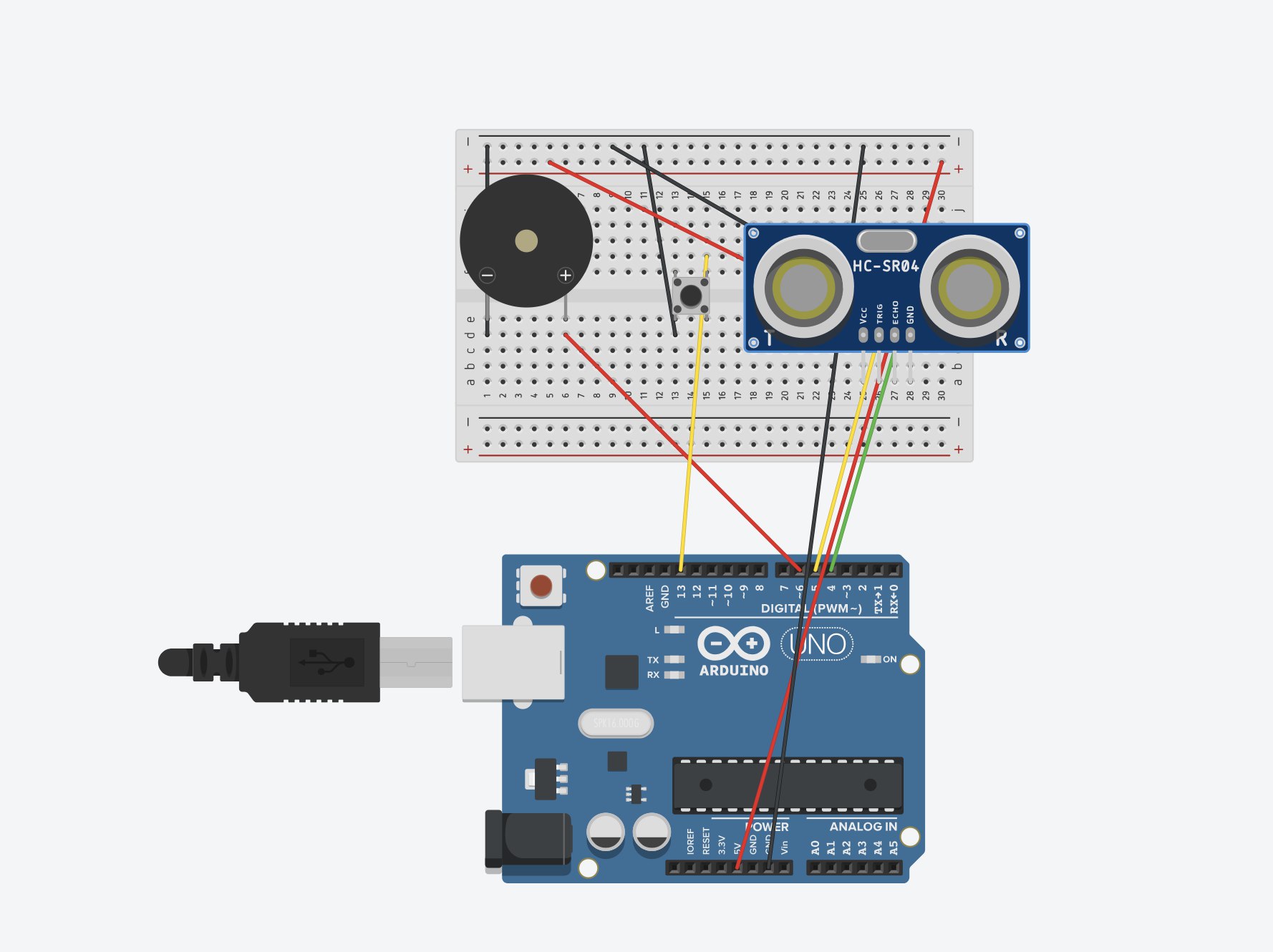
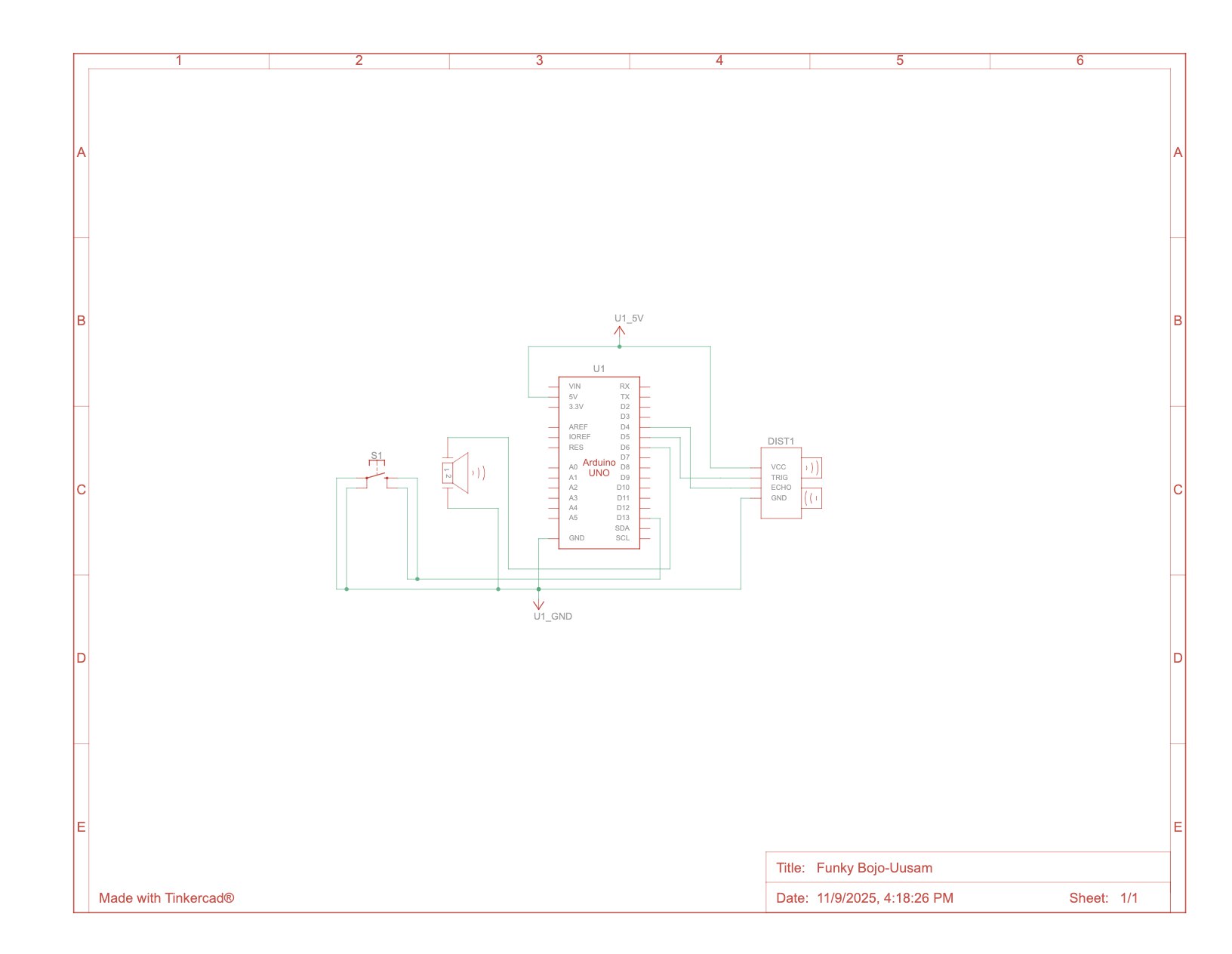
As we began planning how to present our musical instrument and the sound produced by the buzzer while using both digital and analog sensors, we decided to use a button as our digital sensor and a distance-measuring sensor as our analog sensor. The main concept is that the distance sensor detects how far an object or hand is, and based on that distance, it produces different notes and sounds through the buzzer.  When the button is pressed, the system pauses for 300 milliseconds (0.3 seconds) and temporarily stops reading distance values, effectively muting the instrument. Pressing the button again reactivates the sensor, allowing the instrument to continue playing notes according to the object’s position. This simple toggle system makes it easy to control when the instrument is active, giving users time to experiment with the sound and movement.

Arduino Setup and Demonstration: 

Schematic Diagram:
Setup:Video:

Highlight of the code:
Full-code on Github

if (sensorActive) {
    int distance = getDistance();
    Serial.println(distance);
    if (1 < distance && distance < 5) {
      tone(BUZZER, NOTE_C4);
    } else if (5 < distance && distance < 10) {
      tone(BUZZER, NOTE_D4);
    } else if (10 < distance && distance < 15) {
      tone(BUZZER, NOTE_E4);
    } else if (15 < distance && distance < 20) {
      tone(BUZZER, NOTE_F4);
    } else if (20 < distance && distance < 25) {
      tone(BUZZER, NOTE_G4);
    } else if (25 < distance && distance < 30) {
      tone(BUZZER, NOTE_A4);
    } else if (30 < distance && distance < 35) {
      tone(BUZZER, NOTE_B4);
    } else {
      noTone(BUZZER);
    }
  }

We would say the highlight of the coding would be the part where the distance-measuring sensor interacts with the buzzer to produce different musical notes based on how close or far an object is. We were excited to experiment with the distance-measuring sensor and explore how it could be programmed to produce sound through the buzzer. To get better understanding of the integrating notes we referred to Arduino tutorials. 

In the code above, the sensor continuously measures the distance of an object and converts the time it takes for the sound wave to bounce back into centimeters. Depending on the measured distance, the buzzer plays different musical notes, creating a simple melody that changes as the object moves closer or farther away.

Reflection:

We enjoyed experimenting with the distance-measuring sensor as it taught us how precise sensor readings can be transformed into meaningful outputs like sound, and combining it with the button control helped us manage the instrument’s activation smoothly. For future improvements, we would like to expand the range of notes to create more complex melodies and add LED lights that change color with the pitch to make the instrument more visually engaging. We could also experiment with different sensors, such as touch or motion sensors, to add more layers of interactivity. Finally, refining the accuracy and response speed of the sensor would make the sound transitions smoother and enhance the overall experience.


Week 10 – Musical instrument

Group members: Aizhan and Darmen
Concept:

As we began planning how to present our musical instrument and the sound produced by the buzzer while using both digital and analog sensors, we decided to use a button as our digital sensor and a distance-measuring sensor as our analog sensor. The main concept is that the distance sensor detects how far an object or hand is, and based on that distance, it produces different notes and sounds through the buzzer.  When the button is pressed, the system pauses for 300 milliseconds (0.3 seconds) and temporarily stops reading distance values, effectively muting the instrument. Pressing the button again reactivates the sensor, allowing the instrument to continue playing notes according to the object’s position. This simple toggle system makes it easy to control when the instrument is active, giving users time to experiment with the sound and movement.

Arduino Setup and Demonstration: 

Schematic Diagram: 


Setup:


Video Demonstration

Coding:

Arduino file on Github

if (sensorActive) {
    int distance = getDistance();
    Serial.println(distance);
    if (1 < distance && distance < 5) {
      tone(BUZZER, NOTE_C4);
    } else if (5 < distance && distance < 10) {
      tone(BUZZER, NOTE_D4);
    } else if (10 < distance && distance < 15) {
      tone(BUZZER, NOTE_E4);
    } else if (15 < distance && distance < 20) {
      tone(BUZZER, NOTE_F4);
    } else if (20 < distance && distance < 25) {
      tone(BUZZER, NOTE_G4);
    } else if (25 < distance && distance < 30) {
      tone(BUZZER, NOTE_A4);
    } else if (30 < distance && distance < 35) {
      tone(BUZZER, NOTE_B4);
    } else {
      noTone(BUZZER);
    }
  }
}

float getDistance() {
  float echoTime;                   //variable to store the time it takes for a ping to bounce off an object
  float calculatedDistance;         //variable to store the distance calculated from the echo time
  //send out an ultrasonic pulse that's 10ms long
  digitalWrite(TRIG_PIN, HIGH);
  delayMicroseconds(10);
  digitalWrite(TRIG_PIN, LOW);
  echoTime = pulseIn(ECHO_PIN, HIGH);      //pulsein command to see how long it takes for pulse to bounce back to sensor
  calculatedDistance = echoTime / 55.2;    //calculate  distance of object that reflected the pulse in cm 
  return calculatedDistance;
}

We would say the highlight of the coding would be the part where the distance-measuring sensor interacts with the buzzer to produce different musical notes based on how close or far an object is. We were excited to experiment with the distance-measuring sensor and explore how it could be programmed to produce sound through the buzzer. To get better understanding of the integrating notes we referred to Arduino tutorials. 

In the code above, the sensor continuously measures the distance of an object and converts the time it takes for the sound wave to bounce back into centimeters. Depending on the measured distance, the buzzer plays different musical notes, creating a simple melody that changes as the object moves closer or farther away.

Reflection:

We enjoyed experimenting with the distance-measuring sensor as it taught us how precise sensor readings can be transformed into meaningful outputs like sound, and combining it with the button control helped us manage the instrument’s activation smoothly. For future improvements, we would like to expand the range of notes to create more complex melodies and add LED lights that change color with the pitch to make the instrument more visually engaging. We could also experiment with different sensors, such as touch or motion sensors, to add more layers of interactivity. Finally, refining the accuracy and response speed of the sensor would make the sound transitions smoother and enhance the overall experience.

W10: Reading Reflection

The Future of Interaction Design

Reading this piece immediately took me back to Steve Jobs’ keynote when he unveiled the iPhone and boldly declared that we don’t need a stylus; that our fingers are the best pointing device we’ll ever have. Jobs’ vision, at that time, was revolutionary because it simplified interaction and made technology more accessible. He recognised how naturally intuitive our sense of touch is which is the same quality the author values but he focused on usability on physical feel.

While the author criticises “Pictures Under Glass” for robbing us of sensory depth, I see it as a meaningful trade-off. It allowed us to consolidate multiple tools into one, replacing the clutter of physical devices with a single screen that could transform into anything we needed. The flatness of the glass became the canvas of endless interfaces. Even if it dulled the sensation of texture, it heightened the sense of control, mobility, and creative possibility.

That said, I agree that the future can move beyond this limitation. The author’s call to embrace our full tactile and bodily potential opens an exciting direction for technology. What if screens could morph in texture, shape, and resistance depending on the app in use, a photo that feels like paper, a drum pad that vibrates ? That would merge Jobs’ vision of simplicity with the author’s longing for physical depth.

Perhaps, then, “Pictures Under Glass” wasn’t the end of interaction design but a stepping stone.

Moving forward from his response to the comments, I really agreed with the author’s take on the “iPad bad” comment. I liked how he clarified that the iPad is actually good for now. It was a revolutionary invention that changed how we interact with technology. But I also agree with his warning that if, twenty years from now, all we have is the same flat, glassy device with minor haptic improvements, then it would be bad. His comparison to black-and-white film before color photography made a lot of sense to me. It’s a reminder that innovation should keep evolving rather than settling for what feels advanced in the moment.

Reading Reflection Week 10

One of the examples I found most interesting in “A Brief Rant on the Future of Interaction Design” was the author’s take on voice, especially when he described a fictional situation in which Monet uses his voice to obtain the painting he wants. It may sound ridiculous but I really do agree and understand his argument, how active exploration is necessary in some cases, and the use of voice doesn’t apply. This challenged my own way of thinking, expanding to something essential that the author may be trying to express, whether consciously or not. This is, some forms of interactive will not apply to some cases, and this is why the designer or programmer must understand what is most relevant and effective for the experience they are making. For example, in an interactive experience designed to be engaged while standing up, it might not be the best idea to make certain responses triggered by having the user go click on something on the laptop every time as well. Allowing the user to focus on a few things at a time will improve their experience and help them understand the relevance of the interactive elements within the main objective of the project


Something that caught my attention in Bret Victor’s follow-up article was the neglected factor when it comes to tools that are meant to amplify human capabilities, and how hands play an important role in these. I think I speak for many when I say that we often take the skills of our hands for granted. Cooking, drawing, writing, building, organizing, some of the best activities done both for pleasure or to complete a task are done with our hands. And I agree with the author that there is a unique satisfaction that comes from doing these things with our hands. For example, I do love drawing digitally, as the result of my efforts match my intention to draw realistic yet slightly cartoonish objects, landscapes, and characters. However, this process doesn’t match the precision and delicacy of using a brush and applying paint to a canvas, stroke for stroke.

Despite this, I must disagree with the author on one thing. Even though the connection between what I am doing with my hands and the outcome on a screen might not be as strong as doing with another more tangible medium, this does not mean there is no connection at all. Before technology took over most of our ordinary activities such as writing, I enjoyed writing stories with a pen or pencil on my notebook. However, this process became exhausting whenever I had to erase or cross something, or my fingers started to ache from writing for so long. Now, even though I am staring at a screen instead of brushing my fingers over a piece of paper, and typing over a keyboard instead of using a pen, I still enjoy writing just as much as before, and the action has become more manageable for me.


Week 10 – Reading Reflection

I think the idea of moving beyond flat screens is important. Victor Bret’s rant from 2011 makes me think about this a lot. He says our hands are amazing tools. I believe he is right. We should use our hands’ full abilities, not just for poking glass. I see a problem with how we use technology today. We call things interactive when they are not. Tapping a picture on a screen is a limited way to interact. I think true interaction should involve more of our senses and our physical body. It should feel like we are handling real things. Bret’s follow-up answers show that some people missed his point. They focused on new screen technology. But I believe his main idea was about our hands. He wanted us to think about touch and grip, not just better displays.

This makes me consider the role of voice commands. Some people think voice is the future. But I think it has limits. Speaking is not always practical or private. Our hands are often faster and more precise. The best future might combine voice, touch, and physical movement. I feel that the real challenge is for designers. They need to imagine tools that use our whole bodies. I believe we need technology that feels less like a window and more like a material. We need to build things we can truly feel and shape with our hands. This is a difficult but exciting goal.

Week 10: Musical Instrument (Ling and Mariam)

Concept

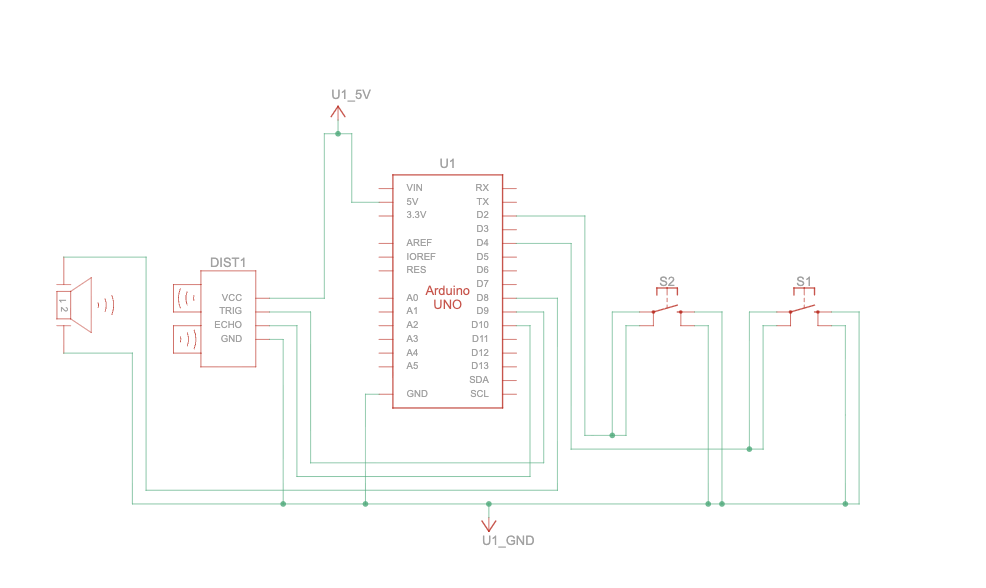
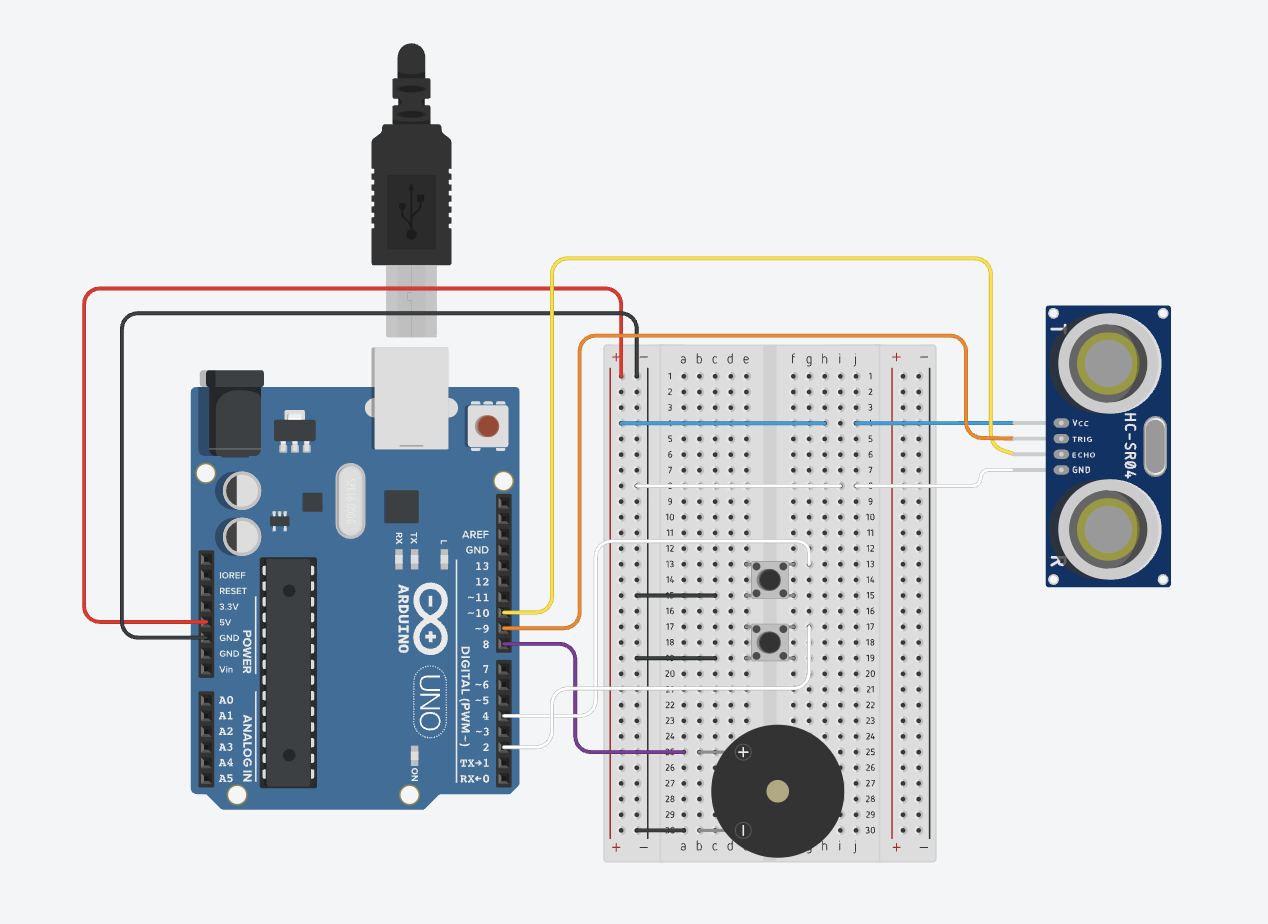
For this assignment, I worked together with Ling to create an instrument using the ultrasonic sensor. He came up with the idea to use the distance sensor, and the way we executed it reminded me of a theremin because there’s no physical contact needed to play the instrument. We also used a red button to turn the instrument on and off, as well as a green button that controls the tempo of the piezo buzzer (based on how many times you click on it in 5 seconds).

Schematic Diagram


Code

const int trigPin = 9;  
const int echoPin = 10; 
const int buzzerPin = 8; 
const int buttonPin = 4;  // system ON/OFF button
const int tempoButtonPin = 2;  // tempo setting button

//sensor variables
float duration, distance; 
bool systemOn = false; // system on or off state

// tempo variables
bool tempoSettingActive = false; 
int  tempoPressCount    = 0;   
unsigned long tempoStartTime = 0;
unsigned long tempoInterval  = 500; 

// for edge detection on tempo button (to count presses cleanly)
int lastTempoButtonState = HIGH;

// for edge detection on system button (cleaner)
int lastSystemButtonState = HIGH;


// for controlling when next beep happens
unsigned long lastBeatTime = 0;


void setup() {  
 pinMode(trigPin, OUTPUT);  
 pinMode(echoPin, INPUT);  
 pinMode(buzzerPin, OUTPUT);
 pinMode(buttonPin, INPUT_PULLUP); // system ON/OFF button 
 pinMode(tempoButtonPin, INPUT_PULLUP);  // tempo button 
 Serial.begin(9600);  
}  

void loop() {
  // system on/off state
  int systemButtonState = digitalRead(buttonPin);

  // detects a press: HIGH -> LOW 
  if (systemButtonState == LOW && lastSystemButtonState == HIGH) {
    systemOn = !systemOn;  // Toggle system state

    Serial.print("System is now ");
    Serial.println(systemOn ? "ON" : "OFF");

    delay(200); // basic debounce
  }
  lastSystemButtonState = systemButtonState;
  
  // if system is OFF: make sure buzzer is silent and skip rest
  if (!systemOn) {
    noTone(buzzerPin);
    delay(50);
    return;
  }

  // tempo button code
  int tempoButtonState = digitalRead(tempoButtonPin);

  // detects a press 
  if (tempoButtonState == LOW && lastTempoButtonState == HIGH) {
    if (!tempoSettingActive) {
      
      //first press (starts 5 second capture window)
      tempoSettingActive = true;
      tempoStartTime = millis();
      tempoPressCount = 1;  // Count this first press
      Serial.println("Tempo setting started: press multiple times within 5 seconds.");
    } else {
      // additional presses inside active window (5 secs)
      tempoPressCount++;
    }

    delay(40); // debounce for tempo button
  }
  lastTempoButtonState = tempoButtonState;

  // if we are in tempo mode, check whether 5 seconds passed
  if (tempoSettingActive && (millis() - tempoStartTime >= 5000)) {
    tempoSettingActive = false;

    if (tempoPressCount > 0) {
      // tempo interval = 1000 ms / (number of presses in 5 secs)
      tempoInterval = 1000UL / tempoPressCount;

      // avoids unrealistically fast intervals
      if (tempoInterval < 50) {
        tempoInterval = 50;
      }

      Serial.print("Tempo set: ");
      Serial.print(tempoPressCount);
      Serial.print(" presses in 5s -> interval ");
      Serial.print(tempoInterval);
      Serial.println(" ms between beeps.");
    } else {
      Serial.println("No tempo detected.");
    }
  }
 
  // ultrasonic sensor distance measurement
  digitalWrite(trigPin, LOW);
  delayMicroseconds(2);

  digitalWrite(trigPin, HIGH);
  delayMicroseconds(10);
  digitalWrite(trigPin, LOW);

  duration = pulseIn(echoPin, HIGH);
  distance = (duration * 0.0343) / 2.0;  // in cm

  Serial.print("Distance: ");
  Serial.println(distance);

  
  //buzzer pitch and tempo
  // checks if distance is valid and in a usable range
  if (distance > 0 && distance < 200) {
    float d = distance;

    // limit distances for stable mapping
    if (d < 5)  d = 5;
    if (d > 50) d = 50;

    // maps distance to frequency (closer = higher pitch)
    int frequency = map((int)d, 5, 50, 2000, 200);

    // uses tempoInterval to define how often we "tick" the sound (creates short beeps at each interval using current frequency)
    unsigned long now = millis();

    if (now - lastBeatTime >= tempoInterval) {
      lastBeatTime = now;

      // plays a short beep (half of the interval duration)
      unsigned long beepDuration = tempoInterval / 2;
if (beepDuration < 20) {
beepDuration = 20;  // minimum hearable blip
 }

tone(buzzerPin, frequency, beepDuration);
}

 } else {
    // if bad/no reading, silence the buzzer between ticks
    noTone(buzzerPin);
  }
  delay(50); //delay to reduce noise

}
Favorite Code
//buzzer pitch and tempo
// checks if distance is valid and in a usable range
if (distance > 0 && distance < 200) {
  float d = distance;

  // limit distances for stable mapping
  if (d < 5)  d = 5;
  if (d > 50) d = 50;

  // maps distance to frequency (closer = higher pitch)
  int frequency = map((int)d, 5, 50, 2000, 200);

This is a pretty simple part of the code, but I loved how the beeping sounds turned out. It’s so satisfying to see how my hand movements directly control the sound, and it made me realize how significant even a small part of the code could be.

The code was completed with assistance from ChatGPT.

Video Demo

Reflection and Future Improvements

Mapping the distance to control the sound was pretty simple. The challenging part was controlling the tempo, we had to figure out the values to divide in order for it to have a clear change in the sound of the piezo buzzer after clicking the green button. Overall, this was a really cool project and I hope to continue to improve and expand my knowledge in physical computing!

Week 10 Production(Ling and Mariam)

Conceptualization

For this week’s assignment, the requirement is to “Make a musical instrument “while using at least one digital sensor (switch), at least one analog sensor (photoresistor, potentiometer, or distance measuring sensor).” I have worked with photoresistor last week, and potentiomter isn’t aesthetic enough for a musical instrument in my view, so I looked into the toolbox and proposed to apply ultrasonic sensor, or in another word, distance measuring sensor. It works perfectly as a tool to measure the distance between the sensor and any solid object in real-time and we were thinking to map this distance to pitches so that whenever people move their hands in front of the sensor, the sound the buzzer make would change accordingly.

After implement this simple step, I was thinking about two problems: first, how could i integrate a switch into this system, and second, is there anyway to alter the tempo, which is another important factor in making music, of the sound the buzzer made. To resolve the first problem, i first decide to add a system on/off switch since it’s just logical to add a switch to control the entire system. To resolve the second problem, I proposed to add a switch to control the tempo of the sound it made since after the first implementation, the buzzer would just make continuous sound and it would be hard to add any tempo element to the instrument.

We decided there could be 2 means to control the tempo:

  1. The switch would record manual interaction with the switch and play the sound precisely how it is manually inputted.
  2. The switch would record how many times people push the button within a 5-second time period(starting from the first push) and calculate the tempo based on 1000ms dividing the times the button is pushed.

We finally decided to go with the second option as it would provide us with a more steady tempo since manual input could be mathematically unstable otherwise.

So the final output(the video demonstration and the schematic) is demonstrated below.

Video Demonstration

Schematic

Code Highlight:

In my opinion, there are two interesting part about this program. First, how the pitch is controlled(a basically mapping program) and secondly, the program to control the tempo(the logic of the tempo-control is listed above).

duration = pulseIn(echoPin, HIGH);
distance = (duration * 0.0343) / 2.0;  // in cm
// Check if distance is valid and in a usable range
  if (distance > 0 && distance < 200) {
    float d = distance;

    // Limit distances for stable mapping
    if (d < 5)  d = 5;
    if (d > 50) d = 50;

    // Map distance to frequency (closer = higher pitch)
    int frequency = map((int)d, 5, 50, 2000, 200);

This code highlights how the pitch is correlated to the distance in programs.

duration = pulseIn(echoPin, HIGH);

This measures how long the echo signal stayed HIGH. This is the time for the sound to travel to the obstacle and back.

distance = (duration * 0.0343) / 2;

The duration(in microseconds) is multiplied by the speed of sound in air (0.0343 cm/µs). It’s divided by 2 because the sound traveled to the object and back, but we only want one-way distance.

// Detect a press (falling edge: HIGH -> LOW)
  if (tempoButtonState == LOW && lastTempoButtonState == HIGH) {
    if (!tempoSettingActive) {
      // First press: start 5-second capture window
      tempoSettingActive = true;
      tempoStartTime = millis();
      tempoPressCount = 1;  // Count this first press
      Serial.println("Tempo setting started: press multiple times within 5 seconds.");
    } else {
      // Additional presses inside active window
      tempoPressCount++;
    }

    delay(40); // debounce for tempo button
  }

This is the tempo controlling program. I think it is very self-explanatory with the comments in the code.

The entire code is completed with assistance from GPT.

Reflection:

For future improvements, i want to work with buzzer that produce better sound than this one, but the working experience with this buzzer is transitive for future works.