Concept:
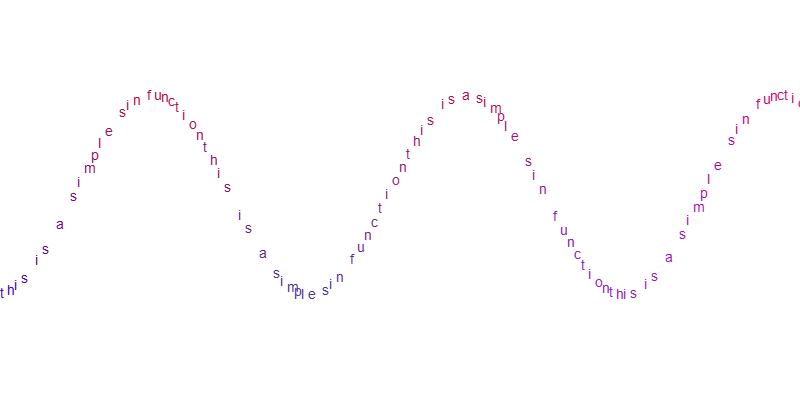
I sought a degree of inspiration from Camillie Utterback’s Text Rain. One key difference, while Utterback made text fall under ‘gravity’ and react to people’s silhouette, I decided to map text onto continuous mathematical functions (see example below)
 *The image above depicts a sine curve with the text ‘this is a simple sin function’.
Core Functionality and Features
The program contains a class appropriately called ‘fun’ (abbreviation for ‘function’) that contains attributes and methods, including a ‘display’ method to draw the curve onto the canvas. ‘fun’ also contains methods for changing the type of function – example from a ‘sin’ to a ‘log’ – and a method for fetching the function’s value from the parameter ‘t’ which in this case, spans the width of the canvas.
The ‘fun’ class once instantiated into an object contains data that alters how the drawn function appears. For example, the ‘sin’ function has the following ‘fun.function_data’:
let SineFunction = new fun("sin");

SineFunction.function_data[0] = 100;    // AMPLITUDE 'a'
SineFunction.function_data[1] = 0.01;   // Frequency 'r'
SineFunction.function_data[2] = 10;     // X Translation 'x'
SineFunction.function_data[3] = 200;    // Y Translation 'y'

/*
SineFunction.getF(t) {
  return a * Math.sin( r * t - x ) + y
}
*/
There are 7 basic types of mathematical functions that ‘fun’ can represent, namely sine (sin), cosine (cos), tangent (tan), hyperbolic sine (sinh), hyperbolic cosine (cosh), hyperbolic tangent (tanh), logarithmic (log).
Additionally, for more advanced generation, there is an additional class ‘algebricF’, that is used in a very similar way to ‘fun’, except that it can store up to two ‘fun’ or ‘algebricF’ classes in it, and performs a variety of specified algebraic operations on the class. Please do not mind the spelling mistake in the name of the class. The operations include addition, subtraction, multiplication, and division.
For interesting visuals, each drawn function’s text is assigned a color. The color is blue near the bottom of the screen, red near the top, and then this is blended with linear interpolation based on its ‘y’ position divided by the canvas ‘height’. A second linearly interpolated color is then chosen for the lateral span, from green at the left and purple (updated 20:20 GST, 16 FEB) at the right. The result of this interpolation is then linearly interpolated with the color of the vertical component, to grant a final color. The vertical color component gets priority because of how the third interpolation is carried out.
Demo
There are 3 demonstrations built into the code itself (courtesy of myself). They can be alternated between by pressing the keys ‘1’, ‘2’, ‘3’, or ‘0’ to disable all demonstrations. Click the screen to toggle whether the drawing moves or is paused.
Settings & Configurable Components
Certain settings and components may be configured in the Configuration section at the absolute top of the sketch. It is recommended that you read the comment or description given to each setting before playing around. It is also highly recommended to NOT alter any code beyond this unless you know what you are doing.
To create your own equations, declare an empty variable just before the setup function, and instantiate the correct ‘fun’ or ‘algebricF’ object inside of the setup function itself. Then, call its display method inside of the draw function. You may need to play around with the various components that constitute towards the function, especially amplitude and the y-translation.
Known Bugs
While there is a toggleable variable called ‘ADJUST_SCREEN’ in the Configuration section – which strives to adjust the screen to capture off-screen parts of the graph – it does not work correctly for all cases, thus it is recommended to use functions that stay within the screen if it is so that you actually want to see stuff.
Code & Additional Credits
As no external media or assistance (exception below) was used, I (Raja Qasim Khan) am the sole author and developer of the project’s code.
(Exception): https://p5js.org/reference/ was used for parts such as fetching date and time (for the canvas capture functionality) and the syntax of certain keywords in the language. No additional sources were employed.
Notes from the developer: I began by starting with the absolute basics of the project in the Processing 3 IDE for Python. Once the basics were done with, I re-wrote the code in JavaScript in p5.js and finished most of the remaining features there.
Please find the code below.
// CONFIGURATION
let TEXT_SIZE = 14; // size of the displayed text
let POINT_INCREMENT = 7; // the increment of character positioning in the display

// The gradient of colors in the Y axis
let MIN_COLOR_Y;
let MAX_COLOR_Y;

// The gradient of colors in the X axis
let MIN_COLOR_X;
let MAX_COLOR_X;

let MOVE_RESISTANCE = 1.2; // The resistance coefficient in moving the graph across the screen. -ve for backwards motion.

let ADJUST_SCREEN = false; // If the screen should translate to include outside points.

let PREBUILT_DISPLAY_NUMBER = 2; /*

Prebuilt by me for demo purposes:

0: don't display any demo.
1 : single 'cos' function.
2: multiple function demo.
3: algebric function demo.
4 show credit information.

*/

let OVERLAY_ENABLED = true; // whether the information overlay is enabled or not.

let BACKGROUND_COLOR = [255, 255, 255, 255]; // the background color RGBA

// GLOBALS
let current_offset = 0;
let isMoving = false;

// MAIN CODE

let F1;
let F2;

let F3;
let F4;

let FUN1;
let FUN2;
let FUN3;

let AF12;
let AF;

let CR;

function setup() {
  frameRate(30);
  createCanvas(800, 400);

  background(color(BACKGROUND_COLOR[0], BACKGROUND_COLOR[1], BACKGROUND_COLOR[2], BACKGROUND_COLOR[3]));

  F1 = new fun("cos");

  F1.function_data[0] = 100;
  F1.function_data[1] = 0.02;

  F1.function_data[2] = 0;
  F1.function_data[3] = 200;

  F2 = new fun("cos");

  F2.function_data[0] = -100;
  F2.function_data[1] = 0.02;

  F2.function_data[2] = 0;
  F2.function_data[3] = 200;

  F3 = new fun("tan");

  F3.function_data[0] = 20;
  F3.function_data[1] = 0.02;

  F3.function_data[2] = 0;
  F3.function_data[3] = 370;

  F4 = new fun("tan");

  F4.function_data[0] = 20;
  F4.function_data[1] = 0.02;

  F4.function_data[2] = 0;
  F4.function_data[3] = 30;

  FUN1 = new fun("sin");
  FUN1.function_data[0] = 100;
  FUN1.function_data[1] = 0.02;

  FUN1.function_data[2] = 0;
  FUN1.function_data[3] = 200/3;

  FUN2 = new fun("sin");
  FUN2.function_data[0] = 50;
  FUN2.function_data[1] = 0.04;

  FUN2.function_data[2] = 0;
  FUN2.function_data[3] = 200/3;

  FUN3 = new fun("cos");
  FUN3.function_data[0] = 100/3;
  FUN3.function_data[1] = 0.06;

  FUN3.function_data[2] = 0;
  FUN3.function_data[3] = 200/3;

  AF12 = new fun("algebricF");
  AF12.eq.fun1 = FUN1;
  AF12.eq.fun2 = FUN2;

  AF = new fun("algebricF");
  AF.eq.fun1 = AF12;
  AF.eq.fun2 = FUN3;

  CR = new fun("sin");

  CR.function_data[0] = 10;
  CR.function_data[1] = 0.005;

  CR.function_data[2] = 0;
  CR.function_data[3] = 200;

  MIN_COLOR_Y = color(0, 0, 255);
  MAX_COLOR_Y = color(255, 0, 0);

  MIN_COLOR_X = color(0, 255, 0);
  MAX_COLOR_X = color(255, 0, 255)
}

class algebricF {
  constructor() {
    /*
    (None) -> None

    A custom computation that MUST be an algebric combination of two 'fun's.

    can also be made of two algebricF's, or one algebricF.

    Operators: "+", "-", "/", "*"
    */
    this.operator = "+";

    this.fun1 = "null";
    this.fun2 = "null";
  }

  getF(t) {
    if (this.operator == "+") {
      return this.fun1.getF(t) + this.fun2.getF(t);

    } else if (this.operator == "-") {
      return this.fun1.getF(t) - this.fun2.getF(t);

    } else if (this.operator == "/") {
      return this.fun1.getF(t) / this.fun2.getF(t);

    } else if (this.operator == "*") {

      return this.fun1.getF(t) * this.fun2.getF(t);
    }
  }
}

class fun {
  constructor(function_type) {
    /*
    (str) -> None

    Creates a new, displayable function.
    function_type s:
        "sin", "cos", "tan", "sinh", "cosh", "tanh", "log"
    */

    this.function_type = function_type;
    this.function_data = [];
    this.eq = new algebricF();
  }

  getF(t) {
    /*
    (float) -> float

    Returns the result of the function at 't'.
    */

    // Please do not mind the atrocity below. That is how I normally code else..if statements before deciding to switch to more readable ones for the sake of this class.

    if (this.function_type == "sin") {

      let a = this.function_data[0];
      let r = this.function_data[1];
      let x = this.function_data[2];
      let y = this.function_data[3];

      return a * Math.sin(r * t - x) - y;
    } else {

      if (this.function_type == "cos") {
        let a = this.function_data[0];
        let r = this.function_data[1];
        let x = this.function_data[2];
        let y = this.function_data[3];

        return a * Math.cos(r * t - x) - y;
      } else {

        if (this.function_type == "sinh") {
          let a = this.function_data[0];
          let r = this.function_data[1];
          let x = this.function_data[2];
          let y = this.function_data[3];

          return a * Math.sinh(r * t - x) - y;
        } else {

          if (this.function_type == "cosh") {
            let a = this.function_data[0];
            let r = this.function_data[1];
            let x = this.function_data[2];
            let y = this.function_data[3];

            return a * Math.cosh(r * t - x) - y;
          } else {

            if (this.function_type == "tan") {
              let a = this.function_data[0];
              let r = this.function_data[1];
              let x = this.function_data[2];
              let y = this.function_data[3];

              return a * Math.tan(r * t - x) - y;
            } else {

              if (this.function_type == "tanh") {
                let a = this.function_data[0];
                let r = this.function_data[1];
                let x = this.function_data[2];
                let y = this.function_data[3];

                return a * Math.tanh(r * t - x) - y;
              } else {

                if (this.function_type == "log") {
                  let b = this.function_data[0];
                  let r = this.function_data[1];
                  let x = this.function_data[2];
                  let y = this.function_data[3];

                  return r * Math.log(t - x) / Math.log(b) - y;
                } else {

                  if (this.function_type == "algebricF") {
                    return this.eq.getF(t);
                  }
                }
              }
            }
          }
        }
      }
    }
  }

  changeTo(new_function_type) {
    /*
    (str) -> None

    Changes the function type and replaces all function_data with default values.
    */

    this.function_type = new_function_type;

    if (this.function_type == "sin" || this.function_type == "cos" || this.function_type == "sinh" || this.function_type == "cosh" || this.function_type == "tan" || this.function_type == "tanh" || this.function_type == "log") {
      this.function_data = [
        10,
        0.1,
        0,
        50
      ];
    } else if (this.function_type == "algebricF") {
      this.function_data = [];
      this.eq = new algebricF();
    }
  }

  display(txt) {
    /*
    (str) -> None

    Draws the function on screen using characters from txt.
    */

    let entry = -this.getF(current_offset * MOVE_RESISTANCE);
    let exit = -this.getF(width + current_offset * MOVE_RESISTANCE)

    let Y_OFFSET = (entry + exit) / 2

    if (Y_OFFSET < 0) {
      // pass
    } else if (Y_OFFSET > height) {
      // pass
    } else {
      Y_OFFSET = 0;
    }

    if (!ADJUST_SCREEN) {
      Y_OFFSET = 0;
    }

    for (let i = 0; i <= Math.trunc(width / POINT_INCREMENT); i++) {

      let Y = -this.getF(i * POINT_INCREMENT + current_offset * MOVE_RESISTANCE) - Y_OFFSET; // Inverted because of the coordinate system.

      if (isNaN(Y)) {
        continue;
      }

      let selected_char = txt[Math.trunc(i) % txt.length];

      fill(lerpColor(lerpColor(MAX_COLOR_Y, MIN_COLOR_Y, abs(Y) / height), lerpColor(MIN_COLOR_X, MAX_COLOR_X, i * POINT_INCREMENT / width), abs(i*Y * POINT_INCREMENT)/(width*height)));
      textSize(TEXT_SIZE);
      text(selected_char, i * POINT_INCREMENT, Math.trunc(Y));
    }
  }
}

function draw() {
  background(color(BACKGROUND_COLOR[0], BACKGROUND_COLOR[1], BACKGROUND_COLOR[2], BACKGROUND_COLOR[3]));

  if (PREBUILT_DISPLAY_NUMBER == 2) {

    F1.display("from nothing we were raised and with nothing we return");
    F2.display("from nothing we were raised and to everything we built");

    F3.display("and return to gardens we may");
    F4.display("and return to flames we will");
  } else if (PREBUILT_DISPLAY_NUMBER == 3) {

    AF.display("this is an algebric function");
  } else if (PREBUILT_DISPLAY_NUMBER == 1) {

    F1.display("this is a simple sin function");
  } else if (PREBUILT_DISPLAY_NUMBER == 4) {

    CR.display("Raja Qasim Khan (rk5260)")
  }


  if (isMoving) { // This translates the graph to create a cool moving illusion.

    current_offset++; // a tanslation for the lateral movement of the function(s).
  } else if (OVERLAY_ENABLED) {

    // display overlay menu.
    fill(color(255-BACKGROUND_COLOR[0], 255-BACKGROUND_COLOR[1], 255-BACKGROUND_COLOR[2])); // the inverse color
    textSize(14);

    text("Click to toggle.", 100, 20);
    text("Demo (press key): ", 100, 34);
    text("0: Disable demo.", 100, 48);
    text("1: Single cos demo.", 100, 62);
    text("2: Multi-function demo.", 100, 76);
    text("3: Algebric demo.", 100, 90);
    text("4: Credits info", 100, 104);
    text("T: Disable overlay!", 100, 118);
    text("C: Capture canvas (image).", 100, 132);
  }
}

function mouseClicked() {

  isMoving = !isMoving;
}

function keyPressed() {

  // Switch displayed prebuilt simulation.
  if (keyCode == 48) {

    PREBUILT_DISPLAY_NUMBER = 0;
  } else if (keyCode == 49) {

    PREBUILT_DISPLAY_NUMBER = 1;
  } else if (keyCode == 50) {

    PREBUILT_DISPLAY_NUMBER = 2;
  } else if (keyCode == 51) {

    PREBUILT_DISPLAY_NUMBER = 3;
  } else if (keyCode == 52) {

    PREBUILT_DISPLAY_NUMBER = 4;
  } else if (keyCode == 84) {

    OVERLAY_ENABLED = !OVERLAY_ENABLED;
  } else if (keyCode == 67) {

    // capture screenshot of canvas.
    saveCanvas("rqk_TextualGraphics_HH" + hour().toString() + "_MM" + minute().toString() + "_SS" + second().toString() + "_dd" + day().toString() + "_mm" + month().toString() + "_yyyy" + year().toString())
  }
}
Link to project: https://editor.p5js.org/rk5260/sketches/Y8JIsLCxj