Week 4 – Data Visualization

Here is my final sketch:


Concept:

I really liked the map idea that we did in class, so I wanted to do something similar but on a smaller scale. I chose Abu Dhabi and decided that I wanted the map to show something useful, like public resources. I chose 10 police stations and plotted them on a map image I found on Google. The goal was too amek he map simple and interactive so that people could click on the locations and see the name and phone number of the station.

Code Highlight:

  //draw popup if active
  if (popup) {
    drawPopup(); // it calls the function to draw the popup overlay and the text
  }
}

function mousePressed() {
  let clicked = false; // to track if the circle was clicked
  for (let i = 0; i < stations.getRowCount(); i++) {
    let x = stations.getNum(i, "X"); //to get the circle x
    let y = stations.getNum(i, "Y"); //to get the circle y
    let name = stations.getString(i, "Name"); //to get the station names
    let phone = stations.getString(i, "Phone"); //to get the station phone numbers

    //check if mouse is inside the circles
    if (dist(mouseX, mouseY, x, y) < 10) {
      popup = true; //show popup
      popupText =
        name +
        "\nPhone: " +
        phone +
        "\n" +
        "click anywhere on the outside to return to map"; //set popup text, with /n to set up the phone number on a new line underneath it, same with the insturctions to leave the popup
      clicked = true; //mark that a circle was clicked
    }
  }
  // If clicked outside any circle to hide the popup
  if (!clicked) {
    popup = false;
  }
}

//to draw the popup with the info
function drawPopup() {
  // Semi-transparent overlay
  fill(0, 0, 0, 150); //transparent grey overlay for the background
  rect(0, 0, width, height); //to cover the entire canvas

  // White popup box
  fill("white"); //color for box
  rect(100, 150, 300, 150, 10); //rect in center with rounded corners

  // Text inside box
  fill(0); //black text
  textFont(myFont); //outside font
  textSize(18); //size
  textAlign(CENTER, CENTER); //to center the text horziontally and vertically
  text(popupText, width / 2, height / 2); //to display the popup text
}

The part of the code I’m particularly proud of is the interactive circles, where you click on the circle, and a pop-up box with information appears. I created a function called drawPopup() to organize my popup drawing code, where I call it manually when the popup boolean is true.

Reflection/future work:

I started this assignment using the same concept as the map visualization we did in class. In the class example, we used latitude and longitude values, which are good for geographic visualizations. But I changed the method to manual X/Y coordinates because I’m using a custom image map, so I needed precise visual placement instead of mathematical mapping. I manually assigned x and y coordinates for each police station and placed them into my Excel sheet, so that they would visually match their positions on my map. I also added interaction logic so users can click the circles to see information, which turns the project from a static visualization into something more interactive using the mousePressed() and dist() functions. I also added a grey transparent overlay behind the pop-up to make it clearer and easier to read.

I used ChatGPT mainly for debugging because I would make silly mistakes like writing CVS instead of CSV, and had a hard time finding the problem with why my sketch wouldn’t load. I also used ChatGPT because I added the title and instructions text and placed it in the middle, but every time I interacted with the circles, the text would be placed on the left of the canvas. So, ChatGPT said it was because of my textAlign(CENTER, CENTER); and it told me to set alignment only for the popup, and to reset it to LEFT, BASELINE before drawing any other text. That helped me better understand how the text-align feature worked as well. I also used a Google font for my text: https://fonts.google.com/selection 

And I searched up on Google how to make a pop-up using a boolean, and I took inspiration from this sketch I found: 

https://editor.p5js.org/YifanLiu/sketches/HkcS9wXo-#:~:text=let%20on%20=%20false;,(204%2C%20153%2C%20255) 

But overall, I mainly used the example we did in class and the lecture slides for reference. I also took some of the concepts from this week’s reading into consideration and provided clear instructions on how to manage the map. For future improvements, I would like to make my animations smoother and maybe add zooming or panning for better navigation on the map, but this assignment definitely helped me understand the different ways we can portray data. 

Reading Reflection – Week 4

One thing that drives me crazy is the car touch screens and buttons that are used to control things like the air conditioning and volume. I have to literally look away from the road just to figure out which button to press. I get so frustrated and end up pressing everything just to see what would change. From what I understood in Norman’s reading, it is the failure of signifiers and mapping. I used to think they were the same thing, but with all of his examples, he made it clear that affordances are what actions are possible, while signifiers are what show those actions to the user. The car buttons do not communicate their function, and their icons are quite confusing. I think this could be improved by adding clear labels, rearranging icons, or even having words instead of icons, so I could predict what will happen before I press it. 

I can apply Norman’s design principles by making sure the buttons actually look clickable and that the interactive elements and directions stand out visually so users do not have to guess. I will incorporate mapping, where the controls match their results spatially and conceptually, so that people can predict what will happen. I noticed that when mapping is unclear, I hesitate before acting because I do not trust what will happen. I would also probably prioritize feedback or make sure to show a loading animation or confirmation message so people know their action worked. I think I would also design my sketches with the assumption that users will make mistakes, by including undo options or very clear instructions. The reading made me realize that good design isn’t about the visual aesthetics of something, but about making sure people understand how to use it; otherwise, it would be really annoying to use.

Assignment 3: Ocean – Farah Shaer

Here is my final sketch:

Concept:

For this assignment, I wanted to create an ocean-inspired sketch. It has clouds in the sky, moving waves, a floating boat, and birds flying across the sky. My goal was to make all of the animations smooth and calm rather than random.

Code Highlight:

class Waves {
  constructor(y, noiseLevel, noiseScale) {
    this.y = y; // the vertical position of the wave
    this.noiseLevel = noiseLevel; //for the height of the waves
    this.noiseScale = noiseScale; // for the smoothness of the waves
    this.t = 0; //the time for the animation (the move part)
  }

  move() {
    this.t += 1; //to update the wave over time (slightly)
  }

  display() {
    stroke("rgba(63,63,198,0.45)"); //color of the wave (a bit transparant)
    strokeWeight(4); //thickness of the wave

    for (
      let x = 0;
      x < width;
      x += 1 // so it can be looped from left to right across the canvas
    ) {
      let nx = this.noiseScale * x; // to scale the x position for the perlin noise, making the x values have a similar height
      let nt = this.noiseScale * this.t; //to scale the time variable for a smooth transiton because as the time increases the wave slowly changes its shape

      let waveHeight = this.noiseLevel * noise(nx, nt); // uses the perlin noise to calc the height of the wave and return it to a value between 0 and 1

      line(x, this.y, x, this.y - waveHeight); // draws a vertical line for the wave
    }
  }
}


I’m particularly proud of the wave animation. This was my first time working with Perlin noise. I followed the p5 noise reference and watched the coding train video to understand how Perlin noise creates smooth and natural movements. I think using noise instead of random values made the water feel more realistic and continuous.

Reflection/future work:

I built the sketch using object-oriented programming with separate classes for the waves, boat, clouds, and birds. I also used arrays to animate multiple objects at once. At the beginning, I started with the clouds, and I tried using the random function to place them, but it looked too messy and chaotic, so I decided to just space them out evenly with a little variation to make it look natural. That way, the clouds felt more organized and intentional. 

Originally, I planned to animate a person with a surfboard moving back and forth, but I decided a floating sailboat would fit the scene better. So I added a boat that floats gently up and down with the waves. I used sin for the floating motion and push and pop with translate to make it easy to move the boat without changing its shape (this is a game-changer). 

Then I felt as if the sketch was too empty, so I added birds that fly from left to right. Their y position changes a little, so they do not move in a straight line. The bird shapes were inspired by another P5 sketch I found online, but I changed the movement and made them fit my sketch.

I think the hardest part was positioning things so everything looked intentional and nice together. The clouds and boat were tricky at first. I also spent a lot of time figuring out how to use push and translate to make the boat move without messing up the coordinates. Once I got it down, it was actually really simple using objects and classes. Also, I felt like the object oriented programing was really useful, since it made it easier for me to create multiple objects without constantly repeating code. For my future work, I do want to lean more towards interactive elements, but I used this assignment to really focus on understanding OOP.

Here are the tutorials I watched and the reference/examples  I found inspiration for the sailboat and birds from other P5 sketches. I liked the shapes, so I used them as a starting point and modified the code to fit my scene by changing the motion, colors, and integrating them into my own object-oriented program:

https://editor.p5js.org/cs105/sketches/iCmF693Ps 

https://editor.p5js.org/zielinsj/sketches/NAzOThoLl#:~:text=Sketch%20Files,37 

https://www.youtube.com/watch?v=Qf4dIN99e2w 

https://www.youtube.com/watch?v=YcdldZ1E9gU 

https://p5js.org/reference/p5/noise/#:~:text=noise()%20is%20used%20to,x%2C%20y%2C%20t)%20

Reading Reflection – Week 3

After reading this article, I realized that I had been using the word interactive without fully questioning what it actually means. I mostly associated it with responsiveness and just assumed that if something reacted to my input, it was interactive. The author’s examples and definition of interactivity helped me clearly distinguish between interaction, reaction, and even participation. For example, the branch example showed how it was more reactive rather than interactive because there was only one active actor. I also really liked how the author argues that reaction, no matter how intense, never becomes interaction. The example with the dancers made it clear to me that, yes, the dancers were dancing with the music (giving a response), but they did not provide any feedback that changed the music or affected it in any way. This also made me question my own work and whether my sketches are more reactive than truly interactive. For example, in my work, I created sketches where the system responds immediately to the participant (like if they press a button), but I did not make it actually change or adapt based on their behavior. So I think my previous sketches were more about animations rather than interactive ones because, yes, it responds to input, but does not meaningfully listen, think, and respond in the way he describes. 

I also like how interactivity was discussed more as a continuous variable rather than binary, especially with the use of the fridge example. I think framing interactivity as high or low rather than interactive or not interactive helped me understand how people can experience the same system differently. I agree with the author’s argument in this case, because it gives designers a more practical way to evaluate the interaction on a scale from high to low, rather than just dismissing the concept altogether. But this has me questioning who gets to define that standard of high or low interactivity, especially when we all can experience systems so differently. 

Also, the difference between the user interface and interactivity was clear. At first, I had a hard time distinguishing between them.  I usually think visually first, and then add interaction later. But now it is clear that for a strong interactive system, it needs to be heavy on both aspects of interactivity in technology, which is combining both form and function, and should not be separate steps. While I do agree with the author, I think he is somewhat biased towards interaction models that give off human conversations. I think this bias most likely comes from his own experience as an interactivity designer, but I think it also limits how other forms of interaction might be perceived and valued. In future work, I want to design my sketches more intentionally, making sure each element has a functional role in the interaction so it does not look like it was just thrown all together. 

Assignment 2: Box Hit

Here is my final sketch:

Concept:

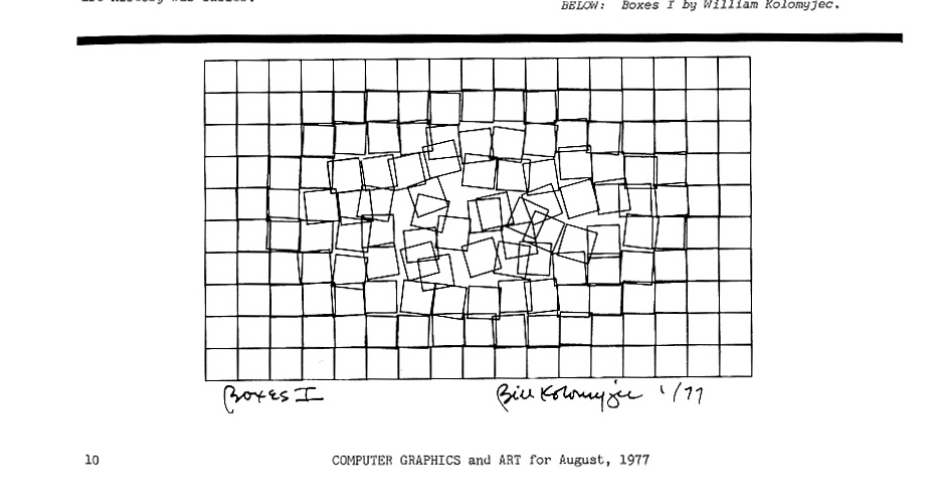
For this project, I was inspired by the game Smash Hit, where a ball hits glass and causes it to shatter. Also, while looking through the computer art magazines, I came across Boxes I by William Kolomyjec. I decided to combine these two ideas by creating a grid of squares with a circle in the center that acts as a button that triggers the distortion of the squares. 

The circle turns green when the viewer hovers over it and turns red when clicked. Once you click on it, the circle causes the squares surrounded by it to distort, kinda like in the artwork I was inspired by. I wanted a controlled system that slowly breaks apart, while having a game-like effect. 

Here is the artwork I was inspired by that was in the magazine:

Code Highlight:

The code that I am particularly proud of is the section that distorts the boxes based on their distance from the center and the randomness to its position and sides. It gave the visual effect I wanted. 

//distortion control using the radius
if (ruined && radius < 155) {
  //so if the disortion is on and the radius hasn't reached its maximum, expand the radius. I chose the number 155 because I didn't want the disortion to go all the way out.
  radius += 4; //to increase the radius gradually (like a firework effect)
}

if (!ruined) {
  //if the distortion is off to reset the radius back to 0.
  radius = 0;
}

//the grid of boxes
for (
  let x = 0;
  x <= width - size;
  x += size //so it can loop horizontly
) {
  for (
    let y = 0;
    y <= height - size;
    y += size //so it can loop vertically
  ) {
    let d = dist(x, y, width / 2, height / 2); //to get the distance from the squares to the center of the canvas

    //to make the grid distorted
    if (ruined && d < radius) {
      // if the distortion is on and the square is in near the radius
      rect(
        x + random(-5, 1),
        y + random(-5, 1),
        size + random(-5, 1),
        size + random(-5, 1)
      ); //to make random x and y positions and change the width and height for a random messy effect. (for the disorted squares)
    } else {
      // if the squares are not within the radius.
      fill("white");
      rect(x, y, size, size);
    } // let the rest of the boxes to be straight and untouched
  }
}

Reflection/future work:

In class, we used loops to create a grid of circles, so I applied the same concept using nested for loops to build a grid of squares. At first, the size of each box was 50, but I felt that it was too large for the distortion effect to look effective. The larger size also caused some of the boxes to be cut off at the edges of the canvas. So I decided to reduce the size of the boxes to 20, which made the grid feel more refined and detailed. 

Also, the distortion effect was happening too fast it felt overwhelming. I tried to slow it down by reducing the values inside the random function, but this did not work the way I expected. So I just did the frameRate function and put it inside the setup function, like how you showed us in class. I think slowing down the frame rate helped the movement feel more controlled and intentional.

When the circle was clicked, all the boxes that were within the radius distorted at the same time. I was going to leave it this way, but I showed my friend, and she told me that I should try to make the distortion spread outward gradually, like a firework. I did this by using a radius that slowly increases over time, allowing it to expand from the center instead of appearing all at once. I think it made it more visually interesting, so I stuck with it.

While working on this project, I sometimes needed help with the order of the functions and how everything should be structured so the sketch would work properly. I already knew the functions from the slides and reference materials and wrote the code myself, but I was not always sure how to organize them in an order that would work. So I used ChatGPT and Google searches to help clarify those details, specifically how to control the distortion using a radius value and why that needs to be placed at the top of the draw function so it could update consistently, and where the mouse-pressed function should be placed. But most of my understanding came from the class examples, lecture slides, and trial and error with my code. 

In the future, I would like to add more details and incorporate more concepts that were previously discussed. I am interested in exploring different types of distortion and animation that really enhance the experience. 

Reading Reflection – Week 2

One thing I really loved in Casey Reas’ Eyeo talk on chance operations was how much inspiration came from bundling architecture. Looking at real neighborhoods and constructions, and then creating them into systems of rules and geometry, made the work really interesting and intentional. That approach really resonated with me, especially because I see a lot of overlap with Casey’s lecture and what we talked about in my Understanding IM class. We talked about the Dada movement and how chance was used as a response to control and structure after WWI, and many of the artworks, like the Jean Arp piece shown in the video, overlapped with examples we’ve already studied. In both of these cases, chance is used within a structure, which allowed forms to emerge rather than be fully planned. Moreover, to me, this video felt like a short history of digital art, showing how artists moved from pure experimentation to systems where form and behavior emerge over time, reminding me of the book he showed of a million random digits with 100000 normal deviations. I also really liked the idea of making things that are clearly artificial, but still giving them an organic quality.

Before watching this video, I mostly thought of randomness as something that makes things messy and out of control. I think that came from my own experience, when I tried to make a random background for my self-portrait, and the words kept filling the space until it turned completely black. This video helped me realize that randomness is not completely random, but is intentional and planned. There is always a set of instructions and the use of precise geometry behind it. I remember Reas said something along the lines of “pure randomness with symmetry, you start to see faces, and triggering our imagination,” and that stuck with me. In my own work, I will now set clear rules first and then allow small random changes, like with the position or scale. I think that feels like the best balance between control and chaos for me because I still design the system, but do not fully control the outcome. The results can be something better than I planned from the start. I do believe the author is biased in a way by portraying chance positively, like yes, chance can open up to new possibilities, but it only works because of the structure placed around it. The video left me thinking about how much control an artist should give up. Also, I am interested in exploring ideas like a maze or a shape that grows outward from the center, similar to what was shown in the video.

Assignment 1: Self Portrait

Here is my final self-portrait:

Concept:

For this project, I created a self-portrait using only 2D primitives. My goal was to make the portrait have many traits of me while still keeping the forms simple, using what we learned in class about 2D primitives and the p5 reference website. I used the same hijab color I wear most often, gold jewelry that is similar to what I wear every day, and burgundy for the shirt since it is my favorite color. 

How this was made:

The portrait was created using basic 2D primitives such as the ellipse, rect, arc, line, and quad. It was really hard positioning the shapes, especially when creating the lashes and the bent right arm. It was a constant trial-and-error process, which helped me better understand how each value in the shape controls the position and form.

For the face, I was not sure what exactly to do, especially because my knowledge of the platform and scope was limited. But I kept the features minimal by just using simple shapes, like an ellipse for the eyes, a small half-triangle nose made with lines, and an arc for the mouth. I was initially unsure how to create the hijab, but by experimenting with a large black ellipse and putting it behind and around my face, I was able to create a framing effect that resembles a hijab without making it too difficult. 

After making the portrait of myself, I decided to experiment with some motion and interactivity, even though we have not covered it yet in class. I started looking at some examples, and I saw many people make the pupils of the eye follow the mouse. So I did this by slightly adding mouseX and mouseY values to their original positions and then limiting the movement by multiplying by 0.008 so the pupils stayed inside the eye. I learned this by reviewing the slides to get an understanding of the variables and watching some tutorials from “The Coding Train” to get a better idea of it. 

Code highlight:

One part of the code that I am particularly proud of is the thought bubble interaction. When you click on the portrait, two thought bubbles appear with random words generated inside them to represent my thoughts. 

let showThoughts = false;//to make the thoughts hidden at first

let thoughts = [
  "THINKING",
  "IDK",
  "SCHOOL",
  "FUTURE",
  "TIME",
  "WHY",
  "WHAT IF",
  "PRESSURE",
  "OK",
  "TIRED"
]; //words I want to have in the background

function setup() {
  createCanvas(400,400);
  }

function mousePressed() {
  showThoughts = !showThoughts;
}//so if you click the thoughts the thoughts appear and if you click again the thoughts disappear.

function draw() {
background('#D2D1C7');//to set the background
print(mouseX, mouseY)
 
//Thought words (the background layer)
//fill(0,80); //making the words black and low opacity
//stroke(0,80);//so the stroke is the same color as the fill
//strokeWeight (3); //to make the text bold
//textSize(20);//to make the text bigger
//text(random(thoughts), random(width), random(height));//to draw a random word at a random position.


//Only draw thoughts if clicked
if (showThoughts) {
//Thought bubbles
noStroke();
fill(255, 230);//soft white and slightly transparent
ellipse(110, 90, 200, 140);//left bubble shape
ellipse(297, 85, 200, 140);//right bubble shape

//Thought words
fill(0);//black
stroke(0);
strokeWeight(2);
textSize(20);

//Left bubble text
text(random(thoughts),random(110 - 60, 110 + 50),random(90 - 40, 90 + 40))//picks one word randomly, then I put padding so it does not go outside the circle 
//Right bubble text
text(random(thoughts),random(277 - 60, 277 + 50),random(85 - 40, 85 + 40));//same thing here just with different placements (I put a smaller number, 277 instead of 297 because some of the text still went outside the bubble for some reason)
  }

This section was quite challenging because I had to control where the text appeared so it stayed inside the bubbles. 

Reflection/future work:

I did not want the background to be left empty. At first, I wanted random words to fill the entire background, but I figured it was too visually messy, and I did not like the result of the background just being black. So I decided to scratch that and just make a thought bubble using white ellipses and have my thoughts scatter in them, where they only appear when you click on the portrait. 

I liked this idea because it allows the viewer to first see my appearance, then reveal what is happening internally, making my self-portrait a bit more personal. At first, you only see me holding up a peace sign, but when you click on the portrait, you get a deeper look into my mind. So I’m particularly proud of this part of the code because it took some time learning how to do it by searching questions and the keyword functions like the function mousepressed and random, and what I needed to equal them with for the function to work, on Google, and watching multiple tutorials, especially from “The Coding Train” like these:

https://youtu.be/POn4cZ0jL-o?si=yuoXE6cM294Seczd

 https://www.youtube.com/watch?v=Bn_B3T_Vbxs 

At one point, I was confused about why words were still appearing in the background. I later realized this was because I left the background in the setup function instead of the draw function, which caused text from previous frames to accumulate on the canvas rather than being cleared each frame.

For future work, I would like to be more accurate with the positioning of things, add smoother animations, and create more interactive elements to further express more emotion and movement.