
Concept
The concept of my project is to create a simple electronic musical instrument using Arduino. I wanted to turn basic components like a button and a potentiometer into something interactive and expressive. The button works like a “play key,” while the potentiometer controls the pitch of the sound. By combining these elements, the user can actively “play” the instrument instead of just hearing a fixed sound. I also added a second button to switch between low and high pitch modes, which makes the instrument feel more dynamic and closer to a real musical device.
How I Made This
int playButtonPin = 2;
int modeButtonPin = 3;
int buzzerPin = 8;
int ledPin = 6;
int potPin = A0;

int lowNotes[]  = {262, 294, 330, 349, 392, 440, 494, 523};   // C4 到 C5
int highNotes[] = {523, 587, 659, 698, 784, 880, 988, 1047};  // C5 到 C6

bool highMode = false;
int lastModeButtonState = LOW;

void setup() {
  pinMode(playButtonPin, INPUT);
  pinMode(modeButtonPin, INPUT);
  pinMode(buzzerPin, OUTPUT);
  pinMode(ledPin, OUTPUT);
  Serial.begin(9600);
}

void loop() {
  int playButtonState = digitalRead(playButtonPin);
  int modeButtonState = digitalRead(modeButtonPin);
  int potValue = analogRead(potPin);

  int noteIndex = map(potValue, 0, 1023, 0, 7);

  // detect second button:change mode
  if (modeButtonState == HIGH && lastModeButtonState == LOW) {
    highMode = !highMode;
    delay(200); //
  }
  lastModeButtonState = modeButtonState;

  int frequency;
  if (highMode) {
    frequency = highNotes[noteIndex];
  } else {
    frequency = lowNotes[noteIndex];
  }

  if (playButtonState == HIGH) {
    tone(buzzerPin, frequency);
    digitalWrite(ledPin, HIGH);
  } else {
    noTone(buzzerPin);
    digitalWrite(ledPin, LOW);
  }

  Serial.print("Mode: ");
  if (highMode) {
    Serial.print("HIGH");
  } else {
    Serial.print("LOW");
  }

  Serial.print("  Note index: ");
  Serial.print(noteIndex);
  Serial.print("  Frequency: ");
  Serial.println(frequency);

  delay(10);
}
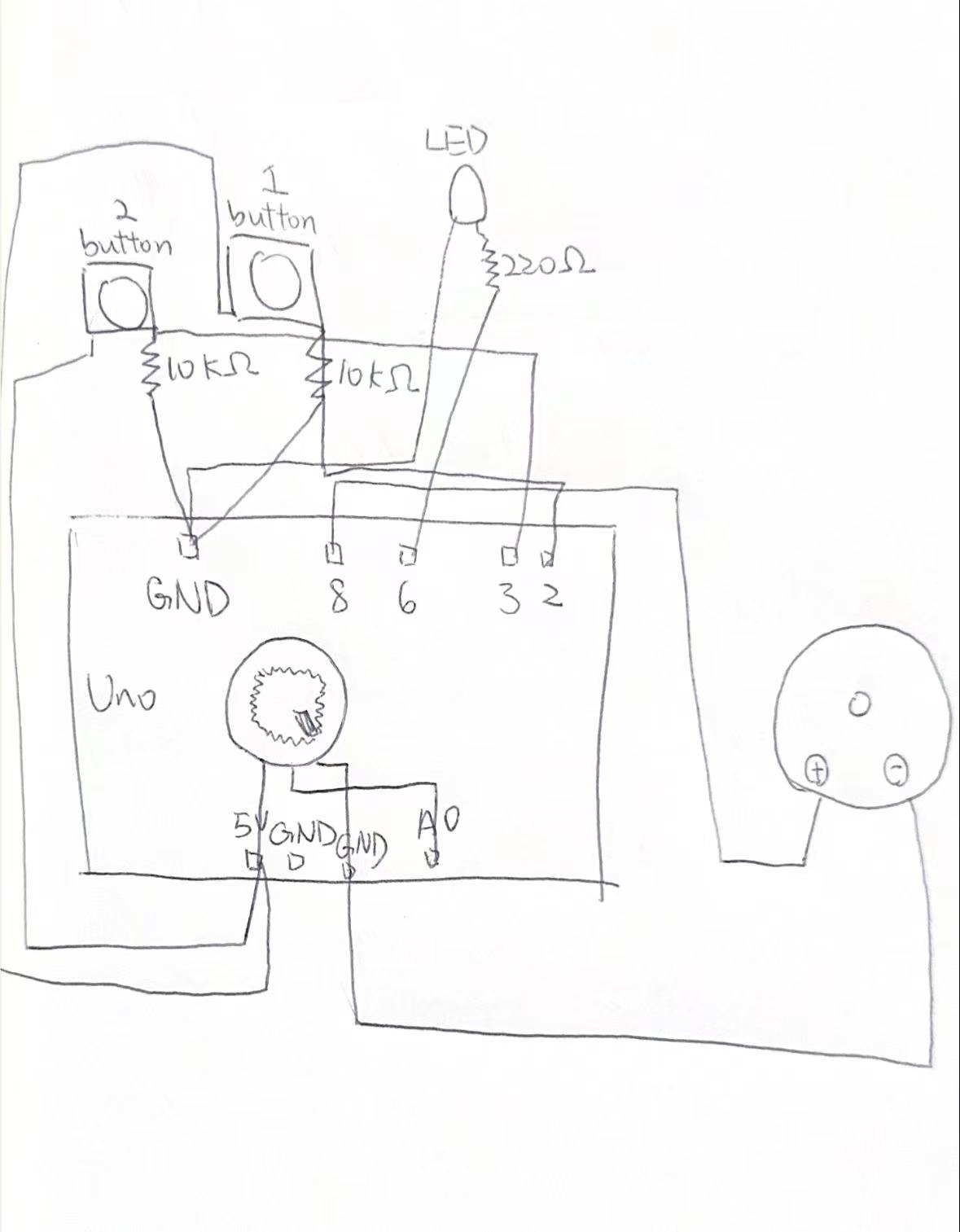
I started by building a very basic circuit with a buzzer, a button, and a potentiometer. At first, the buzzer only made continuous sounds, which didnot feel like music. Then I modified the code so that the potentiometer controls discrete notes instead of continuous frequencies. This made the sound more like a real scale (Do, Re, Mi).
After that, I added a second button to switch between two sets of notes (low and high pitch). This required both wiring changes and updating the code logic to detect button presses and toggle modes. I also added an LED that lights up when the instrument is being played, which gives visual feedback and makes the interaction clearer.
Throughout the process, I tested each part step by step instead of building everything at once. This helped me identify problems more easily and understand how each component works.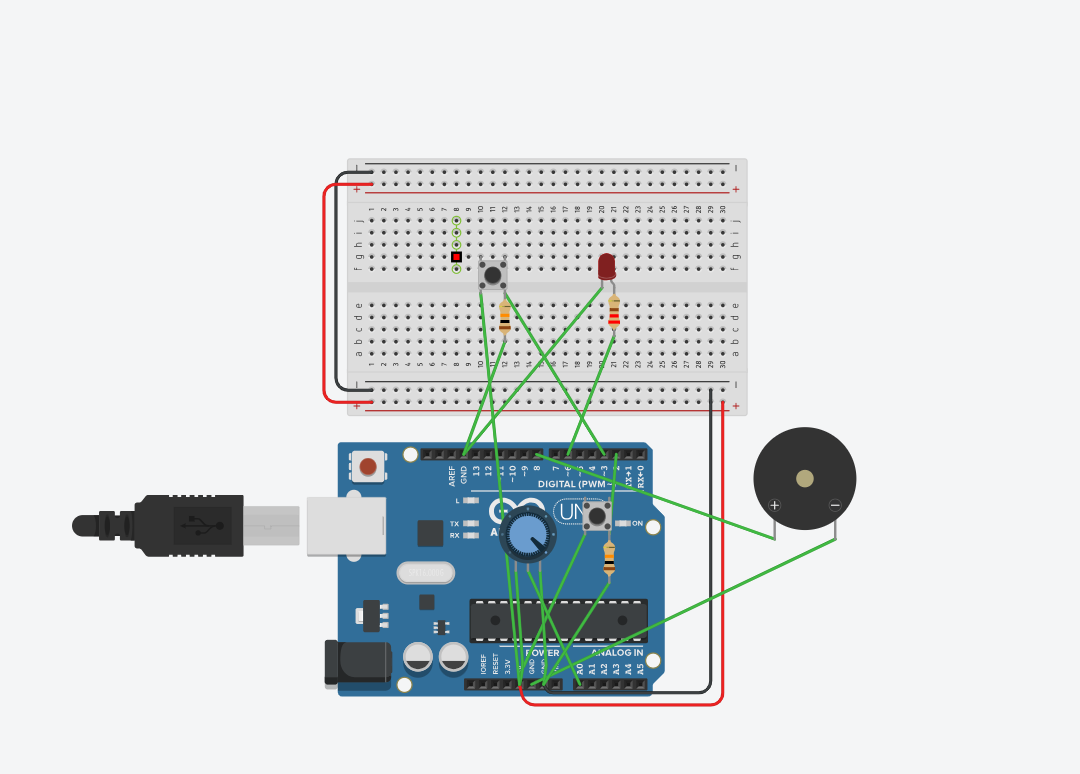
What I’m Proud Of
The part I’m most proud of is how I figured out the mistakes with the buttons. At the beginning, my buttons did not work correctly at all. Sometimes the sound would play randomly, and sometimes pressing the button did nothing. I realized later that I misunderstood how the button pins (1A, 2A, etc.) are connected internally, and I also forgot to use the resistor properly.
After debugging, I learned that the button needs to cross the middle gap on the breadboard and that I must connect a pull-down resistor to stabilize the signal. Fixing this problem made everything work correctly, and it was a moment where I felt I really understood the circuit instead of just following instructions. This experience helped me become more confident in troubleshooting hardware problems.
What I Can Do Better Next Time
Next time, I think I can improve both the design and the interaction of my project. Right now, the instrument is still quite simple, and the sound is limited to basic tones. I could improve this by adding more buttons to create a small keyboard or by programming simple melodies.
I also want to make the interaction more intuitive. For example, I could use a light sensor to control pitch instead of a potentiometer, which would make the instrument feel more creative and less mechanical. Another improvement would be organizing the wiring more clearly, because my current circuit is a bit messy and hard to read.
Overall, this project helped me understand both coding and circuit design better, but I think there is still a lot of space to make it more expressive and closer to a real musical instrument.