
Concept:
For this Arduino assignment, I wanted to combine an analog sensor that works according to the surrounding environment in a smooth, fading way, and a digital sensor that works with the user’s input in an immediate way. When thinking about this assignment, the idea of airplane cabin lights came to mind, where there are dim blue lights lit throughout the plane when it’s dark, along with separate small seat lights that we can turn on and off.
I created an analog system using a photoresistor, where a blue LED lights up in the dark when the surrounding lights are off, in a slow and calm fading manner. I also integrated a digital system using a pushbutton, where a yellow LED turns on and off when it is pressed. The blue light then slowly fades off again when the surrounding environment becomes bright.
Link to Code:
Demonstration:
Setup:
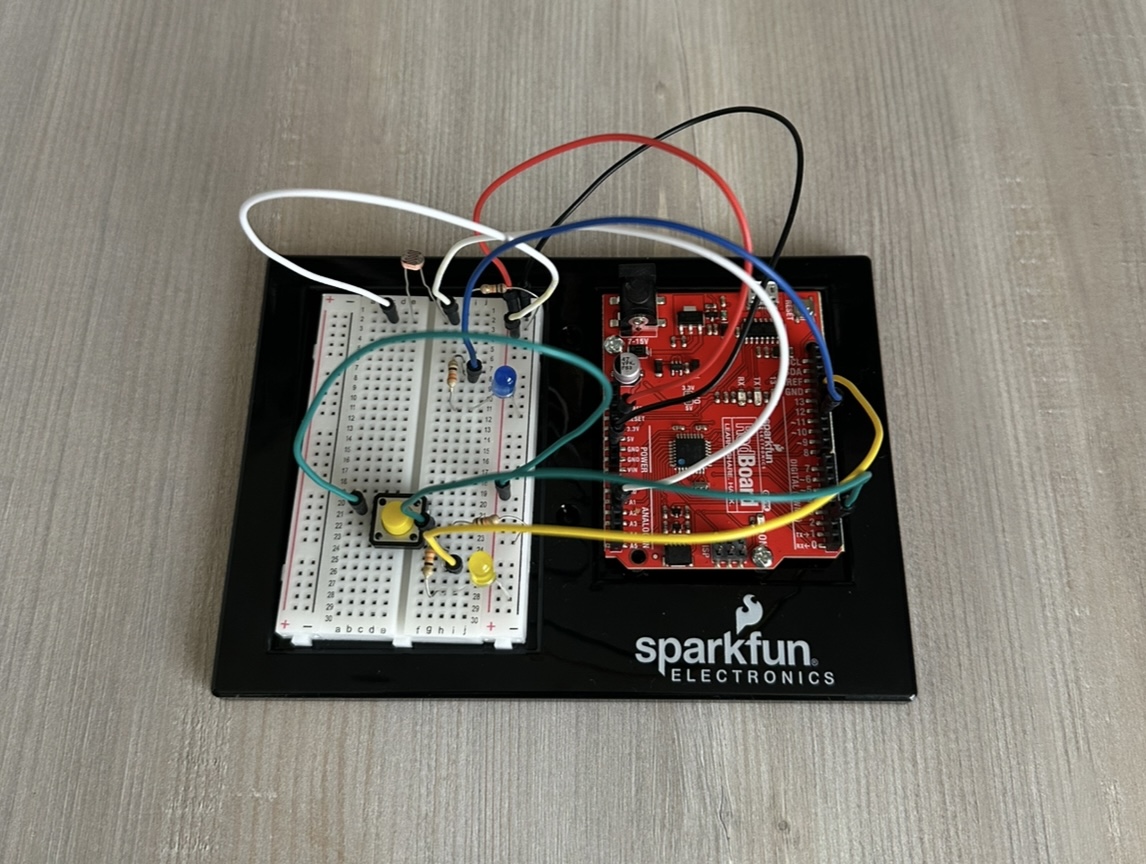
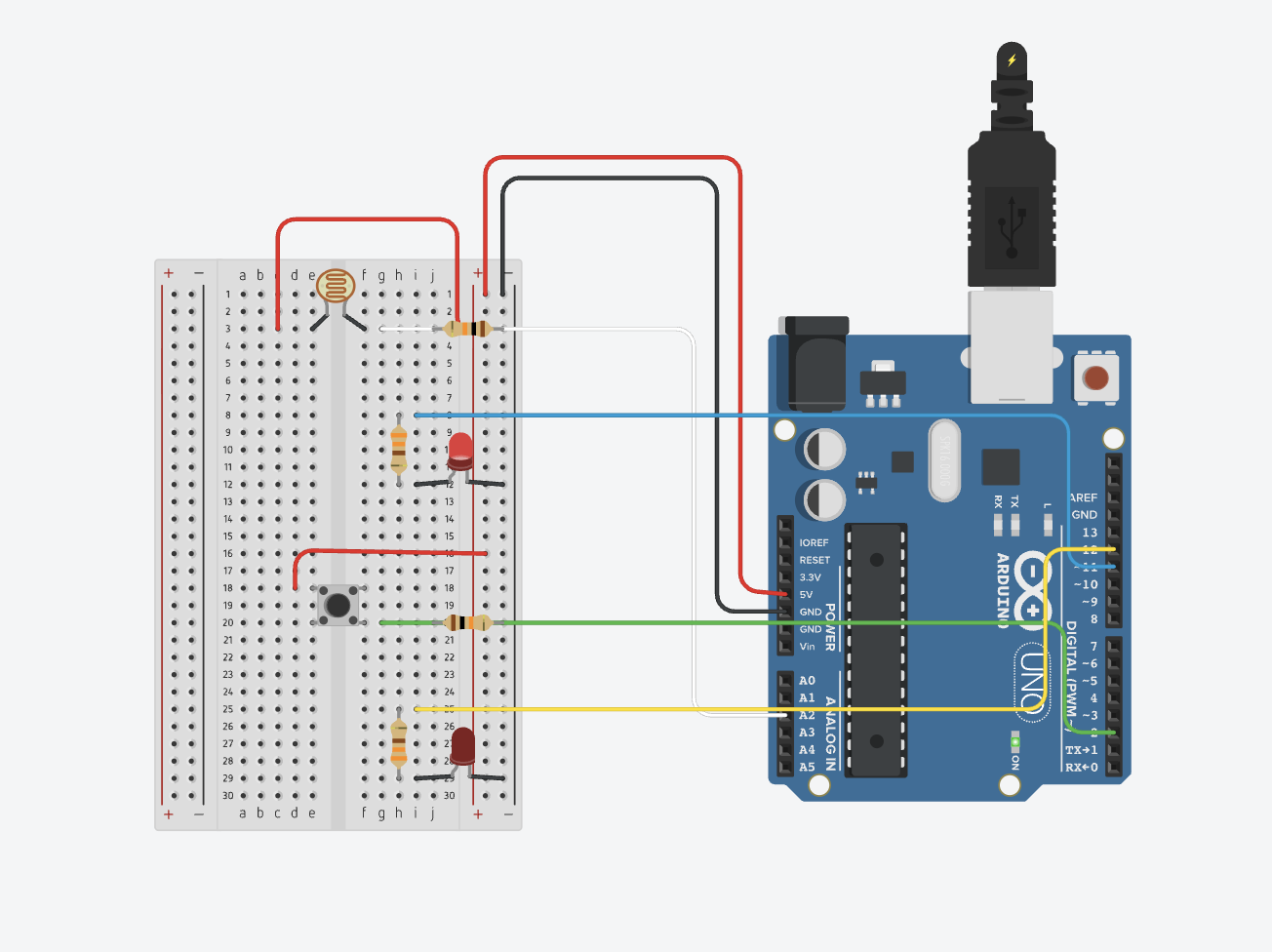
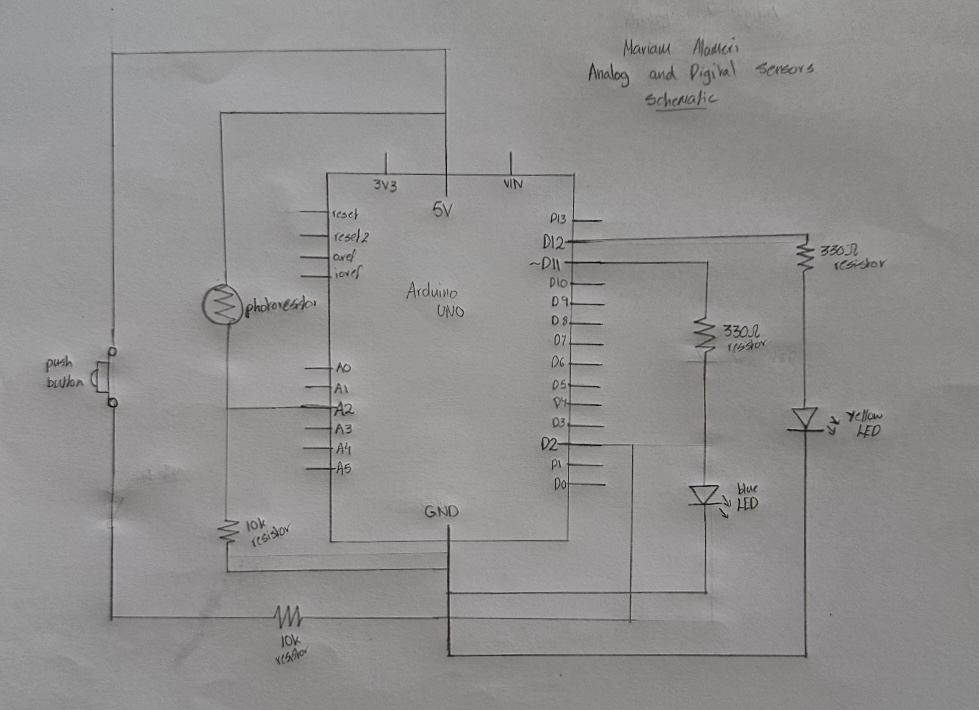
Here is an image of my Arduino setup. I have my 5-volt wire connected to the + bus and my ground connected to the – bus. I also have the photoresistor and pushbutton connected to 5 volts, with their 10kΩ resistors connected to ground. Each LED is placed under its sensor, with one leg connected to ground and the other leg connected to a 330Ω resistor, which then connects to the assigned Arduino pin.
Digital Circuit:
Drawn Schematic:
Code:
Since I have two types of sensors, I organized my code so that under each section (components, setup, loop), the analog part is labeled first, followed by the digital part, also labeled. All explanations are included directly in the code itself.
A particular part of the code I am proud of is the use of the if-else statement for the analog sensor, which allows the blue LED to turn on and off really smoothly and slowly. I wanted to do this to give it a more realistic behavior based on my concept goal. At first, the LED would turn on and off immediately and rapidly, but using this if-else statement along with the brightness calculation allowed it to work the way I wanted by making it gradually increase and decrease. I acknowledge that this function works differently when turning the light off compared to turning it on, and that is because the light sensor values change at different rates when the environment becomes dark or bright, causing the LED to reach its target brightness at different speeds.
if (brightness < targetBrightness) { // gradually adjust brightness according to state
  brightness++;  // increase brightness slowly
} else if (brightness > targetBrightness) {
  brightness--;  // decrease brightness slowly
}
I also used an if statement for the digital sensor to make the yellow LED turn on and off with the push of the button. When I followed what we had done in class and what I already knew, the light would only stay on while holding the button. Again, I wanted to achieve a more realistic behavior for my concept. Using the if statement with the && function allowed me to achieve this toggle effect.
if (buttonState == HIGH && lastButtonState == LOW) { // detect button press and allow transitioning
    ledState = !ledState;  // toggle yellow LED
  }
Reflection:
I found this assignment really interesting, as I felt like I was learning a lot while using two different devices at once. I was initially worried about creating one code that works with two different sensors at the same time, but after planning my process, I was able to manage it. I started off by focusing only on the analog sensor since it is more complex, and then integrated the digital sensor code into each part. I also feel like the organization of my code played a big role in this success.
On the Arduino itself, the setup first looked complicated to me as I was planning, but once I really looked at each part and understood what was happening, it all made sense. However, looking at it now, I feel like I could have organized it in a better way to make the LEDs clearer, since there are so many wires connected all over. That is, to me, an area for improvement and something I will definitely focus on next time, and even try to improve on this same project.
I also feel like this analog and digital sensor assignment could have so many more different approaches, and I would like to think about and explore more creative ideas in the future.
References:
In this assignment, I mostly referred back to our previous lecture recordings and slides, particularly 8.2 and 9.2, to recap what we had learned, and then adjusted and integrated my own ideas to match the concept.
For the pushbutton functionality, I needed to use the bool function to toggle the yellow LED using an if statement, so I referred to the Arduino official documentation for a better understanding:
https://docs.arduino.cc/language-reference/en/variables/data-types/bool/
I also asked ChatGPT about one particular thing, when I wanted to make the brightness of the blue LED fade in and out much slower than it did by default. I knew I had to use an if-else statement, so I explained my goal, and it suggested using brightness++ and brightness– to adjust the speed of the fading effect by gradually increasing and decreasing the brightness until it reaches the target.