Week 5 Midterm Progress

Concept

For my midterm project, I came up this dining hall idea at the last minute. I had originally been inspired by music interactivity in p5.js and considered continuing with my earlier idea of a meditation game. But while eating lunch, I came up with a new idea that felt both playful and relevant to my experience here at NYUAD. So, I mostly working on replanning my idea and preparing assets this week.

As a visiting student from the New York campus, I was used to the dining hall’s pre-made meals. But At NYUAD, the on-demand menus were at first a little overwhelming. Without pictures, I often had no idea what I had ordered (especially with Arabic dishes I wasn’t familiar with) and I even found myself pulling out a calculator to check how much I had left in my meal plan and how much I orderd. Counters like All Day Breakfast felt especially confusing.

So my concept is to digitalize the experience of eating at NYUAD’s D2 All Day Breakfast counter. The project will let users visualize the ordering process, making it more interactive and hopefully reducing the friction that comes with navigating the real-life menu.

User Interaction

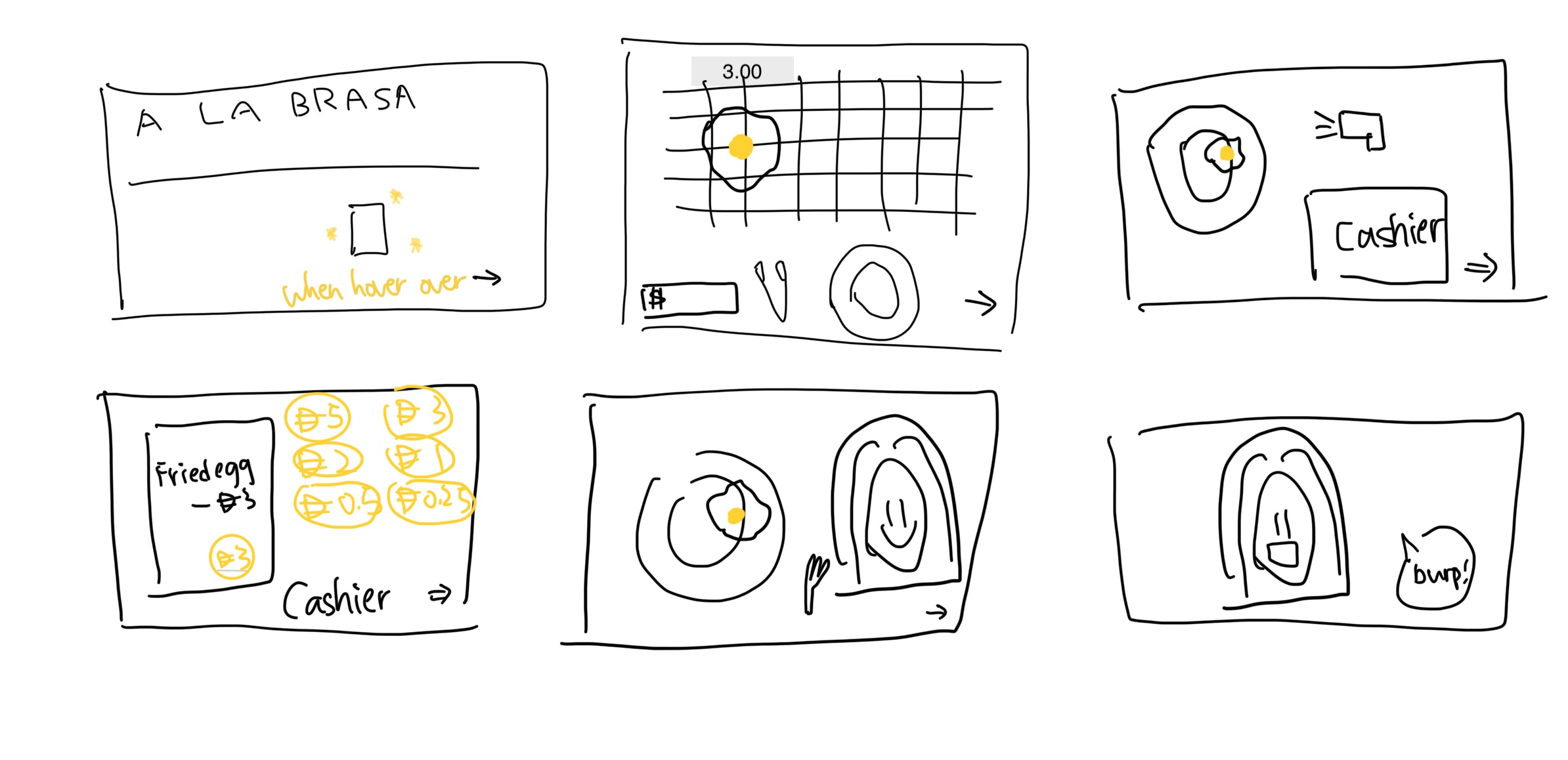
Planned Scenes (prototype):

1.Entering the A LA BRASA counter and tapping into the menu

2.Picking up the clamp to get food from the grill to the plate

3.Scanning food on the plate at the cashier’s scanner

4.Paying with coins in the cashier tray (display receipt?)

5.Eating!!

6.Burping to finish the meal
 

Assets:

Audio:

Dining hall ambient background

Cashier scanner beep

Cash register “kaching”

Burp sound

Yumyum sound


Pixelated images:

A LA BRASA counter background

All Day Breakfast menu

Grill plate

Clamp

Plate

Cashier scanner

Cashier with coins tray

Coins (D5, D3, D2, D1, D0.5, D0.25)

Fork


Pixel art food items:

Avocado fried egg toast

Avocado toast

French toast

Fried egg

Scrambled egg

Plain omelet

Cheese omelet

Mixed vegetable omelet

Tofu omelet

Hash brown

Chicken sausage

Beef bacon

Turkey bacon

Classic pancake

Coconut banana pancake

small bowl salad


The Most Frightening Part & How I’m Managing It

The biggest challenge I anticipate is gathering and aligning all these assets into a coherent game within the midterm timeframe. Real-life food images can be messy and hard to unify visually. To reduce this risk, I’ve decided to make everything in pixel art style. Not only does this match the “breakfast game” aesthetic, but it also makes it much easier to align items consistently.

Since Professor Mang mentioned we can use AI to help generate assets, I’ve been experimenting with transforming photos of my own plates and my friends’ meals into pixelated versions. This approach makes asset creation more manageable and ensures I’ll be able to integrate everything smoothly into the game.
 

Week 5: Reading Response

The part that stopped me was Suicide Box (1996), a camera pointed at the Golden Gate Bridge, quietly counting every time someone jumped. It sounds blunt, almost cold, yet I like the idea behind it. The artists (Natalie Jeremijenko and Kate Rich) flipped surveillance on its head: instead of policing people, the camera bore witness to a tragedy that the official numbers under-reported. I even looked it up afterward and found more debate and follow-up writing. Some people doubt the footage, others question the ethics of recording suicides. That tension actually makes the piece stronger for me; it shows how art can force uncomfortable truths into view.


What struck me next was how the essay treats technology as something physical and playful. Levin keeps pointing out that success often comes from the scene you build, not just the code you write: light a wall evenly, add reflective tape, adjust the lens. I like that attitude. It feels more like setting a stage than crunching math, and it makes computer vision sound approachable even fun for artists and students. The student project LimboTime, for example, came together in one afternoon with a webcam and a bright background. That shows how the simplest setups can spark creative interaction.


Overall, reading this made me want to experiment myself. The mix of raw data, social urgency, and poetic framing in Suicide Box shows how art and code can meet to notice what society tries not to see and maybe, slowly, help change it.

Week 5 – Midterm Progress

After three days of painstaking brainstorming for my midterm, I came up with two directions: one was a game-like networking tool to help people start conversations, and the other was a version of Flappy Bird controlled by the pitch of your voice.

I was undoubtedly fascinated by both, but as I thought more about the project, it was clear that I wanted to experiment with generative AI. Therefore, I combined the personal, identity-driven aspect of the networking tool with a novel technical element.

The Concept

“Synthcestry” is a short, narrative experience that explores the idea of heritage. The user starts by inputting a few key details about themselves: a region of origin, their gender, and their age. Then, they take a photo of themselves with their webcam.

From there, through a series of text prompts, the user is guided through a visual transformation. Their own face slowly and smoothly transitions into a composite, AI-generated face that represents the “archetype” of their chosen heritage.

Designing the Interaction and Code

The user’s journey is the core of the interaction design, as I already came across game state design in class. I broke the game down into distinct states, which becomes the foundation of my code structure:

  1. Start: A simple, clean title screen to set the mood.
  2. Input: The user provides their details. I decided against complex UI elements and opted for simple, custom-drawn text boxes and buttons for a more cohesive aesthetic. The user can type their region and gender, and select an age from a few options.
  3. Capture: The webcam feed is activated, allowing the user to frame their face and capture a still image with a click.
  4. Journey: This is the main event. The user presses the spacebar to advance through 5 steps. The first step shows their own photo, and each subsequent press transitions the image further towards the final archetype, accompanied by a line of narrative text.
  5. End: The final archetype image is displayed, offering a moment of finality before the user can choose to start again.

My code is built around a gameState variable, which controls which drawing function is called in the main draw() loop. This keeps everything clean and organized. I have separate functions like drawInputScreen() and drawJourneyScreen(), and event handlers like mousePressed() and keyPressed() that behave differently depending on the current gameState. This state-machine approach is crucial for managing the flow of the experience.

The Most Frightening Part

The biggest uncertainty in this project was the visual transition itself. How could I create a smooth, believable transformation from any user’s face to a generic archetype?

To minimize the risk, I engineered a detailed prompt that instructs the AI to create a 4-frame “sprite sheet.” This sheet shows a single face transitioning from a neutral, mixed-ethnicity starting point to a final, distinct archetype representing a specific region, gender, and age.

To test this critical algorithm, I wrote the startGeneration() and cropFrames() functions in my sketch. startGeneration() builds the asset key and uses loadImage() to fetch the correct file. The callback function then triggers cropFrames(), which uses p5.Image.get() to slice the sprite sheet into an array of individual frame images. The program isn’t fully functional yet, but you can see the functions in the code base.

As for the use of image assets, I had two choices. One is to use a live AI API generation call; the other is to have a pre-built asset library. The latter would be easier and less prone to errors, I agree; but given the abundance of nationalities on campus, I would have no choice but to use a live API call. It is to be figured out next week.


Week 5 – Reading Response

After reading Golan Levin’s “Computer Vision for Artists and Designers,” I’m left with a deep appreciation for the creativity that arose from confronting technical limitations. The article pulls back the curtain on interactive art, revealing that its magic often lies in a clever and resourceful dialogue between the physical and digital worlds, not in lines of complex code. Apparently, the most effective way to help a computer “see” is often to change the environment, not just the algorithm.

Levin shows that simple, elegant techniques like frame differencing or brightness thresholding can be the building blocks for powerful experiences, in contrast to my preexisting thought for a powerful CV system. The LimboTime game, conceived and built in a single afternoon by novice programmers who found a large white sheet of Foamcore, pushed the change in my perspective. They didn’t need a sophisticated algorithm; they just needed a high-contrast background. It suggests that creativity in this field is as much about physical problem-solving as it is about writing code. It’s a reminder that we don’t live in a purely digital world, and that the most compelling art often emerges from the messy, inventive bridge between the two.

The article also forced me to reflect on the dual nature of this technology. On one hand, computer vision allows for the kind of playful, unencumbered interaction that Myron Krueger pioneered with Videoplace back in the 1970s. His work was a call to use our entire bodies to interact with machines, breaking free from the keyboard and mouse. In the past or now, it is always joyful that our physical presence can draw, play, and connect with a digital space in an intuitive way.

On the other hand, the article doesn’t shy away from the darker implications of a machine that watches. The very act of “tracking” is a form of surveillance. Artists like David Rokeby and Rafael Lozano-Hemmer confront this directly. Lozano-Hemmer’s Standards and Double Standards, in particular, creates an “absent crowd” of robotic belts that watch the viewer, leaving a potent impression that I would not have expected from visual technology in the early 2000s.

Ultimately, this reading has shifted my perspective. I see now that computer vision in art isn’t just a technical tool for creating interactive effects. It is a medium for exploring what it means to see, to be seen, and to be categorized. The most profound works discussed don’t just use the technology; they actively raise questions about the technology. They leverage its ability to create connection while simultaneously critiquing its capacity for control. I further believe that true innovation often comes from embracing constraints, and that the most important conversations about technology could best be articulated through art.

Week 5: Pong² (Midterm Progress Report)

Concept:

Finding the concept for this project was rather difficult– I initially thought about creating a rhythm game that would use the WASD keys and the arrow keys similar to a 2D Beat Saber where the direction you cut mattered as much as your timing. I was inspired by Mandy’s project from Fall 2024 where she made a two player dance game where you have to input a specific pattern of keys in combination with your partner. I thought her project had a lot of charm to it; however, I imagine syncing the rhythm to the onscreen inputs would prove challenging so I scrapped that idea early on.

Then I revisited the project I made for week 3 where we had to use loops. Back then I just wanted to follow Professor Aya’s advice (when she visited on Monday of week 3) and use object-oriented programming to add manually controlled collision physics to the project I made for week 2. That’s how I accidentally made Pong but this week I considered seriously turning it into a fully-functioning project.

I realized that my code was going to be very messy and a long scroll from top to bottom if I kept it all in one .js file, so I looked up how to split up the files. After I created new js files I realized that setup() and draw() could only be run in the main sketch.js file so I had to find a way to work around that for the gameLogic js file which is just an imported week 3 js file. I basically made new functions and named them initiateGame() and initiateMenu() and called them in the main sketch.js setup() function; I also had to add two lines of code into the html file to have the project access these new js files.

<script src="menu.js"></script>
<script src="gameLogic.js"></script>

Updating the “PING” Game

Besides the obvious requirements to add a menu screen and a restart button, there were plenty of personal touches I wanted to add to what I made two weeks ago.

The first of which was to implement a more visually appealing score tracking system. Last time I had the game continuously repeat so I made a very minimalistic but number-based scoring system to fit with the rest of the minimalist aesthetic. Since I was adding a set number of rounds now, I wanted to use a more interesting way of representing each point. There would be a rectangle in the middle that would either flick upwards or downwards slightly based on which side took the point (kind of like a lightswitch in a way).

The next idea was to have the ability for an options menu to change the in-game volume mixer and maybe even keybinds.

Since there was also the need to reset the game without restarting the whole sketch now, I made sure to add an ESC function where you can back out to the menu from the game and also subsequently reset the scores and start a new game the next time the user clicks the button to enter the game.

//RESET SCORE
function resetGame(){ //resets the score
  roundNumber = 0;
  topScore = 0;
  topCounter = [];
  bottomScore = 0;
  bottomCounter = [];
}
...
function menuMousePressed(){
  twoPlayerButton.handleClick(mouseX, mouseY);
  resetGame();
}

I also made each button with its own class while passing functions as parameters to call when clicked. I have only test one button so far– the twoPlayerButton that leads you into the normal mode – but it works great and I’ve “scaffolded” an area for more buttons to be added the same way.

allMenuButtons.push(
  twoPlayerButton = new button(
    tempButton, //image 
    width/2 + 120, //xPos
    height/2, //yPos
    tempButton.width, //sets to uploaded file dimensions
    tempButton.height, 
    switchToGame //which function to call if clicked?
  )
);

User Interface Planning

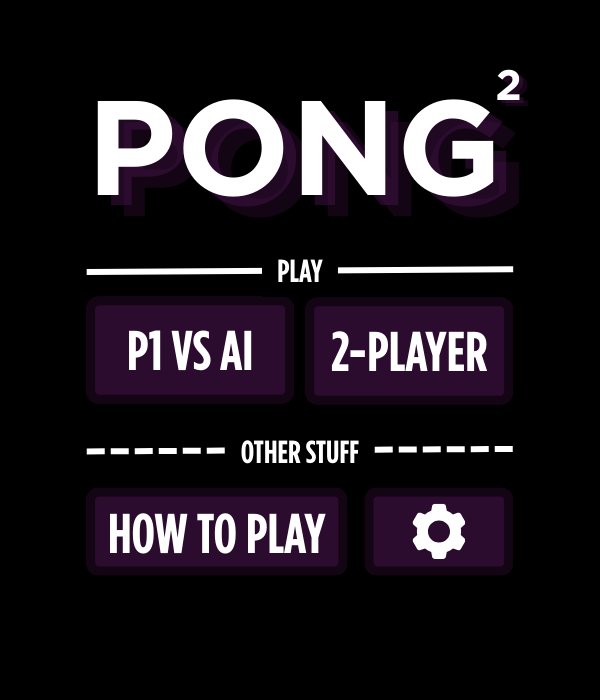
To plan out the UI, I quickly made a Canva file that matched the dimensions of my project and made a quick sketch of what I wanted the menu to look like. I’m going for a rather

This is also how I came up with a better name for the game: Pong2  

It’s not quite Pong 2, but since the paddles are no longer restricted to one dimension along each edge and now have true 2D movement, I wanted to call it something representative of that.

For the font choice I chose Gotham for its geometric feel. Since p5js didn’t have access to Gotham, I downloaded an otf file online and placed it in my sketch folder.

For the final version of the sketch,  I want to add a faint bouncing ball in the background to make the menu screen feel more dynamic and alive too.

A detail I was quite proud about was setting up a hover checker that would turn my cursor into a hand if I was hovering over something that was clickable.

for (let btn of allMenuButtons) { 
  btn.display(); //displays the button
  
  if (btn.isHovered(mouseX, mouseY)) {
    hovering = true; //check if hovering any buttons
  }
}

if (hovering) {
  cursor(HAND);
} else {
  cursor(ARROW);
}
Identify the Most Frightening Aspect: 

The most frightening part of this project is most certainly the one player mode I want to make where you can play against an AI. Theoretically it’s just some simple math to have it sort of predict the ball’s trajectory but I imagine it would consume a considerable amount of effort to figure out how that would work.

I might drop this aspect altogether if it’s too challenging to make before the deadline but I really would like to make it work.


Week 5 – Midterm Project Progress

Project Concept & Design

For my midterm project, I wanted to make something that was a little different. Looking at past projects, I noticed that all the sketches used a ton of colors and soft shapes that created an aesthetically pleasing and welcoming environment for the user. So I thought, why not this time, I make the user uncomfortable? Of course, I can’t know the different things that make various people uncomfortable, so this interactive artwork + game is based on things that make me uncomfortable.

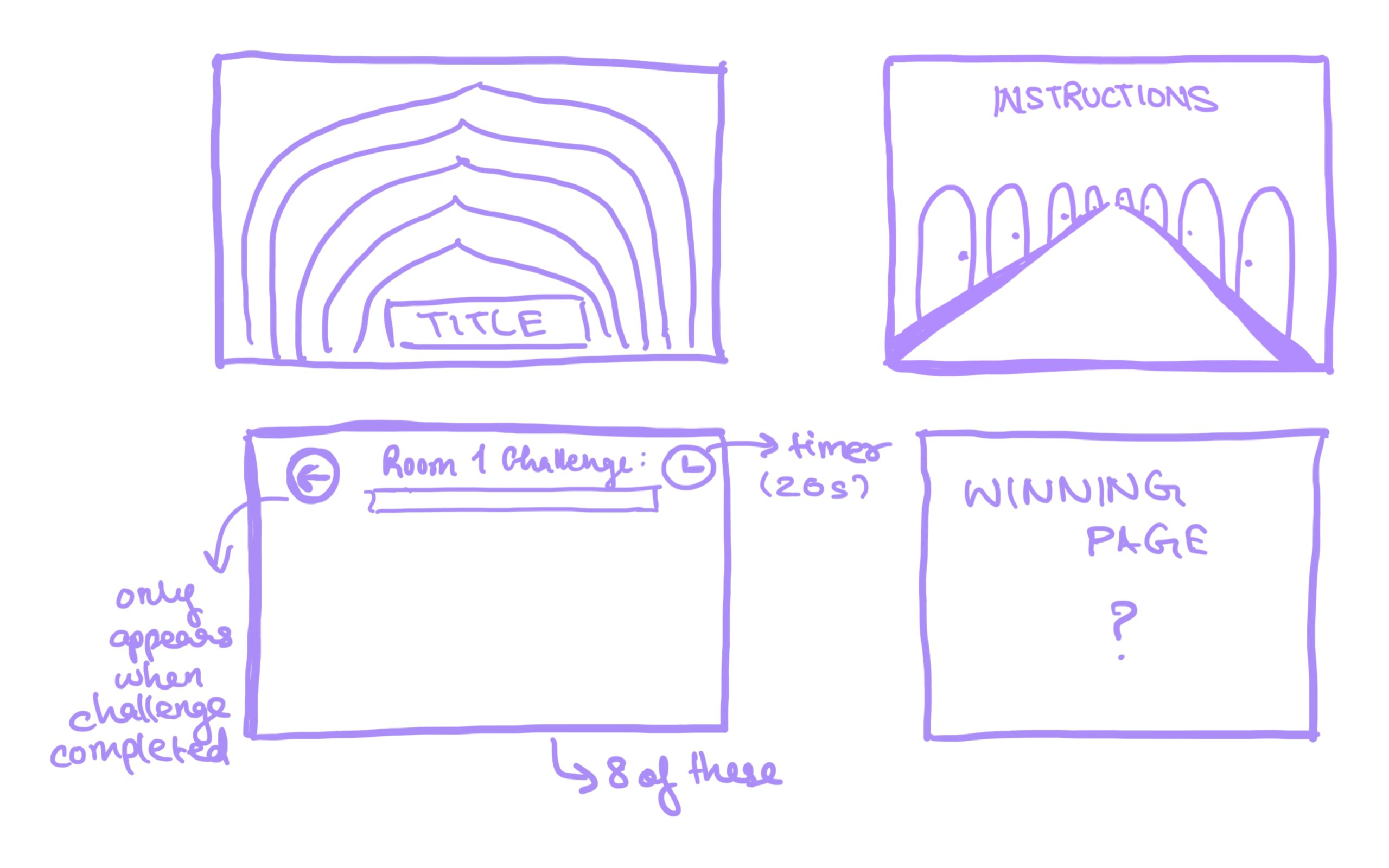
Basically, it’s a series of challenges that the user must get through in order to win. But each challenge is supposed to evoke some sort of uncomfortable emotion/feeling (hopefully) within the user. The design is such that there are 8 doors, behind each of which is a challenge that the user must complete. Once the user has clicked on a door, they are trapped in that room until they successfully complete the challenge. Only then are they given the option to return to the hallway and go through another door. The only colors I aim to use across this game is black, white, and red, as I think it throws people off and adds to the overall mood I’m going for.

Production & The most frightening part

There were two things I was most worried about. First was making the hallway. This is because I couldn’t find the right kind of doors online, and had to design my own using Canva, and then go through the complicated process of cutting out backgrounds, resizing, and figuring out the coordinates on the canvas for each door so that they align in a perfect one-point perspective. That said, I’m pretty happy with how the end result turned out.

Second, I had imagined that it would take a lot of work to implement the general algorithm for the game. That means the structure of dividing it into different rooms, coding a timed mini game for each room (while keeping everything in theme), and keeping the user trapped in a room until they solved it. To minimize this risk, I decided to divide the code into different game states, so that whenever I need to add the code for a new door, for example door 2, I can just add the required code and set the game state to room 2 and test it out. Also for elements like the popups and the timer, which get used for every door, I made them into reusable functions so that I can just call them for every door, only with different arguments (popup messages) based on what I want. Hopefully, for every door I can continue to have the format I have implemented now, which is an initRoom__ and drawRoom__ function for each door. Then it’s pretty much just following the same pattern 8 times.

Risks/Issues

My biggest problem right now is that I may have overestimated my abilities by choosing to do 8 rooms. I’m going to have to think of 8 different mini-game ideas that make people uncomfortable and implement it in the given time frame.

Next Steps

Currently I’ve only implemented 2 rooms. I need to implement the other 6, as well as decide on what to do for the end page of the game when the user finishes all the challenges. I also need to decide on a background soundtrack that will run for the entire game. I also haven’t been able to think of a name for this project yet, and that’s pretty important.

It’s much better to view the sketch in full-screen: https://editor.p5js.org/siyonagoel/full/eEPhmUoLw

Week 5 – Reading discussion

When I think about computer vision, what interests me most is how strange it feels to give a machine the ability to “see.” Human vision is so automatic and seamless that we don’t really think about it, but when you translate it into algorithms, you realize how fragile and mechanical that process is. I find it fascinating that a computer can pick up tiny details that our eyes might not notice, yet at the same time, it can completely miss the “big picture.” That makes me wonder whether computer vision is really about replicating human vision at all, or if it’s creating an entirely different way of perceiving the world.

What I find both exciting and unsettling is how computer vision plays with control. On one hand, it can feel magical when an artwork follows your movements, responds to your gestures, or acknowledges your presence (like in TeamLab). There’s an intimacy there, like the piece is aware of you in a way that a static painting could never be. On the other hand, I can’t help but think about surveillance every time I see a camera in an installation. Am I part of the artwork, or am I being monitored? That ambiguity is powerful, but it also puts a lot of responsibility on the artist to think about how they’re using the technology.

For me, the most interesting potential of computer vision in interactive art isn’t just the novelty of tracking people, but the chance to reflect on our relationship with being watched. In a world where surveillance cameras are everywhere, an artwork that uses computer vision almost automatically becomes a commentary on power and visibility, whether or not the artist intends it. I think that’s what makes the medium so rich: it’s not just about making art “see,” it’s about making us more aware of how we are seen.

Week 5 Reading Response

Computer vision isn’t really “vision” in the way humans experience it, it’s more like a giant calculator crunching patterns in pixels. Where we see a friend’s smile and immediately read context, emotion, and memory, the computer just sees light values and tries to match them against models. It’s fast and can process way more images than a person ever could, but it lacks our built-in common sense. That’s why artists and developers often need to guide it using things like face detection, pose estimation, background subtraction, or optical flow to help the machine focus on what’s actually interesting. Techniques like MediaPipe that can map out your skeleton for gesture-based games, or AR apps that segment your hand so you can draw in mid-air, could let us bridge the gap between human intuition and machine literalism.

But once you start tracking people, you’re also borrowing from the world of surveillance. That’s a double-edged sword in interactive art. On one hand, it opens up playful experiences. On the other, the same tech is what powers CCTV, facial recognition in airports, and crowd analytics in malls. Some artists lean into this tension: projects that exaggerate the red boxes of face detection, or that deliberately misclassify people to reveal bias, remind us that the machine’s gaze is never neutral. Others flip it around, letting you “disappear” by wearing adversarial patterns or moving in ways the system can’t follow. So computer vision in art isn’t just about making the computer “see”, it’s also about exposing how that seeing works, what it misses, and how being watched changes the way we move.

You can also invert the logic of surveillance: instead of people being watched, what if the artwork itself is under surveillance by the audience? The camera tracks not you but the painting, and when you “stare” at it too long, the work twitches as if uncomfortable. Suddenly, the power dynamics are reversed.

Week 5 – Midterm Project Progress

For my midterm project, I decided to make a little balloon-saving game. The basic idea is simple: the balloon flies up to the sky and faces obstacles on its way, that the player needs to avoid

Concept & Production

Instead of just popping balloons, I wanted to make the balloon itself the main character. The player controls it as it floats upward, while obstacles move across the screen. The main production steps I’ve worked on so far include:

  • Making the balloon move upwards continuously.
  • Adding obstacles that shift across the screen.
  • Writing collision detection so that the balloon “fails” if it hits something.

  • Bringing back the buttons and menu look from the beginning, so the game starts cleanly.

It’s been fun turning the balloon from a simple object into something the player actually interacts with.

The Most Difficult Part
By far, the trickiest part has been the balloon popping without errors. Sometimes, the collisions were detected when they shouldn’t be, which gave me a bunch of false pops. Fixing that took way more trial and error than I expected, but I think I finally have it working in a way that feels consistent (I used help from AI and YouTube).

Risks / Issues
The main risk right now is that the game sometimes lags. Most of the time, it works fine, but once in a while, the balloon pops out of nowhere in the very beginning. I’m not sure if it’s about how I’m handling the objects or just the browser being picky. I’ll need to look into optimizing things as I add more features.

Next Steps
From here, I want to polish the interactions more, add sound effects, and make sure the game is fun to play for longer than a few seconds and looks visually appealing and more aesthetic. But overall, I feel good that the “scariest” part (getting rid of the balloon popping errors) is mostly handled.

Week 5 – Reading Response – Shahram Chaudhry

One thing that really stood out to me from this week’s reading is how different computer vision is from human vision. We take it for granted that we can look at a scene and instantly make sense of it. We can tell if it’s day or night, if there’s someone in the frame, if they’re walking or just waving – all without thinking. But to a computer, a video is just a bunch of colored pixels with no meaning. It doesn’t “know” what a person or object is unless we explicitly program it to. There are several techniques to help computers track. For example, frame differencing which compares two frames and highlights motion could be  helpful in detecting someone walking across a room or background subtraction to reveal new people or objects that appear. These sound simple, but they’re super powerful in interactive media. 

What makes this especially interesting is how computer vision’s ability to track things brings up both playful and serious possibilities. On one hand, it’s fun,  you can build games that react to your body like a mirror or let users move objects just by waving. But on the other hand, it opens doors to surveillance and profiling. Installations like The Sorting Daemon use computer vision not just to interact, but to critique how technology can be used for control. Or take the Suicide Box, which supposedly tracked suicides the Golden Gate Bridge. And it made me wonder, did it actually alert authorities when that happened, or was it just silently recording? That blurred line between passive tracking and ethical responsibility is something artists can explore in powerful ways.

Also, while humans can interpret scenes holistically and adapt to new contexts or poor lighting, computer vision systems tend to be fragile. If the lighting is off, or the background is too similar to a person’s clothes, the system might fail. No algorithm is general enough to work in all cases,  it has to be trained for specific tasks. We process thousands of images and scenes every day without even trying. For a machine to do the same, I am assuming it would need countless hours (or even years) of training. Nevertheless, clever engineering and artistic intuition means that we can still make good interactive art with the current state of computer vision.