Week 3 – Generative Artwork

Concept

For this project, I wanted to make something playful and a little alive. I imagined ordinary water bottles sitting on a table and thought about what it would look like if they could bounce around on their own. Well, needless to say, I have some funny stories with water bottle, and so I wanted to create this specifically. I wanted each bottle to feel different, with its own color, size, and movement.

To make this work efficiently, I used object-oriented programming. Each bottle is an instance of a WaterBottle class with its own properties like position, size, color, velocity, and gravity.

Part of the Code I’m Proud Of

One of the parts I like the most is ensuring each bottle had a unique color while keeping everything randomized. While it’s easy to do, I found it fun to experiment with colors.

let shuffledColors = shuffle(BOTTLE_COLORS).slice(0, NUM_BOTTLES);
for (let i = 0; i < NUM_BOTTLES; i++) {
  bottles.push(new WaterBottle(
    random(50, width - 50),
    height - TABLE_HEIGHT,
    random(30, 50),
    shuffledColors[i]
  ));
}

Here I shuffle the array of predefined colors and then slice the first few to assign one to each bottle. This guarantees uniqueness without hardcoding or risking duplicates. Then I loop through and create a new WaterBottle instance for each color, giving it a random size and horizontal position.

The class itself encapsulates the motion logic:

class WaterBottle {
  constructor(x, y, size, bottleColor) {
    this.x = x;
    this.y = y;
    this.size = size;
    this.baseY = y;
    this.velocity = random(-8, -5);
    this.gravity = 0.1;
    this.color = color(bottleColor);
  }

  update() {
    this.velocity += this.gravity;
    this.y += this.velocity;

    if (this.y > this.baseY) {
      this.y = this.baseY;
      this.velocity = random(-8, -5);
    }
  }

  display() {
    push();
    fill(this.color);
    noStroke();
    rectMode(CENTER);
    rect(this.x, this.y - this.size / 2, this.size / 2, this.size);
    fill(200);
    rect(this.x, this.y - this.size, this.size / 3, this.size / 7);
    pop();
  }
}

Challenges

At first, the motion felt mechanical. The bounce was either too uniform or too abrupt. I solved this by giving the bottle a randomized upward velocity every time it hits the table. That small change added unpredictability and made the motion feel more natural.

I also had to think about code structure. Without using classes, I would have had to manually update and draw each bottle, which would be messy and unscalable. Using arrays and a class keeps the logic modular and easy to extend.

Code


Reflection and Future Work

This project allowed me to combine visual creativity with programmatic thinking. I practiced designing independent objects, managing them in arrays, and applying simple physics in a clean, maintainable way.

For future improvements, I could: implement collisions so bottles interact with each other, add rotation or wobble for more lifelike motion, or let the user click a bottle to apply an impulse or change its colorOverall, the project demonstrates how small variations in physics and color, combined with object-oriented design, can turn a simple idea into a dynamic, generative animation.

Overall, it was incredibly fun!

Reading Reflection – Week 3

My opinion on what makes a system truly “interactive” has completely changed. I was struck by Crawford’s argument that the term has been overused to the point of meaninglessness (which was my first time actually coming across this), and I found his own definition incredibly useful. For me, I’ve always thought that an interactive system is one that the user asks and the system gives back a reaction. Crawford, however, frames strong interactivity not as a simple reaction as I thought, but as a genuine conversation, a conversation where two actors (the user and the computer) take turns listening, thinking, and speaking. It’s not enough for the system to just respond; it must listen intently, process the input thoughtfully, and then “speak” back in a way that continues the dialogue. This distinguishes a true interaction from a “mere” reaction.

This immediately made me rethink my own p5.js sketches and how I could elevate them from simple reactive toys to more engaging conversational partners. To make a sketch a better “listener,” it could analyze not just that a user clicked, but how they are moving the mouse; for example, is the gesture slow, or fast? For the crucial “thinking” step, I want to build sketches that have a sense of memory, allowing them to evolve based on the entire history of a user’s actions, not just the last input. I believe this creates a much deeper and less predictable experience. As illustrated in the reading, I believe a sketch can “speak” more eloquently by doing more than just showing a result–it can pose a new visual question or change its own rules (yes!), inviting the user to listen and respond in turn. The ultimate goal for me the next time is to move beyond making a tool and instead create a small world that feels alive, one that truly engages in a dialogue with the user.

Week 3 – Generative Artwork

Concept:

For this assignment, I tried to recreate the random walker algorithm. I used an array to keep track of all the walkers and a class to define how each one moves and displays. The walkers choose random directions at each step, which makes the design change constantly and never looks the same twice. I also added different colors so their paths would overlap in interesting ways and fill the screen with patterns. Using loops made it easier to update and draw all the walkers at once instead of writing separate code for each.

Code Highlight

I’m really proud of how I built the step() function for my walkers. It looks simple, but it’s the heart of the project. By randomly choosing between four directions, each walker ends up moving in unpredictable ways.

step() {
    let choice = int(random(4));
    if (choice === 0) {
      this.x += 2;
    } else if (choice === 1) {
      this.x -= 2;
    } else if (choice === 2) {
      this.y += 2;
    } else {
      this.y -= 2;
    }

Embedded Sketch

Reflections & Future improvements

This project was fun because it used simple functions to create a constantly changing visual. I like that each walker moves randomly and has its own color, creating patterns that are never the same twice. The step() function is especially satisfying, since such a small piece of code drives the entire motion. Using a class to manage each walker made the code organized and easier to expand.

To improve upon my current code, I would like to include more movement variation, such as diagonal movement.  I would also like to let the user click to add more walkers or control colors, which would make the design interactive. I could also have walkers bounce off edges or wrap around the canvas for more interesting patterns.

Reading Response

When i read the “The Arts of interactive Design” , I thought about  interactivity as a real conversation. It’s not about one side doing all the talking. It’s a loop where both sides listen, think about what was said, and then respond. If any part of that loop is weak, the whole interaction feels flat and broken.

For me, a strongly interactive system feels thoughtful and alive. It pays close attention to my actions, processes them in a meaningful way, and gives me a response that shows it “understood” me. It’s not just a simple reaction, like a light switch. It’s more like a good friend who remembers what you said earlier and brings it up again later.

Looking at my own p5 sketches, I realize they are mostly just reactive. They respond to a mouse click or a key press, but that’s it. They don’t really listen to how I do something, they don’t think or remember my past actions, and their response is often a simple, pre-set animation. There is no real dialogue.

To improve them, I need to focus on all three parts of the conversation. I want to make my sketches better listeners by paying attention to things like mouse speed or rhythm. I want to give them a simple memory so they can learn from my previous actions and change their behavior over time. Finally, I want their visual responses to feel more like an answer to what I just did, rather than a generic effect. My goal is to move from creating sketches that just react to creating sketches that feel like they are having a simple, but genuine, conversation with me.


Week 3

In this week’s assignment, we were asked to create a generative artwork using objects and arrays. I have always liked seeing how small movements can make interesting patterns. At first, I thought about making chaotic particles flying everywhere, but that felt messy and confusing. So I decided to make particles orbit around a center point, which allowed me to practice using objects and arrays while keeping the artwork neat and easy to see.

I also wanted it to be interactive, so:

  • Clicking the mouse adds more particles, making the pattern more complex.

  • Moving the mouse slightly affects their movement, making it feel alive.

  • Particles change colors and pulse in size so they feel like a tiny living galaxy.

Part I Am Proud Of

// Particles react to mouse movement
let centerX = width / 2 + cos(this.angle) * this.radius;
let centerY = height / 2 + sin(this.angle) * this.radius;
let dx = mouseX - centerX;
let dy = mouseY - centerY;
this.radius += 0.0005 * sqrt(dx * dx + dy * dy); // subtle attraction to mouse

I am proud of this part because it makes the particles move a little toward the mouse. I also like how the colors slowly change.

It makes the particles feel like they are  alive, instead of staying the same all the time .

// Particles change color over time
this.color[0] = (this.color[0] + 0.5) % 255;
this.color[1] = (this.color[1] + 0.3) % 255;
this.color[2] = (this.color[2] + 0.7) % 255;

How It Works / Functions

  • setup() → Creates the canvas and initial particles.

  • draw() → Updates and draws all particles every frame.

  • mousePressed() → Adds 5 new particles when clicked.

  • keyPressed() → Clears the canvas with ‘c’ or resets particles with ‘r’.

  • Particle.update() → Updates each particle’s motion, size, color, and mouse interaction.

  • Particle.display() → Draws each particle using its position and size.

Final work:

Reflection & Future Improvement

At first, I had too many ideas ,  interaction, different shapes, more complex movement , but I realized I needed to keep it simple. By focusing on particles orbiting with color and size changes, I made something that works well and looks nice.

I also learned that small changes can make a big difference. The particles reacting to the mouse and slowly changing color make the system feel alive. This project reminded me that sometimes simple ideas can be very powerful, especially when they are interactive and thoughtful.

Future Improvement:
In the future, I would like to add sound interaction, so the particles could respond to music or noise. I could also experiment with different shapes or trails instead of only circles, and maybe allow more mouse control or multiple attractor points. These changes could make the artwork even more dynamic and engaging, while keeping the smooth, organic feel.

Everybody is Connected – Week 3

Concept:

I always see people talk about how everyone and everything are connected one way or another, and I find that to be very true. I always find weird connections that bring me and others together, and in my classes, they seem to overlap more often than not, which is a good thing! In all honesty, at first I was going to attempt an artwork that incorporated the spiderman suit pattern somehow, but I found myself overcomplicating it and confusing myself, so I went with this idea instead. A web of connections, and every time you press, more connections happen, like how the more you interact with people or things, the more connections you ge,t whether to others or a bigger scope of understanding.

Part I am proud of:

//draw nodes and connections
function drawWeb() {
  background(0);

  //draw connections
  //the further apart the nodes are
  //the fainter the lines
  for (let i = 0; i < nodes.length; i++) {
    for (let j = i + 1; j < nodes.length; j++) {
      let d = dist(nodes[i].x, nodes[i].y, nodes[j].x, nodes[j].y);
      if (d < connectionDistance) {
        let alpha = map(d, 0, connectionDistance, 255, 50);
        stroke(255, alpha);
        line(nodes[i].x, nodes[i].y, nodes[j].x, nodes[j].y);
      }
    }
  }

  //draw all nodes
  for (let node of nodes) {
    node.show();
  }
}

I used the help of ChatGPT to help me with the thought process, but essentially, I wanted to make the closer connections look bolder and the further ones more faint. I hadn’t used alpha previously; I always rely on manually choosing the color instead, so this was a hands-on way for me to learn.

//when mouse is pressed
//add more nodes and draw connections
function mousePressed() {
  // add 5 new nodes at random 
  for (let i = 0; i < 5; i++) {
    nodes.push(new Node(random(width), random(height)));
  }
  
  drawWeb(); //redraw everything including new nodes
}

I also chose to redraw every time new nodes and connections are made because otherwise, we could see a lot of overlap, and the work would lose some of its visual appeal.

The Art Piece:

Reflection:

To reflect, I want to talk about a struggle I faced that is not related to the final product or my code, but rather that I found myself getting overwhelmed because I had so many ideas, yet neither the time nor the skill to create them yet and so I decided to kind of take a step back and take a more simplistic route. Simple can sometimes be better, and I feel like, in hindsight, the work I created is a pretty solid representation of how my brain feels at times with creative projects like these.

Reading Reflection – Week 3

In my opinion, what makes a strongly interactive system is, as Crawford put it, the “cyclic process in which two actors alternately listen, think, and speak”. It reminded me of something I am learning about in another class of mine, where we read Sartre. A French Philosopher and a major player when it comes to existentialism. In his work, ‘Why Write’, he makes a point in saying that with written forms of art, like books, simply writing it isn’t enough. The reader and the action of reading are what bring the work to life. He describes writing as a creative direction in which the author guides the reader to think in a certain way, but the perception of the reader is still uniquely theirs. In a way, we have presented the speaker of the two actors, which would be the writer. Then the listener and thinker would be the reader. The role of both actors here isn’t passive engagement; the listener should be thinking about what the speaker is saying to make connections and give what the speaker’s saying a broader meaning. Likewise, the speaker should think about what they say and how to respond to what was said by the listener when the roles are reversed. 

I believe that implementing in p5.js what I have in mind would be rather difficult, but a welcome challenge. User input really matters here, and I think adding aspects like microphone access might be a way to consider that. While I’m not sure how complex projects can go on p5, I think something where it registers voice commands to do certain tasks would be very interesting and interactive. Also, having seen previous IM showcases, a potential idea I have in mind, which would combine arduino and p5js would be a functioning (or almost) Spiderman web shooter.


Week3: Reading Response

I agree with the author’s point that interactivity only happens when two subjects are actively engaging with each other through purposefully listening, thinking, and speaking to each other. In my personal experience, I used to feel lonely and left out when a person who I was talking to was scrolling on their phone while I was seriously talking to them about my idea during the team project back in my high school. I felt like I was ignored and I thought I was talking to myself. I think there was no interactivity at all in that situation. 

Also, from what I learned in the class called Immersive Experiences I took in the fall semester last year, I think interactivity also needs to incorporate as much sensory information as possible. For example, if you close your eyes and block your ears completely when someone is talking to you, you won’t be able to know who that person is and what that person is talking about. So, a lack of interactivity can also lead to a lack of information and understanding in real-life situations.

Week3: Generative Artwork

Concept:

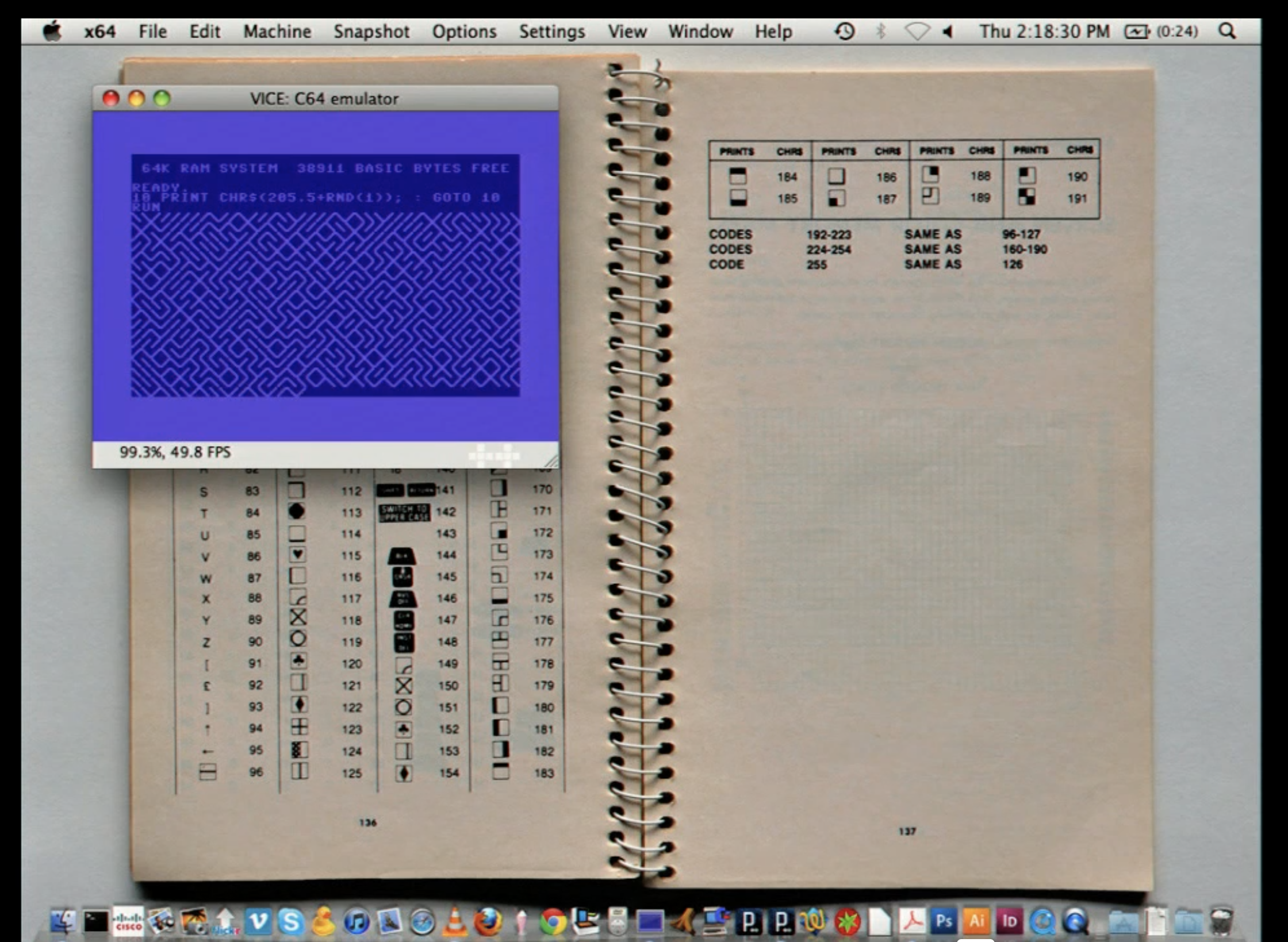
When I was watching the video from our first reading assignment, I came across one of the speaker’s demonstrations where he explained, while generating a maze (image below), that incorporating randomness into art allows the audience to come up with their own conclusions using their own imagination. I truly think that is the beauty of art.

He also mentioned that the same, ordinary structure produces only a single meaning, and I believe is not the point of art. Art is about subjectivity, and I wanted to achieve this by introducing randomness in this assignment. That is why I created an artwork that automatically generates a maze for you to solve. Every time you run the code, you get a different maze so you can enjoy it in a new way each time rather than solving the same maze again and again. Try solving my maze below!

Part of code I’m proud of:

It was pretty hard for me to do it from scratch so I searched for a tutorial video on YouTube. From the video ( https://www.youtube.com/watch?v=jQFYh3nRfSQ ), I was able to learn how stack and class can work together to keep generating paths and filling out all the grids of the canvas. I am especially proud of this mazeIterate() function, which is the most fundamental part of this project. It basically allows you to find an unvisited neighbor that is connected to the grid you are currently standing on. I had to be careful when marking the wall between the current grid and the neighbor grid, because that wall is shared by both of them, meaning that the interpretation from each side is different. Specifically, I created another function called oppositeBlock() to make sure that the same wall is marked as open from the opposite side as well. I was also able to use a stack properly to push the current grid back onto it so that we can return to it when we hit the dead end. 

//function to search for and go to the next tile 
  mazeIterate(){
    let currentGrid = this.stack.pop(); 
  
    let connectedWall = this.pickNeighbor(currentGrid); //find unvisited neighbour that connects with the current tile
    
    if (connectedWall){
      this.stack.push(currentGrid); //put the current tile into the stack so that you can come back when you hit the dead end 
      
      connectedWall.grid[connectedWall.block] = "open"; //mark the wall as open 
      
      currentGrid[oppositeBlock(connectedWall.block)] = "open"; //mark the opposite wall (the same wall) as open 
      
      connectedWall.grid.visited = true; //mark it visited 
      this.stack.push(connectedWall.grid); //push the tile to the stack 

      currentGrid.current = false; 
      connectedWall.grid.current = true; 
    } 
    else if (this.stack.length != 0){ //if there are no neighbors left, 
      currentGrid.current = false;
      this.stack[this.stack.length - 1].current = true; //move back to the previous tile to seek for unvisited neighbor 
    }
  }

Problems I ran into:

I forgot that I needed to mark the border grids as visited at the beginning. This issue was tricky, because if I didn’t do it, the maze would grow outward and go out of bounds. In order to fix this issue, I restricted the boundary by marking all the grids at the border as visited in the constructor so that we can only generate the maze inside our canvas. 

Reflections & Future Improvements:

I am very satisfied with the outcome because I was able to incorporate randomness into my artwork. The learning process took a lot of time because I had to understand how to automatically generate a maze from the tutorial video. However, it was very beneficial for me overall because I was able to reflect upon how to use an array and a class to generate the maze automatically. I think I was able to fully apply all of the concepts we have learned in class so far, so I am very satisfied. For future improvements, I definitely need to work on my comments and variable names, as they are a bit messy right now. But for this assignment, I think my comments would be good for everyone to understand how each part of my code works. 

Week 3 – Functions, Arrays, and Object Oriented Programming

Sketch

My Concept

For this project, I wanted to create a generative artwork inspired by an Instagram post I saw of a supernova made entirely with math. I was amazed by how something so natural and powerful could be represented through math and wanted to make my own version with code. I used object-oriented programming with classes and arrays to build a layered system: a static star field in the background, a clustered supernova core in the middle, and orbiting particle systems that appear when the mouse is clicked. The ParticleSystem class contains Particles as a sub-class for abstraction. The goal was to make the scene feel cosmic and expansive, with a balance of stillness and motion. The pink and orange hues of the supernova give it warmth and contrast nicely with the dark sky and moving particles.

Post Link

Code Highlight

My favorite part of the code was inside the Particle class. The update method receives origin which are the coordinates of the particles superclass, ParticleSystem. It then increments the the particle’s angle, which was set in the constructor to a random angle, by an also randomized angular velocity between 0.005 and 0.008. After that, I used trigonometry to convert the current angle and radius to x and y coordinates. These 3 lines of code are so simple, yet do very well in creating a smooth orbiting effect with any radius and speed.

// Update the particle's position
 update(origin) {
   // Orbit motion
   this.angle += this.speed;
   // Translate motion on x and y
   this.pos.x = origin.x + cos(this.angle) * this.radius;
   this.pos.y = origin.y + sin(this.angle) * this.radius;
 }

Reflection

Seeing the Instagram supernova showed me how math and code can express phenomena far beyond what we normally imagine drawing. Recreating my own version made me realize the power of classes in producing natural-looking patterns with surprisingly little code. What looks like thousands of unique particles is really the same rules repeated again and again, with variation coming from randomness and simple math. I also found that changing small details (like the radius range of the orbits or the color palette) transforms the entire mood of the scene. For me, this project reinforced how generative art is about designing systems of rules that unfold naturally into complex and beautiful results.