Week 8 Reading – Norman,“Emotion & Design: Attractive things work better”

Don Norman’s essay “Emotion and Design: Attractive Things Work Better”, really made me think about how much our feelings affect the way we interact with everyday objects. Norman explains that when something looks or feels pleasant, it actually makes it easier to use. Positive emotions make us more creative and patient, so small design flaws don’t bother us as much. On the other hand, stress or frustration narrows our focus and makes problem-solving harder, which is why usability is especially important in critical or high-pressure situations. I love how he uses examples like teapots, some ugly but practical, some beautiful but tricky, to show that the context and mood of the user really change which design works best.

What really stuck with me is how this idea goes beyond just making things look nice. Design isn’t only about functionality or efficiency; it’s also about how the product makes us feel. When we enjoy using something, we naturally perform better and feel more satisfied. It reminded me that the best designs are the ones that balance function, usability, and beauty, things that work well and bring a little joy into our daily routines. For me, that’s what makes a product feel complete: it’s not just useful, it’s also a pleasure to own and use. A perfect example for me is my piano keyboard. I’ve used many different keyboards over the years, and the ones that are pleasant to touch, look sleek, and respond just right make me want to play more and practice longer. Even if a slightly cheaper or simpler keyboard could technically produce the same sound, it just doesn’t feel as inspiring. The way it looks and feels actually affects my creativity and focus, making the music I play feel better.

Week 8 Unusual Switch Assignment

My concept: 

For this project, I wanted to create a switch using my elbow as the activator. I set up two coins on the table and connected them to the Arduino with jumper wires, so that when my elbow touched both coins at the same time, it would complete the circuit. The Arduino reads this connection as a “press” and turns on an LED. I liked how this made the human body part of the circuit, creating a physical and playful way to interact with electronics.

The process of connecting the coins, taping the jumper wires, and adjusting the setup taught me that even small details, like how the wires touch the coins and keeping them stable, really affect whether the circuit works. The project was about exploring how we can rethink simple switches and find unexpected ways to trigger electronics.

Video Demonstration: 

elbow switch.mov

Arduino Code: 

// Elbow-activated switch with LED

const int switchPin = 2;   // Pin connected to Coin A
const int ledPin = 13;     // Pin connected to LED 

void setup() {
  // Set Pin 2 as input with internal pull-up resistor
  pinMode(switchPin, INPUT_PULLUP);

  // Set LED pin as output
  pinMode(ledPin, OUTPUT);

  // Start with LED off
  digitalWrite(ledPin, LOW);
}

void loop() {
  // Read the state of the switch
  int state = digitalRead(switchPin);

  // If coins are bridged (elbow touches), state is LOW
  if (state == LOW) {
    digitalWrite(ledPin, HIGH);  // Turn LED ON
  } else {
    digitalWrite(ledPin, LOW);   // Turn LED OFF
  }

  // Small delay for stability 
  delay(50);
}

Reflection:

Building this project was a lot of trial and error, and I learned so much about Arduino inputs, digitalRead, and resistors along the way. I realized that small details, like how the wires touch the coins and keeping the connections stable, make a huge difference. At first, I used a 10k pull-down resistor, but the LED wouldn’t stay on reliably when I touched the coins with my elbow. Eventually, I removed the external pull-down and switched to Arduino’s internal pull-up resistor, which made the switch much more stable and responsive.

I also loved seeing how simple code can control hardware in an immediate way, and how experimenting with the physical setup really affects the digital outcome. It was a fun reminder of how hands-on hardware projects are a mix of coding, problem-solving, and creativity.

Ideas for future work or improvements: 

Later on, I’d love to try using different parts of the body or gestures as switches, not just elbows. I could also add more LEDs or other outputs to make it feel more interactive and playful. It would be interesting to experiment with pressure-sensitive  sensors to make the switch respond more smoothly.

Eventually, I could imagine turning this into a small game or interactive piece, where your body becomes part of the control system. Also, I can imagine how interesting it gets when one could actually use their hands as part of the project where they would have more control on the switches and the whole system.

Github Link: 

https://github.com/deemaalzoubi/Intro-to-IM/blob/8753e3a8fa154b92aa973ab1735085c253a33d30/week%208elbowswitch.ino

Reflection – week 8

When I was reading these two articles side by side, I was struck by how they both explore the crucial role of human emotion in successful design, even though one is about teapots and the other about space travel.

Don Norman’s piece, “Emotion & Design,” argues that attractive things aren’t just a luxury but they actually function better. He explains that when we find a product pleasing, it puts us in a positive state of mind. This positive feeling makes us more tolerant of minor problems and more creative in solving them. I can see this in my own life; when I use a beautifully designed website, I feel more patient and engaged, and I don’t get frustrated easily. It’s not just about the tool working correctly, but about how it makes me feel while I’m using it.

This idea perfectly connects to the story of Margaret Hamilton. “Her Code Got Humans on the Moon” shows that the most brilliant technical system is useless if it doesn’t account for human nature. Hamilton understood that even the most highly trained astronauts were human and could make mistakes under immense pressure. Her fight to include error-checking code, which was initially dismissed, proved to be vital. Her software was designed with a deep understanding of human stress and fallibility, making it resilient and, in the end, heroic.

For me, the powerful lesson from both authors is that true excellence in any field requires blending logic with empathy. Norman shows us that beauty improves function by improving the user’s mindset. Hamilton shows us that anticipating human error is not a sign of weak design, but of strong, intelligent design. It reminds me that in my own work and studies, embracing creativity and understanding the human element is just as important as getting the technical details right.

Assignment

Concept

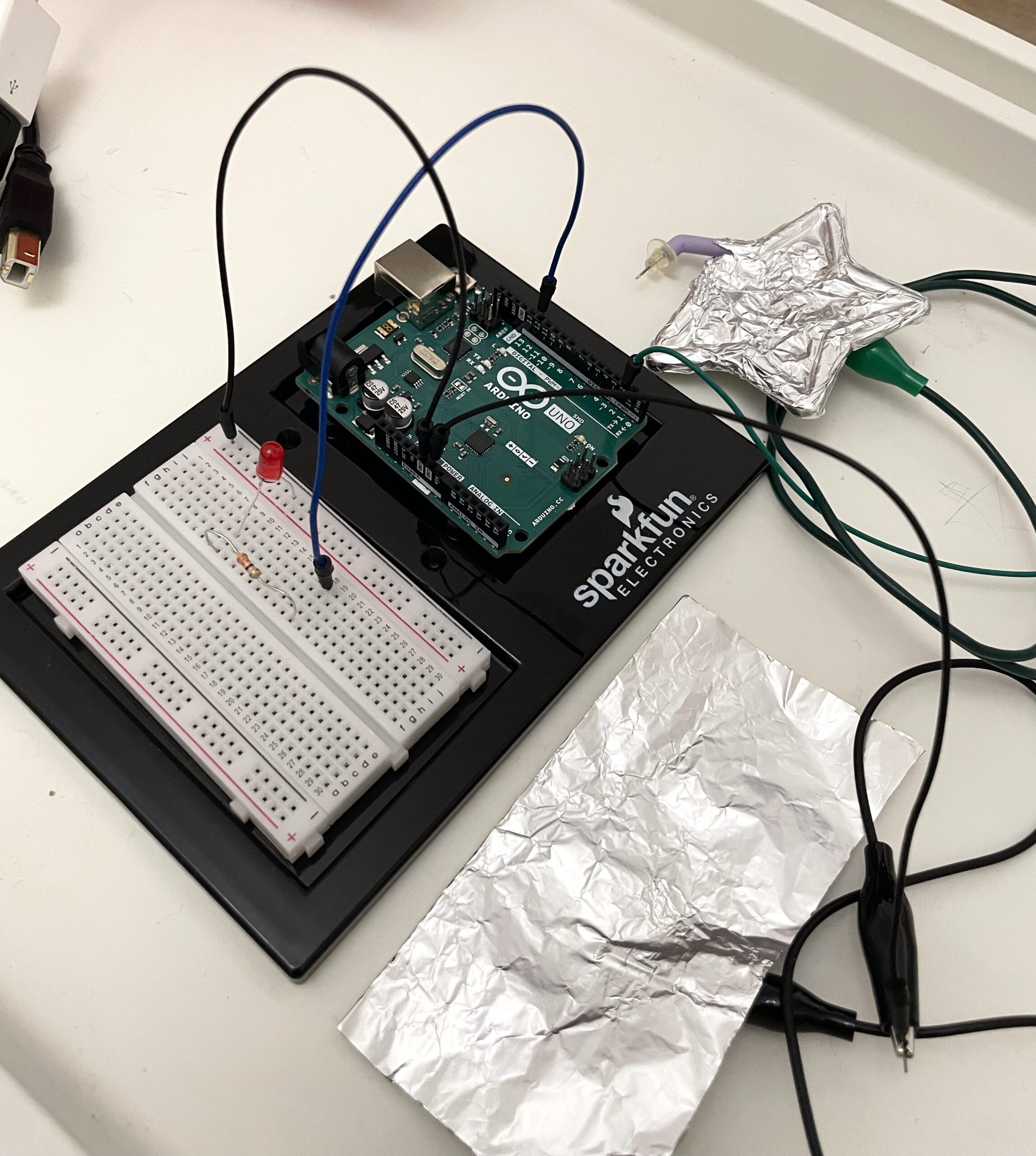
I created a simple switch using aluminum foil around my index finger and thumb. The goal was to make a switch that doesn’t use hands in the traditional sense ,  instead, it works by touching two parts of my own body together. When I bring my thumb and index finger together, the LED turns on. When they are apart, the LED turns off.

For this Arduino project.  I wrapped foil around my thumb and index finger to extend the conductivity, and connected each foil piece to the Arduino using jumper wires. . This simple prototype shows how the human body can become part of an electronic circuit.

 Link to video : Video

Highlight of the code

The code itself is simple. The Arduino reads the input from the foil on your fingers using digitalRead(). When your fingers touch (closing the circuit), it reads HIGH and turns on the LED. When you separate your fingers, the input reads LOW and the LED turns off.

int footSwitch = 2;   // Define the digital pin connected to the  switch (foil pad)
int ledPin = 13;      // Define the digital pin connected to the LED

void setup() {
  pinMode(footSwitch, INPUT);   // Set the foot switch pin as an input to read HIGH/LOW
  pinMode(ledPin, OUTPUT);      // Set the LED pin as an output so we can turn it on/off
}

void loop() {
  int switchState = digitalRead(footSwitch);  // Read the current state of the  switch

  if (switchState == HIGH) {    // If the switch is pressed (fingers touching)
    digitalWrite(ledPin, HIGH); // Turn the LED on
  } else {                      
    digitalWrite(ledPin, LOW);  // Otherwise, turn the LED off
  }
  
  delay(10); // Small delay to stabilize readings and avoid flickering
}

Reflection

This prototype is simple but effective. I noticed that the foil doesn’t always maintain perfect contact, so the LED sometimes flickers if the foil slips or my skin doesn’t touch the metal fully. I could improve this by using stretchable conductive tape  to make contact more consistent.

Even with these small issues, it was exciting to see how my body can act as a switch. Using just fingers and foil, I was able to control the LED and experiment with a non-traditional, hands-free interaction. It’s a great demonstration of how electronics and the human body can be creatively combined in fun, unexpected ways.

Week 8: Unusual Switch

Concept

For this assignment, I struggled to come up with the idea itself. I mean, a switch without using your hands is pretty tricky. I eventually came up with the idea of using an earring and a shoulder pad (of some sort). Basically, when you tilt your head (so the earring touches your shoulder), that’s when the connection happens and the LED turns off. It turns off because the whole idea is laziness. If I’m napping while sitting up, I tilt my head to the side toward my shoulder. So it makes more sense for the LED to turn off when I tilt my head, just like wanting to turn the lights off to go to sleep.

Code

void setup() {
pinMode(2, INPUT_PULLUP); //earring and shoulder foil
pinMode(12, OUTPUT);
}

void loop() {

if (digitalRead(2) == LOW) {
  digitalWrite(12, LOW); // LED turns off when earring connects to shoulder foil
}
else{
  digitalWrite(12, HIGH); // LED is on (not touching)
}
}


Here’s the video of the working switch: Video Demo

Here’s the picture of the wiring:

Future Improvements

Overall, the idea was simple, but I came across some problems. One was the LED kept blinking without a certain pattern, and I wasn’t really sure why. Then i scratched everything and redid it, and it worked. I think it might have been a problem with actually putting the wires and components on the circuit, so I will try to be more precise and careful in the future.

Week 8 Reading Reflection

Norman,“Emotion & Design: Attractive things work better”

This reading really made me think about how design doesn’t just shape what we see, but also how we feel and act. Norman’s main idea is that attractive things actually work better because they put us in a good mood. When we feel happy or calm, we think more clearly and creatively, but when we’re stressed or frustrated, we make more mistakes. It’s interesting how something as simple as how a product looks can change the way our brains approach problems.

What I found most interesting is how emotion can affect performance. I’ve definitely felt that before. When something looks well-designed, I automatically assume it’s easier to use, and I’m less frustrated when it isn’t.

This idea made me think differently about my own projects. I usually focus on getting the function right, but Norman reminded me that appearance and emotional impact are just as important. A design that feels good to use can make people more patient, creative, and willing to explore it which is exactly what good design should do.

Her Code Got Humans on the Moon

This article made me realize how much impact one person’s focus and persistence can have. Margaret Hamilton led the team that wrote the software for the Apollo moon missions, at a time when very few women were in computer science. What stood out to me was how seriously she treated her work, seeing programming not just as a task but as a new discipline worth perfecting. She built systems that could handle errors before they even happened, thinking carefully about every possible failure. While others dismissed her concerns, she stayed confident and made sure the software could handle anything that might go wrong.

The part that impressed me most was when she wanted to include extra code for a mistake that everyone said would never happen, and later it did during Apollo 11. Because of her planning, the astronauts were able to land safely. That moment showed how much preparation and humility matter in great work. Hamilton’s story made me reflect on how important it is to imagine every possibility, even the unlikely ones, and to stay confident in your ideas even when others doubt you. It reminded me that success often comes from quiet persistence and from caring enough to get the details right.

Week 8 – Unusual Switch

Concept
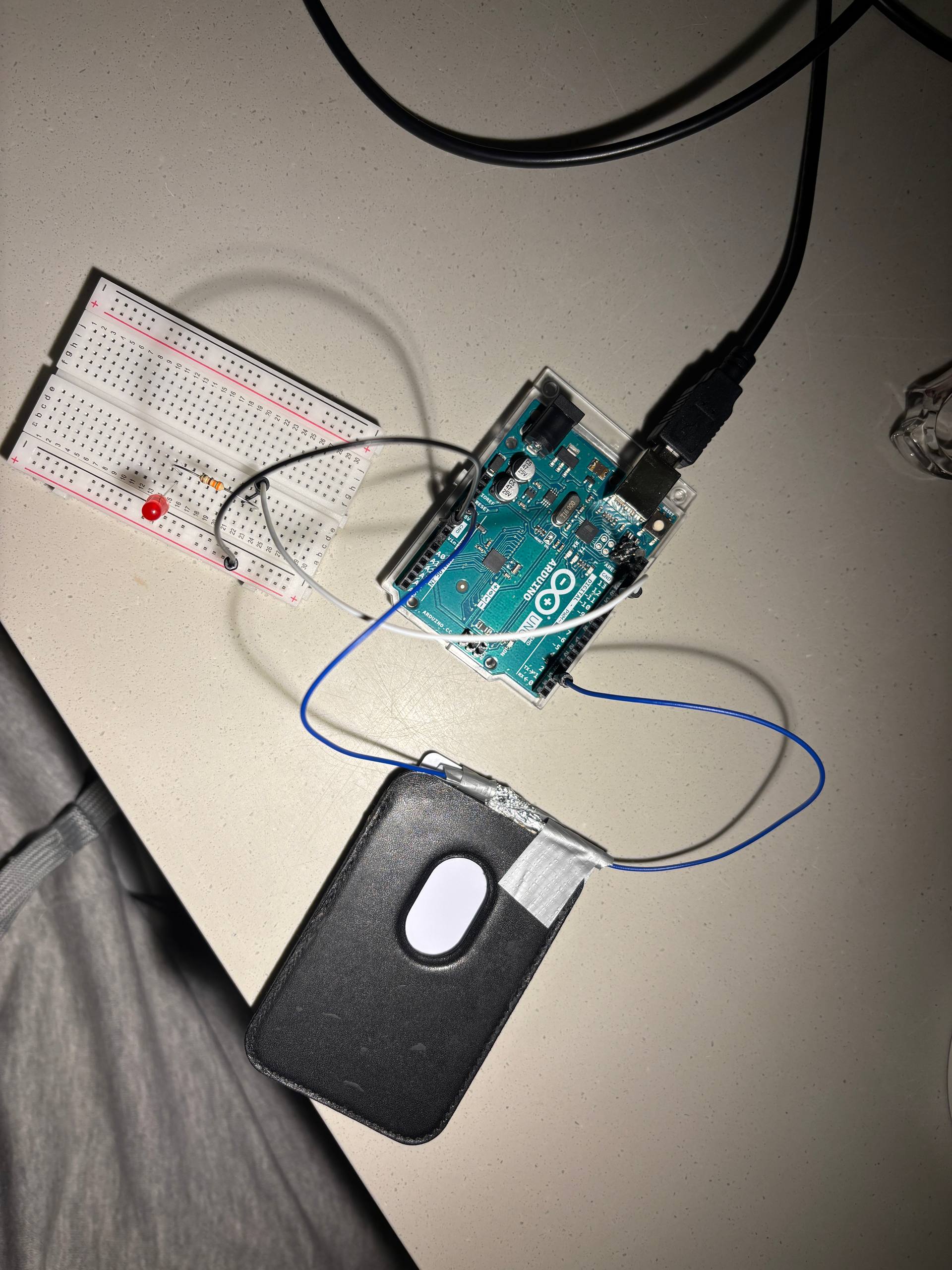
I always keep my magnetic cardholder attached to the back of my phone. It can hold one to three cards comfortably without them falling out. Recently, I almost lost my NYU FAB card, which had around 800 dirhams on it for my study abroad visa appointment. I was so upset and searched my room for two days, cleaning everything. Finally, I found it under my glasses case. That was such a relief. From now on, I’ll always keep it in my cardholder.

For this Arduino project, I reused the LED code from class. The light stays on when the card is outside the holder, and it turns off when the card is inside, showing that it’s safe. I used aluminum foil to extend the wire’s conductivity and duct tape to build a working prototype.

Photo
Video
Unusual Switch on Arduino UNO

Highlight of the code
That’s actually the entirety of the code. The code itself is simple. It starts with a 5V input, and I used digitalWrite(2, LOW) to let the electricity flow since it works from high to low. The system detects when there is contact with the card. If the card touches the sensor, the LED turns off. If there’s no contact and the card is outside the holder, the LED stays on as an alert to remind the user to put the card back for safety. That’s exactly what I did with my FAB card.

void setup() {
  pinMode(13, OUTPUT); // led pin
  pinMode(2, INPUT);  // foil pin
  digitalWrite (2, LOW);
}

void loop() {
  int cardtouch = digitalRead(2);

  if (cardtouch == LOW) { 
    digitalWrite(13, HIGH); 
  } else {
    digitalWrite(13, LOW);
  }

}

Reflection
It’s clear that the prototype isn’t perfect. I can already see ways to improve it, especially since the wires limit the movement of the card. Using a motion or distance sensor would be a better option if I want to make it portable and attach it to my cardholder. The foil isn’t always reliable either. It sometimes slips off the wire, which reduces conductivity and can cause the LED to give the wrong signal. Still, I think it’s great that after just one class, I could use the same code to create something useful that I might actually use in the future.

Week 8 – Reading Reflection

Her Code Got Humans on the Moon:

Margaret Hamilton’s story impressed me with how much dedication and focus one person can bring to their work. She did not see programming as a small or temporary job, she treated it as something worth building a whole discipline around. At a time when few people even understood what software was, she worked with a sense of seriousness and care that helped define the entire field. I found it admirable that she led a team in such a demanding environment, while also constantly pushing for precision and reliability in every line of code. It must have taken even more determination to do this in a male-dominated field, where her ideas were often questioned or overlooked. Yet she proved that talent and persistence can speak louder than bias.

The moment that stayed with me most was when people told her, “That would never happen.” She had warned about a potential error that others dismissed as impossible, but it did happen during the Apollo 11 mission. Because of her preparation, the software knew how to handle it, and the astronauts landed safely. This part made me reflect on how important it is to think beyond what seems likely or convenient. Her ability to imagine every possible mistake shows not only intelligence but humility, the awareness that humans and systems can fail, and that good work anticipates that. Hamilton showed that real achievement does not come from recognition, but from persistence and attention to detail. Even when others doubted her, she stayed focused on what she believed was right. That quiet confidence and responsibility are qualities I hope to develop in my own work.

Emotions & Design: Attractive things work better

This reading made me think deeply about how design affects both our emotions and our behavior. One of the main ideas is that attractive things work better because they make people feel happy and confident. The author explains that when we feel good, our minds become more open and creative, but when we are stressed, we tend to think narrowly and make mistakes. I found this especially interesting because it shows that emotions are not separate from thinking, they actually shape how we use and understand things. Another important idea the author discusses is that good design balances beauty and function. This made me reflect on how I interact with everyday objects. For example, I prefer using items that are both practical and attractive whether it’s a tea set, a notebook, or even my phone interface. When something looks nice, I automatically treat it with more care and feel more motivated to use it.

I also strongly connected with the author’s point about context and mood. He writes, “Design matters, but which design is preferable depends upon the occasion, the context, and above all, upon my mood.” This reminded me of how Kazakh families choose different tea sets depending on the situation. When it is just family, they use the simplest and fastest set. But when guests come, they always bring out the most beautiful one to show respect and hospitality. Another part that stood out to me was how the author connects pleasure with usability. He suggests that when something looks good, we are more tolerant of small problems. I realized this is true for me too, I do not mind if a pretty cup is a bit heavier or a stylish app takes a second longer to load, because its beauty gives me a pleasant feeling. I even change my tea sets every season, one for winter, spring, summer, and fall, because I enjoy drinking from something that matches the season’s atmosphere. The same goes for digital things: an attractive design makes me feel happier and more productive.

Week 8 – Unusual switch

Concept:

I designed a project inspired by one of my favorite arm exercises. The idea is to make the arm’s movement interact with light using an Arduino. I attached pieces of foil and wires on both sides of the arm at a specific distance. As the person bends their arm, the foil pieces move closer together. When the arm is fully bent, the foils touch and complete the circuit, causing both the yellow and blue LEDs to turn on. At the same time, the yellow LED starts blinking while the blue LED stays steadily lit. This setup transforms a simple arm exercise into an interactive experience. The lights provide visual feedback, it also makes the activity more engaging and helps represent effort and motion in a creative, easy-to-understand way.

Coding:

Arduino file on Github

int ledBlue = 8;      // Blue LED pin
int ledYellow = 4;    // Yellow LED pin
int foilSwitch = 2;   // Foil switch pin

void setup() {
  pinMode(ledBlue, OUTPUT);
  pinMode(ledYellow, OUTPUT);
  digitalWrite(foilSwitch, HIGH);
 
}

void loop() {
  int switchState = digitalRead(foilSwitch); // read foil switch

  if (switchState == LOW) {  // foils touching
    digitalWrite(ledBlue, HIGH);
    digitalWrite(ledYellow, HIGH);
    delay(500);                    // on for 500ms
    digitalWrite(ledYellow, LOW);
    delay(500);
    digitalWrite(ledBlue, LOW);
    digitalWrite(ledYellow, LOW);
  }
}

I defined three integers: ledBlue for the blue LED on pin 8, ledYellow for the yellow LED on pin 4, and foilSwitch for the foil sensor on pin 2. Then, in the setup part, I set the LEDs as outputs and used the internal pull-up resistor for the foil switch so it can detect when the foils touch each other. In the loop, I made the Arduino constantly read the state of the foil switch. When the foils touch, the circuit closes, and both LEDs turn on, the blue LED stays on, while the yellow LED blinks every half second. When the foils are not touching, both LEDs stay off.

Setup:

Photo SetupDemonstration Video

Reflection:

This project taught me how simple electronics can respond to physical movement and turn a regular arm exercise into an interactive activity. I learned how to use an Arduino to read input from a foil switch and control LEDs, as well as the difference between input and output pins and how HIGH and LOW signals work with a pull-up resistor. For future improvements, I could also try different colors or numbers of LEDs to show progress in a clearer way. Another improvement is to make the device more comfortable to wear on the arm, so it can be used easily during exercises. I could also practice adjusting the code to make the lights respond faster and more smoothly to the arm movement.

Reading Reflection – Week 8

Don Norman — “Emotion & Design: Attractive Things Work Better”

Don Norman argues that it’s important to design things to be visually pleasing and attractive because it makes us happier and improves how people use them. I agree with him because there were countless times when my mood or motivation dropped just because the things around me looked unattractive. A prime example for me is the room I work in, I probably wouldn’t be able to finish, let alone even start doing my work if I were in a gloomy room with barely any colors, or furniture that doesn’t complement each other. Overall, I find that I’m in a much more positive state of mind when I’m surrounded by things with an appealing design.

Robert McMillan — “Her Code Got Humans on the Moon”

The article about Margaret Hamilton really made me think about just how important not only the mission is, but the people who helped make it happen. Hamilton was a computer scientist in the 1960s who worked in MIT, where she led the development of the onboard flight software for the Apollo missions. I found it very impressive how she managed to succeed in a male-dominated field while also juggling her personal life, such as caring for her daughter, all while doing groundbreaking technical work at such a young age.

Thanks to Hamilton’s experience and clever approach to handling errors or casualties, she was able to save the astronauts on the Apollo 8 flight and bring them back home. I find it truly inspiring that even before they launched the mission, Hamilton wanted to add error-detection code “just in case.” Even when her higher-ups thought it was unnecessary, she didn’t give up and made sure the system could handle unexpected problems, and her preparation paid off in the end.