Reading Response

Attractive Things Work Better

It was really interesting for me to learn how human cognition and emotion are intertwined and how that relationship can determine which design is the best. I personally agree with the author’s idea that more aesthetic and pleasing designs can enhance people’s creativity and allow them to accept even small mistakes or glitches. However, I think that even if a design is aesthetic, if it is too complicated and difficult to use, it will still make me feel frustrated. 

Thus, I believe it’s all about finding the perfect balance between usability, aesthetics, and the emotional impact we gain from the design. In terms of the emotional impact, it is very hard to determine which design works best for people in both pleasant and stressful situations. However, I think it’s always important to make designs both aesthetic and simple at the same time. For instance, Notion is a very simple yet visually pleasing website, and I think that was the key to its success. I know where the templates are, so I can easily choose which template I want to use for my daily diaries and so on. As a software engineer, it is always hard for me to find the right balance between simplicity and aesthetics. However, getting as much user feedback as possible makes it easier for me to find any improvements and add features that make people’s lives easier.


Her Code Got Humans On The Moon

As someone who wants to become a software engineer after graduation, I totally agree that the way Hamilton approached designing software that handles crucial tasks and resolves real-time errors is very important, especially in today’s society. Nowadays, anyone can build almost anything from scratch due to technological advancements without actually knowing how to code at all. However, the real challenge that we, as software engineers, need to tackle is handling critical errors when something goes wrong. If we do not understand the fundamental principles of how software interacts with other components, such as databases, everything in this world will start to malfunction. 

After reading this article, I realized that I want to become a software engineer like Hamilton who can prioritize customers’ needs in  the first place and handle errors in real time. I believe these two skills are fundamental parts of a software engineer’s job in today’s world.

Week 8: Unusual Switch

Main Concept:

In Japan, the way you bow is really important when it comes to apologizing to someone older than you, and even some teachers in middle and high school teach their students how to bow properly. It is considered that bowing to 90 degrees is the most polite and respectful way to apologize to someone older than you. When I was coming up with the idea for this project, the first thing that came to mind was to teach people how to bow correctly to 90 degrees. The main concept is that the light can only be turned off if you bow to 90 degrees.

The link below is the video of me demonstrating my proper bowing detector.

My Proper Bowing Detector

Highlight of the code:

This is the code that I wrote. I wanted to use different pin numbers instead of pin 13 or different analog pins, such as  A1 or A3, but after changing them, my circuit suddenly stopped working. Thus, I chose to stick with pin 13 and A2. Inside the code, I used variables for pin numbers so that I can easily change them in the future. However, I want to figure out with my professor why my circuit suddenly stopped working just by changing the pin numbers.

int ledInput = 13; //variable to control LED
int sensorInput = A2; //variable to control sensor

void setup(){
  pinMode(13, OUTPUT); //send singnals from pin 13
  pinMode(A2, INPUT); //receive signals from A2
}

void loop(){
  //read signals from A2
  int buttonState = digitalRead(A2); 

  if(buttonState == HIGH){
    digitalWrite(13, LOW); //turn off LED if my forehead touches the foil 
  } else {
    digitalWrite(13, HIGH); //turn on LED
  }
}


Reflection and Future Improvements:

Since it was my first time building hardware using an Arduino, it took me a tremendous amount of time to understand how things work, especially the switch example we did in class. Thus, I spent a lot of time going through the slides and experimented for several hours to figure out which side of the jumper wire I can connect to the aluminum foil to make this project work. I really struggled with turning off the LED by placing my head on the A5-sized foil paper on the table for several reasons. First of all, the jumper wire was not long enough, so I had to connect multiple wires, but some of them got unplugged during the trials. Furthermore, since the tape is not conductive, when I covered the tip of the wire, the LED didn’t turn off. I tried using conductive tape because I thought it would allow electricity to go through the wire, but that didn’t work as well. At the end of the day, I made the foil paper on my forehead as large as possible to increase the surface area and only applied the tape to the sides of the foil so that it wouldn’t cover the tip of the wire. 

As for future improvements, I would like to use a sensor instead of a foil paper so that my users don’t have to put the wire on their forehead, which would be inconvenient to use. I also want to create a sensor that can precisely measure 90 degrees to detect the proper Japanese bowing style.

Midterm Project: “Save Polar Bear from Climate Change”

Fullscreen sketch

Overall Concept:

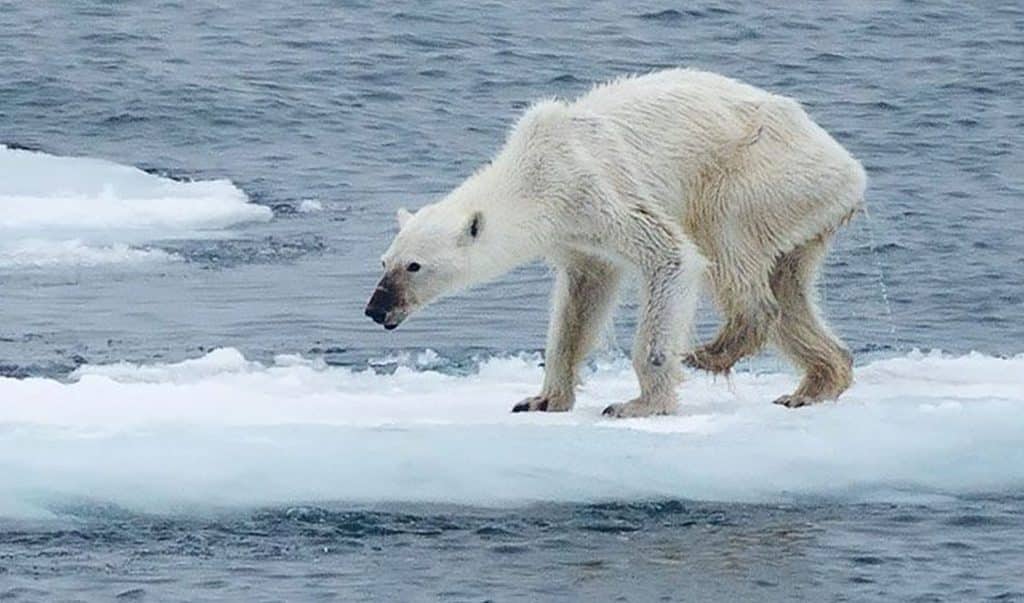
“Save Polar Bears” is a game designed to raise awareness of the impacts of climate change on the ecosystem of polar bears. It is an interactive game yet educational in a sense that it teaches you the real ongoing situation for polar bears. The reason why I made this game is I’ve been super passionate about climate change and I love polar bears since I was a child. I have been doing research about climate change since high school and I found out that polar bears are struggling with hunting due to the melting icebergs. Thus, I incorporated this situation as a main theme of this game: polar bears need to eat as many fish as possible to survive while running away from melting icebergs. 
How my project works: 

My game is simple. The user’s mission is to collect as many fish as possible without falling into the ocean. The field is made of a 10 X 10 grid representing icebergs. One of the icebergs is randomly chosen every 3 seconds to melt. But here is the tricky part that I’m proud of: every 2 seconds, the temperature increases, as shown in the top-left corner by the temperature parameter. The higher the temperature becomes, the faster the icebergs melt. However, there is also a power-up that appears every 7 seconds. If you pick it up, two icebergs will be restored. So, users have to figure out how to collect as many fish as possible while also restoring icebergs at the same time. 


Users can also learn about why we need to save polar bears from climate change by selecting the “Why Save Polar Bears?” button. I wanted to include this feature to educate people about the real situation affecting polar bears and their ecosystem due to the impacts of climate change.

The part of the game design I am proud of:

The part of the game design I’m most proud of is the gimmick where, as the temperature rises, more icebergs start to melt. I wanted to create a feature that reflects the real effects of climate change on the ecosystem of polar bears, and the idea of rising temperatures causing ice to melt felt the most meaningful and engaging to me. It represents what is happening in the Arctic Ocean, where polar bears are struggling to hunt their prey due to the rapid melting of icebergs.


The problems I ran into & Future improvements: 

The most challenging problem I ran into during the production of this game was definitely adjusting everything to full-screen mode. Since I am using 10 X 10 grids, it is not very suitable for a full-screen game, especially if you are using a laptop with varying screen sizes. Therefore, I had to calculate everything to make it fit properly in full-screen mode. For instance, I had to make the polar bear slightly larger when using full-screen mode by including fullscreen() in the if statement and multiplying the polar bear’s size by 1.4. I also had to resize each button depending on if users are in fullscreen mode or not using a ternary operator. But, I was able to learn how to use a ternary operator instead of using if statements again and again, so it was a good learning experience for me to make the code more readable. 


In terms of future improvements, I would like to add more interactive features to the game. For example, I was planning to include a feature where polluted garbage is scattered around the field, and if the polar bear collects three pieces of garbage, it dies. However, since I didn’t have enough time to implement it this time, I would like to add that feature later to incorporate more elements related to climate change. Furthermore, in terms of implementation details, since I had to manually calculate the sizes of the polar bear, fish, power-ups, etc., to match the full screen, I would like to adjust them more precisely next time to improve the user experience. Currently, if you touch the tip of a melted iceberg, it immediately results in a game over. I want to modify this so that players can slightly touch the edge of melted icebergs without immediately losing, as it can be confusing when they feel they didn’t actually fall into the ocean but still lose the game.


The part of code I’m most proud of: 

The part of the code that I’m most proud of is the GameManager class. This is the core of how the game works. It contains the addFish() function, which makes fish appear at random locations and adds them to the fish array for display. It also includes the addPowerups() function, which works similarly to addFish(). Furthermore, the fillWithIcebergs() function creates 10  X 10 grids by precisely calculating the position of each iceberg using the nested loops we learned in class. 


I also spent a lot of time designing the isOver() function, which is the core mechanic of the game. It checks whether the polar bear has stepped on a melted iceberg. To determine whether an iceberg has melted, I created a Boolean variable called melted to indicate which ones are completely melted. In the isOver() function, I used an if statement to only check the melted icebergs and added a condition where, if the distance between the polar bear and the iceberg becomes shorter than half the size of either, the game ends. I still need to fine-tune this logic so that small touches on the melted icebergs are allowed, making the game a bit more forgiving. 

class GameManager {
  constructor() {
    this.score = 0; //score starts with 0
    this.icebergs = [];
    this.fish = [];
    this.powerUps = [];
  }

  //function to fill up the canvas with 15 X 15 grids
  fillWithIcebergs() {
    let cols = 10;
    let rows = 10;
    let x_width = width / cols; //how wide each grid is
    let y_height = height / rows; //how tall each grid is

    this.icebergs = [];

    //create 15 X 15 grids
    for (let i = 0; i < cols; i++) {
      for (let j = 0; j < rows; j++) {
        //push all the icebergs into an array called icebergs to display them
        this.icebergs.push(
          new Iceberg(
            i * x_width + x_width / 2,
            j * y_height + y_height / 2,
            x_width,
            y_height
          )
        );
      }
    }
  }

  //function to restore 3 icebergs
  addIcebergs(num) {
    let restored = 0;
    for (let iceberg of this.icebergs) {
      if (iceberg.melted && restored < num) {
        iceberg.restore();
        restored++;
      }
    }
  }

  //function to add more fish
  addFish(num) {
    for (let i = 0; i < num; i++) {
      let x = random(width);
      let y = random(height);
      this.fish.push(new Fish(x, y, fishSprites));
    }
  }

  //function to add more powerups
  addPowerUp(num = 1) {
    for (let i = 0; i < num; i++) {
      let x = random(width);
      let y = random(height);
      this.powerUps.push(new PowerUp(x, y));
    }
  }

  //function to check if bear went into melted icebergs
  IsOver(bear) {
    //adjust the size of polar bear accordingly
    let bearSize = width * bear.baseScale;
    if (fullscreen()) {
      bearSize *= 1.6;
    }
    //don't make polar bear too big or too small
    bearSize = constrain(bearSize, 90, 300);

    const bearHitbox = bearSize * 0.5;
    const bearHalf = bearHitbox / 2;

    for (let iceberg of this.icebergs) {
      if (iceberg.melted) {
        const overlapX = abs(bear.x - iceberg.x) < bearHalf + iceberg.w / 2;
        const overlapY = abs(bear.y - iceberg.y) < bearHalf + iceberg.h / 2;

        if (overlapX && overlapY) {
          return true;
        }
      }
    }

    return false;
  }
}

This is the final production of my project:


Reference: 

In this midterm project, chatGPT was used to help me rectify several problems I faced during the development phase. Here is a breakdown of how I used chatGPT in this midterm project: 

    • ChatGPT helped me understand how to use a lambda function to carry out a certain action, which in my case switching the game state, when a certain button was pressed.
    • ChatGPT helped me adjust the size of objects (polar bear, fish, powerups, and icebergs), text (title and body paragraph), and buttons to adjust to the fullscreen mode. 
    • ChatGPT helped me calculate and adjust the position and size of the score display and the temperature slider at the corner of the game

Week 5: Midterm Project’s Progress

Main Concept and User Interaction:

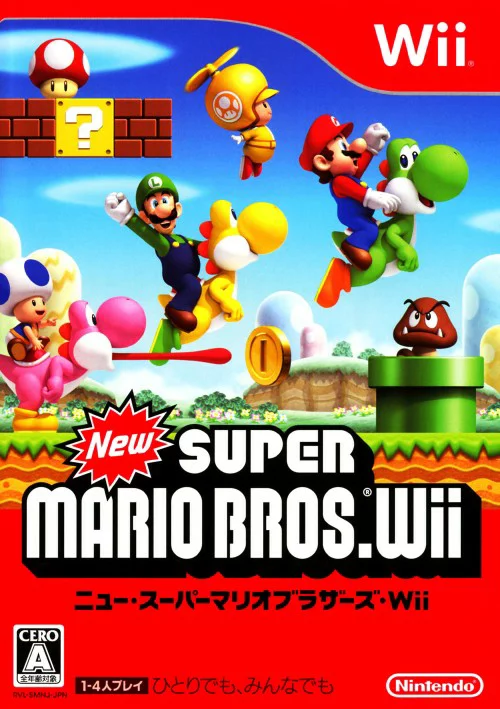
Super Mario has been the greatest game I’ve ever played, and I have so many good memories associated with it. I used to play it with my whole family after my dad came back from work. Since I was a child, I didn’t know how tired he was after finishing his job, but I kept begging him to play with me. Even though he was apparently exhausted, he always said yes to me, and I was absolutely happy and excited every night. Super Mario is thus a fundamental part of my childhood. For this midterm project, I wanted to bring back that childhood memory by making a simple version of Super Mario Bros 2, a Wii game I used to play with my family.


Most Uncertain Part of My Midterm Project:

The most uncertain part of my midterm project is how to actually make Super Mario run and jump using the sprite concepts that we learned in class. Since I had no experience making animations where a character responds to key presses, I started the project by completing this feature. I first went to a website called “The Spriters Resource” to get sprite images of Super Mario and then imported them into my project. But since the sprite images had a green background, I had to remove it using another website “Remove Background” and make the background transparent so that Mario matched the canvas background.


Code Snippet:

As you can see, this is the code I wrote to animate Mario running and jumping. I used the same logic that we discussed in class. If a user presses the right arrow, Mario runs to the right. If a user presses the up arrow, Mario jumps vertically. I used modulo to make sure the running animation loops back to the first frame and doesn’t go over the limit.

let isRunning = false;
  let isJumping = !onGround;

  //Make mario run towards right 
  if (keyIsDown(RIGHT_ARROW)) {
    x += speed;
    isRight = true;
    isRunning = true;
  }
  //Make mario run towards left
  if (keyIsDown(LEFT_ARROW)) {
    x -= speed;
    isRight = false;
    isRunning = true;
  }
  
  //make mario always stay inside the canvas 
  x = constrain(x, 0, width); 

  //animation for running
  if (isRunning && onGround) {
    //every 6 frame, move to the next sprite 
    if (frameCount % 6 === 0) {
      index = (index + 1) % sprites[1].length; //use modulo to loop through the same animation
    }
    drawMario(sprites[1][index]); //draw running Mario
  }
  
  //Animation for jumping 
  else if (isJumping) {
    drawMario(sprites[3][0]); //sprite for jumping
  }
  
  //sprite for idle 
  else {
    drawMario(sprites[0][0]);
  }


Sketch:


Reflections and Future Improvements:

It was relatively easier than I expected to implement the animation of Mario running and jumping because I only had to apply the concepts we learned in class, such as using nested arrays to store each sprite image and if-else statements to trigger certain actions when a certain key is pressed. However, I still need to fix one critical issue, which is when Mario runs too fast, the background image glitches. I am still not sure how to solve this issue, so I would like to ask my professor during the next class. To make it more like Super Mario Bros 2, I need to add some obstacles such as blocks, pitfalls, Koopa Paratroopas, Bullet Bills, and Goombas. I would also like to add a score tracking system where the longer you play, the higher your score gets. This is to make the game more interesting and fun.

Week 5: Reading Response

I think both computer vision and human vision have benefits and downsides in terms of how they can comprehend the reality and meaning of the world. Computer vision simply relies on the quality of algorithms and environmental conditions, which often makes it fail to comprehend the meaning of videos. Human vision, on the other hand, allows us to instinctively comprehend everything in the world through our greatest tools called “eyes”. Furthermore, when it comes to emotions, computer vision is not able to fully understand human emotions. As mentioned in the reading, the emotion recognition system turns very subjective, complex, personal features, called emotions, into objective data, which I don’t think is ethically right, because we are essentially labeling people’s emotions in a way that does not perfectly depict them. However, computer vision can literally track everything in real time for as long as possible until the whole energy is consumed. We, as humans, cannot keep our eyes open and look at everything. But computer vision can stay active indefinitely, being able to record everything that is going on. Expanding on this, computer vision can depict the true reality of the world if all of the conditions are met and algorithms are implemented correctly. For example, Suicide Box was able to reveal the true reality of suicide that society was uncomfortable confronting. In this sense, computer vision is very effective in maintaining transparency. 


To enhance the quality of computer vision, we can control the environment of the physical world. For example, we can change the brightness and lighting of the background or change the color of objects so that the target is spotlighted, making it easier for computers to track.


In terms of the future of computer vision, I think more and more artists are going to incorporate computer vision into their interactive art as people are getting more interested in human and computer interaction, such as VR, AR, XR, and robotics. teamLab would be a great example. They exhibit artwork that allows people to interact with it. Specifically, in Sketch Aquarium, kids draw fish and then the fish appear on the screen so people can feed them or make them swim together. But I believe there are also ethical implications of using computer vision, such as tracking people’s personal data without consent and digital sexual harassment. Therefore, we should establish standards to make sure that computer vision tracking systems are used in appropriate ways.

Week 4: Generative Text

Fullscreen sketch

Main Concept:

My main concept is the first home screen you see when you buy a new phone. There are so many “hello” messages in different languages popping up, and that makes me shiver and feel like I’m really getting a new phone. For this assignment, I wanted to replicate that feeling of “I’m getting a new thing.” I also thought generating “hello” in different languages would symbolize that even though we are divided by languages, we are all connected with each other, and it is important to understand and embrace one another.


The part of the code I’m proud of:

The part of the code I am most proud of is the update function. In order to calculate the time that has passed after the word was generated, I had to learn a new function called millis(), which basically gives you the number of milliseconds that have passed since the program started. I used multiple if-else statements to make the word gradually appear and disappear based on time intervals. For instance, the transparency of the word gradually increases from 0 to 255 within 1 second so that it does not pop up immediately. This was meant to imitate the iPhone’s way of generating “hello,” which gradually fades in. I also used the map() function, which we learned in class, to map 0 to 1 second to 0 to 255 in transparency. I am happy about the fact that I was able to fully utilize the concepts we learned in class in this update function inside the Hello class. 

update(){
    let passed = millis() - this.beginTime; 
    
    if (passed < 1000){
      //gradually fade in in 1 sec 
      this.alpha = map(passed, 0, 1000, 0, 255);  
    } else if (passed < 3000){
      //full transparancy after 3 secs
      this.alpha = 255;
    } else if (passed < 5000){
      //gradually fade out in 2 secs
      this.alpha = map(passed, 3000, 5000, 255, 0); 
    } else{
      //word faded out
      this.over = true;
    }
  }

Sketch:


Reflections & Future Improvements:

For future improvements, I would like to change the color of the word each time it pops up to make it more colorful and enjoyable for viewers. Furthermore, I want to avoid generating the same word two times in a row. I think I will be able to do this by using an if-else statement to control the conditions. Overall, I am happy with the outcome, as I was able to replicate a simpler version of the iPhone’s starting screen.

Week4 Reading Response

I totally agree with the author’s essential idea that it’s all about balancing competing priorities including usability, attractiveness, cost, reliability, manufacturability, marketability, and so on. I realized through reading that nowadays people care more about aesthetics rather than functionality, which undermines the usability of the product. Although aesthetics are quite important to attract a larger audience, I truly think that preserving usability is a must and should never be compromised. Otherwise, it would be bad if we, as producers, confuse users about how to use the product. As someone who likes minimalistic design, in my future projects in interactive media, I would like to keep the design simple and modern, while still being attractive to users. Muji is a great example. Its product designs are super simple, yet their usability is pretty good. Thus, I would like to balance usability and attractiveness like Muji does. 


I also realized that what’s being discussed in this reading is quite similar to the software development life cycle I learned in my software engineering class. Back in the old days, communication between clients and producers was not prioritized. However, in modern days, we use the agile method, where communication among users, developers, and business people is the most important factor in increasing usability and satisfying users’ expectations. I drew a connection here with the reading in the sense that we put more emphasis on facilitating communication to better understand and design the product itself. 


Something that drives me crazy is a washlet. As a Japanese person, I’m proud that so many foreigners are fond of it. But I don’t know how to use it even to this day. It has too many buttons, and sometimes there are buttons called “massage,” which I’m scared to press because I cannot imagine how a toilet would massage me while sitting. Also, there are multiple buttons to spray water, so I don’t know from which part of the toilet the water will spray. I’m just scared of getting wet and confused. I wish it could reduce the number of buttons for usability and add some simple text to explain what will happen when I press a certain button.

Week3: Reading Response

I agree with the author’s point that interactivity only happens when two subjects are actively engaging with each other through purposefully listening, thinking, and speaking to each other. In my personal experience, I used to feel lonely and left out when a person who I was talking to was scrolling on their phone while I was seriously talking to them about my idea during the team project back in my high school. I felt like I was ignored and I thought I was talking to myself. I think there was no interactivity at all in that situation. 

Also, from what I learned in the class called Immersive Experiences I took in the fall semester last year, I think interactivity also needs to incorporate as much sensory information as possible. For example, if you close your eyes and block your ears completely when someone is talking to you, you won’t be able to know who that person is and what that person is talking about. So, a lack of interactivity can also lead to a lack of information and understanding in real-life situations.

Week3: Generative Artwork

Concept:

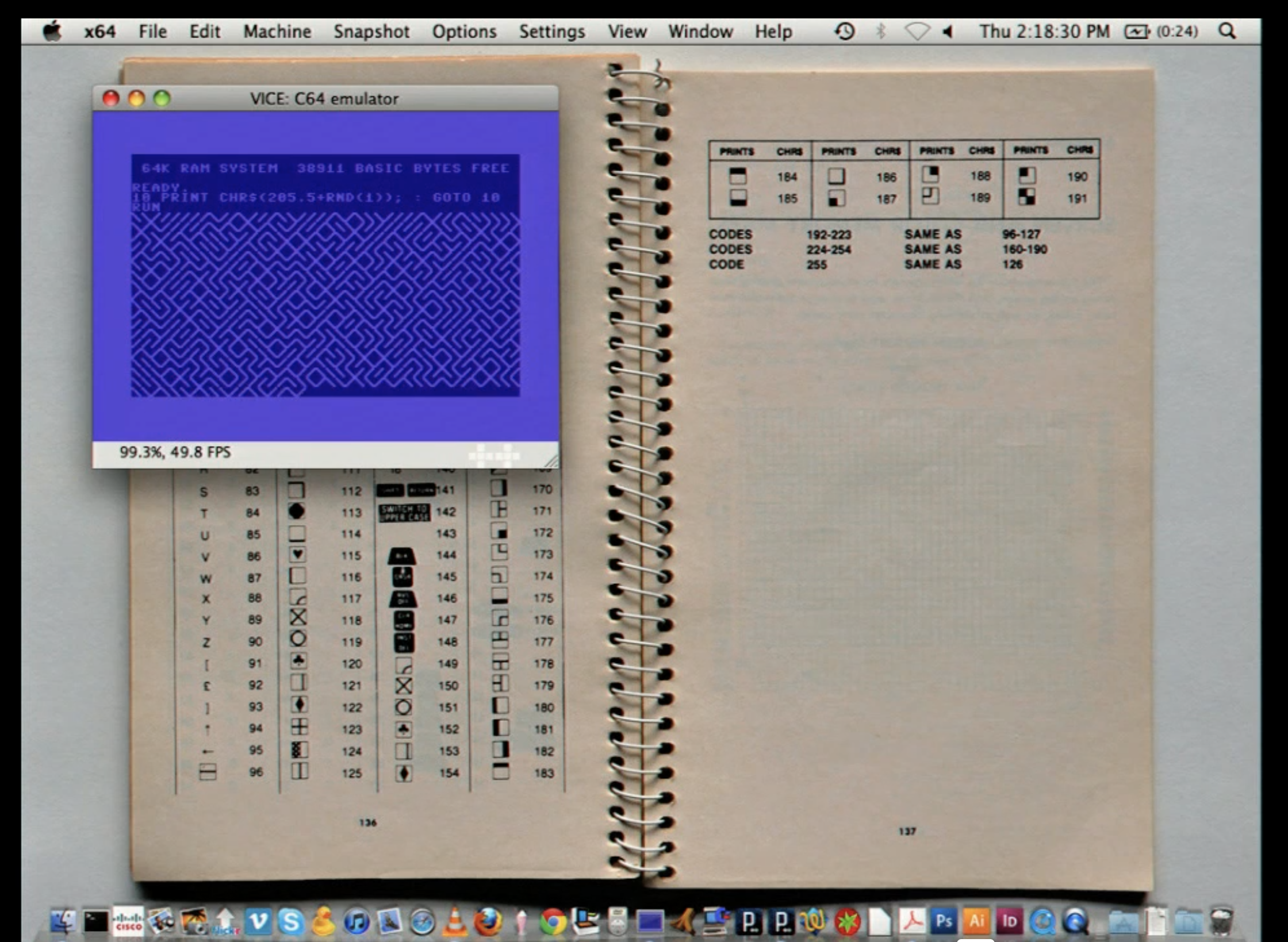
When I was watching the video from our first reading assignment, I came across one of the speaker’s demonstrations where he explained, while generating a maze (image below), that incorporating randomness into art allows the audience to come up with their own conclusions using their own imagination. I truly think that is the beauty of art.

He also mentioned that the same, ordinary structure produces only a single meaning, and I believe is not the point of art. Art is about subjectivity, and I wanted to achieve this by introducing randomness in this assignment. That is why I created an artwork that automatically generates a maze for you to solve. Every time you run the code, you get a different maze so you can enjoy it in a new way each time rather than solving the same maze again and again. Try solving my maze below!

Part of code I’m proud of:

It was pretty hard for me to do it from scratch so I searched for a tutorial video on YouTube. From the video ( https://www.youtube.com/watch?v=jQFYh3nRfSQ ), I was able to learn how stack and class can work together to keep generating paths and filling out all the grids of the canvas. I am especially proud of this mazeIterate() function, which is the most fundamental part of this project. It basically allows you to find an unvisited neighbor that is connected to the grid you are currently standing on. I had to be careful when marking the wall between the current grid and the neighbor grid, because that wall is shared by both of them, meaning that the interpretation from each side is different. Specifically, I created another function called oppositeBlock() to make sure that the same wall is marked as open from the opposite side as well. I was also able to use a stack properly to push the current grid back onto it so that we can return to it when we hit the dead end. 

//function to search for and go to the next tile 
  mazeIterate(){
    let currentGrid = this.stack.pop(); 
  
    let connectedWall = this.pickNeighbor(currentGrid); //find unvisited neighbour that connects with the current tile
    
    if (connectedWall){
      this.stack.push(currentGrid); //put the current tile into the stack so that you can come back when you hit the dead end 
      
      connectedWall.grid[connectedWall.block] = "open"; //mark the wall as open 
      
      currentGrid[oppositeBlock(connectedWall.block)] = "open"; //mark the opposite wall (the same wall) as open 
      
      connectedWall.grid.visited = true; //mark it visited 
      this.stack.push(connectedWall.grid); //push the tile to the stack 

      currentGrid.current = false; 
      connectedWall.grid.current = true; 
    } 
    else if (this.stack.length != 0){ //if there are no neighbors left, 
      currentGrid.current = false;
      this.stack[this.stack.length - 1].current = true; //move back to the previous tile to seek for unvisited neighbor 
    }
  }

Problems I ran into:

I forgot that I needed to mark the border grids as visited at the beginning. This issue was tricky, because if I didn’t do it, the maze would grow outward and go out of bounds. In order to fix this issue, I restricted the boundary by marking all the grids at the border as visited in the constructor so that we can only generate the maze inside our canvas. 

Reflections & Future Improvements:

I am very satisfied with the outcome because I was able to incorporate randomness into my artwork. The learning process took a lot of time because I had to understand how to automatically generate a maze from the tutorial video. However, it was very beneficial for me overall because I was able to reflect upon how to use an array and a class to generate the maze automatically. I think I was able to fully apply all of the concepts we have learned in class so far, so I am very satisfied. For future improvements, I definitely need to work on my comments and variable names, as they are a bit messy right now. But for this assignment, I think my comments would be good for everyone to understand how each part of my code works. 

Week 2 : Reading Reflection

I think randomness plays two roles. One is to embed the messages of an artist against the structured society they lived in. The other is to ignite our imagination through unexpected results. In terms of the first one, there were many artworks introduced by the speaker where artists incorporated randomness to imply the message that they wanted to use their own imagination within the structured society. Thus, in those earlier times, randomness represented people’s desire to bring chaos into the society they lived in to free themselves from structure so they could live in their own world. I guess that was their way of manipulating their own imagination to find out who they are. I really resonated with the second role of randomness, which is to allow the audience to use their own imagination to interpret an artwork. There was a project I learned about in the course I took in the fall semester in 2024 called “immersive experiences”, where the producer of the artwork brought a group of random people together in the same place without giving any instructions, and simply let them play with what they had in the room. I felt this was very similar to the concept of randomness the speaker described, in the sense that randomness can lead to unexpected events that we can then interpret using our imagination. Unlike structured artwork, there is no right or wrong way to interpret it. Therefore, you have total freedom in how you interpret and critique a piece of artwork. You can either agree with it or disagree with it. However, with structured artwork, there is usually only one way to interpret it from a single perspective. 


I also found the example shown in the video very intriguing, where the speaker demonstrated different codes to show the effects of having randomness by comparing structured codes. The code with the functionality of generating random numbers allowed us to use our imagination to think, for example, that generated things might be a maze or to enjoy tracing where a particular path might go. However, the code without that functionality only generated one dedicated path, which is expected from the process of coding. In this sense, incorporating randomness into artwork adds an intriguing aspect and allows us to freely use our imagination to analyze, interpret, and critique it. I think that is the beauty of incorporating randomness into artwork. But I also agree with the author’s point that it is about achieving a balance between randomness and order. For instance, in one of his artworks where things emerged from the top, bottom, and sides, he defined conditions where, if particles collided with each other, they would deviate away. Those general functions that create interesting animations are absolutely necessary, and humans should be in charge of defining them. However, the way things appear can be controlled by randomness, because if there is only one way for things to emerge, then the result is always expected. I think the result should always be unexpected so that viewers can use their own imagination to interpret the art. At the same time, artists should define some core functionalities or general rules of interaction so that the structure itself has meaning. My conclusion is that a fusion of structure and randomness gives meaning to artwork. If one of them is lacking, the result is either predictable or too chaotic to the point where the meaning is not interpretable. Having a strong balance between structure and randomness allows us to freely use our imagination to explore the meanings of artwork.