Week 4 – Click to affirm, I guess? (Generative Text and Data Assignment)

Concept:

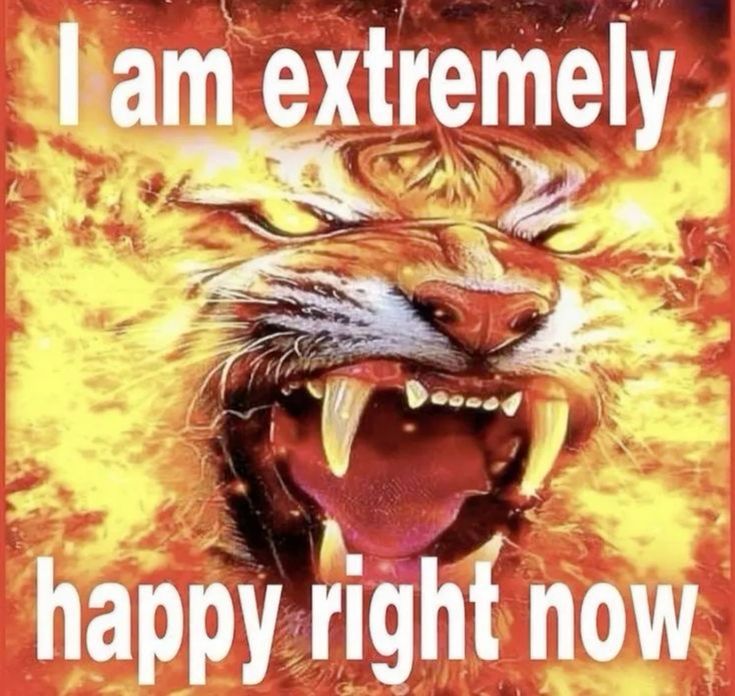
I really like Frutiger Aero, and I love things that are designed so badly that they just become funny and it actually works. I’ve fallen victim so many times to buying products with designs that were just so ugly and horrendous that it made me laugh. Lately, on my Pinterest, I keep seeing these stupid affirmation memes with really loud and emphatic text and completely random background and this horrendous gradient border. Naturally, I was so drawn to it, that now I have these stuck up on my wall back home. My parents are frustrated. My sister loves it.
I’m not a fan of making the same thing as something I see, but since I’m still a beginner to Javascript, I wanted to make something that I would enjoy making, especially in such a short period of time. So, I decided to make my own version of these. I hope you find this as funny as I do.

Artwork:

(I laughed a lot while making this.)

Process:

I had to make so many sections and so many functions and so many variables and etcetera, etcetera. Firstly, I had to import each image into the program, and I named each image by number so that importing them would be easier. I also made a list of affirmations I found online and through my friends onto a spreadsheet and imported it as a .csv file. Since I wanted the option of inputting your own affirmations, I made another list for user input.

function preload(){
  table = loadTable('Affirmations.csv','csv'); //csv file
  for (let i=0; i < totalImages; i++)
  {
    images.push(loadImage(i+'.jpg'));
  }
}

I loaded each row from the .csv file.

// load from csv file (I'm starting on row 2 because header lol)
 for (let r = 2; r < table.getRowCount(); r++){
   let line = table.getString(r,0);
   if (line) Affirmations.push(line); // prevent empty
)

After adding user input, I made a function to generate a new image every 3 seconds. There were multiple steps I had to take for this, which were:

FIRSTLY! Pick a random nature image:

let nextImgIndex;
  do {
    nextImgIndex = floor(random(images.length));
  } while (nextImgIndex == lastImgIndex);
  currentImg = images[nextImgIndex];
  lastImgIndex = nextImgIndex;

SECONDLY! Pick which list is currently active (the .csv file or the user input list):

let activeList;
if (modeCheckbox.checked() &&
   userAffirmations.length > 0) {
  activeList = userAffirmations;
} else {
  activeList = Affirmations;
}

THIRDLY! Pick a random affirmation from the chosen list:

if (activeList.length > 0){
   let nextTextIndex;
   do {
     nextTextIndex = floor(random(activeList.length));
   } while (nextTextIndex === lastTextIndex && activeList.length > 1);
   
   currentText = activeList[nextTextIndex];
   lastTextIndex = nextTextIndex;
 }

FOURTHLY! Add glow. Yay!

colorMode(HSB, 360, 100, 100);
 glowColor = color(random(360), 85, 100);
 colorMode(RGB);

For drawScene(), I used this code. I realized I could crop the nature images in the code (code is so cool… wow) so I did it in this.

function drawScene() {
  if (!currentImg || currentImg.width <= 1) return;

  // automatic crop image to square size
  let imgAspect = currentImg.width / currentImg.height;
  let canvasAspect = width / height;
  let sx, sy, sw, sh;
  if (imgAspect > canvasAspect) {
    sh = currentImg.height;
    sw = sh * canvasAspect;
    sx = (currentImg.width - sw) / 2;
    sy = 0;
  } else {
    sw = currentImg.width;
    sh = sw / canvasAspect;
    sx = 0;
    sy = (currentImg.height - sh) / 2;
  }
  
  image(currentImg, 0, 0, width, height, sx, sy, sw, sh);
  drawGlowBorders();

  // text style
  let txt = currentText;
  let maxWidth = width * 0.85;
  let fontSize = constrain(map(txt.length, 0, 50, 80, 40), 35, 90);

  push();
  translate(width / 2, height / 2);
  scale(1, 1.7); 
  textAlign(CENTER, CENTER);
  textFont('Arial');
  textStyle(BOLD);
  textSize(fontSize);

  drawingContext.shadowBlur = 30;
  drawingContext.shadowColor = glowColor.toString();
  fill(255);
  noStroke();
  
  text(txt, -maxWidth/2, -height/3.4, maxWidth, height/1.7);
  
  drawingContext.shadowBlur = 0;
  text(txt, -maxWidth/2, -height/3.4, maxWidth, height/1.7);
  pop();
}

I thought the glow borders at the very end were really funny to figure out, but this is what I ended up with.

function drawGlowBorders() {
  let bSize = 45;
  noFill();
  for (let i = 0; i < bSize; i++) {
    let alpha = map(i, 0, bSize, 180, 0);
    stroke(red(glowColor), green(glowColor), blue(glowColor), alpha);
    strokeWeight(1);
    rect(i, i, width - i*2, height - i*2);
  }
}

Reflection:

There’s a lot of things I want to improve. Obviously, with the current skill level and time that I have, I don’t think this would be feasible, but I wanted to make sure you could save your custom affirmations into a file you can download later. I also wanted to let you delete affirmations you didn’t like and add more (database management? I guess?).  I also found out that .csv files cannot store images, so I was limited to using only 21 images for now. I honestly made this so it could double not only as an assignment but also a funny thing for my friends to laugh at, so I think I achieved this, but I would like to play more with the generative aspect and data aspect of this. The text itself on the screen is not interactive (e.g. if I click it, nothing happens) and the data is not really visualized, more being used as a list to remove the need to individually type each affirmation into the code. I’m glad I figured out parts of the code that I know in Python though (like input) so hopefully that should make future projects easier.

Week 3 – Oops… cells!

Concept:

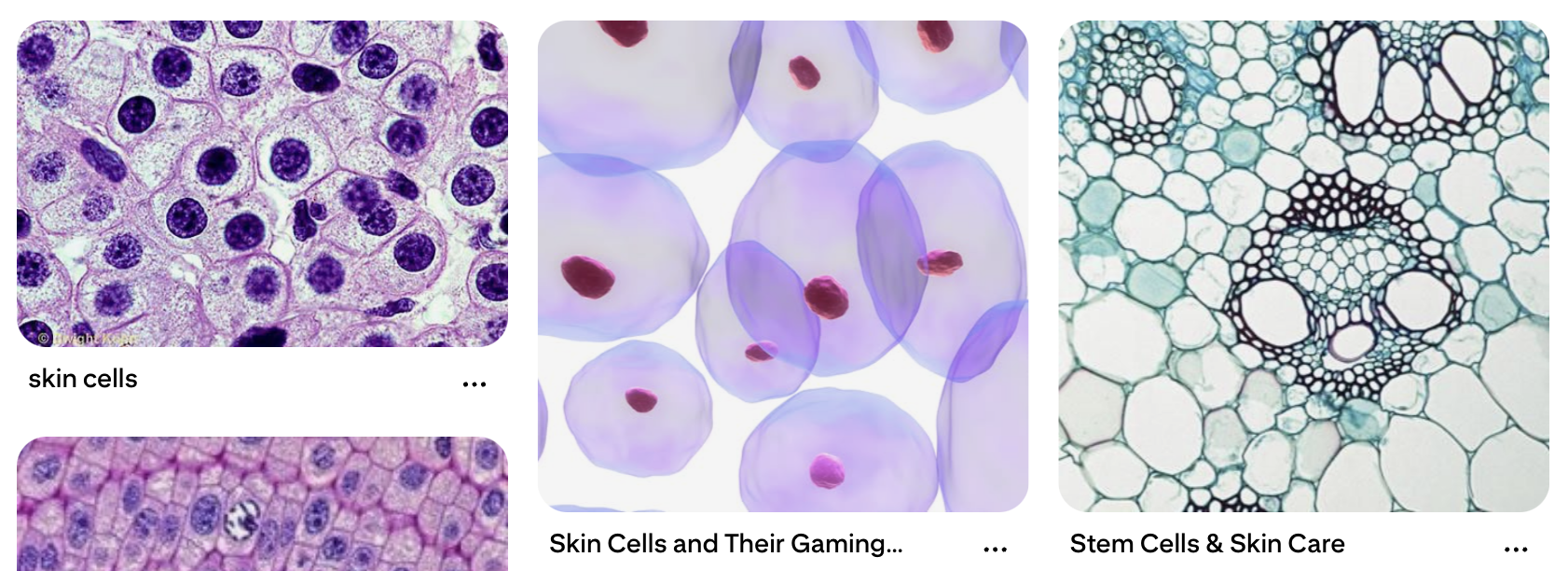
My mom is a Pathologist, and when I was younger, she was fascinated in showing me cells under a microscope from blogposts on Facebook (her feed was a very nice spectrum of plant care and medical studies). I never took biology in school (I’m more of a physics person), but I always found these images really fascinating. So, I thought I would try and recreate cells (very unrealistically) using Javascript. In middle school, when we were taught about cells, we saw cells as this blobby, almost round, jelly-looking circle with things inside of them. While I only remember a few organelles such as the mitochondria and the nucleus, I thought it would be interesting to include these when making the cells. These say skin cells but it’s the closest I can get to explaining what I have in mind:

Artwork:

(Click the screen to generate new cells!)

Process:

I experimented a lot this time, especially with the motion and shapes of the cells. I had two classes, one for the organelles and one for the cells themselves. This is the class code for the organelles:

class Organelle {
  constructor(type, relX, relY, hue) {
    this.type = type;
    this.relX = relX;
    this.relY = relY;
    this.hue = hue;
    this.angle = random(TWO_PI);
    this.spin = random(-0.02, 0.02);
  }

  display(px, py, radius) {
    push();
    translate(px, py);

    let floatX = this.relX + sin(frameCount * 0.02 + this.angle) * 5;
    let floatY = this.relY + cos(frameCount * 0.02 + this.angle) * 5;

    translate(floatX, floatY);
    rotate(frameCount * this.spin);
    noStroke();

    if (this.type === "nucleus") {
      // Hematoxylin stain: Deep purples/blues
      fill(280, 70, 40, 0.9);
      ellipse(0, 0, radius * 0.4);
      fill(280, 80, 20, 0.9);
      ellipse(0, 0, radius * 0.15);
    } else if (this.type === "mito") {
      // Eosin stain: Deeper pink
      fill(340, 60, 70, 0.8);
      ellipse(0, 0, 14, 8);
    } else if (this.type === "crystal") {
      // Hexagon shape in vibrant magenta
      fill(320, 80, 80, 0.7);
      beginShape();
      for (let a = 0; a < TWO_PI; a += PI / 3) {
        vertex(cos(a) * 8, sin(a) * 8);
      }
      endShape(CLOSE);
    } else if (this.type === "ring") {
      // Ring shape in light purple/pink
      noFill();
      stroke(300, 40, 60, 0.7);
      strokeWeight(2);
      circle(0, 0, 16);
    }
    pop();
  }
}

I used H&E staining as a reference for the color scheme to mimic cell scans. For this, there were multiple shapes I used:

  1. Nucleus (filled in circle at the center of the cell)
  2. Mitochondria (filled in ellipses)
  3. Rings and Hexagons for random organelles

These are then randomly generated in each cell.

This is the class code for the cells:

class Cell {
  constructor(x, y) {
    this.pos = createVector(x, y);
    this.baseRadius = random(40, 90);
    this.radius = this.baseRadius;
    
    // Constraint to Eosin spectrum (Pink/Magenta)
    this.hue = random(325, 350); 
    
    this.noiseOffset = random(1000);
    this.organelles = [];
    this.pulseSpeed = random(0.01, 0.03);
    this.rotation = random(TWO_PI);
    this.spin = random(-0.002, 0.002);

    this.organelles.push(new Organelle("nucleus", 0, 0, this.hue));

    let count = floor(random(3, 8));
    let types = ["mito", "crystal", "ring"];
    for (let i = 0; i < count; i++) {
      let angle = random(TWO_PI);
      let dist = random(this.baseRadius * 0.2, this.baseRadius * 0.7);
      let rx = cos(angle) * dist;
      let ry = sin(angle) * dist;
      this.organelles.push(new Organelle(random(types), rx, ry, this.hue));
    }
  }

  move() {
    this.pos.x += map(noise(this.noiseOffset), 0, 1, -0.8, 0.8);
    this.pos.y += map(noise(this.noiseOffset + 100), 0, 1, -0.8, 0.8);
    this.noiseOffset += 0.005;
    this.rotation += this.spin;

    // Breathing pulse
    this.radius = this.baseRadius + sin(frameCount * this.pulseSpeed) * this.baseRadius * 0.1;

    // Screen Wrap
    if (this.pos.x > width + this.radius) this.pos.x = -this.radius;
    if (this.pos.x < -this.radius) this.pos.x = width + this.radius;
    if (this.pos.y > height + this.radius) this.pos.y = -this.radius;
    if (this.pos.y < -this.radius) this.pos.y = height + this.radius;
  }

  display() {
    push();
    translate(this.pos.x, this.pos.y);
    rotate(this.rotation);

    // Soft Eosin cytoplasm layers
    for (let layer = 1.2; layer > 0.8; layer -= 0.1) {
      noStroke();
      fill(this.hue, 30, 95, 0.15); 
      beginShape();
      for (let a = 0; a < TWO_PI; a += 0.1) {
        let xoff = map(cos(a), -1, 1, 0, 1.5);
        let yoff = map(sin(a), -1, 1, 0, 1.5);
        let offset = map(noise(xoff, yoff, frameCount * 0.01), 0, 1, -10, 10);
        let r = (this.radius + offset) * layer;
        vertex(cos(a) * r, sin(a) * r);
      }
      endShape(CLOSE);
    }

    // Main Cell Membrane Outline
    noFill();
    stroke(this.hue, 50, 70, 0.6);
    strokeWeight(2);
    beginShape();
    for (let a = 0; a < TWO_PI; a += 0.1) {
      let xoff = map(cos(a), -1, 1, 0, 1.5);
      let yoff = map(sin(a), -1, 1, 0, 1.5);
      let offset = map(noise(xoff, yoff, frameCount * 0.01), 0, 1, -10, 10);
      let r = this.radius + offset;
      vertex(cos(a) * r, sin(a) * r);
    }
    endShape(CLOSE);
    pop();

    for (let o of this.organelles) {
      o.display(this.pos.x, this.pos.y, this.radius);
    }
  }
}

For the cells to breathe, move and change shape, I used Perlin Noise and sin() functions. I also included screen wrapping to make sure no cell would wander off screen. This part was difficult for me, so I did get some help from my friends. Making the constantly changing shape and boundary of the cell was also especially difficult for me but I’m glad it turned out the way it did.

Reflection:

I liked working with classes! It makes it much more organized (I think… as of now…) and I’m able to separate parts. It was definitely hard though, because I’m primarily a Python user so this threw me off, but it was a good challenge. I want to try and create more projects using OOP now, and try to link more of my interests to making projects like this. I did ask ask my mom for help with the colors and stains, so hopefully she approves of this! I want to experiment more with cell lifespans and cell shapes, maybe set a certain amount of time before a cell “dies” and disappears or set a condition to generate new cells every once in a while too.

Week 3 – Reading Response | THE ART OF INTERACTIVE DESIGN (Chris Crawford)

As a designer, there’s one phrase I find really funny that people ask me: “Can you make it more interactive?” This confuses me immensely. Do you want me to make it “pop” out more? More interactions on your social media posts? Are you expecting something else but you can’t think of the exact word to sum all your thoughts up so instead you tell me to make it more interactive? What do you mean? Thus, I 100% agree with all, if not most, statements that Chris Crawford makes in this reading. Interactivity is “overused and underunderstood.” Just like any other concept (think common internet words and phrases today like “hyperfixation” or “gaslight / gatekeep / girlboss”), interactivity is also one of those words that we didn’t originally know the importance of when it first came out, but now that we live in such a technologically advanced (and advancing) world, we see that word everywhere. And, if you asked someone to define what exactly interactivity is… well. You won’t receive the same definition twice.

I liked how he brought up the example of people using interactivity as a way to make things sound interesting. Interactive screen! Interactive book. Interactive art. Interactive clothes. Shoes. You see them in adverts all the time now. Interactive exhibitions. Interactive events. Washing machines with interactive interfaces. Are we using this term correctly? What is the actual definition of interactivity?  When thinking of defining interactivity, he states, “the joy of thinking comes from all of those fascinating nooks and crannies that lurk in nuance.” Could this not also be applied to defining art? There are so many flexibilities in defining what art exactly is, because we all have such varying definitions of what we determine is art or not. So, anything can be considered interactive, because everyone interacts with things differently… right? 

I also found his definition interesting, interaction as “a cyclic process in which two actors alternately listen, think and speak.” In Understanding Interactive Media, we discussed interactivity as feedback loops. I, the artist, act a certain way. My audience acts a certain way in response. Then, to their response, I change the way I act too. Even when artists study art, they create an artwork, they see how others react to it and act accordingly, some responses being an art teacher calling their work trash, or a person on the internet sending a comment of how much they like their artstyle. The Gomer and Fredegund example is similar to this. I also never really considered interaction existing in degrees, which surprised me. I liked the comparison of degrees of interaction to having two different conversations where you talk in one and the other person barely responds to you, and another conversation where you both flow really well. They both are interactive! They’re just different degrees of interactions.

In a strongly interactive system, I think the degree of interaction should be very high – there should be a very prominent feedback loop. For example, if an artwork starts off as the color green, and I don’t like that and I say I don’t like this color, it changes to orange. And, I can tell it again, and it can change if it can. However, even with this example, the artwork follows my instructions and doesn’t adapt. It is simply following my instructions and not actually responding. The system should be able to respond to the audience’s conversation. Regarding what ideas I have for improving the degree of user interaction in my P5 sketches, I think I’m yet to figure this out. I do feel like when I create a design, I don’t think too much about interaction and visuals separately. I unintentionally put them together and work with them together, because a good design should have both working collaboratively, not side by side. I’ll probably be more intentional when I design now, though.

Week 2 – Reading Response | Casey Reas @ Eyeo2012

There is often a debate about how the universe works. Are we really in control of what decisions we make, or has some otherworldly being already written them for us? Is destiny real? Are the things we deem unpredictable actually predictable, and when people say they’re unpredictable… are they really? 

These same questions can be made about artwork. Older (“traditional”)  artwork was very methodical; we could fit artwork into different “eras,” find commonalities within artworks in certain eras, understand a very specific technique that artists would follow during a certain period of time or in a certain geographical area. However, now with our unlimited access to the internet and the rise of globalization, art has branched out significantly. We have shifted from order to chaos – we have people raising questions about which artwork is better (the usual digital versus traditional artwork battle), who decides what art is, and whether that shovel in the corner can actually even be considered artwork! (For this one, we’ll have to ask Duchamp himself.)

I found this talk interesting and I found that many arguments linked to my conversations in other classes. In Understanding Interactive Media, we discussed procedural art; art that is more focused on the process, and not the end product itself. One example I want to discuss in relation to this video is Sol Lewitt’s “Wall Painting”. In this artwork, the same set of instructions are given to everyone – draw 50 points anywhere on a continuous stretch of wall, and then draw lines connecting these dots. Yet, every artwork that comes from these instructions come out differently – super random! The reason I bring this up is because I feel that in this video, we discuss whether there is true randomness in artwork. Randomness allows you to remove your own egos and “preconceived notions” from creative processes (or at least, that’s what artists like John Cage and Marcel Duchamp believe). Randomness is a jumping-off point to get outside your own ideas of correctness.

The thing with algorithms, however, is that even when you code something to be random, there may eventually be a point that the code reaches where it stops being random, especially in generative art. Depending on the complexity of the code, it may become the same earlier, or may take a very long time, but Reas discovered that it eventually will reach homogeneity. Humans cannot replicate the same drawing the exact same ever, but computers can eventually. Hence, how random really is randomness? You can add some randomness to keep a system homeostatic, to keep it consistent but also remain dynamic, but even then, this is still a confusing concept to me. Even with the example of Mondrian explaining that the grid can still be used to represent pure feeling, through his physical brushstrokes being visible, that made me wonder about the difference in human and computer artwork.

In regards to making my own generative artwork, I made it before watching the video completely. Even when making it, I knew that no two artworks would be the same at the beginning, but eventually, at some point (whether it be in a thousand runs or even millions), there will be a moment where my artwork will be the same as another iteration earlier. Thus, maybe we can also acknowledge randomness depending on scale and complexity. Maybe the art we code doesn’t have to be 100% random, because maybe we will never be able to reach that certain percentage. However, within the percentages we can reach, we can play around with them and have fun.

Week 2 – Generative Artwork

Concept:

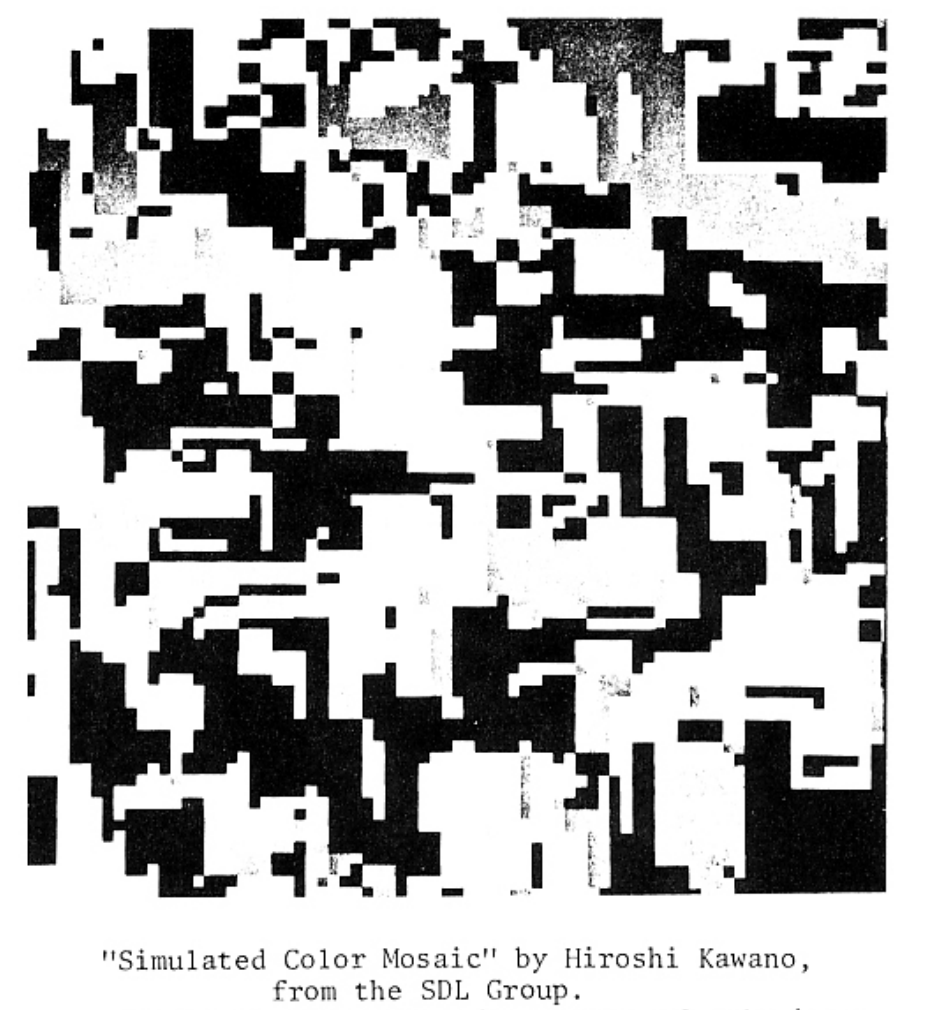
I’m very new to the concept of generative art, and so I found myself struggling to come up with an idea for this project. Upon scrolling through some of the resources provided to us, I was inspired by this one artwork in Computer Graphics And Art (May, 1978), “Simulated Color Mosaic” by Hiroshi Kawano, and I liked how randomized the blocks were. Thus, I wanted to try and create an algorithm that would allow for a different randomized result at each run or click. No two patterns would look the same (hopefully). In order to create these blocks to be randomized, however, I needed to find an algorithm that would let me create blocks randomly, or at least have some planned out randomness (reference to the reading… haha).

Artwork:

(Click the screen to create a new pattern!)

Process:

To create this, I had to first come up with how to create a different pattern each time. Thus, I decided to create the variable blocks, so I could perform actions on it. It was an array, so it could hold many blocks that would be generated on each run. The block then had specific elements (blocks.push({ x: 0, y: 0, sz: 600, black: false })); it would start off at a size bigger than the canvas (to create bigger blocks) and then have a condition of black:false to edit the color of each block.

Afterwards, to draw the blocks, it would firstly go through every square, staring with a block and then targeting it to split it in half and so on. For this, I used this condition:

function draw() {
  background(randomColor);

  // go through every square
  for (let i = blocks.length - 1; i >= 0; i--) {
    let b = blocks[i];

    rect(b.x, b.y, b.sz, b.sz);

    if (blocks.length < 400 && b.sz > 30 && random(1) < 0.05) {
      splitBlock(i);
    }
  }
}

function splitBlock(index) {
  let b = blocks[index];
  let newSz = b.sz / 2;

  blocks.splice(index, 1);

  for (let x = 0; x < 2; x++) {
    for (let y = 0; y < 2; y++) {
      blocks.push({
        x: b.x + x * newSz,
        y: b.y + y * newSz,
        sz: newSz,
        black: random(1) < 0.4 ? !b.black : b.black
      });
    }
  }
}

It draws the block, and then to split the block, it checks the array and size to make sure it splits blocks of a certain size (not too big nor small boxes) and under the limit of 400 blocks in the screen (not too high to lag but also at a lower size so you can see more variation in size of bigger blocks). There’s many random possibilities for the blocks splitting to make sure that the pattern is different each time.

Then, to reset the artwork when it is pressed, I used a different function:

function mousePressed() {
  blocks = [{ x: 0, y: 0, sz: 600, black: false }];
}

Originally, I was planning on keeping the artwork black and white (similar to the inspiration). However, after creating the code, I decided to add color to it. However, instead of just having the same color each time, I added code to change color on every reset.

I added two more variables, randomColor and randomColor2. In setup(), before starting to add the blocks, I set the colors to random with this code:

randomColor = color(random(255), random(255), random(255));
randomColor2 = color(random(255), random(255), random(255));

After, I also set this condition:

if (b.black) {
     fill(randomColor2);
   } else {
     fill(randomColor);
   }

I wrote in the code earlier, black: random(1) < 0.4 ? !b.black : b.black. This was to change the colors of some blocks randomly so it wouldn’t all accidentally end up the same color. Finally, I also added the random code again in mousePressed(), so it would reset into different colors again.

This is the final code:

let blocks = [];
let randomColor;
let randomColor2;

function setup() {
  createCanvas(500, 500);
  noStroke();

  randomColor = color(random(255), random(255), random(255));
  randomColor2 = color(random(255), random(255), random(255));

  blocks.push({ x: 0, y: 0, sz: 600, black: false });
}

function draw() {
  background(randomColor);

  // go through every square
  for (let i = blocks.length - 1; i >= 0; i--) {
    let b = blocks[i];

    if (b.black) {
      fill(randomColor2);
    } else {
      fill(randomColor);
    }

    rect(b.x, b.y, b.sz, b.sz);

    if (blocks.length < 400 && b.sz > 30 && random(1) < 0.05) {
      splitBlock(i);
    }
  }
}

function splitBlock(index) {
  let b = blocks[index];
  let newSz = b.sz / 2;

  blocks.splice(index, 1);

  for (let x = 0; x < 2; x++) {
    for (let y = 0; y < 2; y++) {
      blocks.push({
        x: b.x + x * newSz,
        y: b.y + y * newSz,
        sz: newSz,
        black: random(1) < 0.4 ? !b.black : b.black
      });
    }
  }
}

// reset when press screen
function mousePressed() {
  randomColor = color(random(255), random(255), random(255));
  randomColor2 = color(random(255), random(255), random(255));

  blocks = [{ x: 0, y: 0, sz: 600, black: false }];
}
Reflection

The loops were confusing. I spent a a while trying to figure this out (much longer than I would have liked) and I think the outcome is okay, but I definitely want to explore creating more artworks that are more complex. The logic took more time to create than the actual code, but it was fun nonetheless. Next time, I would like to work a bit more with colors and shapes, and create a more interesting animation. It’s okay right now but it could be so much better. I really do like the color combinations I’ve been getting! Maybe I could make a color palette generator for my artworks later… or add more colors to this… we’ll see. I’m still not completely confident about loops and conditionals in Javascript, so I hope to get better with more practice.

Week 1 – Self-Portrait

Concept:

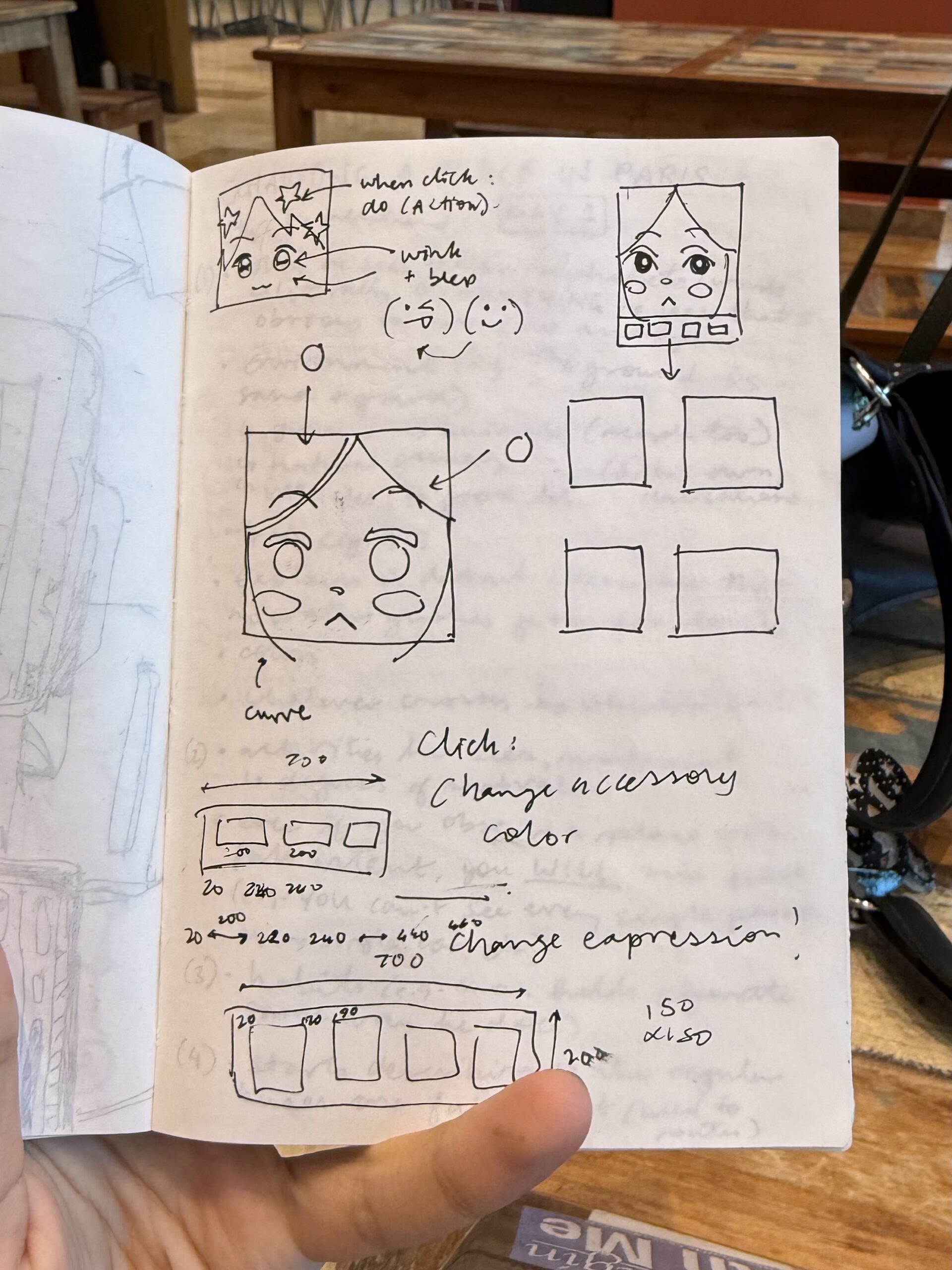
Lately, on my TikTok feed, I keep seeing these square profile pictures which look really cute. I tried to generate my own version of it online, but then the website required me to use Flash… which I do not have. Oops. So, when I was coming up for an idea for my self-portrait during lab on Thursday last week, I thought I could probably just make this by myself, right?

I wanted to make three different versions of the profile picture: one that (somewhat) resembled me normally, one that resembled me when I am tired (me 70% of the time) and one that was fun and colorful. I would use the same base code, so that I wouldn’t need to make completely different faces, but would change some aspects so that the faces would still have some clear changes (e.g. closed vs. open eyes, different color schemes, accessories etc.).

To switch between the three different faces, I would make buttons at the bottom of a screen as a panel. I wanted to make each face more interactive, but I was worried that it would interfere with the faces and the buttons programming, so I’ll work on it once I learn the language better.

Process:

Firstly, before actually deciding on the panels and buttons, I had to figure out how I was even going to code the face. I started with the hair as the background color, making a long ellipse for the face and then adding circles for the bangs. After, I created the eyebrows and eyelids with even more ellipses (I think I may have abused the ellipse() tool…), and the eyes on top (for layering purposes). I used the ellipse with noFill() to create the glasses, and then to make the mouth, I used triangles. Most of the face was just trying and testing out shapes and coordinates, which took me around two hours. However, once I figured out the first face, it didn’t take me that long (only an hour or so) to edit and modify the other faces.

To make it easier, I also coded a line to make sure I could navigate the coordinate system better rather than trial and error-ing again and again.

For the third face, I used this code for the star hair clip. I struggled quite a bit, but I asked one of my friends for help, and we came up with this:

function star(x, y, radius1, radius2, npoints) {
  let angle = TWO_PI / npoints;
  let halfAngle = angle / 2.0;
  beginShape();
  for (let a = 0; a < TWO_PI; a += angle) {
    let sx = x + cos(a) * radius2;
    let sy = y + sin(a) * radius2;
    vertex(sx, sy);
    sx = x + cos(a + halfAngle) * radius1;
    sy = y + sin(a + halfAngle) * radius1;
    vertex(sx, sy);
  }
  endShape(CLOSE);
}
    strokeWeight(3);
    fill(255, 247, 161);
    star(200, 220, 70, 150, 5);

After, I had to create the buttons. I created a new file (so I could just copy and paste the face codes into the file after I programmed the buttons), and I used this as the code:

let currentScene = 1;

let btnSize1 = 200;
let btnSize2 = 150;
let btn1X = 20,btn1Y = 725;
let btn2X = 240,btn2Y = 725;
let btn3X = 460,btn3Y = 725;

 function setup() {
  createCanvas(700,900);
 }
  
 function draw() {
  background(220);
  
//state
  
  if (currentScene === 1){
    drawImage1();
  } else if (currentScene === 2){
    drawImage2();
  } else if (currentScene === 3){
    drawImage3();
  }
   
// panel
   
  fill(251,251,251);
   noStroke();
  //x y w h
  rect(0, 700, 700, 200); 

// buttons
   
   //1
  fill(217, 93, 83); 
  rect(btn1X, btn1Y, btnSize1, btnSize2);
  fill(0);
   
   //2 
  fill(161, 126, 140); 
  rect(btn2X, btn2Y, btnSize1, btnSize2);
  fill(0); 
   
   //3
  fill(66, 164, 255); 
  rect(btn3X, btn3Y, btnSize1, btnSize2);
  fill(255);

 } 
  function mousePressed(){
    
  //button 1
    
  if (mouseX > btn1X && mouseX < btn1X + btnSize1 && mouseY > btn1Y && mouseY < btn1Y + btnSize2) {
    currentScene = 1;
  }
    
  //button 2
    
    if (mouseX > btn2X && mouseX < btn2X + btnSize1 && mouseY > btn2Y && mouseY < btn2Y + btnSize2) {
    currentScene = 2;
  }
    
  //button 3
    
    if (mouseX > btn3X && mouseX < btn3X + btnSize1 && mouseY > btn3Y && mouseY < btn3Y + btnSize2) {
    currentScene = 3;
  }
    
}
   
function drawImage1(){
  // code for first expression;
  
}

function drawImage2(){

// code for second expression;

}
   
function drawImage3(){
 
// code for third expression;

}

   
note: I realized I put the wrong coordinates for the buttons, so now there's more space on the right than the left. I'll fix it soon.
note2: I used the resources from p5.js tutorials, references and examples for most of the code.
Reflection and Possible Improvements:

I had been pushing this off for a while because I was scared it would take too long and I would not be able to create something I would be satisfied with. However, I think this turned out better than I expected! I’m happy with the button interaction and the facial expressions.

I really do want to work with adding more interactivity in the future and maybe also coding an animation (such as spinning the star and flower hair clips in the ‘happy’ expression or waking my picture up for the ‘tired’ expression). I would really like to experiment with adding more features once I become more confident with loops and putting commands within commands, since the many lines of code for each face threw me off and made it hard for me to navigate where one command started and ended. (Oops.)