Week 2 – Video Reflection

I had to reconsider my approach to structure after watching Casey Reas’ presentation on chance operations and randomness. I have a background in business, so I’ve always thought that control and planning are crucial for projects, schedules, and data analysis. I assumed the same would apply to coding: clearly define the rules and follow them. The 11×11 grid of dots, one of Reas’ examples, showed how controlled randomness functions: each dot moves according to precise rules, but minor variations or “random” steps result in patterns that change from orderly to chaotic. The thought of chaotic work always scared me. He demonstrated how a system can be both rule-based and unpredictable at the same time by describing instructions like moving in a straight line, bouncing off edges, or slightly deviating from a path. It helped me understand that randomness need not imply a lack of control but can be incorporated into a well-organized framework to produce entertaining and captivating results.

I want everything to be flawlessly structured, so as a beginner coder, I frequently question my work. I enjoy doing things the “right” way and abiding by the rules. Reas’s ability to strike a balance between chance and rules has piqued my interest in trying new things. While allowing randomness to dictate specifics like placement, size, or interactions, I hope to establish boundaries in my own projects, such as establishing a color scheme, the quantity of elements, or grid positions. This method seems applicable not only to coding or art but also to business: stability is provided by a clear structure, but creativity and innovation can be stimulated by flexibility and unpredictability.  Reas’ talk taught me that embracing chance within rules doesn’t undermine order; it makes it more interesting, alive, and full of potential surprises.
Week 1 – Self-Portrait

Project Overview

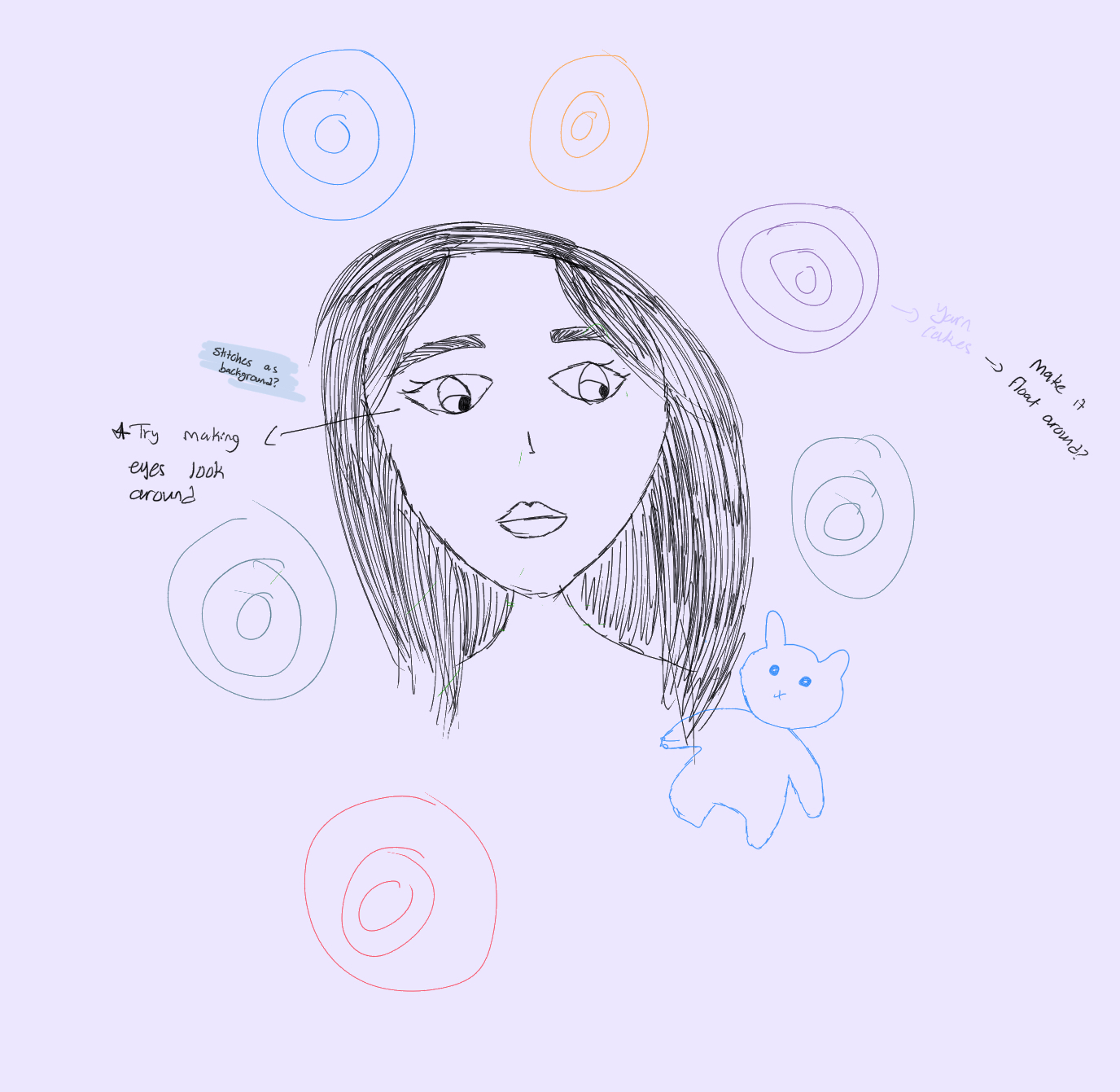
For this assignment, I created an interactive self-portrait that represents me both visually and personally. The portrait includes:

  • My cartoonish face with long straight hair, eyebrows, eyelashes, nose, and mouth.
  • Interactive eyes that follow the user’s mouse, which I am especially proud of.
  • A background of colorful circles that symbolize “yarn cakes,” reflecting my love for crocheting.
  • A small bunny plushie on the side, inspired by one of my crochet projects, including tiny stitched details to mimic real crochet stitches.

    Visual Documentation

    I started with an extremely rough sketch to plan what I wanted my self-portrait to look like and the placement of facial features, hair, and background elements. I also noted a couple of interactive elements I hoped to achieve. 

    I watched a YouTube tutorial to  learn the mouse-following pupil technique, which became the most interactive and technically exciting part of my sketch: YouTube tutorial. Honestly, I struggled a lot with this part, but I was determined to get it right. I tried to make the pupils move without leaving the eyes, and after lots of trial and error, I finally figured it out.

    The circles in the background represent yarn cakes, inspired by my hobby. Crocheting is similar to knitting, but instead of using two needles, I use a hook to create loops and form fabric.

    The little bunny in the corner represents one of my actual crochet projects, and I tried to include stitch details to mimic crochet.

    Interactive Features

    • The eyes follow the user’s mouse, giving the portrait a sense of life.
    • Users can move their mouse around the canvas to see how the pupils track it.

    Technical Notes

    • Eyes: Pupil positions are calculated by taking the difference between the mouse coordinates and the center of each eye, multiplied by a scaling factor to keep pupils inside the eyeball. This took me some time to get the hang of.
    • Hair & Face: Used basic shapes (rectangles, ellipses, arcs).
    • Background Yarn Cakes: Multiple overlapping circles of different sizes and colors, inspired by real crochet yarn balls.
    • Bunny Plushie: Ellipses for the head and ears, with short lines to simulate crochet stitches.

    Research, Tutorials, and Inspirations

    • YouTube tutorials helped with  the eye-following technique.
    • Crocheting inspired the yarn cakes and bunny, making the project personal.
    • I was inspired by examples given in class and wanted to create cartoon-style self-portraits similar to them.

    Coding I Am Proud Of

    I am most proud of the eye-following interaction, which made the portrait feel alive. My code for this feature is well-commented and included below. 

    //eyes
     stroke(0);
     fill("#FCC7D9");
     ellipse(170, 120, 30, 35); //left eye
     ellipse(230, 120, 30, 35); //right eye
     fill(255);
     ellipse(170, 130, 25, 20); //left eye
     ellipse(230, 130, 25, 20); //right eye
    
     fill(0);
     let leftPupilX = 170 + (mouseX - 170) / 40; // small movement toward mouse
     let leftPupilY = 130 + (mouseY - 130) / 40;
     ellipse(leftPupilX, leftPupilY, 10, 15); // left pupil
    
     let rightPupilX = 230 + (mouseX - 230) / 40;
     let rightPupilY = 130 + (mouseY - 130) / 40;
     ellipse(rightPupilX, rightPupilY, 10, 15); // right pupil
    

    Reflection

    I am really proud of myself because this is my first time ever coding. I learned a lot of new things and hope to improve along the way.

    I wish I could have animated the yarn cakes so they floated gently in the background while the eyes moved around, making the portrait even more dynamic. Linking the yarn cake movement to the eye-following interaction could create a more immersive experience, where the background reacts to the user.

    This would enhance the interactive and playful feel of the portrait, connecting personal elements to user engagement.