Midterm Project – Balloon Pop

Game link:

https://editor.p5js.org/mm13942/full/lU_ibrAn2

Concept

My project is a fun and lighthearted balloon survival game where the player controls a balloon flying through the sky. The goal is simple — avoid the falling bombs, collect hearts for extra points, and stay alive as long as possible. The balloon can only move left and right, while the background scrolls continuously to give the feeling of rising into the clouds. The moment the balloon hits a bomb or the timer bar runs out, it pops and game over.

Inspiration

I was inspired by classic arcade-style games where the goal is to survive for as long as possible while dodging obstacles. I wanted to make something cheerful and colorful but still challenging. The idea of having a balloon as the main character felt fitting because it’s fragile yet expressive, and visually, it works well with soft, moving clouds and bright skies.

Production and Main Features

Initially, I was planning to do the obstacles on the sides that appear randomly:
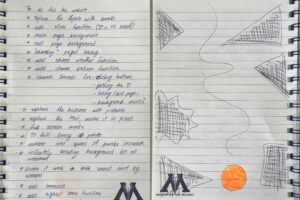
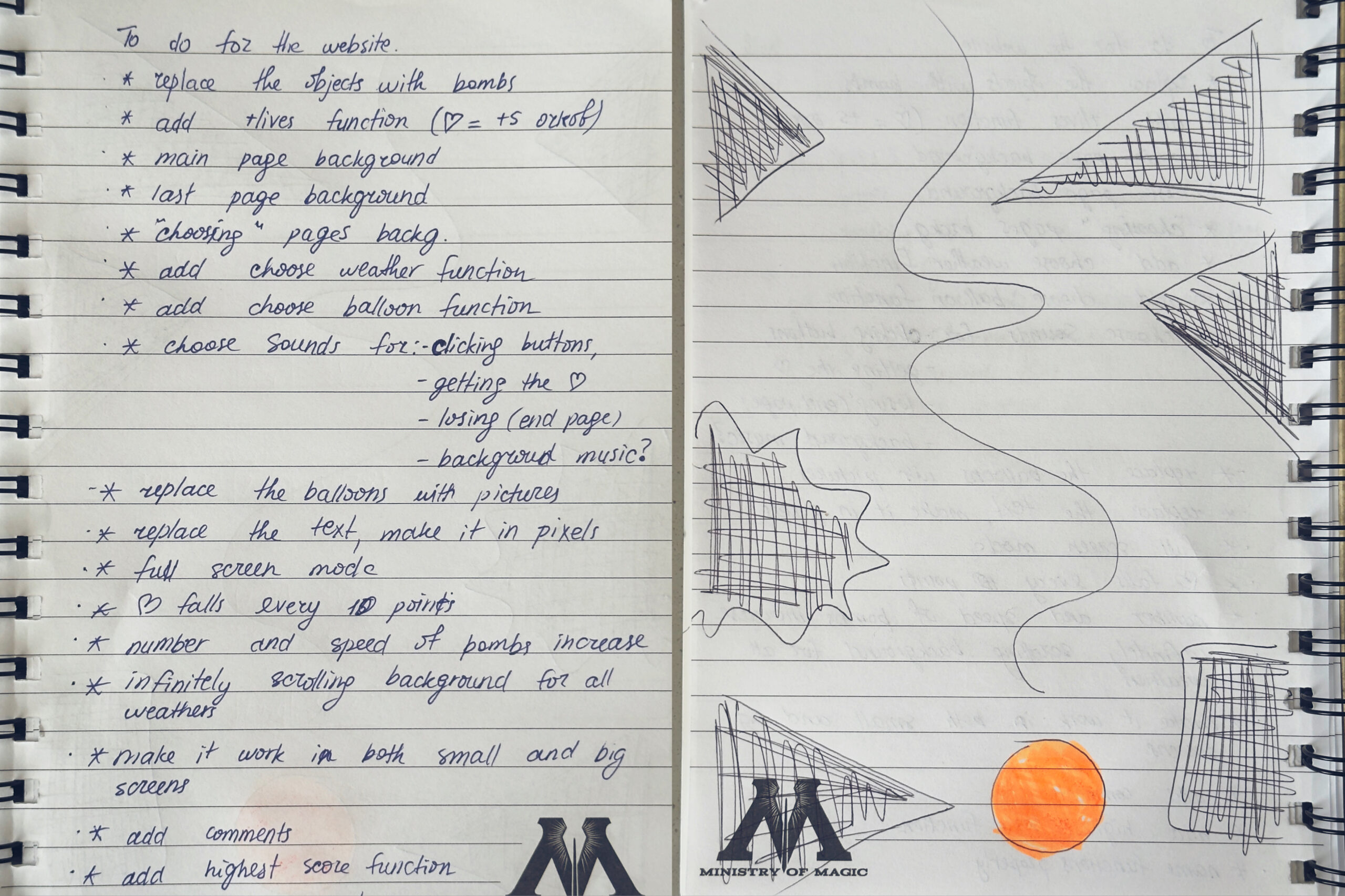
but then I understood that it wouldn’t be a great decision, considering the size of a laptop screen, so I decided to stick to my another idea with objects falling randomly from the sky. After creating the draft of the game, I wrote down everything that needed to be added to my work to complete the game.

Key Features:

  1. Object-Oriented Design – Classes for Balloon, Bomb, Heart, and Button
  2. Pages:
    • Main page with right-aligned buttons
    • Instructions page
    • Weather choice page (Rainy, Sunny, Snowy)
    • Skin choice page (Pink, Yellow, Orange balloons)
    • Game over page with left-aligned content
  3. Gameplay Mechanics:
    • Bombs spawn with increasing difficulty (max 7)
    • Hearts spawn every 8 points (+5 score bonus)
    • Hearts spawn away from bombs to avoid interference
    • Proper collision detection with circular hitboxes (no false collisions)
    • Infinitely scrolling backgrounds based on weather
    • Score tracking with high score display
  4. Controls:
    • Arrow keys or A/D to move
    • C key for fullscreen toggle
    • Mouse clicks for all buttons
  5. Audio Support – Sound functions
  6. Highlighted Buttons – Selected weather/skin buttons get highlighted
  7. Back Buttons – On every sub-page to return to main menu

Code I’m Proud Of

Part of the code that I’m really proud of might not seem too hard, but it was definitely the most time consuming one and took a lot of trial and error. it was removing the white background from the uploaded pictures. when it first worked out, I thought everything was good but turns out P5 was creating 60 frames per second of one single image and when I played for more that 10 seconds it kept shutting down. I had to do a lot of debugging to understand what the actual problem was and was finally able to make it work without lagging, which really made me happy

processedBombImg = removeWhiteBackground(bombImg);
  processedHeartImg = removeWhiteBackground(heartImg);
  processedPinkBalloonImg = removeWhiteBackground(pinkBalloonImg);
  processedYellowBalloonImg = removeWhiteBackground(yellowBalloonImg);
  processedOrangeBalloonImg = removeWhiteBackground(orangeBalloonImg);
  
  // Initialize player balloon
  player = new Balloon(width/2, height - 80 * scaleFactor);
  
  // Create all button objects with proper positions
  setupButtons();
  
  // Set the pixel font for all text
  textFont(pixelFont);
}


// remove White Background 
function removeWhiteBackground(img) {
  // Create a graphics buffer to manipulate pixels
  let pg = createGraphics(img.width, img.height);
  pg.image(img, 0, 0);
  pg.loadPixels();
  
  // Loop through all pixels and make white ones transparent
  for (let i = 0; i < pg.pixels.length; i += 4) {
    let r = pg.pixels[i];     // Red channel
    let g = pg.pixels[i + 1]; // Green channel
    let b = pg.pixels[i + 2]; // Blue channel
    
    // If pixel is mostly white (R, G, B all > 200), make it transparent
    if (r > 200 && g > 200 && b > 200) {
      pg.pixels[i + 3] = 0; // Set alpha to 0 (transparent)
    }
  }
  pg.updatePixels();
  return pg; // Return the processed image
}

I also really liked the energy bar idea. I was really struggling with coming up with ideas, and my friend Nigina gave some feedback on my game and suggested to add this feature, which prevents the players from skipping the hearts.

function drawEnergyBar() {
  // Position in top-right corner
  let barX = width - energyBarWidth * scaleFactor - 20 * scaleFactor;
  let barY = 20 * scaleFactor;
  let barW = energyBarWidth * scaleFactor;
  let barH = energyBarHeight * scaleFactor;
  
  // Draw outer frame 
  stroke(255); // White border
  strokeWeight(3 * scaleFactor);
  noFill();
  rect(barX, barY, barW, barH);
  
  // Calculate fill width based on current energy percentage
  let fillWidth = (energyBar / 100) * barW;
  
  // Determine fill color based on energy level
  let barColor;
  if (energyBar > 60) {
    barColor = color(0, 255, 0); // Green when high
  } else if (energyBar > 30) {
    barColor = color(255, 255, 0); // Yellow when medium
  } else {
    barColor = color(255, 0, 0); // Red when low 
  }
  
  // Draw filled portion of energy bar
  noStroke();
  fill(barColor);
  rect(barX, barY, fillWidth, barH);
  
  // Draw "ENERGY" label above bar
  fill(255);
  textAlign(CENTER, BOTTOM);
  textSize(16 * scaleFactor);
  text("ENERGY", barX + barW / 2, barY - 5 * scaleFactor);
}


Design

Visually, I wanted it to feel airy and positive, so I used soft pastel colors, smooth cloud movement, and rounded buttons. Each page has its own layout — right-aligned buttons on the main page and left-aligned elements on the Game Over screen — to make navigation easy.

Challenges

The hardest part of my code was definitely managing how all the game elements work together  (the bombs, hearts, clouds, timer bar, and different pages). Getting everything to appear, move, and disappear smoothly without glitches took a lot of trial and error.Sometimes bombs appeared too frequently or hearts overlapped with them. I fixed this by randomizing positions with distance checks.

if (bombs.length < maxBombs && frameCount % 50 === 0) { bombs.push(new Bomb(random(width), -20)); } if (score % 10 === 0 && !heartExists) { hearts.push(new Heart(random(width), -20)); heartExists = true; }

The collision detection between the balloon and falling bombs was tricky too, since I had to make sure it felt fair and accurate using circular hitboxes. Another challenging part was balancing the gameplay, making bombs fall fast enough to be fun but not impossible, while also keeping the hearts from overlapping with them. On top of that, managing all the page transitions (main menu, instructions, weather, skins, game over) and keeping the selected settings consistent made the logic even more complex. Overall, the hardest part was making everything work together in a way that felt natural and didn’t break the flow of the game.

Future Improvements

In the future, I’d like to make the game feel more complete by adding real background music and more sound effects for popping, collecting hearts, and clicking buttons. Another improvement would be to make the difficulty change as the score increases, for example, bombs could fall faster or spawn more frequently the longer you survive. I’m also thinking of adding new power-ups like shields or magnets to make the gameplay more interesting. On the design side, animated buttons and smoother page transitions could make the menus feel more polished. Eventually, I’d love to include a high score system to track progress and make players more competitive.

 

Week 5 – Reading discussion

When I think about computer vision, what interests me most is how strange it feels to give a machine the ability to “see.” Human vision is so automatic and seamless that we don’t really think about it, but when you translate it into algorithms, you realize how fragile and mechanical that process is. I find it fascinating that a computer can pick up tiny details that our eyes might not notice, yet at the same time, it can completely miss the “big picture.” That makes me wonder whether computer vision is really about replicating human vision at all, or if it’s creating an entirely different way of perceiving the world.

What I find both exciting and unsettling is how computer vision plays with control. On one hand, it can feel magical when an artwork follows your movements, responds to your gestures, or acknowledges your presence (like in TeamLab). There’s an intimacy there, like the piece is aware of you in a way that a static painting could never be. On the other hand, I can’t help but think about surveillance every time I see a camera in an installation. Am I part of the artwork, or am I being monitored? That ambiguity is powerful, but it also puts a lot of responsibility on the artist to think about how they’re using the technology.

For me, the most interesting potential of computer vision in interactive art isn’t just the novelty of tracking people, but the chance to reflect on our relationship with being watched. In a world where surveillance cameras are everywhere, an artwork that uses computer vision almost automatically becomes a commentary on power and visibility, whether or not the artist intends it. I think that’s what makes the medium so rich: it’s not just about making art “see,” it’s about making us more aware of how we are seen.

Week 5 – Reading Reflection

Reading the essay Computer Vision for Artists and Designers made me realize how differently computers and humans actually “see.” Our eyes and brains process the world in ways that feel natural: we recognize faces instantly, understand depth, guess intentions from gestures, and fill in missing details without even noticing. Computers, on the other hand, don’t have that intuitive grasp. They just see pixels and patterns. A shadow or a little blur can confuse them. Where we understand context,  like knowing a cat is still a cat even if half hidden, computers rely on strict rules or training data, and they often fail when something doesn’t match what they’ve been taught to expect.

To bridge that gap, a lot of effort goes into helping machines track what we want them to notice. Instead of raw pixels, we give them features: edges, colors, corners, or textures. Algorithms can then use those features to keep track of an object as it moves. More recently, deep learning has allowed computers to learn patterns themselves, so they can recognize faces or bodies in a way that feels closer to human intuition (though still fragile). Sometimes, extra sensors like depth cameras or infrared are added to give more reliable information. It’s almost like building a whole toolkit around vision just to get machines to do what we take for granted with a single glance.

Thinking about how this plays into interactive art is both exciting and a little unsettling. On one hand, the ability to track people makes art installations much more engaging — an artwork can respond to where you’re standing, how you move, or even who you are (as I observed in TeamLab). That creates playful, immersive experiences that wouldn’t be possible without computer vision. But the same technology that enables this interactivity also raises questions about surveillance. If art can “see” you, then it’s also observing and recording in ways that feel uncomfortably close to security cameras. I think this tension is part of what makes computer vision so interesting in art: it’s not just about making something interactive, but also about asking us to reflect on how much we’re being watched.

Week 5 – Midterm Project Progress

For my midterm project, I decided to make a little balloon-saving game. The basic idea is simple: the balloon flies up to the sky and faces obstacles on its way, that the player needs to avoid

Concept & Production

Instead of just popping balloons, I wanted to make the balloon itself the main character. The player controls it as it floats upward, while obstacles move across the screen. The main production steps I’ve worked on so far include:

  • Making the balloon move upwards continuously.
  • Adding obstacles that shift across the screen.
  • Writing collision detection so that the balloon “fails” if it hits something.

  • Bringing back the buttons and menu look from the beginning, so the game starts cleanly.

It’s been fun turning the balloon from a simple object into something the player actually interacts with.

The Most Difficult Part
By far, the trickiest part has been the balloon popping without errors. Sometimes, the collisions were detected when they shouldn’t be, which gave me a bunch of false pops. Fixing that took way more trial and error than I expected, but I think I finally have it working in a way that feels consistent (I used help from AI and YouTube).

Risks / Issues
The main risk right now is that the game sometimes lags. Most of the time, it works fine, but once in a while, the balloon pops out of nowhere in the very beginning. I’m not sure if it’s about how I’m handling the objects or just the browser being picky. I’ll need to look into optimizing things as I add more features.

Next Steps
From here, I want to polish the interactions more, add sound effects, and make sure the game is fun to play for longer than a few seconds and looks visually appealing and more aesthetic. But overall, I feel good that the “scariest” part (getting rid of the balloon popping errors) is mostly handled.

Week 4 – Reading Response

One thing that always frustrates me are the elevator button panels. I can’t count the number of times I’ve stood in front of a shiny panel of identical metal buttons, with no clear distinction between “door open,” “door close,” or the emergency button. Sometimes the “door open” symbol is barely visible or located in an unintuitive spot, and more than once I’ve pressed the alarm instead of the open button (which is always a bit embarrassing).A small redesign could go a long way: using clearer icons, color coding, or even tactile differences would make it more intuitive. Norman’s point that “when something goes wrong, the user is often blamed instead of the design” fits perfectly here. It’s not that people are clumsy, it’s that the system doesn’t communicate well.

I’m still thinking about the line that said “Good design starts with an understanding of psychology and technology. It is not enough that we build products that work; they must be understandable and usable.” This directly brings us to the UX. UX is important because it shapes the way people experience and connect with a product, space, or interaction. Good UX reduces confusion, frustration, and wasted effort, making tasks feel natural and even enjoyable. As Norman emphasizes, design isn’t just about how something looks, it’s about how it communicates its purpose and supports human behavior. When UX is overlooked, people often end up blaming themselves for “not getting it,” when in reality it’s the design that failed to guide them.

When I think about applying Norman’s principles of design to interactive media, the biggest lesson is clarity in signifiers and feedback. In my projects, I’ve sometimes assumed that users will “just know” what to click or press, but Norman’s reminder is that what feels intuitive to me as the designer may not feel that way to someone else. Adding clear visual cues like arrows, hover highlights, or simple instructions makes interactions discoverable and satisfying. Affordances and signifiers should be obvious, users shouldn’t have to guess what to click, drag, or press. Feedback is just as important: when someone interacts with my project, they should instantly see or hear a response. That way, instead of frustration, interaction feels like a satisfying loop.


Week 4 – Bump please

Concept

For this assignment I wanted to create something to do with text and the first thing that came to my mind was how we ask our friends to Bump! our posts on our Facebook RoR group (Room of Requirement, a group in Facebook for NYU Abu Dhabi students). So then I decided why not create something to do with this legendary word Bump?

When I think of that word, multiplication comes to my mind because the more times you write it, the more audience sees your post. So that lead me to an idea that when you press the word, it spawns another Bump!, with a random color and its own bouncing behavior.

Creation

I created a Bump class that stores position, speed, color, and the text itself. Each bump moves across the canvas and bounces when it hits the edges. When the user clicks on a bump, a new one is created in a random position with a random color, and it moves independently. I also added a restart option so that pressing the key C or c clears the screen and brings back just one bump in the center.

Difficulties

The most challenging part for me was figuring out how to detect if the mouse actually clicked on the text. Since text doesn’t have a simple rectangle in p5.js, I had to calculate the approximate bounding box using textWidth and the text size. After that, I also had to make sure the bumps bounced correctly on the edges, which meant checking both horizontal and vertical boundaries.

Favorite Part

My favorite part of the code is definitely the spawning of new bumps. I love how every click brings a surprise because the new text gets a random color and a random speed. It gives the sketch a playful and unpredictable feeling, which matches the energy of the word Bump! itself.

function mousePressed() {
  // check each bump to see if mouse is inside it
  for (let b of bumps) {
    if (b.clicked(mouseX, mouseY)) {
      // if clicked, create a new bump at random position
      bumps.push(new Bump(random(width), random(height)));
      break; // only add one new bump per click
    }
  }

Future Improvements

In the future, I would like to add a few more playful features. For example, making the bumps grow or shrink over time, adding sound effects when they collide with the walls, or even keeping track of how many bumps were created. Another fun idea would be to make the bumps interact with each other—like bouncing off one another instead of just overlapping.

So here’s my end result, and if you see my post on RoR, please bump it :))

Press bump! to multiply it, and press C to reset

Week 3 – Reading Reflection

It was really interesting (and funny) to read this first chapter of The Art of Interactive Design. I have never thought that interactivity could be so different and have its’ ‘levels’. And to answer the question proposed at the end of the book, Are rugs interactive? my answer is yes, but the interaction is low, because it’s one sided (just like a fridge).

If I talk about my idea of interaction, I think it’s when the users can engage with the interface. A strongly interactive system is characterized by its ability to respond to user input in meaningful and timely ways. Such systems provide clear cues about how the user can act, make the results of actions visible, and maintain a balance between user control and system guidance. Importantly, they allow exploration and learning by allowing users to experiment without fear of irreversible mistakes.

In my p5 sketches, these principles suggest several ways to improve interaction. For example, I can add more responsive feedback, like visual or auditory cues when users click or hover over elements. Allowing users to customize aspects of the sketch, such as colors, speeds, or behaviors, can enhance engagement. Introducing elements of exploration, like hidden surprises or random effects, encourages experimentation. Additionally, implementing smoother animations and more natural movements, rather than abrupt changes, can make interactions feel more intuitive and satisfying. Overall, designing sketches that are predictable yet playful, and that reward user input, aligns with the chapter’s emphasis on creating systems that are both interactive and enjoyable.

Week 3 – Fish

For this project, I created a small aquarium scene, where colorful fish swim across the screen. Each fish is an object with its own properties like color, speed, and direction, and they move infinitely using simple math. I used arrays to manage multiple fish at once, and clicking on a fish makes it disappear, while pressing “C” brings all the fish back.

I decided to do this because I wanted to practice the class material but keep it interesting at the same time. Initially, I just had fish swimming in one direction with different speeds but I thought it was too boring so i added different directions and made them more interactive.

One problem I ran into was making fish face the correct direction when swimming left or right, but adding a simple check for xspeed solved it. Overall, this project helped me practice object-oriented programming and arrays while making a fun, interactive visual.

The part of the code that I’m proud of is this part:

move() {
    if (!this.visible) return; // skip if hidden

    this.x += this.xspeed;
    this.y += this.yspeed;

    let bodyHalf = 30;
    if (this.x > width + bodyHalf) this.x = -bodyHalf;
    if (this.x < -bodyHalf) this.x = width + bodyHalf;
    if (this.y > height + bodyHalf) this.y = -bodyHalf;
    if (this.y < -bodyHalf) this.y = height + bodyHalf;
  }

Here, it makes the fish disappear when clicked. It took me some time to figure out where I’d need to press and how not to let the “invisible” fish get in the way.

Something that I would like to improve in the future would be adding more aesthetics to it and making the fish more sophisticated-looking so to say.

But after all, here’s what I got, try to catch them all 😛

Week 2 – Kaleidoscope

Concept

When I was trying to come up with an idea on what art to create, I tried to sketch different styles, 3D, pressable, not pressable, colorful, black and white. But I wasn’t fully satisfied with the end result and couldn’t get myself to code. I was scrolling shorts and I saw one that said “Why do we still have these in a store?” and the first thing he showed was a kaleidoscope (link to short: https://youtube.com/shorts/vnFYE48zqIA?si=TGT7zf0O8515eiQ_).

When I was a child kaleidoscope was my favorite thing ever, but I would also break it eventually to get the pretty stones out of it (lmao). So then I thought, why not recreate that pattern? I also thought that the most interesting art is usually interactive. That was when I came up with the idea to make a kaleidoscope, an individual one, the one that people can customize and interact with.

Production

I didn’t really understand how to make it work and this YouTube tutorial helped me a lot: https://youtu.be/KcHqRAM0sEU?si=AfDeL56RTEBYEjbl . I watched it and customized the code as I wanted.

I first made a usual one:
Press C to clear the canvas. 

But then I wanted to make it more interesting, so I added a function where the sketch disappears every second:

Try drawing simple circles and rectangles in one place along the rhythm of one second

Difficulties and favorite part of code:

The code itself is very short and was’t so difficult to make. What actually challenged me was understanding how to do it initially. And once I got the concept I was able to create without further struggles.

One part of the code that I liked was the function that draws a line in a random color, and then draws a vertically mirrored “reflection” of that line.

function drawReflection(x, y, px, py) {
  strokeWeight(7);
  stroke(random(255), random(255), random(255));
  line(x, y, px, py);

  push();
  scale(1, -1);
  line(x, y, px, py);
  pop();
}

Conclusion:

I really enjoyed seeing how a small code can create very interesting customizable designs, and overall it was really interesting to do.

Week 2 – Reading Response

After I watched Casey Reas’s Chance Operations talk I was filled with different emotions, curious and even inspired. The way he treated randomness was probably the most interesting part of it, although it may sound cliche. The progress of his works that were shown was fascinating. He treated randomness not as something chaotic but rather international, and the precision and effort it took to create that art is truly fascinating. Even a single dash or slash, once given a set of rules and a little unpredictability, could turn into visuals that felt alive. It made me think about my own tendency to over-control creative work, sometimes the most interesting results come when I just let the imagination be (just like in homework for this class). 

I also liked the way he uses geometry as a way to move from points to lines, and even dimensions that are very difficult to picture in mind. At the same time, his examples reminded me that digital randomness isn’t truly random at all, it’s always controlled by algorithms and history. 

What stayed with me most was his idea that just a “slight bit of noise” keeps systems alive, which I think is such a relatable thing in our daily life as well, because would it be so interesting to live and to be if it wasn’t for imperfections?