Concept
This game is inspired by Emirati culture, specifically the tradition of Talli weaving, which is often associated with older generations thus the character Yedo which is a way of saying Grandma in Arabic . I wanted to create something that doesn’t just function as a game, but also reflects a part of the culture in a modern, interactive way. The idea of matching thread colors comes directly from the process of choosing and weaving Talli, where color plays an important role in the final design. By turning this into a fast paced challenge, I translated a traditional craft into something engaging and digital, while still keeping its cultural essence.
I also focused on the visual style using warm brown tones, wood textures, and handcrafted shapes to give the game a feeling of a traditional workspace rather than a typical digital interface. This made the experience feel more connected to the environment where Talli is actually made.
Embedded code
Highlighted code
//new round (source custom logic)
function startNewRound() {
  let target = random(talliColorOptions); //picks a random talli color from the list
  targetColorName = target.name; //stores the name of the color the player must find
  correctIndex = floor(random(12)); //chooses a random spot in the grid for the correct color
  gridColors = []; //clears the grid before filling it again
  //fills the grid with 12 colors one correct color and the rest random but not matching the target
  for (let i = 0; i < 12; i++) {
    if (i == correctIndex) gridColors.push(target);
    //places the correct color in its chosen position
    else {
      let other;
      do {
        other = random(talliColorOptions); //picks a random color option
      } while (other.name == target.name); //ensures it's not the target color
      gridColors.push(other); //adds the wrong color to the grid
    }
  }
  roundStartTime = millisInGame(); //records when this round started for the timer
}
function getClickedCellIndex(mx, my) {
  let cols = 4; //number of columns in the grid
  let rows = 3; //number of rows in the grid
  let cellW = width / 5; //width of each grid cell
  let cellH = height / 6; //height of each grid cell

  let startX = width / 2 - cellW * 1.5; //starting x position of the grid
  let startY = height / 2 - cellH * 1.5 + cellH; //starting y position of the grid

  let index = 0; //keeps track of which cell number its checking

  //This function loops through the grid and compares mx,my with each cell to figure out which cell was clicked.
  for (let r = 0; r < rows; r++) {
    //loops through each row
    for (let c = 0; c < cols; c++) {
      //loops through each column inside that row

      let x = startX + c * cellW; //x position of this cell
      let y = startY + r * cellH; //y position of this cell

      let hitW = cellW * 0.8; //slightly smaller hitbox width to make tapping feel nicer
      let hitH = cellH * 0.8; //slightly smaller hitbox height

      //checks if the mouse click (mx, my) is inside this cells hitbox
      if (
        mx > x - hitW / 2 &&
        mx < x + hitW / 2 &&
        my > y - hitH / 2 &&
        my < y + hitH / 2
      ) {
        return index; //returns the number of the cell that was clicked
      }

      index++; //moves to the next cell number
    }
  }
  return -1; //returns -1 if the click didnt hit any cell
}
These are the parts of my code I’m most proud of is how I generate each round and detect where the player clicks, using the startNewRound () and getClickedCellIndex () functions. This part was honestly the most challenging because it’s what makes the game actually work, not just look good. At first, I had a problem where the correct color would sometimes show up more than once, which made the game confusing. I fixed this by using a do. . .while loop that keeps picking a new random color until it’s different from the target color, so now there is always only one correct answer. Another issue I faced was that when I clicked on a Talli, it didn’t always register properly because the shape is not a perfect rectangle. To fix this, I created a slightly smaller “hitbox” inside each grid cell using 0.8 of the width and height, so the clicks feel more accurate and natural. I also had to carefully calculate the positions of each cell using rows, columns, and an index system, so I could match the clicked area to the correct color. This part really pushed me to think logically and problem solve, and it’s the reason the game feels interactive and responsive instead of just visual.
In terms of interaction, the game starts with a title screen where the player clicks a large “Start” button to begin. Once the game starts, the user sees a grid of twelve talli colors along with a prompt from Yedo telling them which color to tap. The player must click the correct talli before the timer runs out, and each correct answer immediately generates a new round with a fresh set of colors and a slightly shorter time limit. If the player clicks the wrong talli or runs out of time, the game switches to a game over screen showing their score and high score, and they can click again to restart. This loop of clicking, reacting, and racing against the timer is what makes the experience interactive and engaging.
How it was made
My midterm project was created by combining what I learned in class with my own ideas and experimentation. I built the game step by step, starting with the basic structure like setup () and draw(), then adding different features like the title screen, gameplay, timing system, and interactions. I used class examples such as the timer using millis (), the reset button, and fullscreen toggle, and adapted them to fit my game. I also used reference videos for things like the high score system and general game logic, then changed them to match my Talli concept. For the background I used generative ai to give me what I wanted and for the audio I selected a wood clicking sound to fit the theme.
A big part of my process was working in separate p5.js files before adding things into my main project. For example, I experimented with the Talli shape in a different file to get the design and details right, and I also tested parts of the game logic separately. While I was doing that, I was also building the title screen and setting up the base of my main project file. This helped me stay organized and avoid breaking my main code while testing new ideas.
One of the parts I struggled with at first was the timer bar, because I needed it to visually shrink as time passed. I figured it out by using millis to track how long the round has been running, and then using map to convert that time into the width of the bar. The full bar is drawn first, and then the shrinking red bar is drawn on top using the mapped value. For example, this line Let w = map()elapsed,0, allowedTime, barW, 0); takes the elapsed time and turns it into a decreasing width, so the bar gets shorter the closer the player gets to running out of time. Once I understood how map() works, the whole system made sense, and the timer bar became a clear visual indicator that adds pressure and makes the game feel more dynamic. I reference the p5Js website to understand this function and how it remaps one range of numbers into another this really helped to apply for when I wanted to shrink the timer bar.
After building the basic structure, I focused on the gameplay elements like the grid, score, and timer. I created the 4×3 grid by looping through rows and columns and assigning each cell a color from the gridColors array. The score system was placed in the top left corner using simple text placement, and I used millis to calculate how long each round has been running so I could control the timer and difficulty. I also added a restart system using a reset function that brings the player back to the title screen and resets all the main variables. For the text that shows the color and the color chosen I used the random function and built the sentence and depending on what color is chosen it is followed in on the sentence. For the high score, I followed a reference video and compared the current score to the saved one, updating it only when the player beats their previous best. This made the game feel more replayable and gave the player a reason to keep trying.
Most of the core logic, like generating random colors, building the grid, and detecting clicks, was developed through trial and error. I tested frequently, fixed issues like repeated colors and inaccurate click detection, and improved the game step by step. I referenced a basic p5.js code with screen switching and click detection example (linked in references ) to understand how to structure multiple screens (title, game, and game over) and how to check if the mouse is inside a rectangular area. I adapted the logic to fit my Talli Game by expanding it into a full grid system, adding timers, and creating custom hitboxes.
Overall, the project is a mix of class learning, references, and my own problem solving, with a workflow that kept my code clean and easier to manage.
Reflection and future ideas
Overall, I’m really proud of how this project turned out because I was able to turn a cultural idea into an actual working game. At the start, I didn’t expect it to come together this smoothly, especially with all the different parts like timing, interaction, and visuals. One of the biggest things I learned was how important it is to build step by step and test constantly, because small mistakes in logic can affect the whole game.
I also improved a lot in problem solving and the importance of being patient and having different files as back up to not lose my progress in case I get an error. For example, I had to figure out how to stop colors from repeating, how to make clicks more accurate, and how to organize my code so it didn’t get confusing. Working in separate files really helped me stay organized and experiment freely without breaking my main project. I also feel like I got better at thinking both creatively and logically at the same time, especially when designing the Talli and making sure it actually worked in the game. In the future I hope to be able to create more explorative and advanced games similar to games that follow a story as you complete the quests one that comes to mind is It Takes Two its a two player game but the concept is interesting since its a story game where you have two players work together to complete the game I like the concept of it being multiplayer so in the future I hope to be able to understand how to have two players and code for the different types of events in the game etc.
References :
High score reference :
https://www.youtube.com/watch?v=gvtXwIYh35s
Bezier shape:
https://p5js.org/reference/p5/bezierVertex/
Reset button:
https://editor.p5js.org/mrquirk/sketches/_5Jdl1JKH
Start button home page:
https://www.youtube.com/watch?v=HfvTNIe2IaQ
Fonts:
https://fonts.google.com/specimen/Old+Standard+TT?query=old
Sound file:
https://samplefocus.com/samples/wood-tap-click
P5js with screen switching and click detection reference :
Copy:https://editor.p5js.org/maa9946/sketches/09uKWhHdi
Original link: https://editor.p5js.org/ehersh/sketches/SJ8hr7XCm
Map ():
https://p5js.org/reference/p5/map/
Shape:
https://editor.p5js.org/maa9946/sketches/KeancnIJE

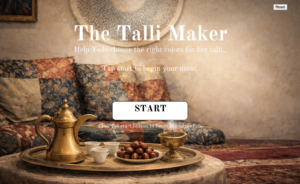
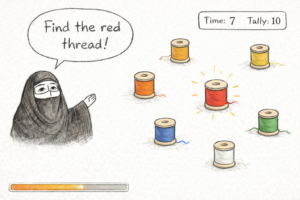 Generative ai helped me clear up the rough sketch this is a idea of how the game will look like but of course when actually played you will be able to see the randomness affect.