Reading Reflection – Week 2

In his talk, Casey Reas explores how generative art uses code, rules, and chance operations to create dynamic and unpredictable visuals, showing that creativity comes from both structure and chance. I found it particularly interesting when Reas explained that generative art is a space where structured rules interact with randomness, because when people generally think of coding, they assume there’s always a “right” way to do it, but I don’t necessarily think that’s true. I agree with Reas on this point about how chaos and order thrive together in generative art. But at first, I was one of the people who thought coding was strict and bound by certain rules to follow,  now I see that it can be more playful and freeing.

When I was coding my artwork assignment, I decided to add randomized colors to my code to make it more exciting every time I run the code. The outcome always comes out as different and unique from the one before it, and I enjoyed the unpredictability of it. At the same time, I wonder if too much randomness could take away from the artist’s control. Reas seems to always see randomness in a positive way, but I’m not sure I fully agree with that. Personally, I think it works best when theres a balance, where the structure I write in the code guides the randomness so that the results are still under my control to some extent.
Week 1: Self-Portrait

Concept

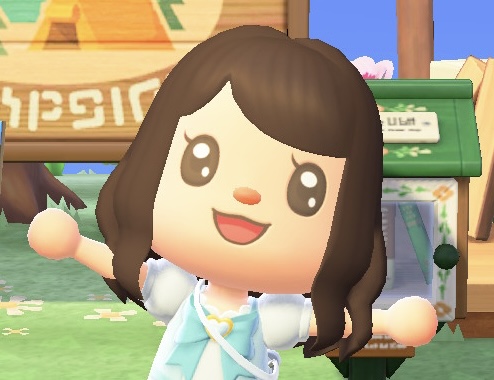
For my self-portrait, I decided to base it on my Animal Crossing Avatar. I thought it would be a fun way to represent myself since my character in the game feels like a version of me. Also, the cartoon style of the avatar fits perfectly for this kind of assignment!

Here’s my character for reference:

Favorite Code

Although I didn’t do anything super complex, I’m especially proud of how the eyes turned out. I think they gave the portrait a lot of personality and helped bring the whole thing together.

//left eye
  fill("black");
  ellipse(175, 225, 38, 50);

  fill("white");
  ellipse(174, 213, 18, 12);
  ellipse(182, 235, 6, 10);

  fill("black");
  triangle(158, 220, 152, 200, 163, 210);

  //right eye
  fill("black");
  ellipse(265, 225, 38, 50);

  fill("white");
  ellipse(265, 213, 18, 12);
  ellipse(274, 235, 6, 10);

  fill("black");
  triangle(248, 220, 241, 200, 251, 210);

Here’s the self-portrait I created:

Reflection and Future Improvements

While working on the portrait, I experimented with different shapes for the mouth and lashes. I tried using curves and Bezier functions, but they didn’t turn out the way I had hoped. In the end, I used an arc for the mouth and a triangle for the lashes, which worked better for the style I was going for.

I also used a semicircle arc for the bangs, but it stuck out a little awkwardly. To fix it, I placed a triangle in the same color as the background on top of the part that was sticking out, but I’m sure there’s probably a cleaner way to handle this.

In the future, I’d like to practice more shapes and figure out better techniques for handling these things.

Overall, this project was a fun way to explore coding and experiment with shapes. I’m excited to keep practicing and see how much more expressive I can make my sketches in the future!