Reading Reflection – Week 3

My opinion on what makes a system truly “interactive” has completely changed. I was struck by Crawford’s argument that the term has been overused to the point of meaninglessness (which was my first time actually coming across this), and I found his own definition incredibly useful. For me, I’ve always thought that an interactive system is one that the user asks and the system gives back a reaction. Crawford, however, frames strong interactivity not as a simple reaction as I thought, but as a genuine conversation, a conversation where two actors (the user and the computer) take turns listening, thinking, and speaking. It’s not enough for the system to just respond; it must listen intently, process the input thoughtfully, and then “speak” back in a way that continues the dialogue. This distinguishes a true interaction from a “mere” reaction.

This immediately made me rethink my own p5.js sketches and how I could elevate them from simple reactive toys to more engaging conversational partners. To make a sketch a better “listener,” it could analyze not just that a user clicked, but how they are moving the mouse; for example, is the gesture slow, or fast? For the crucial “thinking” step, I want to build sketches that have a sense of memory, allowing them to evolve based on the entire history of a user’s actions, not just the last input. I believe this creates a much deeper and less predictable experience. As illustrated in the reading, I believe a sketch can “speak” more eloquently by doing more than just showing a result–it can pose a new visual question or change its own rules (yes!), inviting the user to listen and respond in turn. The ultimate goal for me the next time is to move beyond making a tool and instead create a small world that feels alive, one that truly engages in a dialogue with the user.

Week 2 – Loops

Concept

This idea came from something super ordinary: looking at the lamp on my desk. I liked how objects close to it felt sharp and bright, while things farther away faded quietly into the background and into the wall. I wanted to capture that shift in attention, where one small light changes the way everything around it feels.

My sketch uses a grid of circles and a drifting light. As the light moves, the circles respond by glowing more when it’s near and dimming when it’s far. The result is a simple pattern that looks somewhat steady but comes alive as the light passes through.

Code I’m proud of

The bit of code I like most is the distance calculation, and how just a few lines of code could turn geometry into behavior!

let d = dist(x, y, lightX, lightY);

if (d < 150) {
  fill(255 - d, 200, 100);
} else {
  fill(50);
}

That small check gives each circle its own response. Some of them glow strongly, others fade away. It’s nothing complex, but it changes the grid from static to responsive, and I like that.

Here’s the work!

Reflections

If I keep developing it, I’d like to make the light follow the mouse so the viewer can interact directly. Multiple lights with different colors could overlap and create more interesting patterns. I could also vary the size or shape of the circles to add depth, so the sketch feels less like a flat grid and more like a living surface.

For now, though, I’m happy with how it turned out. It’s a small experiment, but it was indeed very fun to implement.

Reading Reflection – Week 2

I think Casey Reas’ talk was beneficial in how it helped me rethink my understanding of randomness in creative work. Before watching his presentation, I viewed chance as leaving artistic control, a way in which an artist makes pieces without intent. Reas’ presentation, however, provides compelling evidence to the contrary. His determined works gave way to systems where a tiny bit of injected “noise” was the crucial element preventing the entire structure from becoming homogenous and static. To be clear, his idea that a slight, random “jitter” is what keeps a system dynamic and alive has fundamentally changed my perspective in a way. It’s not about letting go of control entirely; it’s about building a system of rules and then introducing a controlled element of unpredictability to see where it goes. The quote Reas shared perfectly captures this: “It’s a chance that is always planned, but also always surprising.” This has made me think; is the artist’s role less about being a creator of objects and more about being a designer of ecosystems, carefully balancing deterministic rules with probabilistic life? I think this point is very interesting and eye-opening to me in some way.

Moving forward, I feel like I want to incorporate randomness more into my own work as, let’s say, a subtle disruptor of stillness and rigidity. All my life, I was focused on creating art pieces that are rigid. Going forward, instead of creating a perfectly symmetrical digital pattern, I want to play with the form and introduce a slight, randomly determined offset to the position or rotation of each element. The overall structure would still be mine, but the final texture would feel more organic and less sterilely perfect. For me, the balance between total randomness and complete control will lie in intentionality. The balance is right when randomness serves the artist’s goal, whether it’s to create surprising juxtapositions or whatever the goal is. Complete control often leads to predictable, “lifeless” results, while total randomness leads to incoherent noise. The sweet spot for me is a well-defined system where chance is given just enough freedom to introduce variations that I could not have conceived of on my own, making the final output a true collaboration between my intent and the unexpected.

Self portrait – Abdelrahman


Assignment 1: Self-Portrait with p5.js

For this first assignment, I wanted to keep things fun. Instead of trying to make a realistic self-portrait, I went for a cartoon version of myself using only simple shapes in p5.js. I spend a lot of my free time messing around with cartoon animation, so it felt right to make something that leans more toward humor and character design than strict accuracy. To be honest, you can think about it as less “this is exactly me” and more “this could be a funny character version of me.”

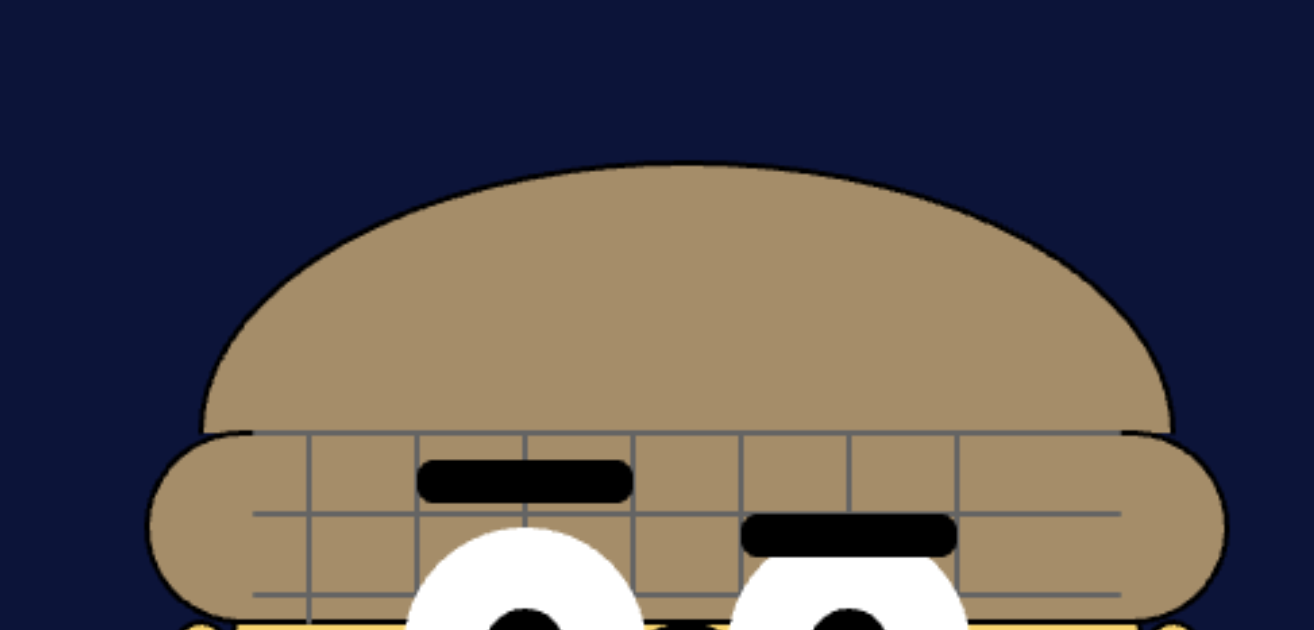
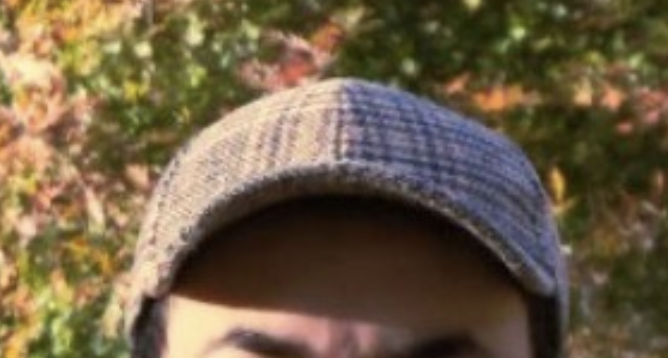
While I was building it, I played around with how the shapes stacked and layered, almost like sketching with blocks of color. Gradually, the face started to take shape, and I found myself enjoying the process of tweaking small details until it felt right. One of my favorite parts is the hat and how the patterned brim adds a bit of texture and keeps it from looking too flat. Even though it’s all made from basic geometry, I’ve tried to make the final portrait have a personality that feels a little quirky, and I hope I’ve succeeded in doing so.

Highlight of Code

As I mentioned above, one part I’m particularly proud of is the hat pattern (I have this hat in real life). For it, I used a simple pair of for loops with line() to create a crosshatch effect. It gave the hat texture and visual interest without being too complicated:

// Hat pattern 
stroke(100);
for (let i = 130; i < 270; i += 20) {
  line(i, 120, i, 155);
}
for (let j = 120; j < 155; j += 15) {
  line(120, j, 280, j);
}
noStroke();

It is not 100% likeness, but just enough to provoke the character and the sense of personality I want.

Embedded Sketch

Here’s the live sketch (embedded from p5.js):

Reflection

This assignment was a lot of fun, but also more challenging than I expected. The hardest part for me was getting the proportions and placement to look right. At first the eyes looked uneven, or the body would run off the canvas, and fixing that was mostly trial and error. I spent a lot of time just adjusting numbers a little bit at a time until things felt balanced.

What I liked about this process is that it felt a bit like debugging, but in a more visual way. Instead of checking for errors in the console, I was checking with my own eyes to see if something looked off. That back and forth between logic and aesthetics was interesting and kept me engaged. In the end, I am very happy with how my self-portrait turned out. It is simple and kind of silly (one that I might use in my future animations), but that is what I wanted. More than anything, I enjoyed treating code like a sketching tool instead of just a way to solve technical problems. It was refreshing and utterly intersting.