
In terms of concept, I created an 600,600 frame animation which has bubbles of random sizes with each bubbles having different widths and heights and that if you drag the mouse along the frame it will form more and more bubbles a bit like what you would see in chemistry reaction. I also added a gimic where it shows hello in 7 different languages. For let x = random width and let x = random height I ended up with function ask different bubbles, at different widths and heights at random place. I commented on specific hard parts of the code such as the bubble class and interaction functions, this makes the logic very easy to follow.
In terms of the code I am particularly proud of the code from the Bubble class section which is lines 42-50 and 53-60. As I set variables X, Y and R where bubbles form at X, Y, R but they are random and that anything within frame of setup will do only once. (Generate 30 bubbles then no more), but anything after background 220 would do and run in the output again. I also set it to move random within the scope (-2,2) so that it could create reaction between bubbles not too fast and not too slow about right. And I chose to fill the bubbles with random colours and also not having stroke for the bubbles to be more beautifully designed. I then realized that I wanted to do (-5,5) but that would mean that the bubble would be reacting to each other too rapidly, so I had to go watch some of the Object-Oriented Programming examples from Dan Shiffman’s coding tutorials from the links below:
https://youtu.be/rHiSsgFRgx4?si=_Fz-81v_ZoDdLj7G
https://youtu.be/T-HGdc8L-7w?si=pm0hI9p7K852YnL0
https://youtu.be/fBqaA7zRO58?si=55BSv8u6SYXY80y0
//—————Bubble and Text Array—————–
// cite YT Dan Shiffman 7.3
let bubbles = []; //blank store for incoming bubbles
// Greetings mousePressed-stamp greetings on canvas
let greetings = [“สวัสดี”, “Marhaba”, “привет”, “Hola”, “Ciao”, “Bonjour”, “你好”, “Olá”];
let greetIndex = 0;//start with สวัสดี
let texts = []; //blank store for incoming greetings
function setup() {
createCanvas(600, 500);
// create 30 bubbles at the start
for (let i = 0; i < 30; i++) {
let x = random(width);
let y = random(height);
let r = random(10, 60);
bubbles[i] = new Bubble(x, y, r);
}
}
function draw() {
background(220);
// update + show all bubbles (including new ones from mouseDragged)
for (let i = 0; i < bubbles.length; i++) {
bubbles[i].move();
bubbles[i].show();
}
// show all stamped greeting texts
for (let i = 0; i < texts.length; i++) {
texts[i].show();
}
// instruction text
fill(0);
textSize(12);
text(“Drag mouse to add bubbles | Click to stamp greetings”, 20, 20);
}
// ——————– Bubble Class ——————
// cite youtube Dan Shiffman 6.2
class Bubble {
constructor(x, y, r) {
this.x = x;
this.y = y;
this.r = r;
this.col = color(random(255), random(255), random(255)); // random(R,G,B)
}
move() {
this.x += random(-2, 2);
this.y += random(-2, 2);
}
show() {
noStroke();
fill(this.col);
ellipse(this.x, this.y, this.r); // Dan YT 6.3
}
}
// ——————– Greeting Text Class ———–
class GreetingText {
constructor(x, y, msg) {
this.x = x;
this.y = y;
this.msg = msg;
// style (random)
this.size = random(14, 26);
this.col = color(random(255), random(255), random(255));
}
show() {
fill(this.col);
textSize(this.size);
text(this.msg, this.x, this.y);
}
}
// ——————Interaction———————–
// Drag mouse: add more bubbles
function mouseDragged() {
let r = random(10, 60);
let b = new Bubble(mouseX, mouseY, r);
bubbles.push(b);
}
// Click mouse: stamp greeting words (store as objects)
function mousePressed() {
let msg = greetings[greetIndex];
greetIndex = (greetIndex + 1) % greetings.length;
let t = new GreetingText(mouseX, mouseY, msg);
texts.push(t);
}
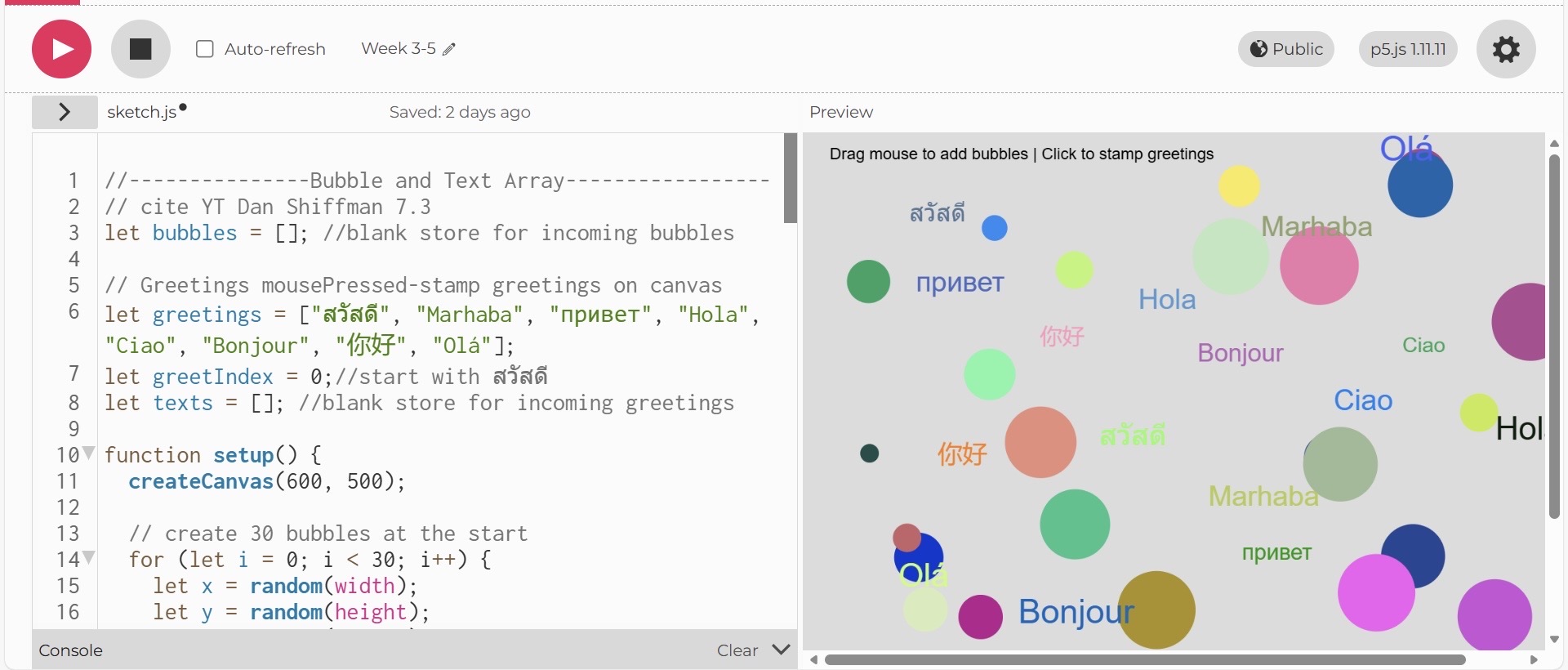
<iframe src=”https://editor.p5js.org/po2127/full/D7dM3ayTa”></iframe>
https://editor.p5js.org/po2127/full/D7dM3ayTa
I think what I could improve for the future would be separating different features such as bubbles, greetings, UI text into their own files and clearly labeled section so the sketch stays clean as there is more code. I also think adding more interaction logic, such as limiting how many bubbles can appear, letting users delete objects, or adding animations to the greeting text instead of just putting it there.