
My concept:
Initially I had lots of images saved from different types of designs, forms, and artists until I realized that I kept going back to page 19 in ProgrammInformation21_PI21. When it comes to art, I have drawn many zentangle-style pieces, which rely heavily on repetition and pattern, which is why I felt drawn to this specific art piece. I then decided to take inspiration from the piece and try to create movement similar to what I see. When I first looked at the image the shapes I saw were: triangles, squares, and circles. When I first looked at the image, the shapes I noticed were triangles, squares, and circles. Although circles are not clearly visible when zooming in, I decided to include them in my final piece to represent my initial visual interpretation of the artwork, hence why I called the piece Captured.
Inspiration from old computer art magazines: My project is inspired by early computer-generated art found in old programming and computer art magazines, where artists worked with limited tools leading to their reliance on shapes, repetition, and randomness.
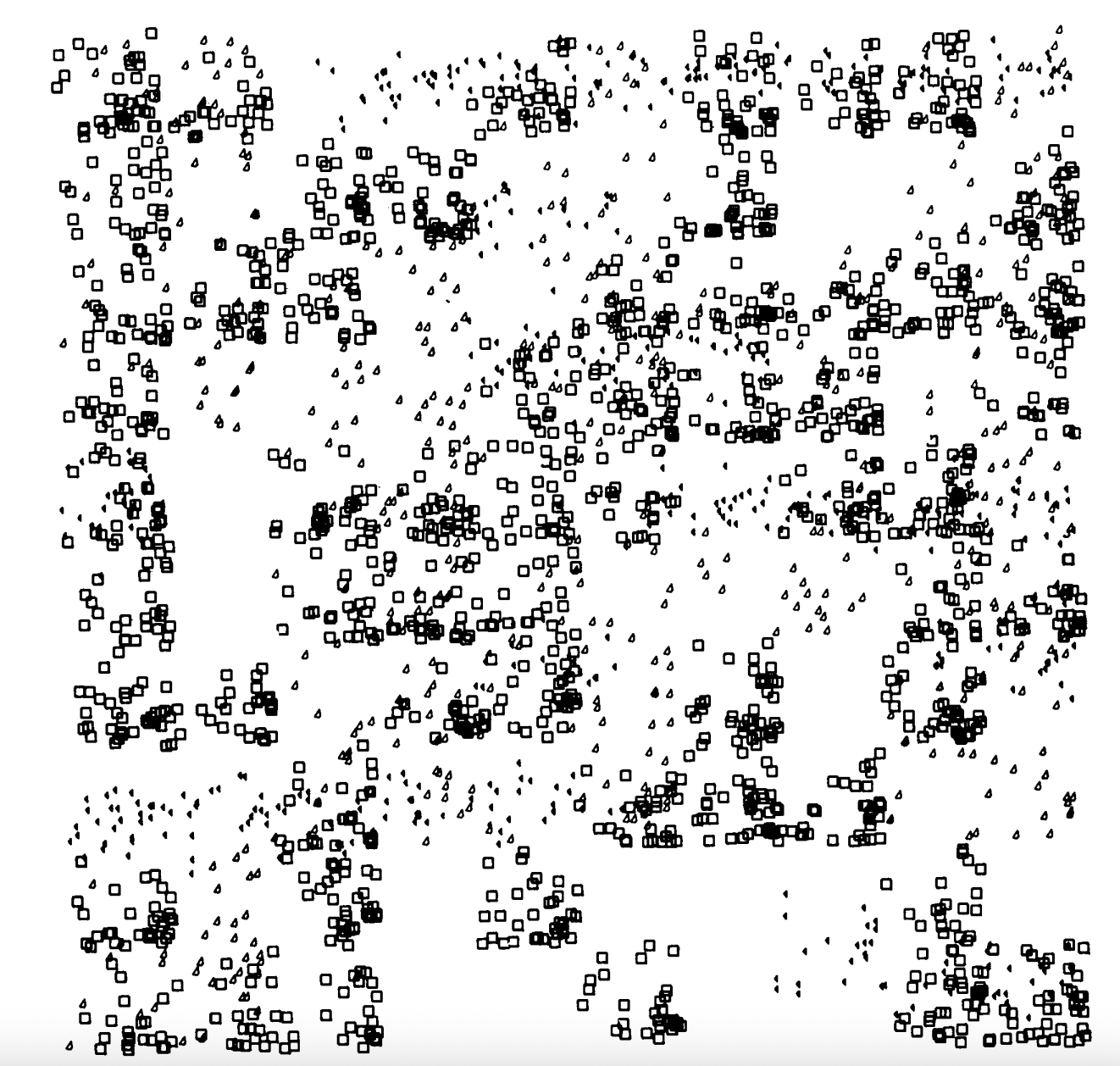
Embedded Sketch:
How this was made:
This project took me around 4 hours to create. Much of the time was spent on searching and finding idea because I was just introduced to generative art and was still learning how randomness and loops affect visual outcomes. After finding the “perfect” inspiration I was then able to start brainstorming how I wanted my piece to look like.
At first I started off by creating just squares and triangles that were evenly spaced out but the results felt too structured compared to the chaotic image from the magazine. I then began experimenting with the [random] function:
let x = random (width);
let y = random (height);
I combined this with rect() for squares and ellipse() for circles. Initially, I used a single square size [rect(x,y,10,10);] but unfortunately again, did not create the layered visual effect I wanted. To address this issue, I added more than one rect and played around with the width and height until I was able to layer three squares on top of each other with the small ellipse size. After I created the three different points for the triangles:
if (random(1) <0.8) { //80% chance to draw 3 rects and 1 ellips
    rect(x,y,10,10); //x,y being random and 10,10 the W,H \|/ the same
    rect(x,y,7,7);
    rect(x,y,6,6);
    ellipse(x,y,5,5);
  } else { //the rest -> 20% will be triangles
    triangle(x, y-5, x-5, y+2, x+2, y+2);
I was also able to play around with the amount of shapes appearing on each frame (5) [for (let m = 0; m < 400; m++)]. Like everything else, starting is the hardest part so once I get used to the numbers and codes I used the rest of my time experimenting until I was satisfied with the results.
One code I am proud of:
for (let m = 0; m < 400; m++) { //drawing 400 shapes for every frame -> x5. Using m for my name
This was my favorite part of the code. I kept changing the number between 100 and 600 and experimenting with how the shapes changed and how the final piece turned out. In the end, I decided to keep it at 400 because it felt the closest to how I first saw the image. When I looked at everyone else’s self-portrait, I noticed that some people used this function, and at first I honestly didn’t understand how it worked. After looking into this source (JavaScript Loops Explained), I was finally able to create a similar effect and actually understand what the code can be used for instead of just copying it.
Resources: I of course wasn’t able to open p5.Js and create this project, so I kept referring back to the Week 2 lecture notes from both Professor Mang and Professor Aya’s weekly slides along with the website JavaScript Loops Explained Helped me create my code for the 400 shapes for each frame, I was able to make the loop but instead of using ‘i’ I just decided to use m for my name, adding a personal twist.
Full code:
function setup() {
  createCanvas(400, 400);
  frameRate(5); //to control the speed, or like I call this "the sets" I put 5 to make it slow but fast.
  noFill(); //black outline for the shapes
  stroke(0);
}

function draw() {
  background(255); //making the background white to match inspo

  for (let m = 0; m < 400; m++) { //drawing 400 shapes for every frame -> x5. Using m for my name

    //local variables created, so inside the loop each shape gets a new random position
    let x = random (width);
    let y = random (height);

    if (random(1) <0.8) { //80% chance to draw 3 rects and 1 ellips
      rect(x,y,10,10); //x,y being random and 10,10 the W,H \|/ the same
      rect(x,y,7,7);
      rect(x,y,6,6);
      ellipse(x,y,5,5);
    } else { //the rest -> 20% will be triangles
      triangle(x, y-5, x-5, y+2, x+2, y+2); //creating 3 different points for the triangle. Point 1: x, y-5 moving up. Point 2: x-5 moving left, y+2 moving down. Point 3: x+2 right, y+2 down
    }
  }
}
Reflection:
For future assignments, I think I’ll try to come up with ideas faster so I don’t spend so much time looking for the “perfect” inspiration before starting. Instead, I want to just start coding and see where it takes me. This feels like a fun challenge because the code can change so much depending on small adjustments. At the same time, having a general idea and then adjusting it as I go also works. I also want to experiment with more types of code. I know it’s not realistic to use every single thing we learn in one project, but it would be interesting to try combining more of them and seeing what comes out of it.