
My concept:
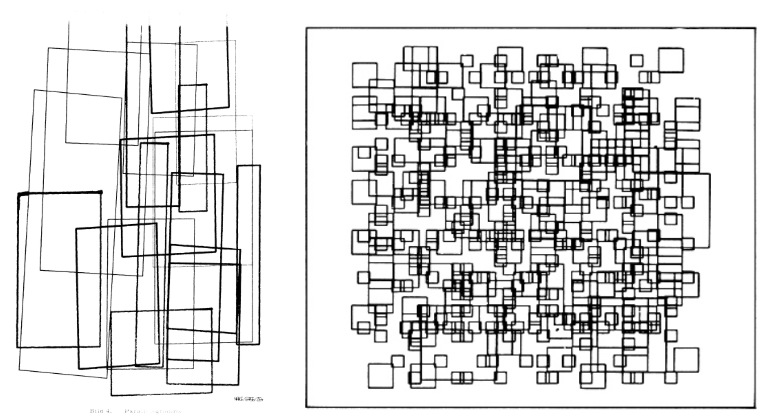
As I started planning my work for assignment two, I decided I want to create something abstract using the new things we’ve learned in class, along with concepts I caught up on from previous classes. I started off by looking at the documents attached with the instructions, and two specific artworks grabbed my attention. I noticed how both have rectangles and squares in different sizes and complex ways, intersecting and overlapping one another. This inspired me and gave me the idea to create something similar using squares and rectangles, but make it colorful and moving to add life to it. Here are the references:
Embedded sketch:
A Code I’m proud of:
In this assignment I felt particularly proud of adjusting the movements of the shapes, as it was like trying to get the ranges of the sizes correct and ensure they moved within the frame while still appearing random, enhancing the image I was trying to display. I tried many different ways and ranges of numbers until I reached a result that satisfied me.
//Use if statements to ensure the shapes bounce back and forth instead of going out of frame
  if (rectX < -40 || rectX > 40) rectSpeedX *= -1;
  if (rectY < -40 || rectY > 40) rectSpeedY *= -1;

  if (squareX < -40 || squareX > 40) squareSpeedX *= -1;
  if (squareY < -40 || squareY > 40) squareSpeedY *= -1;

//Rectangles:

  //Set the loop to ensure multiple appear in each frame
  for (let i = 0; i < 25; i++) {

    //Randomize the position for pattern
    let w = random(20, 70);
    let h = random(20, 50);

    //Make width and height random to get a variety of sizes
    let x = random(0, width - w) + rectX;
    let y = random(0, height - h) + rectY;

//Squares:

  //Set the loop to ensure multiple appear in a frame
  for (let i = 0; i < 25; i++) {

    //Randomize the sizes of the squares for diversity
    let s = random(20, 60);

    //Adjust positions of sqaures
    let x = random(0, width - s) + squareX;
    let y = random(0, height - s) + squareY;
Another part that I’m surprisingly proud of is choosing the background color. I was just experimenting with different colors until I realized I could make it transparent, allowing the previous frames to show through and giving a more realistic look that matches the inspiration pictures.
//Set the background color to fit the goal
function draw() {
  background("#BDE0FF84");
Reflection and ideas for future work or improvements:
After completing this assignment, I felt satisfied with the progress I made and the final result. I feel that I was able to create a plan and successfully execute it through code, using the different techniques learned in class and resources provided. I enjoyed setting many colors at once and watching them appear on the display using random() and my colors array. I gained a stronger understanding of using loops, specifically for loops, and what really stood out to me is how much they can simplify and improve the flow of code. I also became more comfortable using if statements with || to adjust the movements. For future work, I would like to improve this artwork by learning how to make the shapes float around more smoothly in a specific pattern, or by adding more complex shapes to make it even more interesting.
References:
I referred back to the weekly slides provided by the professor to recap using the “if” statements as we did in class, which I used to keep the shapes within the frame.
I used the “for loop” reference page from the p5 website to learn more and generate multiple shapes within each frame and control their repeated movement.
https://p5js.org/reference/p5/for/
I used ChatGBT to set the colors of the shape outlines. I wanted to work with a range of selected colors rather than a single randomly changing color. It showed me how to use an array of strings to store the colors I wanted, and then, within the shape movement, use stroke(random(colors)) to randomly select and display these colors in each frame.