
Here is my final sketch:
Concept:
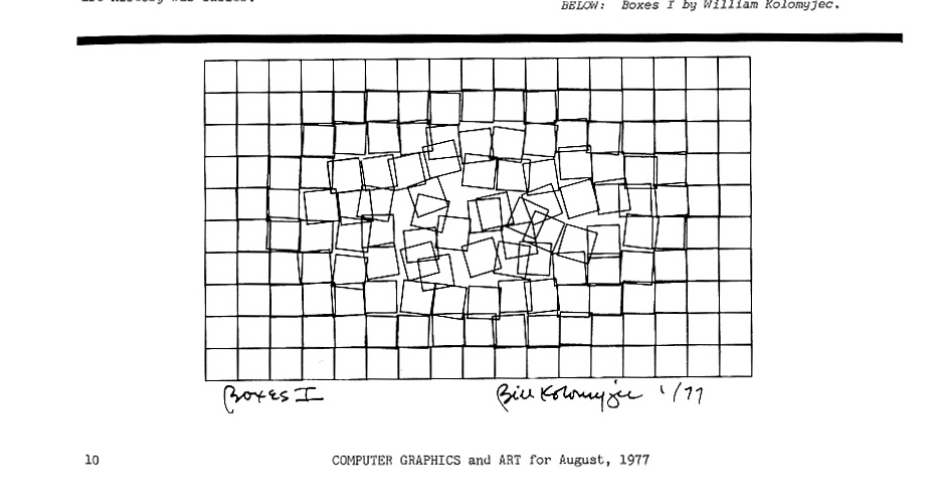
For this project, I was inspired by the game Smash Hit, where a ball hits glass and causes it to shatter. Also, while looking through the computer art magazines, I came across Boxes I by William Kolomyjec. I decided to combine these two ideas by creating a grid of squares with a circle in the center that acts as a button that triggers the distortion of the squares.
The circle turns green when the viewer hovers over it and turns red when clicked. Once you click on it, the circle causes the squares surrounded by it to distort, kinda like in the artwork I was inspired by. I wanted a controlled system that slowly breaks apart, while having a game-like effect.
Here is the artwork I was inspired by that was in the magazine:
Code Highlight:
The code that I am particularly proud of is the section that distorts the boxes based on their distance from the center and the randomness to its position and sides. It gave the visual effect I wanted.
//distortion control using the radius
if (ruined && radius < 155) {
  //so if the disortion is on and the radius hasn't reached its maximum, expand the radius. I chose the number 155 because I didn't want the disortion to go all the way out.
  radius += 4; //to increase the radius gradually (like a firework effect)
}

if (!ruined) {
  //if the distortion is off to reset the radius back to 0.
  radius = 0;
}

//the grid of boxes
for (
  let x = 0;
  x <= width - size;
  x += size //so it can loop horizontly
) {
  for (
    let y = 0;
    y <= height - size;
    y += size //so it can loop vertically
  ) {
    let d = dist(x, y, width / 2, height / 2); //to get the distance from the squares to the center of the canvas

    //to make the grid distorted
    if (ruined && d < radius) {
      // if the distortion is on and the square is in near the radius
      rect(
        x + random(-5, 1),
        y + random(-5, 1),
        size + random(-5, 1),
        size + random(-5, 1)
      ); //to make random x and y positions and change the width and height for a random messy effect. (for the disorted squares)
    } else {
      // if the squares are not within the radius.
      fill("white");
      rect(x, y, size, size);
    } // let the rest of the boxes to be straight and untouched
  }
}
Reflection/future work:
In class, we used loops to create a grid of circles, so I applied the same concept using nested for loops to build a grid of squares. At first, the size of each box was 50, but I felt that it was too large for the distortion effect to look effective. The larger size also caused some of the boxes to be cut off at the edges of the canvas. So I decided to reduce the size of the boxes to 20, which made the grid feel more refined and detailed.
Also, the distortion effect was happening too fast it felt overwhelming. I tried to slow it down by reducing the values inside the random function, but this did not work the way I expected. So I just did the frameRate function and put it inside the setup function, like how you showed us in class. I think slowing down the frame rate helped the movement feel more controlled and intentional.
When the circle was clicked, all the boxes that were within the radius distorted at the same time. I was going to leave it this way, but I showed my friend, and she told me that I should try to make the distortion spread outward gradually, like a firework. I did this by using a radius that slowly increases over time, allowing it to expand from the center instead of appearing all at once. I think it made it more visually interesting, so I stuck with it.
While working on this project, I sometimes needed help with the order of the functions and how everything should be structured so the sketch would work properly. I already knew the functions from the slides and reference materials and wrote the code myself, but I was not always sure how to organize them in an order that would work. So I used ChatGPT and Google searches to help clarify those details, specifically how to control the distortion using a radius value and why that needs to be placed at the top of the draw function so it could update consistently, and where the mouse-pressed function should be placed. But most of my understanding came from the class examples, lecture slides, and trial and error with my code.
In the future, I would like to add more details and incorporate more concepts that were previously discussed. I am interested in exploring different types of distortion and animation that really enhance the experience.