
Inspired from parking lot detection system, my project is a small re-creation of that as well as a mix of some fun elements to entertain users. The idea is simple: a system that detects if a room is occupied or not as well as a way of showing the number of people in the room. This system can be used in the Bahara rooms. These rooms have no windows and there is no ptracical way of checking if the room is in use without acutally opening the doors. Hence, the secuirty working in our campus has to periodically check if there are any people in the room, as well as possible accidents. Using this system can provide people with these unknown information.
Link to p5js: https://editor.p5js.org/yj2082/full/CUheQmfX3
Link to Arduino: https://github.com/yongjejeon/Detection-Ardunio-p5js
How this was made(Arduino Explanation):
This system uses 2 Infrared distance sensors and 1 neo pixel ring. The 2 distance sensors are placed side by side to check if the person either entered the room or exited the room. If sensor 1 detects first before sensor 2, then it means that the person entered the room and vice versa. There is more logic in double checking if the detection is really true or not. For example, there are cases where user moves too slow or the user stops half way. These shouldnt be counted so I added a logic to at first detect potential IN or potential OUT and confirming if these are actually IN and OUT depending if timeout does not run out. We have a boolean variable called armed. It is set to true if there is no detection. If there is a detection, there are 3 cases: Idle, S1 active and S2 active. If its idle it means that there is potentially a in or an out. It checks and sends to either S1 active or S2 active cases. In either of the cases, it does sometime similar, it checks if the other sensor is met before the time out, if its not then its idle. If it meets, than it means that its confirmed to be either In or out.
/arming logic
      if (s1 || s2) {             //either the sensor sees somethings
        lastNotClearTime = now;
      } else {                //if both are clear meaning enought time since delay has passed
        if (!armed && (now - lastNotClearTime > CLEAR_DELAY)) {
          armed = true;
        }
      }
      //direction
      switch (state) {

        case IDLE:  //only if armed is true, it reacts.
          if (armed) {
            if (s1 && !s2) { //sensor 1 sees but sensor 2 does not
              state = S1_ACTIVE;    //potential IN
              stateStart = now;
            } else if (s2 && !s1) { //other case
              state = S2_ACTIVE;    //potential OUT
              stateStart = now;
            }
          }
          break;

        case S1_ACTIVE:     //potential IN
          if (s2) {       //if we see s2 before time out,
            // Sequence: S1 then S2 -> IN
            peopleCount++;
            if (peopleCount < 0) peopleCount = 0;
            updateRing();
            lastEvent = 1;   // IN
            armed = false;
            lastNotClearTime = now;
            state = IDLE;
          } else if (!s1 || (now - stateStart > TIMEOUT)) {   //if time out then idle
            state = IDLE;
          }
          break;

        case S2_ACTIVE:
          if (s1) { //same idea for sensor 2
            peopleCount--;
            if (peopleCount < 0) peopleCount = 0;
            updateRing();
            lastEvent = -1;  // OUT
            armed = false;
            lastNotClearTime = now;
            state = IDLE;
          } else if (!s2 || (now - stateStart > TIMEOUT)) {
            state = IDLE;
          }
          break;
      }
The neo pixel ring on the other hand provides one simple information: if the room is occupied or not. If there is no one in the room, meaning the count is 0, then it displays green. If there is atleast one person in the room, then it displays red.
//updating led based on count if room is occupied its red if not its green
void updateRing() {
  ring.clear();
  if (peopleCount > 0) {
    for (int i = 0; i < NUM_LEDS; i++) {
      ring.setPixelColor(i, ring.Color(150, 0, 0));
    }
  } else {
    for (int i = 0; i < NUM_LEDS; i++) {
      ring.setPixelColor(i, ring.Color(0, 150, 0));
    }
  }
  ring.show();
}
Arduino sends 2 information: the number of people and if its IN or OUT.
      Serial.print(peopleCount);
      Serial.print(',');
      Serial.println(lastEvent);
How this was made (P5js)
There is two transactions between p5js and arduino. p5js receives count and if a person enters or not.
if (port.opened()) {
    let data = port.readUntil("\n"); //reading line from ardunio
    if (data.length > 0) {            //if read, split the data by comma
      let parts = split(trim(data), ",");
      if (parts.length === 2) {
        let pc = int(parts[0]);
        if (!isNaN(pc) && pc >= 0) {
          peopleCount = pc;            //receiving count
        }

        let ev = int(parts[1]);
        if (!isNaN(ev)) {
          lastEvent = ev;              //checking if entered or exited
        }
On the other hand, p5js sends reset command to arduino to reset counter for people when r is pressed. This is the helper function for that.
function resetCount() {
  // Reset on the p5 side
  peopleCount = 0;
  lastPeopleCount = 0;
  statusMessage = "Manual reset to 0.";
  showGifForCount(0);
  console.log("People count manually reset to 0 in p5.");

  //Reset arduino
  if (port.opened()) {
    port.write("RESET\n");
    console.log("Sent RESET command to Arduino.");
  }
}
This is the main logic of p5js. It saves the meme that suits each situation with a dictionary. the key is the number of people and the value is the image address. Im proud of how I included memes in my project to bring humor into my project. Without it my project would have been a detection system, which is cool by itself, but there are nothing to show or present in the showcase other than showing how it can detect yoshi. However, this adds a layer of exitement into my project and a motivation for users to test my project more than once to find out which meme comes out next.
let gifGroups = {
  0: [
    "https://media.tenor.com/hrisiYKNn6UAAAAj/you-may-now-enter-kourtlyn-wiggins.gif",
    "https://media1.tenor.com/m/IZF4HViktvgAAAAd/abbott-elementary-come-on-in.gif",
    "https://media1.tenor.com/m/ZGJod50ebXIAAAAd/you-want-to-come-in-invitation.gif"
  ],
  1: [
    "https://media.tenor.com/eIoZmG3L4fYAAAAi/yoshi-yoshi-tv.gif",
    "https://media1.tenor.com/m/lANYAosZI4AAAAAd/yoshi-mario.gif"
  ],
  2: [
    "https://media1.tenor.com/m/8Mt2eEPPSg4AAAAd/happy-birthday-dance.gif"
  ],
  3: [
    "https://media1.tenor.com/m/cMvelryh5BAAAAAd/car.gif",
    "https://media1.tenor.com/m/ovq2B-ML6I4AAAAd/guys-hugging.gif"
  ],
  4: [
    "https://media1.tenor.com/m/ROTEC3I3vkQAAAAd/despicable-me.gif",
    "https://media1.tenor.com/m/onl3-G1xIGEAAAAd/walk-cross.gif"
  ],
  5: [
    "https://media1.tenor.com/m/K3shTb7Ow-MAAAAd/johnny-depp-movie.gif",
    "https://media1.tenor.com/m/iLYNgJj42gEAAAAd/dwight-the-office.gif",
    "https://media1.tenor.com/m/ywI3ImfzsvYAAAAd/nicolas-cage-who-are-you-people.gif",
    "https://media1.tenor.com/m/ZBuCuZ4Ms-oAAAAd/where-did-all-of-these-people-come-from-patrick.gif"
  ],
  6: [
    "https://media1.tenor.com/m/27Atub3mjoMAAAAd/jordan-stop-it.gif"
  ],
  7: [
    "https://media1.tenor.com/m/fTXGp5PtzscAAAAd/yoshi-luigi.gif"
  ],
  8: [ // 8 or more
    "https://media.tenor.com/uaqJICjtx4QAAAAM/that%27s-it-enough.gif"
  ]
};
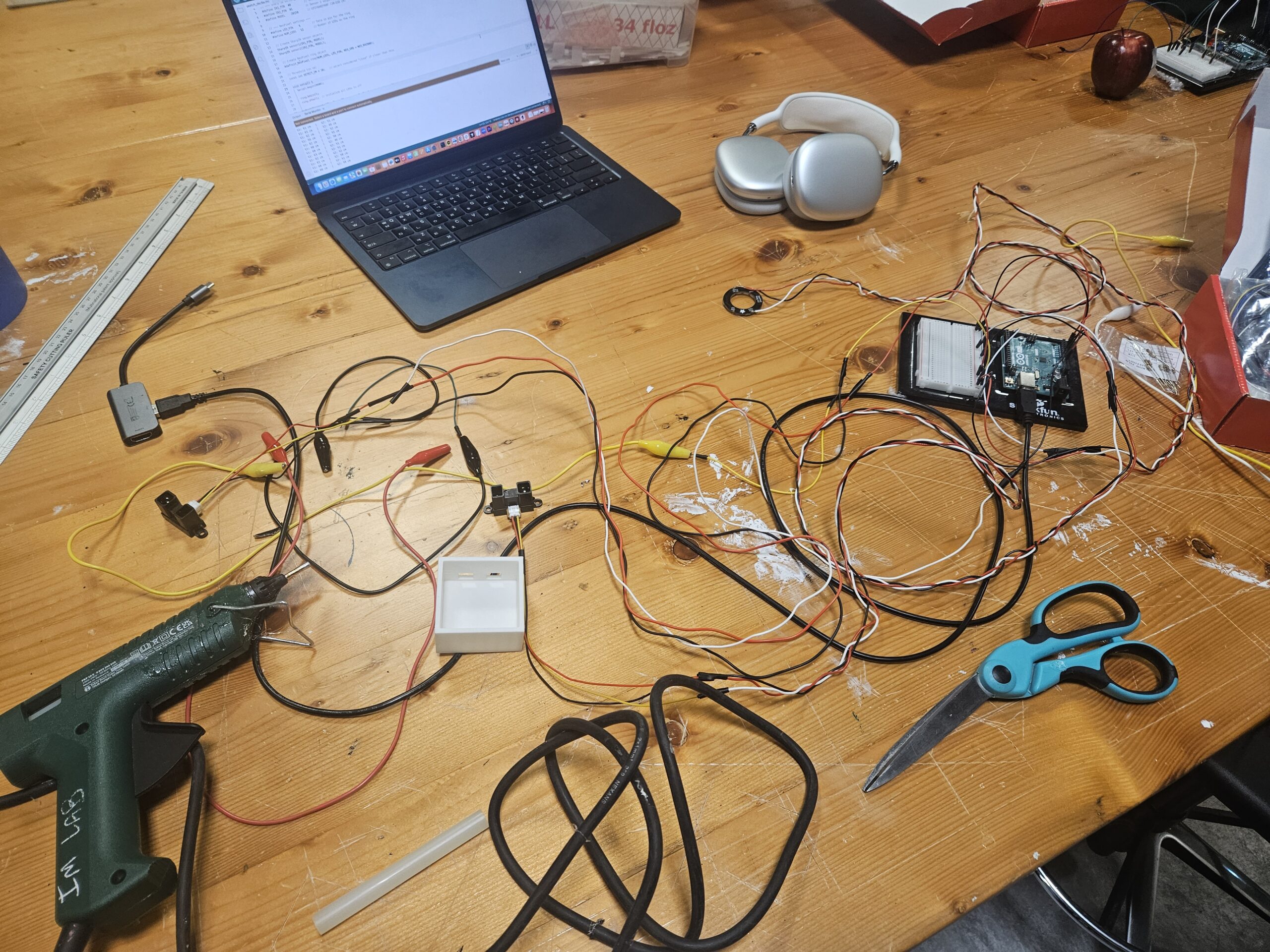
For the final project display, I created a small door way to test this system in action. Using laser cutting printers I cut out a door way large enough for my yoshi doll to walk through. I also used 3D printers to print out 2 things: a case for the Infrared sensors and a case for the arduino board. I made these myself and although it was confusing at first, I was able to quickly adapt to it.
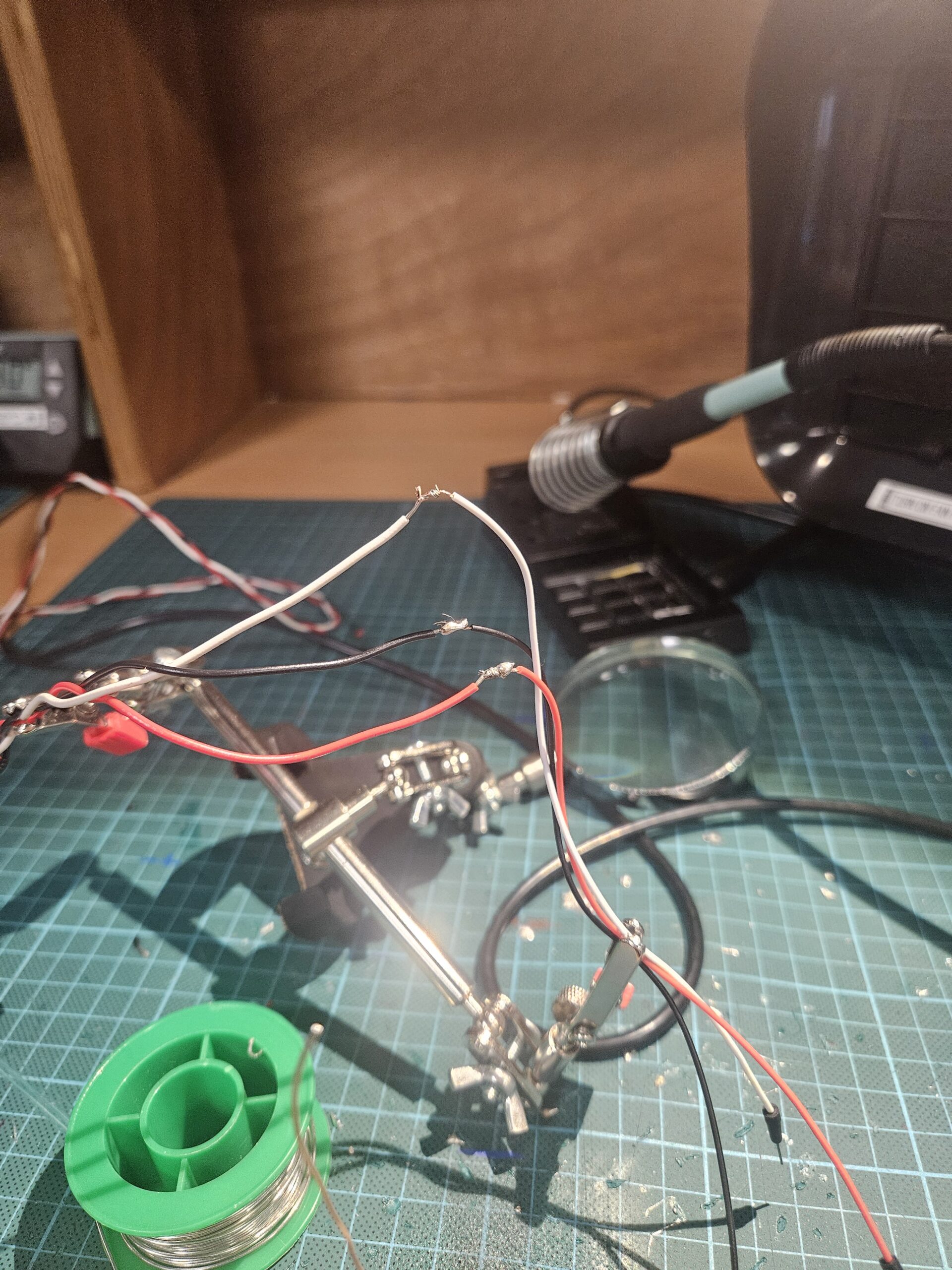
Since these sensors were not from the ardunio kit, I had to solder wires to the sensors as well as for the neo pixels. Thankfully, I was able to get used to soldering towards the end.
Schematic
Usage of AI
I received help from AI when displaying the memes.
function showGifForCount(count) {
  // Remove previous gif element if any
  if (gifElement) {
    gifElement.remove();
    gifElement = null;
  }

  let url = pickGifForPeopleCount(count);
  if (!url) return;
The memes were not made by me. They were all saved from a website called tenor.com.
Future Improvement
One major improvement is the cable management. In the current prototype, the wiring between the sensors, microcontroller, and LED ring is exposed, which makes the setup look unfinished and less polished. A future version could incorporate a more integrated system and internal routing channels to hide the wires and create a cleaner presentation.