
Project:
Concept:
The main concept behind this project was my 3rd production assignment “Colorful Concoction“. Ever since that asssignment I’ve wanted to build up on it and create something generative to the user and interactive in the same sense. So when I found out that we had access to tools such as hand tracking and face tracking, I knew I wanted to go deeper into creating something that would truly give a fun feeling to the user.
I decided to create a simple project where the user could generate balls of different color and with the user’s hand, they are able to decide the size of the given ball. So if the user chooses to make a screen filled with tiny balls, they are able to. Or if they want larger ones they can as well. It gives that sense of variety for the user. And then they are able to interact with the balls using their own hands by flicking them around and pushing them. This was the main highlight of what I wanted to do to make it truly fun for the user.
So how does it work and what am I proud of:
The program starts with an instructions screen I whipped up in Canva, waiting for the user to click to start the actual program. Going from my own game that I’ve made for a different course, it was done using different states for when the program should be starting, and when it should be played (which is why they’re named game state).
function draw() {
  //Different state for Start, to show the instructions screen
  if (gameState === "START") {
    //Displays the instruction screen
    image(instructionsImg, 0, 0, width, height);

  }
//Starts the actual program
  else if (gameState === "PLAY") {

    background(0);
Now in order for the user to actually create the ball, they must firstly allow camera access and then present their hand to the camera so it can track their position of their thumb and index finger. The tracking was done simply with ml5.js’ hand tracking library which was of course the main part of the whole project. Now in terms of the size of the ball, that was simply done with seeing the distance between the points of the thumb and index finger, and from there we can generate a simple circle. Also to note all of the balls were added to an array so that it can be dynamically updated when needed.
let finger = hand.index_finger_tip;
        let thumb = hand.thumb_tip;

        //Finds the midpoint between the thumb and index finger
        currentX = (finger.x + thumb.x) / 2;
        currentY = (finger.y + thumb.y) / 2;

        //Based off the distance, it determines the size of the ball
        currentPinch = dist(finger.x, finger.y, thumb.x, thumb.y);

        //This makes a new random color for the cursor on screen, or in this case the ball
        cursorColor = color(random(255), random(255), random(255), 200);

        //Creating the random colored ball
        fill(cursorColor);
        stroke(255);
        strokeWeight(2);
        circle(currentX, currentY, currentPinch);
Problems and how I solved them:
The main part of the program was also the main problem that I faced. Getting the hands to be displayed on screen while also giving the balls a notion that they should think of the hands as a wall was a bit tricky to write. Not to mention that doing hand tracking with a camera isn’t as smooth as it could be so it took a good amount of time before I got it working.
Firstly, using the ml5js reference, all of the joints of the hand were marked with numbers. Using this, I made an array where all of the joints can be loaded and I could then dynamically add lines to them and dots to signify the joints of the hand. 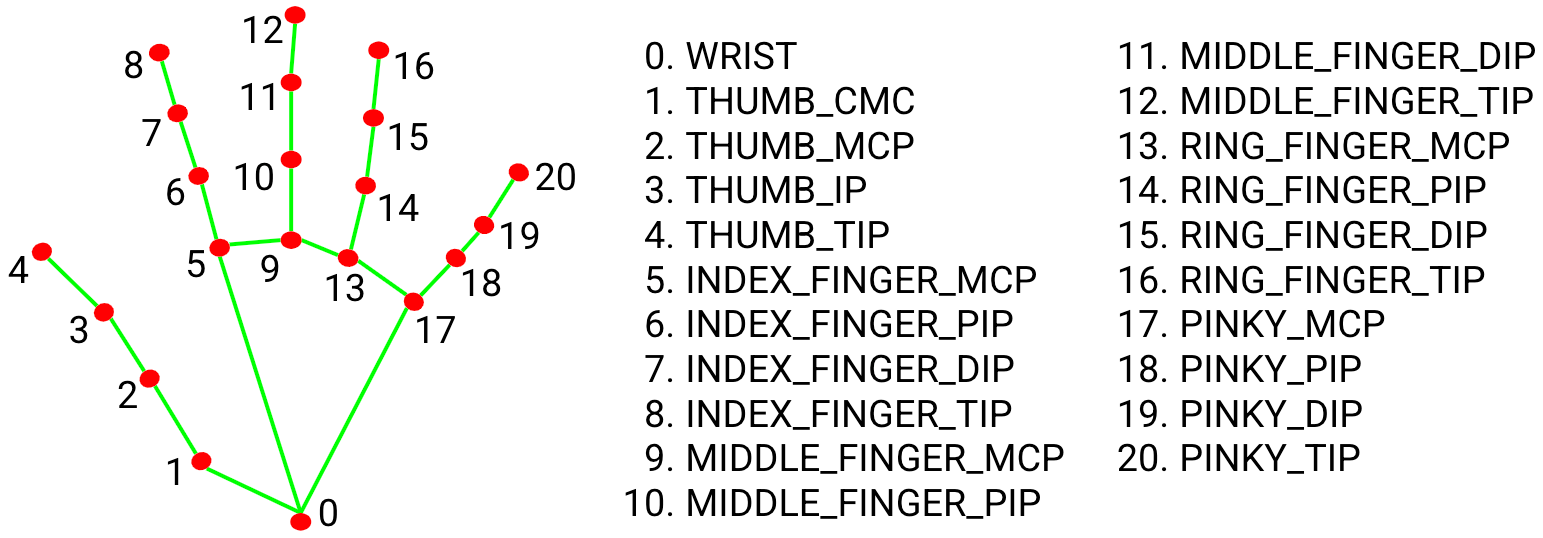
This was done using a for loop that constantly loads the lines and joints depending on where the hand is, so that it is actively updating where the hand is on the screen instead of just, having a static image.
//This draws the lines for the skeleton of the hand
for (let i = 0; i < connections.length; i++) {
  let pointBase = hand.keypoints[connections[i][0]];
  let pointEnd = hand.keypoints[connections[i][1]];
  line(pointBase.x, pointBase.y, pointEnd.x, pointEnd.y);
}

//This draws the joins as white dots
fill(255);
noStroke();
for (let i = 0; i < hand.keypoints.length; i++) {
  circle(hand.keypoints[i].x, hand.keypoints[i].y, 10);
}
And after that it was simple as to just adding vectors to the balls and having them repeal off the canvas’ wall and also off the hand as well. Finally after a good while, I managed to get it to work. Now your mileage may vary, as some camera’s capture it better than other (I myself was stuck with an older, bit blurry camera).
Areas of Improvement:
Most of all I think the main area of improvement for me is just probably to add more customization should I want to. I was debating on having some way for the user to change color, but time constraints sort of hampered that notion. I was thinking even this by itself can be enough as adding too much can drown out the simple nature of the project.
I think another area is making it seemless for the user to interact with the program fully with their hands. I tried but I wasn’t getting the results I desired and ultimately I decided just to stick with keyboard inputs for most things which is unfortunate. Possibly it could be a nice idea to have it so the other hand can be clamped and the ball could spawn or somehow find a gesture with a hand that could change modes. But overall I’m happy with how it turned out in the end.