
Concept:
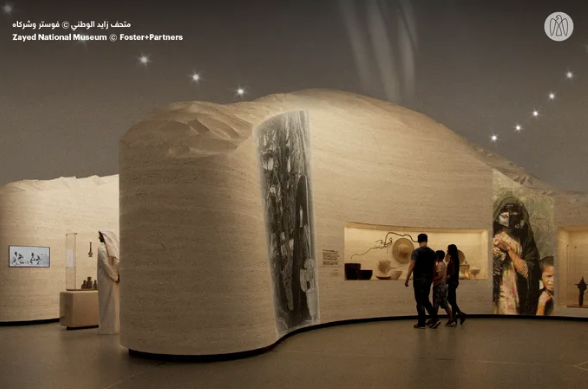
My midterm project is designed to be a new interactive game that combines both an artistic experience and a fun game that users can enjoy. The Maze Captures is inspired by the Sheikh Zayed Museum and the Qasr Al Hosn Festival in Abu Dhabi. The artistic side comes from the museum, which is new and modern with a strong historical and cultural connection to the United Arab Emirates. I was then able to develop the game aspect from the Qasr Al Hosn Festival, which had a culturally themed escape room, but I adapted it to my own idea.
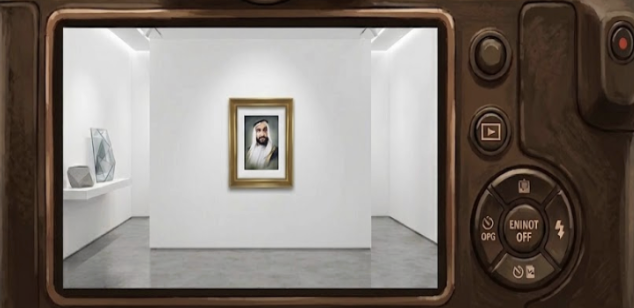
The concept of the game is to walk around and experience the museum, and each time an object is spotted, the player should position it inside their camera lens frame and capture it within a specified time to increase their score.
Here is an image that demonstrates my inspiration, from the Sheikh Zayed National Muesuem:
Embedded Sketch:
How it works:
The game starts with an instructions page to allow the user to understand what they are expected to do for the game to work. They press the start button and are positioned at the start of the maze. Players use the arrow keys to walk around smoothly and use their mouse pad to look around both sides for easier movement. The setup is structured in a way that gives the player different paths to take, like a maze would be, and includes different types of objects, from artworks to items placed throughout.
When an object is spotted, it should be centered in the lens frame and captured using the Enter button, and a capture sound is added for interactivity and a sense of reality. Each time an object is captured, the score increases depending on how early it is within the timer, the earlier the capture, the higher the score. Once the time is over, the player views their score and can press the play again button to restart the game.
An AI generated image to picture my ideas:
Reflection:
I am proud of my project overall, as working with WEBGL requires a lot of effort, and I feel like I was able to manage it well. I am particularly proud of creating the movement of the player, as it started off as a problem, but I was able to overcome it in the best way possible. The issue was that the arrow keys were not aligned with the movement and would keep switching, and I couldn’t look around. I then figured out that I should set each arrow key using sine and cosine code to allow each one to have its own behavior rather than mixing them up. I also used the mouseDragged function covered in class to be able to look around.
//Mouse movement to look around
function mouseDragged(){
  angle += movedX * 0.01;
}

//Player Movement using the keys
function movePlayer() {
  let nextX = player.x;
  let nextZ = player.z;

  if (keyIsDown(UP_ARROW)){
    nextX += sin(angle) * speed;
    nextZ -= cos(angle) * speed;
  }

  if (keyIsDown(DOWN_ARROW)){
    nextX -= sin(angle) * speed;
    nextZ += cos(angle) * speed;
  }

  if (keyIsDown(LEFT_ARROW)){
    nextX -= cos(angle) * speed;
    nextZ -= sin(angle) * speed;
  }

  if (keyIsDown(RIGHT_ARROW)){
    nextX += cos(angle) * speed;
    nextZ += sin(angle) * speed;
  }
Another part I am proud of, which was also a problem at first, was that the player would walk through the walls, not allowing the game to function as I intended and making it unrealistic. I followed tutorials about movement in WEBGL and was able to use a for loop and detection code to prevent that from happening. I also applied it to prevent players from moving outside the game floor area.
In walls class:
//Setup code to prevent walking through walls
  detect(px, pz, size){
    return(
    px + size > this.x - this.w/2 &&
    px - size < this.x + this.w/2 &&
    pz + size > this.z - this.d/2 &&
    pz - size < this.z + this.d/2
    );
  }
In sketch:
let blocked = false;

for (let wall of walls) {
  if (wall.detect(nextX, nextZ, playerSize)) {
    blocked = true;
    break;
  }
}
Overall, I am satisfied with the outcome of my work. However, there are some areas where I think I could improve in the future, mostly regarding the graphics. Perhaps I could add more advanced decor and curves to the walls to make it more modern, and I would also love to create the exterior design of the museum so that players could move outside and look at it as well.
References:
I started off by learning about the WEBGL Mode in order to be able to complete my project the way I want it to be, using these links:
https://p5js.org/reference/p5/WEBGL/
https://youtu.be/nqiKWXUX-o8?si=tSUSM77-Ie64E13u
To meet requirements, I used the slides covered in class and reviewed these links.
Go into fullscreen:
https://p5js.org/reference/p5/fullscreen/
Since I worked with WEBGL mode, I followed tutorials and reference links for each part:
Setting up the maze, with the floor and walls:
https://youtu.be/6TPVoB4uQCU?si=LFsx9b4IhB0HOYoW
Allowing the player to move around:
https://youtu.be/BW3D9WwalQE?si=144ULyiZDN_HCjMr
Add images and objects in the maze: