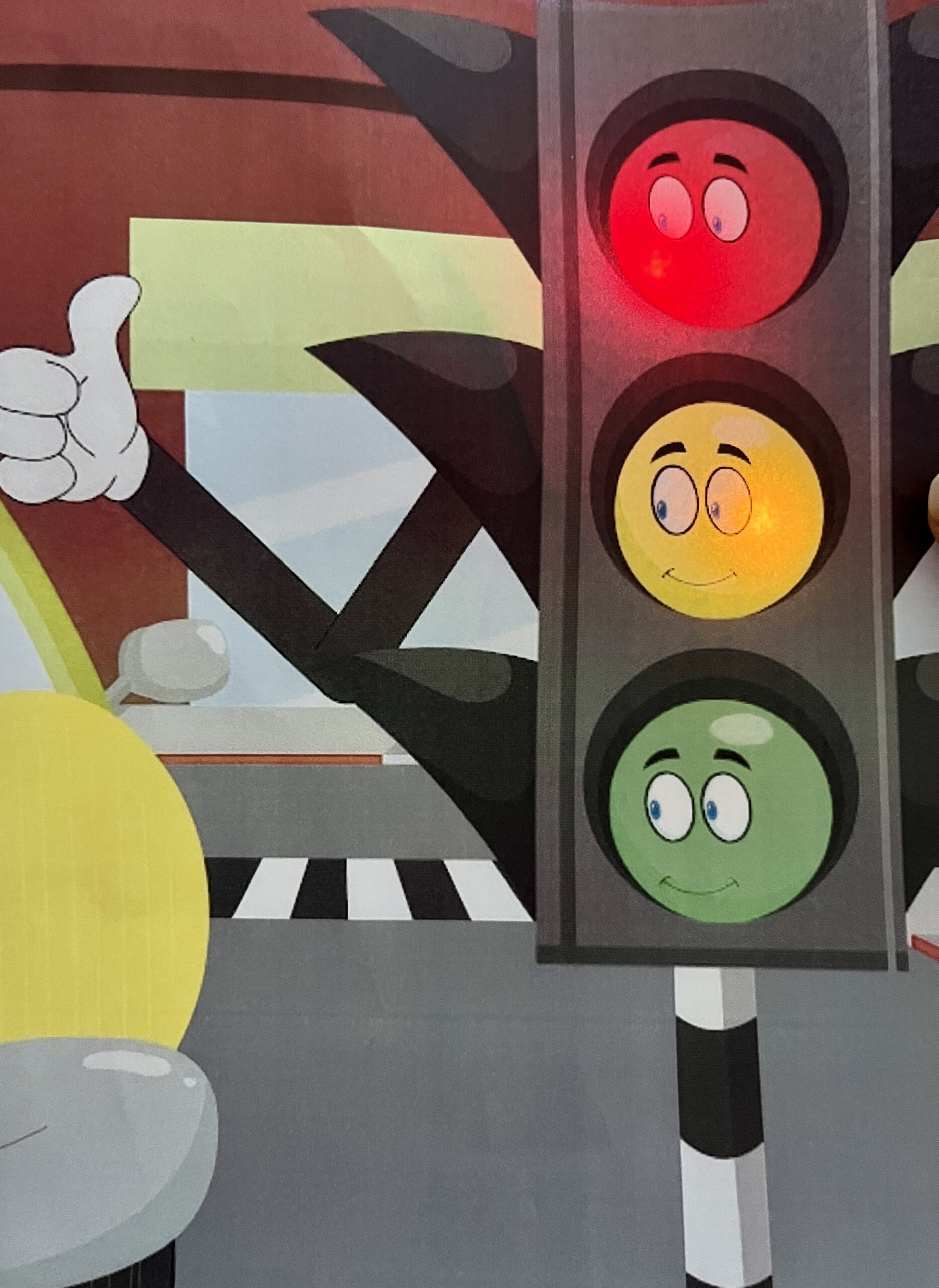
I tried to create an interactive traffic signal by integrating a push button and a potentiometer connected to two LEDs. Upon pressing the digital input push button, the red light illuminates, while the potentiometer, serving as the analog input, enables control over the brightness of the yellow light. This dual-input system represents a significant challenge, as initially, I could only manage them separately.
Reflection:
Coding proved to be an inspiring task, particularly in merging both analog and digital components seamlessly. Despite the initial difficulty, this project served as a valuable learning experience, providing insights into the intricacies of combining different inputs and coding for a cohesive interactive system. As I look ahead, the incorporation of the third color, red, looms as the next exciting phase, promising further growth and mastery of interactive design.
In this article, the author talks about things that often show up in projects using physical computing. They say we should see these things as a kind of creative playground, not as limits. It’s like having a favorite game on the playground – it’s familiar, but the real fun starts when you add your special twist. The article mentions the Mattel/Nintendo Power Glove from 1989, adding a bit of nostalgia. Despite being old, it shows how simple ideas, like tapping, can become exciting. This glove, though basic, laid the foundation for the fun interactions we see in drum gloves today. The Power Glove reminds us that even simple ideas can turn into cool and unique things with time.
The article rightly says that gloves, especially drum gloves, are almost as popular as theremin instruments. Drum gloves are fun because they connect to something everyone understands – tapping to make a rhythm. Unlike the abstract theremin, drum gloves have a familiar way of making sounds. Tapping gives a structured way to create notes, making it easy for people to use. This fits well with the idea in the article that common themes in physical computing can be a starting point for creative expression, not a block.
The Power Glove from 1989 is a great example. It’s simple but directly connects with gestures, like tapping, which laid the groundwork for the engaging drum gloves we have today. The Power Glove and drum gloves show a balance between what’s familiar and what’s new, making physical computing a creative playground where each new version adds to the story of interactive art.
“Making Interactive Art: Set the Stage, Then Shut Up and Listen”
In “Making Interactive Art: Set the Stage, Then Shut Up and Listen,” the writer offers valuable insights into interactive art, likening it to a performance rather than a finished painting or sculpture. This perspective aligns seamlessly with the encouragement from the first reading to see physical computing as a creative playground, where established themes act as a starting point rather than a constraint.
The advice that the author suggests to the audience what their course of action could be resonates deeply. It encourages artists to think beyond creating a static piece and consider how they can guide the audience to uncover their own stories and emotional interpretations. This aligns with the idea that the stage is set not just by the artist but evolves with the contributions of the audience. It’s a beautiful way of framing interactive art as a collaborative journey where the artist provides the stage, and the audience brings the performance to life.
In my opinion, this approach to interactive art introduces a refreshing shift from the traditional view of art as a one-way communication. It empowers the audience to be co-creators, transforming the artistic experience into a shared exploration. The emphasis on suggesting rather than dictating allows for a more organic and diverse range of interpretations, enriching the overall impact of the artwork. It reinforces the notion that true interactivity lies not just in the technology but in the dialogue between the artist, the work, and the audience.
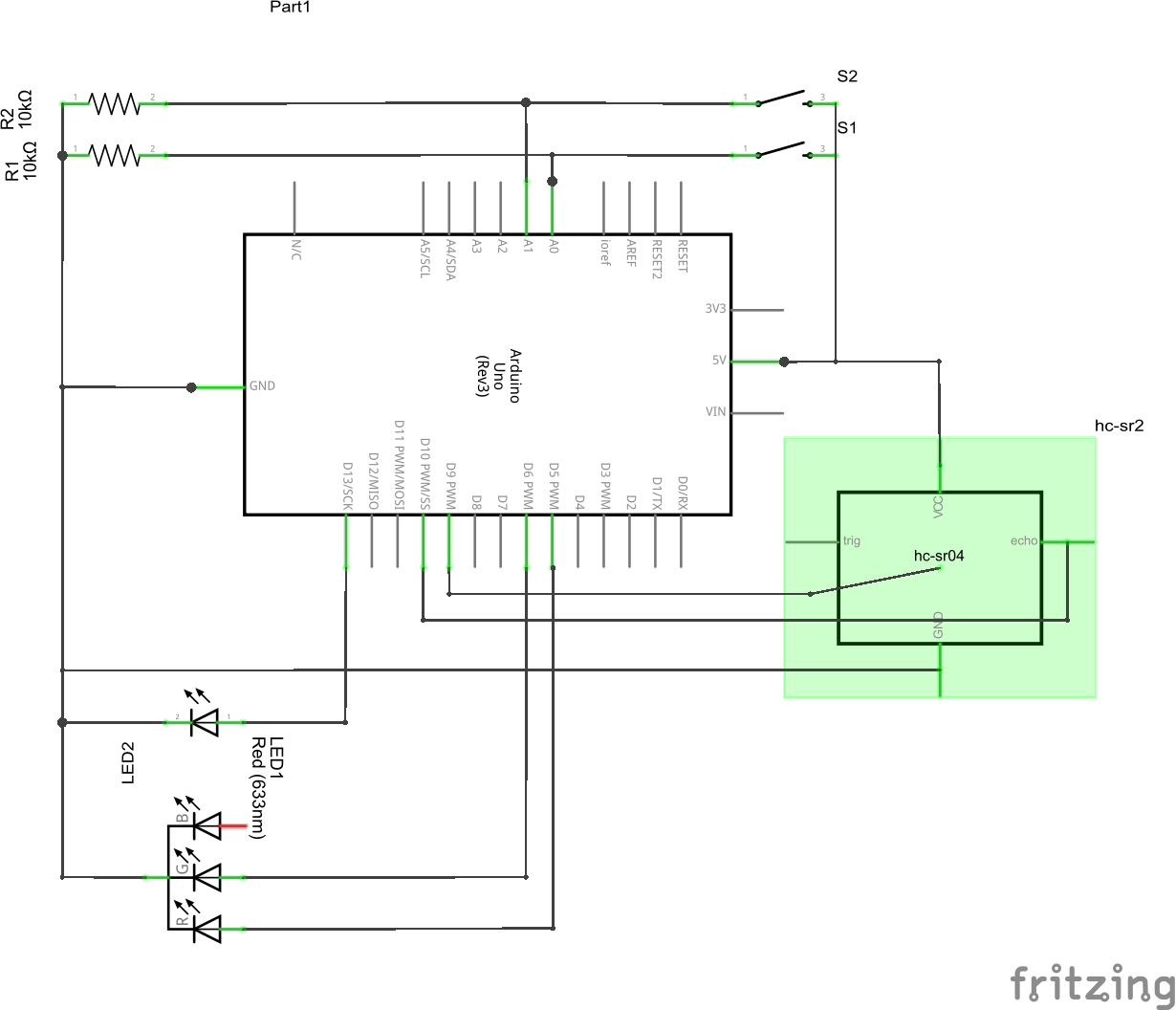
For this assignment, I used the ultrasonic sensor to make something like a parking sensor. If the distance is above a certain threshold, the LED displays green. If the distance is below the threshold, it gradually turns red along the distance of 20 centimeters. After that, the LED turns completely red. There are two switches used as input for digital data. One is this system’s overall switch, which shuts the entire system when open. Once it’s closed, a blue LED lights up indicating the system is functioning. The other button when pressed, records the current distance the sensor gets and stores this data as the new threshold.
Bret Victor’s perspective on the future of interaction design struck a chord with my own reflections on technological progress. Looking back at the portrayal of the future in movies, it’s clear that the evolution of technology often takes unexpected turns. The idea that inventors revolutionize existing technologies, rather than just refining them, makes sense. It’s a call to break free from envisioning the future as a mere extension of the present.
Consider the shift from fiction to reality in accessing information instantly. While the end goal remains the same, the path we took diverged significantly from those cinematic depictions. The emergence of the Internet and smartphones reshaped how we interact with information, emphasizing the need to actively shape the future rather than predict it.
I agree with Bret’s perspective, that he rehashes in his responses to “A Brief Rant on the Future of Interaction Design”, that we shouldn’t accept stagnation and minor improvements, and should still strive to achieve better design. Although touchscreens are a vision of the past come true, it would be staying in the past if we constrained the vision for future technology to what we have and know today. Touchscreens brought our vision and haptic senses together, and the user experience we can achieve through them is miles better than technology that we used to have. However, what if we were able to embed more senses into our technology? It’s hard to imagine, but that’s exactly the point. It’s easy to think about what we know already, but revolutionary ideas require exploring the unknown.
In this article, Bret Victor criticizes the mainstream vision for the future of interactive and technological advancements. His main arguments stem from a video created by Microsoft, “Productivity Future Vision,” that demonstrates how people could possibly interact with technology in the future. Mainly, I can understand why Bret Victor finds this vision unnecessary, and “a timid increment from the status quo, and the status quo, from an interaction perspective, is terrible.” Taking a step back to look at the big picture, the current technologies have been mainly developed with one main purpose in mind: simplifying tasks, allowing us to get from point A to point B in a minimal amount of steps. That is most likely why “Pictures behind Glass” became such a prominent theme in 21st-century technology. Using a finger on a small glass display minimizes the distance needed to interact with the GUI, allowing the computer to perform the tasks. Therefore, it is considered efficient.
Being raised in a digital age of technology, my generation had grown up with these “Pictures behind Glass” technologies, and they have become extremely intuitive for us to understand. Bret Victor, on the other hand, grew up in a different era where these technologies have not yet been developed. I believe that is a crucial factor to consider when trying to understand his opinion about the future of interaction design. I agree with a lot of the arguments he makes about how our hands are crucial tools for understanding the world and objects around us and the digital touch displays that we are so used to removing a significant portion of digital interaction. However, it is hard to imagine how one can combine physical response with digital computations in an efficient and effective way. One example of this that I recently saw was a new project on Kickstarter where a company developed a pen that operates just as a normal pen when you write notes. However, simultaneously converts the physical ink into a digital copy to one of your devices. Ultimately, I believe that Bret Victor does make a variety of strong arguments and suggestions as to how future interactive technologies should aim to perform, but I also believe that his vision differs significantly from those of the newer generations.
Responses and Follow-Up
Whilst responding to the most common questions and suggestions about the article, I believe that Bret Victor was able to elaborate on certain aspects of the article that were missing. For instance, he had clarified that the problem isn’t that these superficial ‘touch-screen’ technologies are prominent now, but rather he is worried that if we don’t address the need for more “hands on” interaction, then the future interaction designs will not be up to his ideology of what they should be. And with that, I can agree. Specifically, had had also mentioned the ideology from parents that their children can interact with an iPad but cannot tie their own shoelaces. I believe that this is actually a significant problem that we face in our societies. Each year, children are introduced to these technologies at a younger age than before, and consequently, their brains develop substantially differently from ours. There are two ways to look at it. For instance, if a child is neglected by their parents and is given a device to entertain themselves, the child will consequently search for comfort and entertainment in the digital realm. What makes this scary is that the companies that develop the applications that kids love so much have no interest in providing tools to better educate and help with the healthy mental development of children, but rather all they care about is their annual revenue. This leads to children adopting and forming bad habits through constant device usage and lack of physical hands-on interaction.
I believe that Victor’s responses helped me understand his perspective more thoroughly and consequently agree with his ideas. As humans, we love to simplify and make our daily lives for efficient, from the development of cars to get around faster to the development of modern smartphones to perform the equivalent of hundreds if not thousands of separate tasks from a few decades ago, all with one device. Of course, for mature individuals, these tools can be seen as a blessing in saving our precious and finite time left, but I believe they pose a much greater risk for the generations that are to come after us. As Victor deliberately mentions, our hands allow us to better understand the world around us, and when we teach our young ones to neglect the full potential of their hands and envision a future where even less tactile interaction will be better, I come to realize how unsettling the next decades can be.
Artists often provide detailed interpretations and instructions alongside their interactive pieces, potentially limiting participants’ freedom to interpret and engage. The author suggests that interactive art should be seen as a conversation starter, where the created environment or instrument is a catalyst for participants to take meaningful actions and derive their own understanding of the artist’s expression. This approach emphasizes the interactive nature of the art form and encourages a more open-ended and dynamic engagement between the artist, the work, and the audience. This also helps the artist to interact with the audience and get new perspectives and ideas which he/she could contribute to their new artworks. Giving the audience their space and freedom would actually change their perspective towards the artwork. Also the listening part mentioned by the author which is the next crucial step in creating interactive art. It involves actively listening to participants. Artists are encouraged to observe and interpret how individuals engage with the designed elements, noting emotional responses, comprehension levels, and overall reactions. The variety of responses, including excitement, indifference, or sharing newfound knowledge, is seen as part of an ongoing conversation between the artist and the audience. More than perfecting an interactive artwork, the performance phase is more important and significant because it involves the real-time, unpredictable responses of participants. During the performance phase, the artist witnesses how individuals interpret and engage with the interactive elements. This phase is a live, evolving dialogue between the artist’s creation and the audience’s reactions. It allows for a deeper understanding of the diverse ways people interact with and derive meaning from the artwork.
For this assignment i attempted to make temperature sensor readings using the TMP 36 , and controlling a set of LED’s with a potentiometer.
Temperature sensor components :
Four LED’s : blue, green, yellow, and red.
Temperature sensor TMP 36
Ten jumper wires
Four 330 ohm resistors
concept:
The TMP 36 is at first measuring the temperature of the room at the moment, the LED lights light up according to how warm or cool the environment is, as you can see from the video below, before placing my finger on the TMP 36 the temperature was ranging from 23 degrees to 24 degrees (yellow LED), after placing my finger on the sensor the temperature was reading a range of 26 degrees to 27 degrees Celsius (red LED).
Code :
const int sensorPin = A0;
const float baselineTemp = 18.5;


void setup() {
  // put your setup code here, to run once:

Serial.begin(9600);
for ( int pinNumber = 2; pinNumber < 6; pinNumber++)
{
  pinMode(pinNumber, OUTPUT);
  digitalWrite(pinNumber, LOW);
}


}

void loop() {
  // put your main code here, to run repeatedly:

int sensorVal = analogRead(sensorPin);

Serial.print("Sensor Value: ");
Serial.println(sensorVal);


float voltage = (sensorVal / 1024.0) * 5.0;

Serial.print(", Volts: ");
Serial.print(voltage);

Serial.print("' degrees C: ");
float temperature = (voltage - 0.5) * 100;
Serial.println(temperature);


if (temperature < baselineTemp + 1.5)
{
  digitalWrite(2, LOW);
  digitalWrite(3, LOW);
  digitalWrite(4, LOW);
  digitalWrite(5, LOW);

}


 else if (temperature >= baselineTemp + 1.5 && temperature < baselineTemp + 3)
 {
  digitalWrite(2, HIGH);
  digitalWrite(3, LOW);
  digitalWrite(4, LOW);
  digitalWrite(5, LOW);
 }


 else if (temperature >= baselineTemp + 3 && temperature < baselineTemp + 4.5)
 {
  digitalWrite(2, LOW);
  digitalWrite(3, HIGH);
  digitalWrite(4, LOW);
  digitalWrite(5, LOW);
 }


 else if (temperature >= baselineTemp + 4.5 && temperature < baselineTemp + 6)
 {
  digitalWrite(2, LOW);
  digitalWrite(3, LOW);
  digitalWrite(4, HIGH);
  digitalWrite(5, LOW);
 }

 else if (temperature >= baselineTemp + 6)
 {
  digitalWrite(2, LOW);
  digitalWrite(3, LOW);
  digitalWrite(4, LOW);
  digitalWrite(5, HIGH);
 }


delay(1);


}
Explanation :
As you can see above , i set the baseline temperature at 18.5 degrees . Every time the temperature increases by 1.5 degrees that determines which color amongst the four LED’s lights up, 2 (blue) the coolest, 3(green), 4(yellow), and 5 (red) the warmest.
Difficulties :
I had some issues with setting up the baseline temperature, where at first it did not work, i kept on changing the LOW’s and HIGH’s until it worked how it supposed to.
Potentiometer sensor components :
potentiometer sensor
Four LED’s
eleven jumper wires
Four 330 ohm resistors
Concept:
Using the potentiometer, it controlled how many LED’s light up starting from the first blue LED until the last red LED , using voltage as the A5 pin im using reads the voltage from 0 to 1023 volts.
Readings:
Code :
int potPin = A5 ;
int led1Pin = 2 ;
int led2Pin = 3 ;
int led3Pin = 4 ;
int led4Pin = 5 ;


void setup() {
  // put your setup code here, to run once:

pinMode(potPin, INPUT);
pinMode(led1Pin, OUTPUT);
pinMode(led2Pin, OUTPUT);
pinMode(led3Pin, OUTPUT);
pinMode(led4Pin, OUTPUT);
Serial.begin(9600);

}

void loop() {
  // put your main code here, to run repeatedly:

int potMeasure = analogRead(A5);
Serial.println(potMeasure);

if (potMeasure < 256 )
{
  digitalWrite(led1Pin, HIGH);
  digitalWrite(led2Pin, LOW);
  digitalWrite(led3Pin, LOW);
  digitalWrite(led4Pin, LOW);
}

else if (potMeasure < 512)
{
 digitalWrite(led1Pin, HIGH);
  digitalWrite(led2Pin, HIGH);
  digitalWrite(led3Pin, LOW);
  digitalWrite(led4Pin, LOW);
}


else if (potMeasure < 768)
{
 digitalWrite(led1Pin, HIGH);
  digitalWrite(led2Pin, HIGH);
  digitalWrite(led3Pin, HIGH);
  digitalWrite(led4Pin, LOW);
}


else if (potMeasure < 1024)
{
 digitalWrite(led1Pin, HIGH);
  digitalWrite(led2Pin, HIGH);
  digitalWrite(led3Pin, HIGH);
  digitalWrite(led4Pin, HIGH);
}
}
Explanation :
Starting at a low range of 256 volts, if pot measure is less than this measure LED 1 pin will turn on therefore, every time this range increases by 256 the other LED’s will turn on respectively until the last LED which stops at a range of 1024 volts.
Thoughts :
I enjoyed creating this assignment, but i would like to create something more creative and complex in the coming up assignments.
I believe that both of these readings highlight two important facets of physical computing.
Physical Computing’s Greatest Hits (and Misses) is an informative piece that aims to categorize (and explain) some of the most notable genres of physical computing projects. In the preamble to the piece, in which the author states that despite certain themes recurring, it doesn’t mean that the projects that use those ideas are unoriginal. In fact, they go on to assert that these forms of interaction allow for a lot of innovation and creativity. In my opinion, this is incredibly important, as it reminds us of a key principle in physical computing: the sensory input need not aim to be unique, but what we do with that input should.
Making Interactive Art: Set the Stage, Then Shut Up and Listen highlights a second key component of physical computing. Physical computing is inherently an interactive paradigm and necessitates a user-computer interaction. It might be tempting to provide clear instructions or an elaborate backstory to the project, but part of the beauty of interactive artworks is the limitless ways one can play around with them. Letting the user explore the project itself is the only way to truly realized the potential of a physical computing project.
The reading “Physical Computing’s Greatest Hits (and misses)” delves into the most popular physical computing projects over time. As I was going through the different project creations, I realized that the technology used in several of these would be very useful for people with disabilities. It would allow them to communicate and interact with others more easily, along with performing different activities without the need for any additional assistance. Certain projects that come to mind for this include the body-as-cursor and hand-as-cursor. Someone who is a paraplegic or quadriplegic would be able to express themselves more easily with these projects. Off the top of my head, I instantly thought of Stephen Hawking and how he has used a similar technology to communicate and express himself without moving any part of his body. The only thing I would like to add is that I wish we would’ve also gotten the point of view of someone who is not familiar with physical computing projects to get their take on what they think is the most popular or most beneficial of these projects. That being said, I appreciate how the reading informs users that just because a project has already been done by someone that does not mean that you can’t make it your own with just a few changes.
The reading “Making Interactive Art: Set the Stage, Then Shut Up and Listen” delves into the creation of interactive and interpretive art and informs the readers how the artist’s job is only to create and that they should leave it to the audience to interpret it however they like. This reading has made me realize how many artworks I’ve seen at shows and museums with interpretations provided as well. Though I didn’t think much about it at the time, I now wish I had been able to interpret it on my own as that would’ve made those artworks more personal to me and my experience. That being said, the artwork belongs to the artist and they have every right to do with it as they please. I believe if an artist wishes to provide an interpretation with their artwork, they have every right to do so, and the audience can’t be mad about it. I would also add that in the digital world of today, anyone can easily Google the interpretation of any artwork they don’t understand, so it would be much simpler to just provide the interpretation with the artwork in the first place. This would save the iPad generation a lot of time Googling the answer.
These readings both delve into the end-user experience with different projects. The first reading explains how people interpret different physical computing projects and the second reading explains how people interpret different interactive artwork. Both the readings also emphasize how no matter what each project or artwork was made for, everyone can use or interpret them according to their own needs and abilities.
I wanted to highlight the juxtaposition of “Making Interactive Art: Set the Stage, Then Shut Up and Listen” and “Physical Computing’s Greatest Hits (and misses)” as it offers a comprehensive view of the delicate balance required in the realm of interactive art and physical computing. The former reading emphasizes the importance of creating a space for open interpretation, urging artists to resist the urge to over-explain their creations. I think this really resonates with the idea that true interactive art is a living conversation, where the audience actively contributes to the experience. On the other hand, the latter, showcasing recurring themes in physical computing projects, reinforces the notion that repetition doesn’t equate to stagnation but rather serves as a canvas for individual interpretation and innovation. Themes like theremin-like instruments or video mirrors may be recurrent, but each iteration offers a unique perspective, inviting creators to infuse their individuality into well-trodden paths.
What stood out the most to me was the encouragement to embrace recurring themes not as constraints but as opportunities for creative expression. The notion that physical computing provides a playground for creativity, as expressed in response to “Physical Computing’s Greatest Hits (and misses),” aligns seamlessly with the idea of setting the stage and letting the audience take the spotlight. I think this serves a profound reminder that even within established themes, there is ample room for exploration and originality. Hence, the blend of such perspectives encourages a dynamic approach to interactive art, where established concepts serve as a foundation rather than a limitation, and the true beauty emerges from the fusion of technology, creativity, and the unique interpretations of those engaging with the art.