All Posts

Week 10 Instrument

Video: https://youtu.be/d6cVEQlEJnk

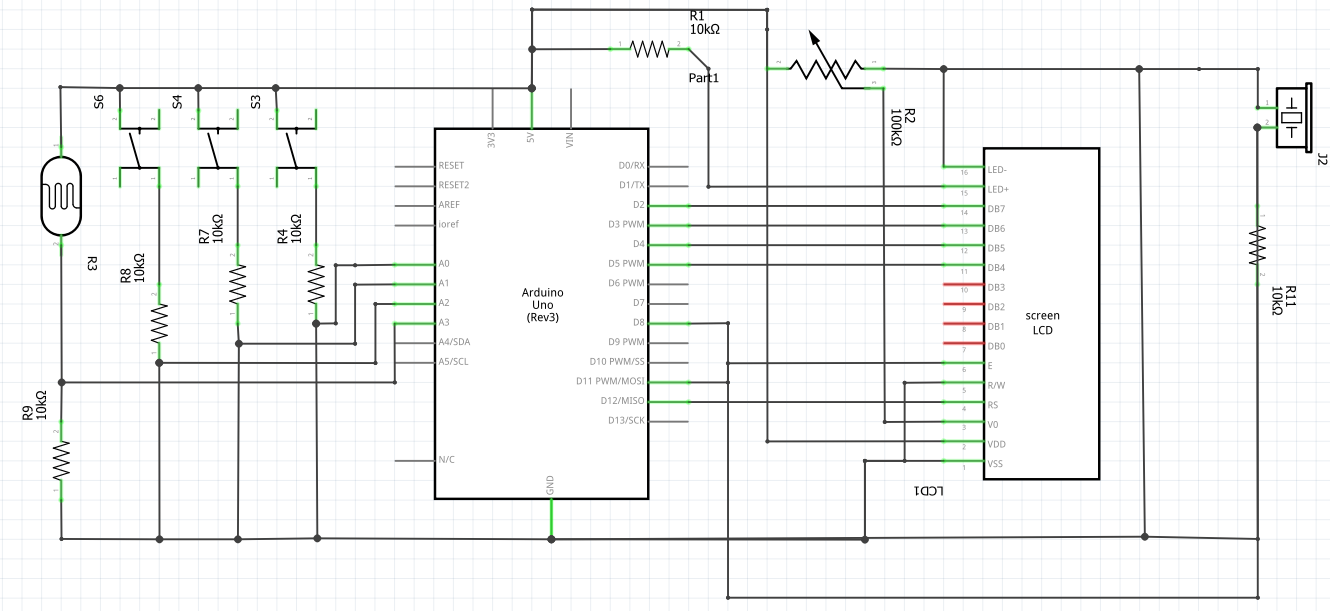
For our group assignment, we weren’t sure in what way a sensor could be implemented to generate musical notes, so we first brainstormed on an instrument on which we could base this assignment: the accordion. To replicate the keys, we decided to use switches (buttons) and for “bellows” we decided on the flex sensor. We first planned out our schematic, first mapping out the switches, resistors then the analog (connecting) wires. However when actually delving into the construction of the breadboard and subsequently the coding aspect, we ran into a few problems that required us to improvise. We first realized through using the serial monitor that the output generated by the flex sensor was incredibly jittery and inconsistent. It was hard to make out a constant value range. Hence we decided to use an alternative sensor: the photoresistor. Ultimately our approach was predominantly to improvise. Once we had resolved our main code, we decided to utilize the LCD, on a whim, to show “:)” or “:(” pertaining to specific conditions. This required us to do some research on how the LCD is connected to the breadboard, and the code used to display characters: https://docs.arduino.cc/learn/electronics/lcd-displays

HOW IT WORKS:
3 buttons play different notes. The range in tone of the note varies according to the photoresistor – the more the light is conceived, the higher the note is played. Subsequently, the LCD shows “:)” when the tone frequency, determined by the analog reading from the flex sensor, is higher than the previous frequency; otherwise, it displays “:(“. This comparison is specific to each color (red, green, blue), and the frequency values are mapped accordingly.

Schematic:
Arduino Code:

// include the library code:
#include <LiquidCrystal.h>

// initialize the library by associating any needed LCD interface pin
// with the arduino pin number it is connected to
const int rs = 12, en = 11, d4 = 5, d5 = 4, d6 = 3, d7 = 2;
LiquidCrystal lcd(rs, en, d4, d5, d6, d7);

int buzzerPin = 8;
int redpin = A0;
int greenpin = A1;
int bluepin = A2;
int phopin = A3;
float prev = 0;

void setup() {
  // put your setup code here, to run once:
  pinMode(buzzerPin, OUTPUT);
  pinMode(redpin, INPUT);
  pinMode(greenpin, INPUT);
  pinMode(bluepin, INPUT);
  pinMode(phopin, INPUT);  //
  lcd.begin(16, 2);
  Serial.begin(9600);
}

void loop() {
  // put your main code here, to run repeatedly:
  int redState = digitalRead(redpin);
  int greenState = digitalRead(greenpin);
  int blueState = digitalRead(bluepin);
  int flexState = analogRead(phopin);  // 350 to 1000
  float redvariance = 130.8 + map(flexState, 350, 1050, 0, 130.8);
  float greenvariance = 261.6 + map(flexState, 350, 1050, 0, 261.6);
  float bluevariance = 523.2 + map(flexState, 350, 1050, 0, 523.2);
  if (redState == HIGH) {
    tone(buzzerPin, redvariance);
    if (higherThanPrev(prev, redvariance)) {
      lcd.print(":)");
    } else {
      lcd.print(":(");
    }
    prev = redvariance;
    delay(100);
  } else if (greenState == HIGH) {
    tone(buzzerPin, greenvariance);
    if (higherThanPrev(prev, greenvariance)) {
      lcd.print(":)");
    } else {
      lcd.print(":(");
    }
    prev = greenvariance;
    delay(100);
  } else if (blueState == HIGH) {
    tone(buzzerPin, bluevariance);
    if (higherThanPrev(prev, bluevariance)) {
      lcd.print(":)");
    } else {
      lcd.print(":(");
    }
    prev = bluevariance;
    delay(100);
  } else {
    noTone(buzzerPin);
  }
  lcd.clear();
}

bool higherThanPrev(float prev, float now) {
  return prev < now;
}

Overall we were quite pleased with the end result, even more so with our LCD addition. However, we felt as though it was difficult to classify our project as a musical instrument since, despite the complex interplay between analog/ digital sensors, the sounds produced were less “musical” in a sense. Furthermore, we realized that whilst the tone of the sound produced by the blue switch was very clearly affected by the amount of light perceived by the photoresistor, this was not the case for the red switch. It was much harder to distinguish a change in the tone of the sound. We believe it is because the red button signals the C note in the 3rd octave, and the blue one signals the C note in the 5th octave. Since the frequency of octaves is calculated with the formula “Freq = note x 2N/12”, the changes in frequencies mapped to the notes will be more significant as octaves increase. For future improvements, especially with regards to its musicality, perhaps we could have each button play a series of notes, hence the 3 switches would produce a complete tune. Rather than mapping ranges for the photoresistor, we could choose a (more than/ less than) specific value. For example, in a dark room, the complete tune would be played in a lower key whilst in a bright room, the tune would play in a higher key.

Week 10 : Assignment (Mudi and Mariam)

Concept :
For our musical instrument, we decided to craft an innovative instrument using an Ultrasonic sensor, a button, and a Buzzer. To kick off the musical vibes, just gently hold down the button. Now, here’s where it gets interesting when you wave your hand in front of the ultrasonic sensor at varying distances it unveils a different array of notes!


IMG_4039


Code snippet :

int trig = 10;
int echo = 11;
int buttonPin;
long duration;
long distance;
void setup() {
pinMode(echo, INPUT);
pinMode(trig, OUTPUT);
Serial.begin(9600);
}
void loop() {
digitalWrite(trig, LOW); //triggers on/off and then reads data
delayMicroseconds(2);
digitalWrite(trig, HIGH);
delayMicroseconds(10);
digitalWrite(trig, LOW);
duration = pulseIn(echo, HIGH);
distance = (duration / 2) * .0344; //344 m/s = speed of sound. We're converting into cm
int notes[7] = {261, 294, 329, 349, 392, 440, 494}; //Putting several notes in an array
// mid C D E F G A B
buttonPin = analogRead(A0); 
if (distance < 0 || distance > 50 || buttonPin < 100) { //if not presed and not in front
noTone(12); //dont play music
}
else if ((buttonPin > 100)) { //if pressed
int sound = map(distance, 0, 50, 0, 6); //map distance to the array of notes
tone(12, notes[sound]); //call a certain note depending on distance
}
}


Challenges:
I wouldn’t call this one a challenge but more of a hiccup really was that we found ourselves repeatedly unplugging and replugging them due to connectivity issues and the Arduino kept on giving errors.

Week 10 – Reading Reflection

A Brief Rant on the Future of Interaction Design

This guy really doesn’t like screens, so much so that he calls screens “Pictures Under Glass”, meaning that they provide no connection to the task that one is performing. And to be honest, that is true. Even while typing this response, I can feel the keys under my fingertips, knowing where each key is without looking at it. I can tell exactly how much pressure I need to apply on each key for it to type something. I hear a clicking sound whenever I press a key, and I can anticipate which key produces which sound before I even press it with my fingers. I honestly love my keyboard because of how it feels to the touch, even though it’s not exactly very dynamic. I can’t say the same for my phone screen.

This guy suggests that screens were never meant to be the final all-encompassing technology of interaction design, but they are merely a transitional technology. After all, what else in the natural world do we use the gesture of sliding our fingers for? Even the act of making a sandwich requires more interaction than screens, the supposed Interface of the Future.

I find this vision of the future of interaction design very interesting, because I’ve never really thought about how much screens on handheld devices actually ignore our very hands before. I am curious to explore some other visions and ideas that consider this incapacity of screens and provide other exciting possibilities for the purpose of interaction design.


Responses

This guy mentions the idea of finger-blindness here which really caught my eye. Finger blindness, as he puts it, is when you don’t use your hands to their full potential for doing what they were meant to do (not swiping away at screens) making it harder to attach meaning and value to the act of touching something, which is a scary thought. Other than that, I love how this guy addresses these responses with humor and also makes sense at the same time. He reiterates that screens aren’t necessarily bad – for now. It’s just that we shouldn’t be limiting ourselves to just screens when we think about future advancements in technology but come up with other receptive devices that appreciate the intricacy of our hands. After all, humans deserve so much more than just screens.

Noctune Noir Week 10

Group Members: Batool Al Tameemi, Arshiya Khattak

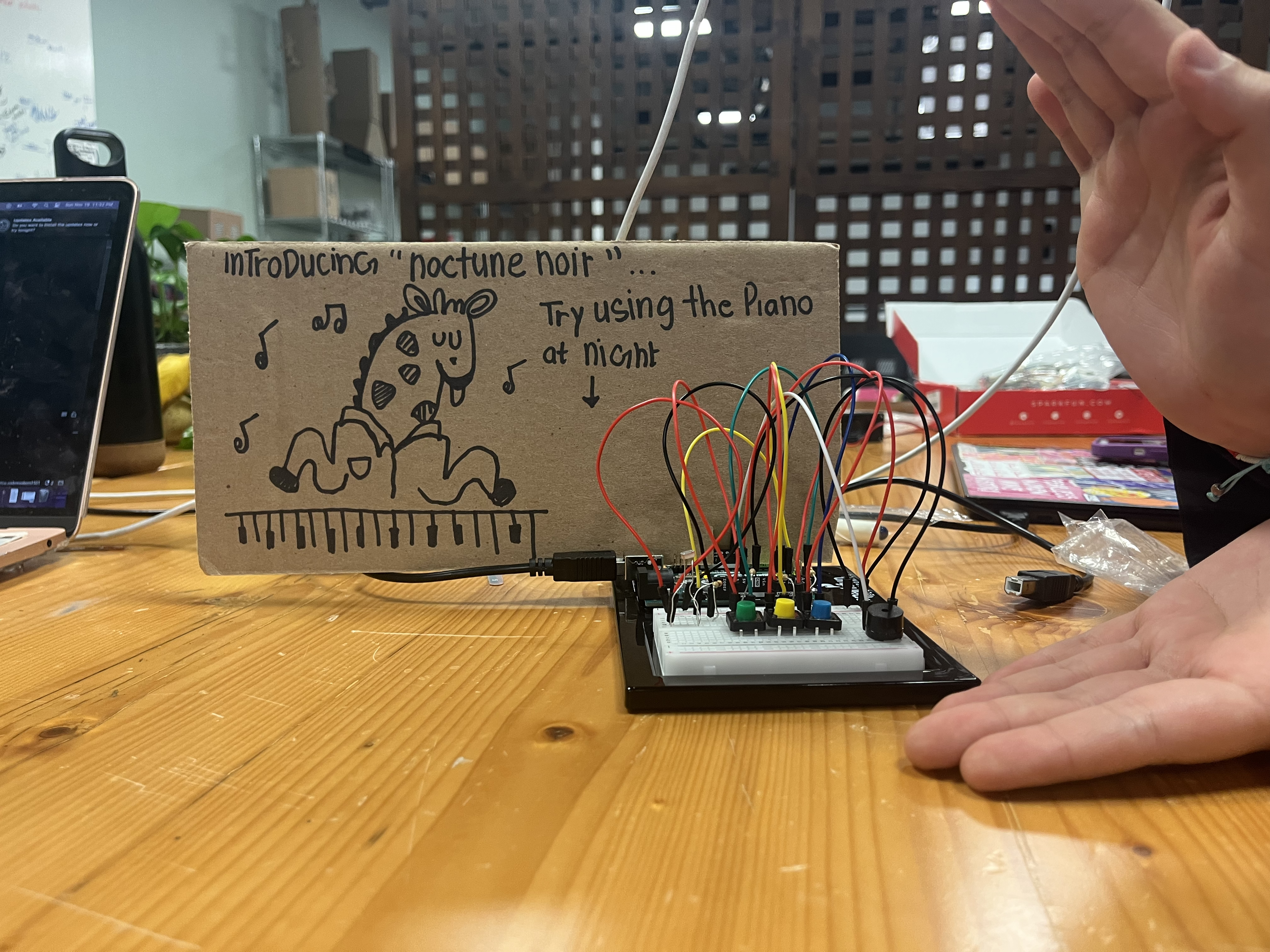
Concept: For this project, we knew we wanted to implement something piano-esque, i.e. pressing buttons and implementing different sounds. Essentially, it is a simple Arduino circuit that uses three buttons and a buzzer, playing a note every time a button is pressed. However, we wanted to make the concept a little more fun, so we decided to add a photocell (it was also a cool way to add more notes than just 3). When the photocell is uncovered, the buttons play higher frequency notes (A flat, G, and F) and when it’s covered, it plays lower frequency sounds (D, C, and B). The idea is in daylight the keys play more upbeat-sounding tones, while at night they make more sombre-sounding noises.

Video & Implementation


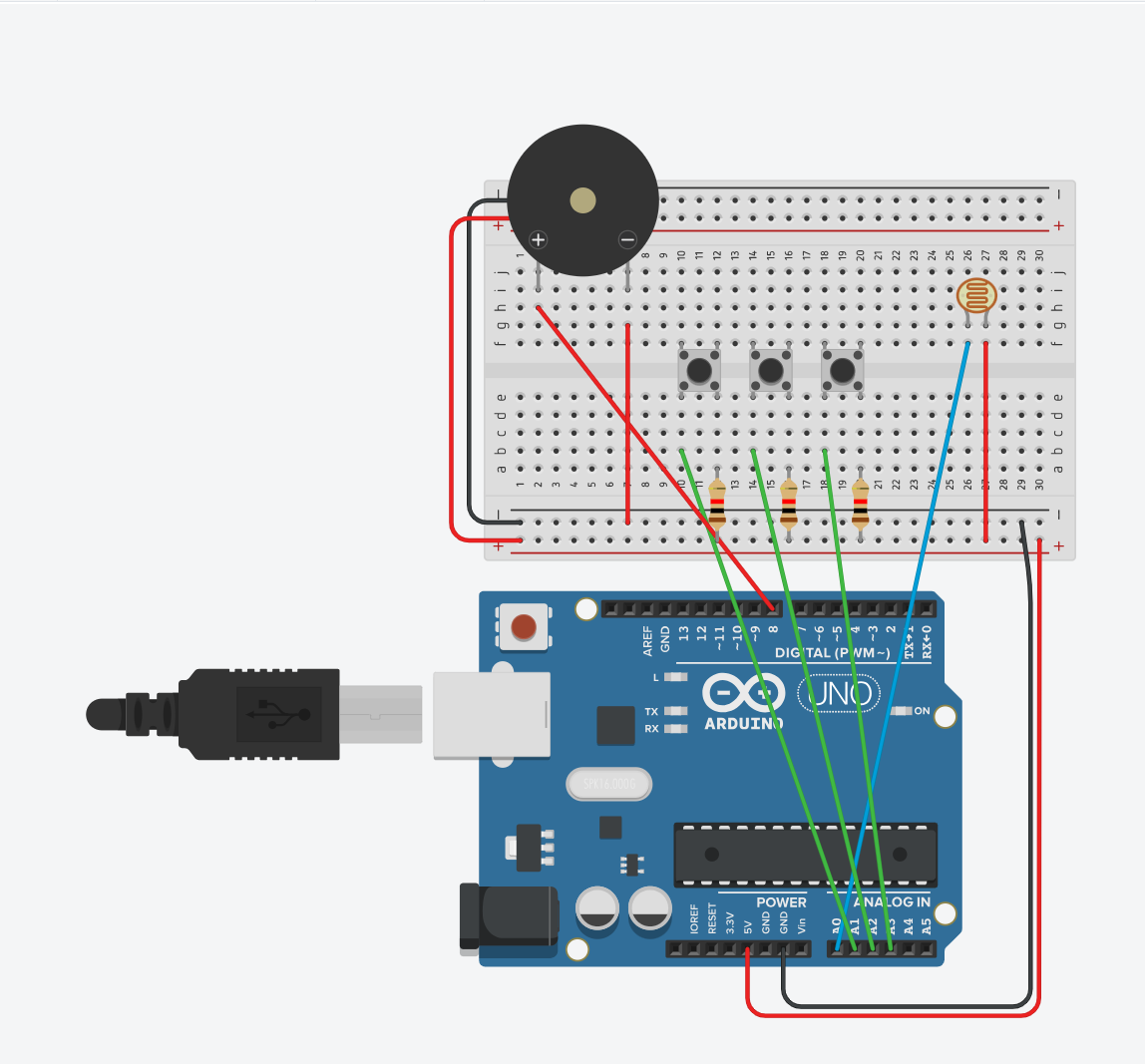
TinkerCad Diagram:

The code for this project was relatively straightforward. The frequency equivalent in Arduino for the notes were taken from this article.

int buzzPin = 8;
int keyOne = A1;
int keyTwo = A2;
int keyThree = A5;
int lightPin = A0;
int brightness = 0;
int keyOneState, keyTwoState, keyThreeState;

int flexOneValue;

void setup() {
  Serial.begin(9600);
}

void loop() {
  brightness = analogRead(lightPin);
  keyOneState = digitalRead(keyOne);
  keyTwoState = digitalRead(keyTwo);
  keyThreeState = digitalRead(keyThree);
  Serial.println(brightness);
  if (brightness < 45) {
    if (keyOneState == HIGH) {
      // tone(buzzPin, 262);
      playTone(587); //D flat
    } else if (keyTwoState == HIGH) {
      playTone(523); //C
    } else if (keyThreeState == HIGH) {
      playTone(494);
    }
  } else {
    if (keyOneState == HIGH) {
      // tone(buzzPin, 1000, 400);
      playTone(831); //A
    } else if (keyTwoState == HIGH) {
      playTone(784); //G
    } else if (keyThreeState == HIGH) {
      playTone(698);
    }
  }
}


void playTone(int frequency) {
  int duration = 200;
  tone(buzzPin, frequency, duration);
  delay(duration);
  noTone(buzzPin);
}

Future Highlights and Improvements

One thing that we both thought would be cool to implement on a longer form of this project would be to have different levels of brightness play different notes, rather than just having two states. It would also be cool to incorporate different forms of input, such as the flex sensor (we tried to use it but it was a bit buggy so we scrapped the idea).

week 10: musical instrument

Group Members: Batool Al Tameemi, Arshiya Khattak

Concept: For this project, we knew we wanted to implement something piano-esque, i.e. pressing buttons and implementing different sounds. Essentially, it is a simple Arduino circuit that uses three buttons and a buzzer, playing a note every time a button is pressed. However, we wanted to make the concept a little more fun, so we decided to add a photocell (it was also a cool way to add more notes than just 3). When the photocell is uncovered, the buttons play higher frequency notes (A flat, G, and F) and when it’s covered, it plays lower frequency sounds (D, C, and B). The idea is in daylight the keys play more upbeat-sounding tones, while at night they make more sombre-sounding noises.

Video & Implementation


The code for this project was relatively straightforward. The frequency equivalent in Arduino for the notes were taken from this article.

int buzzPin = 8;
int keyOne = A1;
int keyTwo = A2;
int keyThree = A5;
int lightPin = A0;
int brightness = 0;
int keyOneState, keyTwoState, keyThreeState;

int flexOneValue;

void setup() {
  Serial.begin(9600);
}

void loop() {
  brightness = analogRead(lightPin);
  keyOneState = digitalRead(keyOne);
  keyTwoState = digitalRead(keyTwo);
  keyThreeState = digitalRead(keyThree);
  Serial.println(brightness);
  if (brightness < 45) {
    if (keyOneState == HIGH) {
      // tone(buzzPin, 262);
      playTone(587); //D flat
    } else if (keyTwoState == HIGH) {
      playTone(523); //C
    } else if (keyThreeState == HIGH) {
      playTone(494);
    }
  } else {
    if (keyOneState == HIGH) {
      // tone(buzzPin, 1000, 400);
      playTone(831); //A
    } else if (keyTwoState == HIGH) {
      playTone(784); //G
    } else if (keyThreeState == HIGH) {
      playTone(698);
    }
  }
}


void playTone(int frequency) {
  int duration = 200;
  tone(buzzPin, frequency, duration);
  delay(duration);
  noTone(buzzPin);
}

Future Highlights and Improvements

One thing that we both thought would be cool to implement on a longer form of this project would be to have different levels of brightness play different notes, rather than just having two states. It would also be cool to incorporate different forms of input, such as the flex sensor (we tried to use it but it was a bit buggy so we scrapped the idea).

week 10: reading reflection

Last semester, I took a core class called Touch that discussed the very phenomenon Bret Victor is discussing in A Brief Rant on the Future of Interactive Design. In the class, we took time to understand the sheer capability of human touch and the richness of sensory experiences. Inevitably, we also discussed how modern technology is a disservice to the human tactile and proprioceptive experiences, and could even be contributing to the dullness of our sensory capabilities. Needless to say, I believe Victor’s annoyance at the ‘Pictures Under Glass’ world is very understandable and even justified. This might sound like a claim coming from an angry old boomer, but I genuinely believe most people in today’s world (unless they make the effort to seek it) have extremely limited haptic experiences. We live in an era where the current technology renders our haptic system obsolete. I’d even say that this lack is felt to some capacity in individuals, as you often find people gravitating to objects that are old-fashioned, or even cumbersome, just for the vibes or the aesthetic. Mechanical keyboards, polaroid and film cameras, and even flip-phones. This is because humans were inherently made to touch and feel.

In his follow up, Victor also brings up a point about how using touch-screens is easy because they have been dumbed down enough to be used by toddlers. He says that adults deserve “so much more”, implying that multimodal experiences need to be made for adults. However, I find it important to point out that any sort of primitive interactive can be performed by a child – it’s just that in this day and age, pictures under the glass are all we have. Children deserve more as well, and there should be research on technology as such.

Week 10 | Musical Instrument

Instrument: piano.

Team members:  Fady John (fje3683) and Victor Alves Gomes Nadu (va2269).

Concept

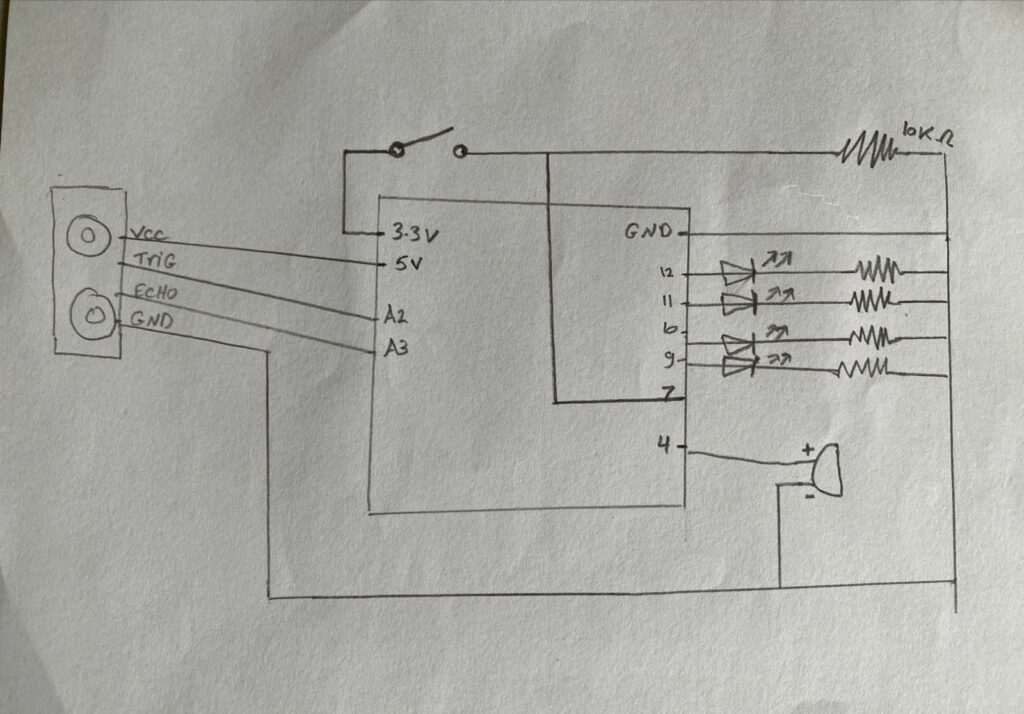
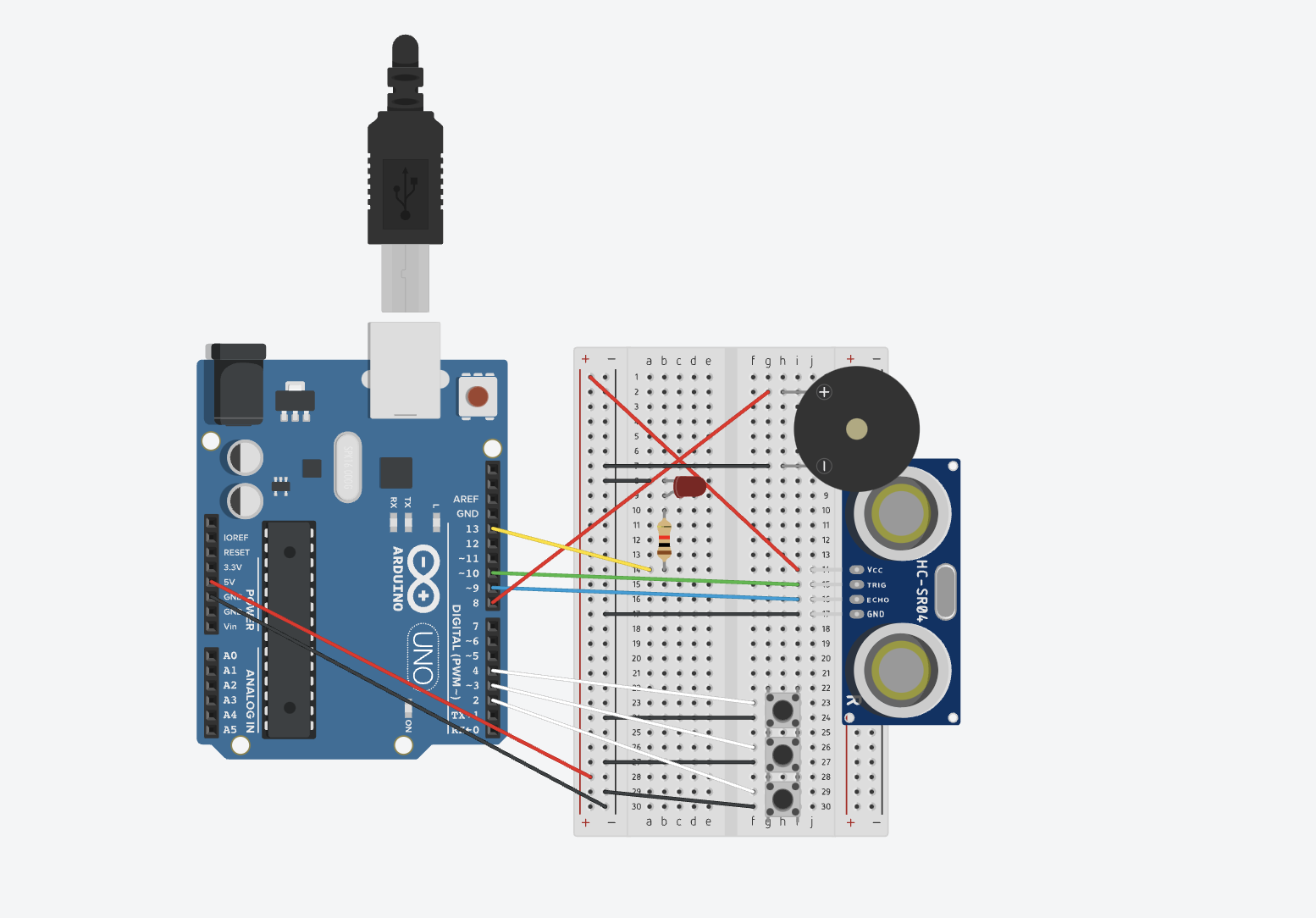
For our instrument project, we have decided to create a piano that plays different tones of the musical scale depending on the measured distance that someone is from the sensor. To build the instrument on the breadboard, we utilized an ultrasonic sensor, LEDs, resistors, and jumper wires, creating an interactive and dynamic musical experience. The analog ultrasonic sensor was responsible for measuring the distance, allowing for an intuitive interaction with the piano. As the user moves closer or farther away, the musical output changes, providing a unique take on the instrument. As for the LEDs, they add a visual element to the project besides also offering an understanding of the distance-based musical scale since they light up corresponding to the played notes.

Circuit Schematic

Figure 1

Code

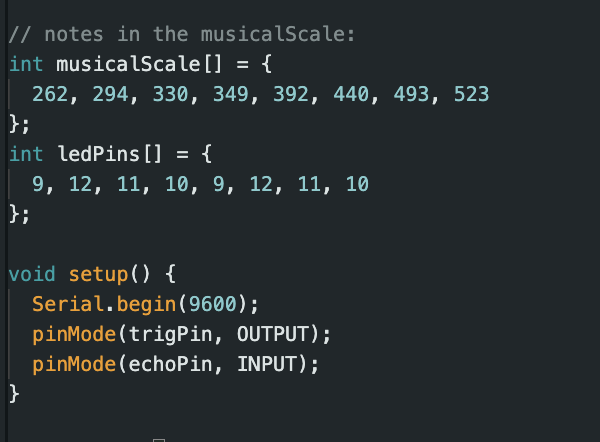
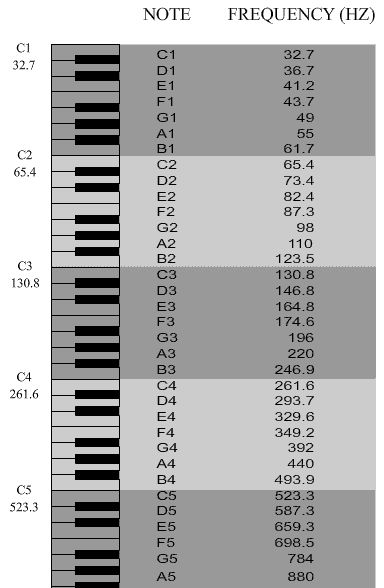
In the code, we defined the specific pins used for each LED and provided the notes in the musical scale in the form of an array. Specifically, we have used the tones from C4 to C5 in the musical scale as shown in figure 3 below.

Figure 2
Figure 3


Reflections and improvements

Initially, we planned to create drums, but we ended up settling on a piano since that was a more feasible and practical instrument. As for improvements, currently, the distance sensor is not that accurate, which is something that could be worked on. Other than that, we have managed to create something fun and so we are proud of our work.

Week 10 – response

Weekly Response

We’ve made significant strides in achieving much of what was demonstrated, but it hasn’t reached the level of convenience we hoped for. Take Siri on iPhones, for instance. Despite its heavy advertisements, it’s not as frequently used in reality and isn’t convenient enough to be  highlighted as an important feature. Its limited usability in public or noisy settings restricts its practicality. Similarly, the flashy concept of drawing in the air showcased in the video lacks real-world applicability. In professional settings, more practical, industrial-grade alternatives would likely be preferred.

However, considering the video was made nine years ago, it serves as a benchmark for our progress toward the creator’s vision. The idea of a singular device for all tasks is closer to reality today. Many functionalities showcased, like summoning a taxi, scheduling appointments, using voice commands for messages, and even unlocking a Tesla car, are now accessible through modern phones. While data isn’t projected on transparent glass yet and smart glasses aren’t widely available, we’re moving towards more advanced technologies where convenience triumphs over merely looking impressive. The focus is shifting to inventions that truly serve convenience rather than flashy devices with limited practicality.

Week 10 | Reading Reflection

Thinking about the Microsoft Productivity Vision video and Bret Victor’s thoughts, it feels like there’s a big question about where technology is heading. The video shows a future where everything is super connected and digital, but it made me worry about losing the real experiences that make us human. Bret Victor’s point about wanting more tangible and inclusive interactions with technology makes sense. He’s saying that we shouldn’t sacrifice the good things about being human just to make technology more efficient.

It’s interesting to note that Victor grew up in a different time, which shapes his views. I get that the ‘Pictures behind Glass’ way of doing things is familiar and easy, especially for someone like me who grew up in the digital age. Still, Victor’s idea of finding a balance between the physical and digital world seems like a smart move. The challenge is to make technology work with us, enhancing our experiences instead of taking away from them. Looking at new innovations, like a pen turning physical notes into digital copies, shows a step in that direction. In short, Victor’s thoughts push us to think about how we can have the best of both worlds in our tech-filled future.

As I dove into the second article, what struck me was how people had such different reactions to where interactive media is headed. One response “My child can’t tie his shoelaces, but can use the iPad.” shows the influence of technology on people. It’s just a simple example about a child using ipad but it has more beyond it. Our interaction with technology is a double-wedged weapon. Hence, we should carefully try to use technology to have a positive impact on our life rather than negatively affecting it.

Week 10 – Musical Instrument!

Concept:
Our musical is sort of a 3 note piano with 3 octaves. There are three buttons that each play a specific note (A, B and C), and an ultrasonic sensor to measure the distance which in turn specifies the octave the user wants to play the notes in (3,4,5). The nearest interval plays the notes in the third octave, the next plays the notes in the fourth interval which sounds higher than the first interval and the last interval plays the notes in the fifth interval which sound higher than the middle interval. The buttons are controlled by switches that act as our main digital input and trigger specific notes depending on the secondary input which is the analog input from the ultrasonic sensor that specifies the octave to play the notes. We have also included an LED light that blinks when the instrument is first started and when the user has exceeded the range of the input from the ultrasonic sensor.

Notes played: A3, A4, A5, B3, B4, B5, C3, C4, C5.

Process & Highlights:
It was an interesting process trying to figure out how to connect everything together the right way and to get the ultrasonic sensor to work as expected, but once we figured everything out it was pretty easy to follow through the code. It helped to work as a team because we brainstormed the idea together and worked on the logic of the code and implemented it together which was more fun than working individually. I would say the highlight was finally getting it to work the way we wanted it to.


Here is a video demo of our instrument:

Code:

const int trigPin = 9;
const int echoPin = 10;
const int ledPin = 13;
const int buzzerPin = 8;
const int switchPin1 = 2; // Pin for the first switch
const int switchPin2 = 3; // Pin for the second switch
const int switchPin3 = 4; // Pin for the third switch

float duration, distance;

// Melodies
#include "pitches.h"

int melody11 = NOTE_C3;
int melody12 = NOTE_C4;
int melody13 = NOTE_C5;
int melody21 = NOTE_A3;
int melody22 = NOTE_A4;
int melody23 = NOTE_A5;
int melody31 = NOTE_B3;
int melody32 = NOTE_B4;
int melody33 = NOTE_B5;


void playNote(int melody){
  tone(buzzerPin, melody, 800);
  delay(1000);
}

void setup() {
  pinMode(trigPin, OUTPUT);
  pinMode(echoPin, INPUT);
  pinMode(ledPin, OUTPUT);
  pinMode(buzzerPin, OUTPUT);
  pinMode(switchPin1, INPUT_PULLUP);
  pinMode(switchPin2, INPUT_PULLUP);
  pinMode(switchPin3, INPUT_PULLUP);
  Serial.begin(9600);
}

void loop() {
  digitalWrite(trigPin, LOW);
  delayMicroseconds(2);
  digitalWrite(trigPin, HIGH);
  delayMicroseconds(10);
  digitalWrite(trigPin, LOW);

  duration = pulseIn(echoPin, HIGH);
  distance = (duration * 0.0343) / 2;


  if (distance < 10) {
    Serial.println("Distance: 1");
    digitalWrite(ledPin, HIGH);   // Turn on the LED

    if (digitalRead(switchPin1) == LOW) {
      playNote(melody11); 
    } else if (digitalRead(switchPin2) == LOW) {
      playNote(melody21); 
    } else if (digitalRead(switchPin3) == LOW) {
      playNote(melody31); 
    }

  } else if (distance < 20) {
    Serial.println("Distance: 2");
    digitalWrite(ledPin, HIGH);   // Turn on the LED

    if (digitalRead(switchPin1) == LOW) {
      playNote(melody12); 
    } else if (digitalRead(switchPin2) == LOW) {
      playNote(melody22); 
    } else if (digitalRead(switchPin3) == LOW) {
      playNote(melody32); 
    }

  } else if (distance < 30) {
    Serial.println("Distance: 3");
    digitalWrite(ledPin, HIGH);   // Turn on the LED
    digitalWrite(ledPin, LOW);
    digitalWrite(ledPin, HIGH);
    if (digitalRead(switchPin1) == LOW) {
      playNote(melody13); 
    } else if (digitalRead(switchPin2) == LOW) {
      playNote(melody23); 
    } else if (digitalRead(switchPin3) == LOW) {
      playNote(melody33); 
    }

  } else {
    Serial.println("Distance: 4");
    //Blink
    digitalWrite(ledPin, LOW);    // Blink the LED
    digitalWrite(ledPin, HIGH);
    digitalWrite(ledPin, LOW);
    digitalWrite(ledPin, HIGH);
    digitalWrite(ledPin, LOW);
    digitalWrite(ledPin, HIGH);
    digitalWrite(ledPin, LOW);
    noTone(buzzerPin);             // Turn off the buzzer
  }
}

Reflections:
We found this exercise a bit harder than the previous one but it was more fun to implement. If we could change one thing about our instrument, it would be to maybe have a screen display the note being played as well as more buttons to replicate an actual piano with more octaves.Additionally, we would love to find a way to incorporate more creativity within.

Done by Mirette & Keya

References:

pitches.h used from tone()