All Posts

Week 10 – Reading Reflection

When I started reading the text “Hands”, I felt like the author was telling the obvious things. However, recalling how my little sister was born during the pandemic time with an iPad and iPhone at home, his words have value. My sister knows everything about the screens and how to manipulate them, but she might not know the basic things such as how to tie the shoes, hold the pen properly, etc. Because of this, I understand that pictures under glass are affecting the skills and reducing the capabilities of the hands, thus, reducing the real-life experience. What I mean by experience is that we are replacing the papers with screens, or table games such as chess and ping-pong with screen ‘dynamics’, but they don’t create the same tactile feeling… it is just a screen. 

Furthermore, the picture in the glass puts a huge emphasis on the vision, assuming that it might compensate for the tactile feelings. However, I think that this might be not the best inclusive solution for people with visual impairments. Hands give enough intuitive information for us to understand the material we are touching, how thick it is, how to manipulate it, etc, which cannot be replaced by the glass screen unless we look at it. As the author said, this is a good temporary solution, but not in the long term. So, he gave good ideas about the issues we have and now it is time to start thinking about the solutions for this issue. 

Overall, I think that our desire to touch, feel, and move cannot be replaced with visual aesthetics. 
[Week 10] Reading Response

< A Brief Rant on the Future of Interactive Design>

Looking at the video, I think my very shallow but instant impression was: cool. It definitely is close to what I’ve been picturing- something that’s been displayed to us through media (like Netflix Black Mirror series) until now, somewhat brainwashing this is what we have coming and this is all we could expect.

I love how the reading questions if the aspect of our future daily lives shown in the video is the next form of ‘technology’, or interaction, as the author focuses.

I think a big part of why technology has limited power to fascinate people and bring joy with the littlest thing is that lack of feeling. The reading talks about how if we were to read a book, we’d be able to feel it. With basic interactions with ‘Pictures Under Glass’, this is not possible. I think we’ve all felt this limitation with certain technology like e-books and simply visually satisfying games.

The author acknowledges that this is just a rant and that the current developments the world is showing are still great. It’s just a matter of how do we progress from here, using everything humans can do. Regardless of any statements that can be made around his opinion, I like how he approached the concept of ‘tool’ and what that can mean when we are inventing or developing a tool.

Musical Instrument – Week #10

Concept:

Our idea for the musical instrument was drawn from the classic guitar mechanism. By integrating Light-Dependent Resistors (LDRs) as the sensory input and buzzers as the output, we’ve created a playful experience. Each LDR is strategically positioned to represent a distinct musical note, and when covered, it triggers a corresponding buzzer, simulating the act of plucking strings on a guitar. There’s also a digital switch, which, when pressed, records the notes being played. When the switch is released, the notes are played back.

Items used:
  • Arduino Uno
  • 6 Light-Dependent Resistors (LDRs)
  • 6 Buzzers (Speakers)
  • Resistors (for LDRs )
  • Jumper Wires (for connecting components)
  • 2 Breadboards
  • 1 Momentary Switch
Technical Implementation:

In our musical instrument, each Light-Dependent Resistor (LDR) is assigned to represent a specific musical note, creating a musical sequence reminiscent of a guitar tuning. The choice of notes – E, A, D, G, B, E – corresponds to the standard tuning of the six strings on a guitar. When an LDR is covered, it changes the resistance and triggers the Arduino to interpret this change as a command to play the designated note through the corresponding buzzer.

The Arduino continuously reads the analog values from the LDRs and, upon detecting a significant change, maps the input to trigger the corresponding buzzer connected to a digital output pin. The code is designed to be modular, allowing for easy adjustments to resistor values or the addition of more sensors and buzzers for expanded musical possibilities. 

When the digital switch is pressed, the notes which are played are recorded in an integer array. As soon as the switch is released, the notes in the array are played back using the regular tone() function. 

// check recording state
 if (digitalRead(SWITCH_PIN) == HIGH) {
   Serial.println("Recording");
   recordMode = true;


 } else if (digitalRead(SWITCH_PIN) == LOW) {
   if (noteCount > 0) {
     Serial.println("Playback");
     recordMode = false;
     for (int i = 0; i < noteCount; i++) {
       tone(playback_PIN, melody[i]);
       delay(200);
     }
     noTone(playback_PIN);
     noteCount = 0;
   }
 }
Future Improvements:

The array can only hold a maximum of 50 notes, and a future improvement could be adding some warning (LED flashing?) to indicate that the array capacity has been reached. There’s also no error handling at this stage, so there could be some unexpected errors if more than 50 notes are recorded.

week 10: musical instrument (zion & lukrecija)

Demo:

Concept:

Our idea for the musical instrument was drawn from the classic guitar mechanism. By integrating Light-Dependent Resistors (LDRs) as the sensory input and buzzers as the output, we’ve created a playful experience. Each LDR is strategically positioned to represent a distinct musical note, and when covered, it triggers a corresponding buzzer, simulating the act of plucking strings on a guitar. There’s also a digital switch, which, when pressed, records the notes being played. When the switch is released, the notes are played back.

Items used:

    • Arduino Uno
    • 6 Light-Dependent Resistors (LDRs)
    • 6 Buzzers (Speakers)
    • Resistors (for LDRs )
    • Jumper Wires (for connecting components)
    • 2 Breadboards
    • 1 Momentary Switch

Technical Implementation:

In our musical instrument, each Light-Dependent Resistor (LDR) is assigned to represent a specific musical note, creating a musical sequence reminiscent of a guitar tuning. The choice of notes – E, A, D, G, B, E – corresponds to the standard tuning of the six strings on a guitar. When an LDR is covered, it changes the resistance and triggers the Arduino to interpret this change as a command to play the designated note through the corresponding buzzer.

The Arduino continuously reads the analog values from the LDRs and, upon detecting a significant change, maps the input to trigger the corresponding buzzer connected to a digital output pin. The code is designed to be modular, allowing for easy adjustments to resistor values or the addition of more sensors and buzzers for expanded musical possibilities. 

When the digital switch is pressed, the notes which are played are recorded in an integer array. As soon as the switch is released, the notes in the array are played back using the regular tone() function. 

 // check recording state

 if (digitalRead(SWITCH_PIN) == HIGH) {

   Serial.println("Recording");

   recordMode = true;

 } else if (digitalRead(SWITCH_PIN) == LOW) {

   if (noteCount > 0) {

     Serial.println("Playback");

     recordMode = false;

     for (int i = 0; i < noteCount; i++) {

       tone(playback_PIN, melody[i]);

       delay(200);

     }

     noTone(playback_PIN);

     noteCount = 0;

   }

 }

Future Improvements:

The array can only hold a maximum of 50 notes, and a future improvement could be adding some warning (LED flashing?) to indicate that the array capacity has been reached. There’s also no error handling at this stage, so there could be some unexpected errors if more than 50 notes are recorded.


Reading Response – Week #10

Are we really going to accept an Interface Of The Future that is less expressive than a sandwich?

The warning about avoiding the body’s natural interfaces inspires reflection about the effects of immobile futures. Despite the simplicity and accessibility of touchscreens, the absence of tactile interactions raises concerns about the long-term impact on human development. Some of the consequences are already visible, such as an increase in bad posture, poor eyesight or decreased attention span. The rant invites to contemplate the depth of interaction design in the context of adult capabilities, expressing the notion that a fully-functioning adult human deserves interfaces that go beyond the simplicity of existing touch-based interactions. However, it is interesting to imagine the alternatives. As discussed in the second reading, many more expressive options are simply not optimal, such as voice or gestures. Even besides their limitations, just thinking about having to control the multiple windows on my laptop with a hand gesture in a cafe or another public space makes me uncomfortable, not to mention the discomfort associated with voice commands. I think this is where a lot of difficulties emerge as well – as a society we are already on a path to a screen-based future, and some deep habits have already been formed. This is where the challenge arises. We’re already heading towards a screen-centric future, and deep-rooted habits have taken hold. Transitioning to more expressive interactions would face resistance, as significant changes are often taken pessimistically and lack widespread support. This reluctance makes achieving a shift towards more expressive interfaces even more challenging.

Week 10 – Creative Musical Instrument

Concept:

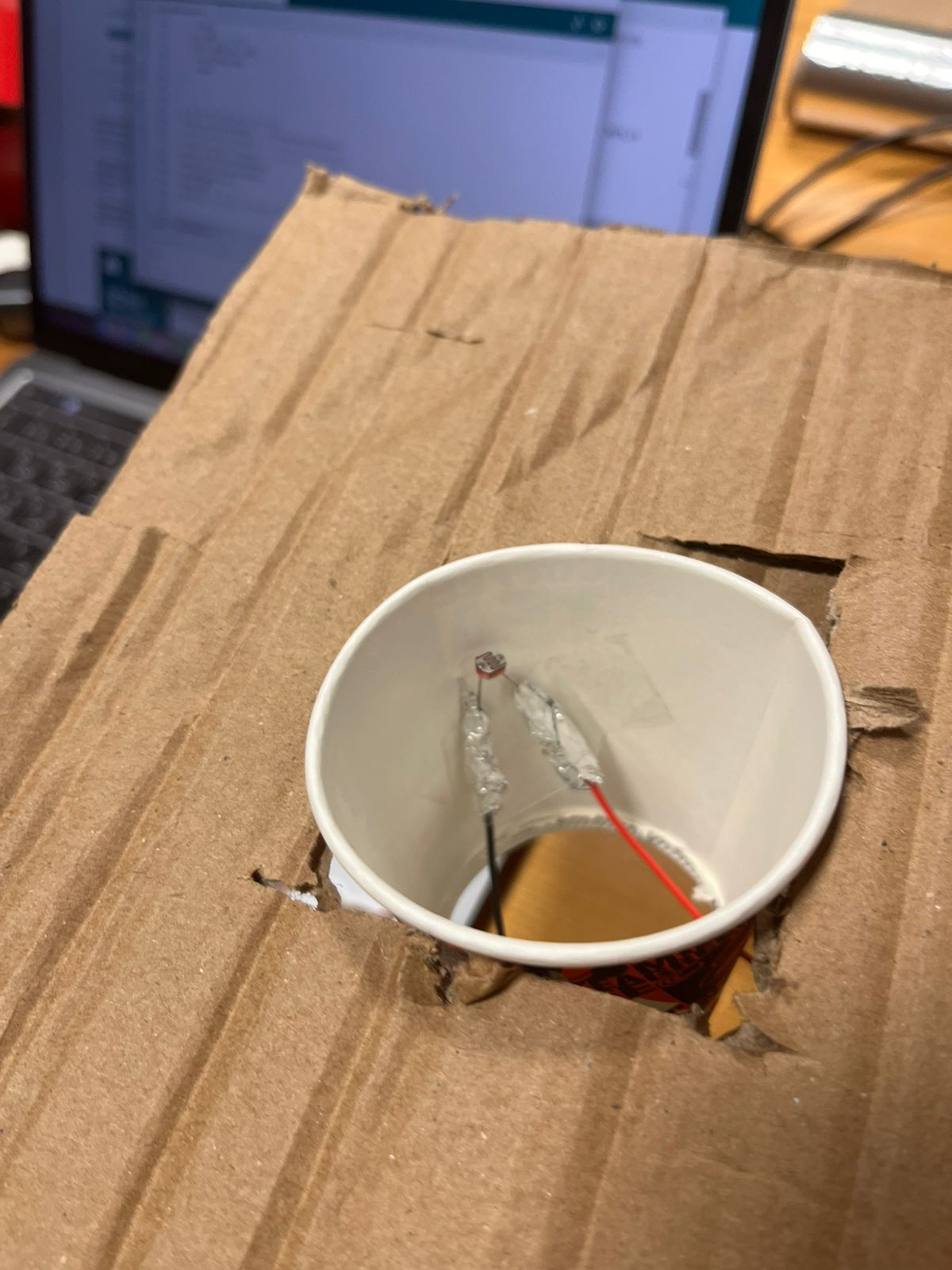
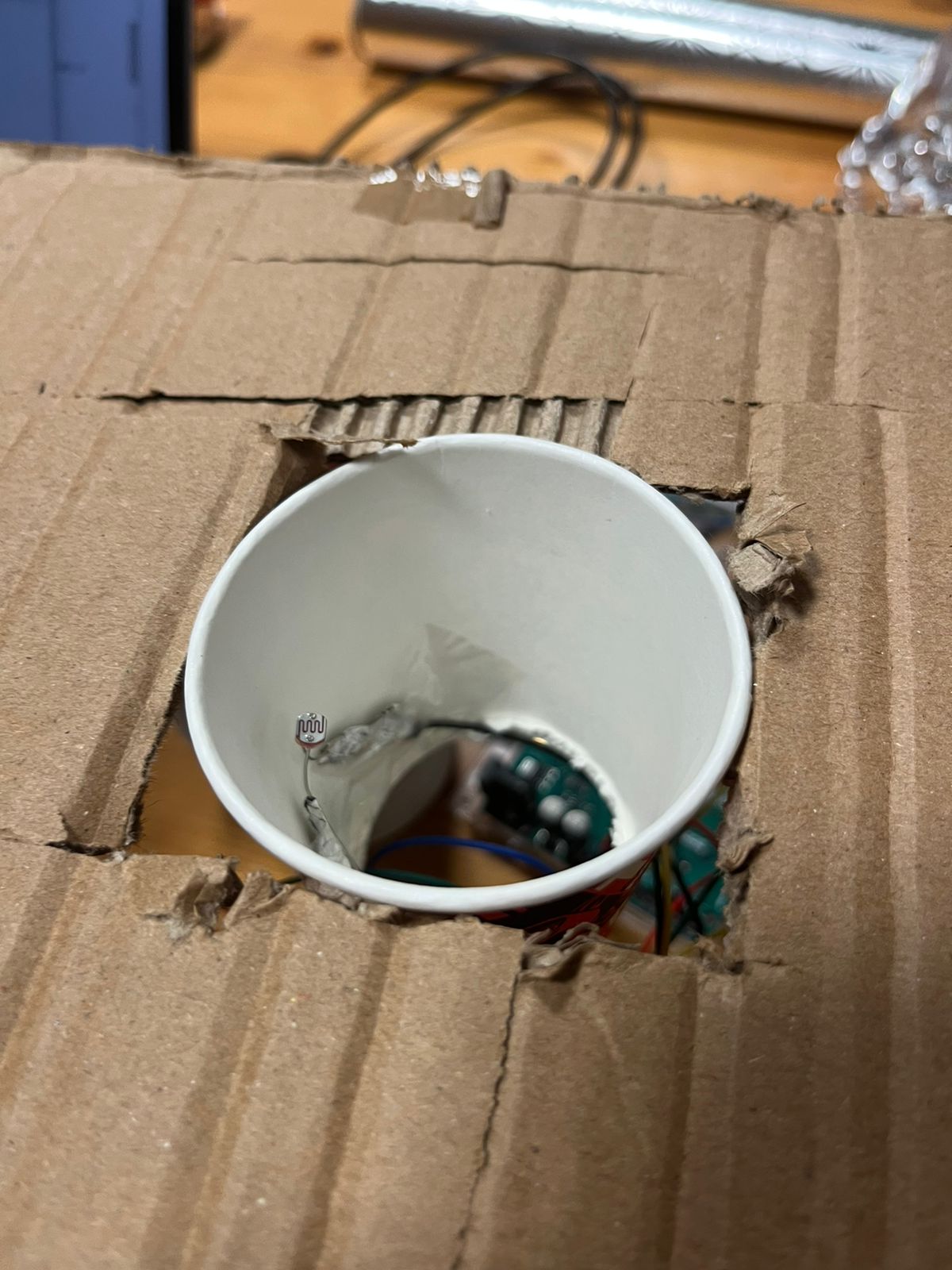
For this week, Izah and I decided to create a musical instrument based on our favorite analog sensor: the photoresistor. To do this, we decided to utilize an interesting concept to make the instrument work: an instrument that can only be played with 2 people. The idea here was to provide a completely different experience compared to traditional musical instruments. First of all, by allowing the notes only to be played with 3 hands and second, allowing to have different notes based purely on the placement of the hand (no touch). Because no traditional instrument requires 2 people to play it, we considered that this would be a greatly innovative idea.

Demonstration


Code highlight:

if (switchState ==1){
    //sensor 1
    if(sensorValue1 > 500){
      currentState+=100;
    }
    else if (sensorValue1>250 && sensorValue1 < 500) {
      currentState+=10;
    }

    else if (sensorValue1 < 250){
      currentState+=1;
    }

    //sensor 2
    if(sensorValue2 > 500){
      currentState+=100;

    }
    else if (sensorValue2>250 && sensorValue2 < 500) {
      currentState+=10;

    }

    else if (sensorValue2 < 250){
      currentState+=1;
    }

    //sensor 3
    if(sensorValue3 > 500){
      currentState+=100;

    }
    else if (sensorValue3>250 && sensorValue3 < 500) {
      currentState+=10;
    }

    else if (sensorValue3 < 250){
      currentState+=1;
    }

This code provides the change of currentState. Current State can be incremented in increments of 1, 10, or 100. This ensures that the state is always controlled in a way where we can always tell exactly in what level all sensors are working on. For example, if currentState = 111, then that means that there is one HIGH, one MID and one LOW state, regardless of which is which.

Challenges:

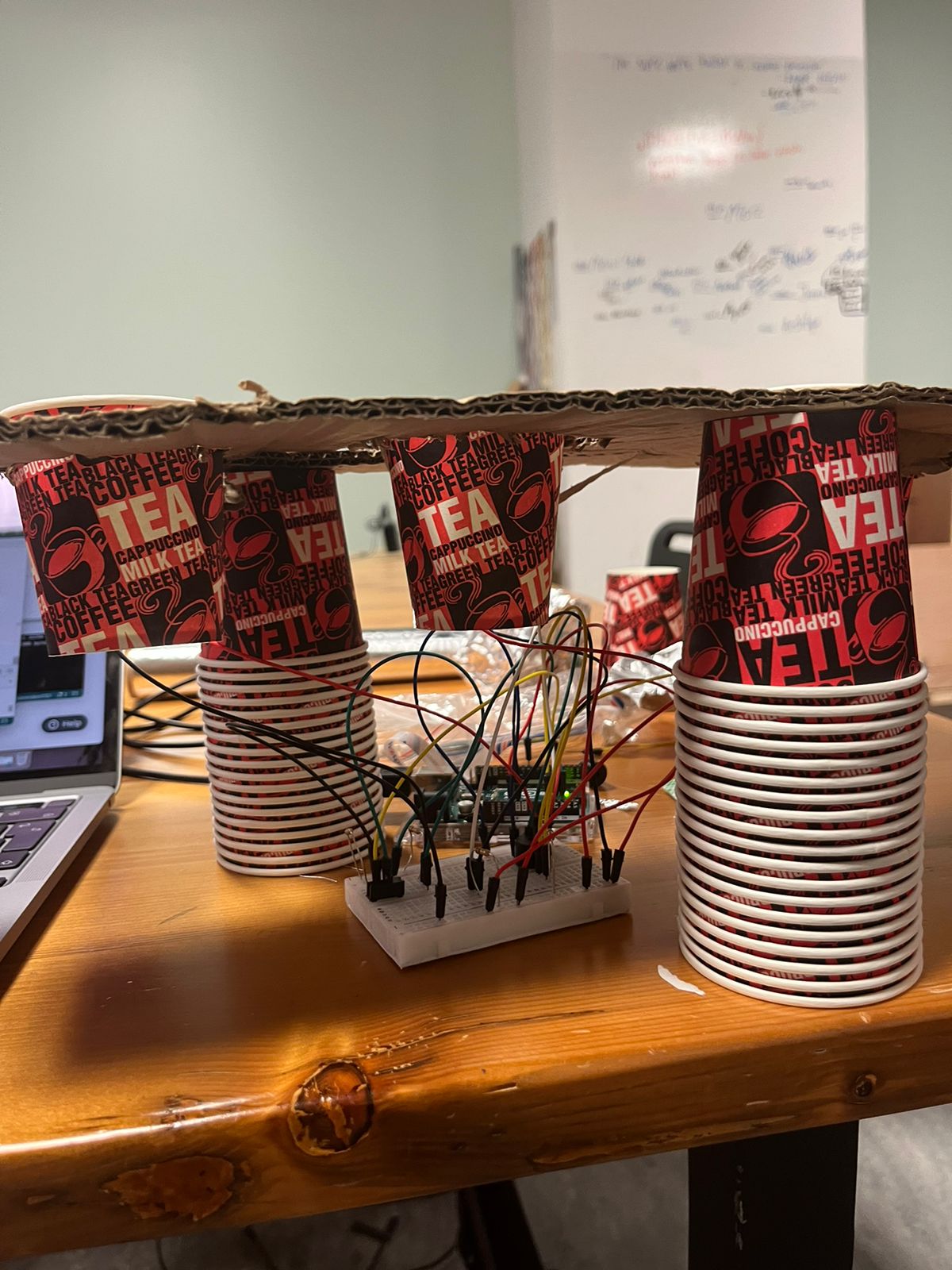
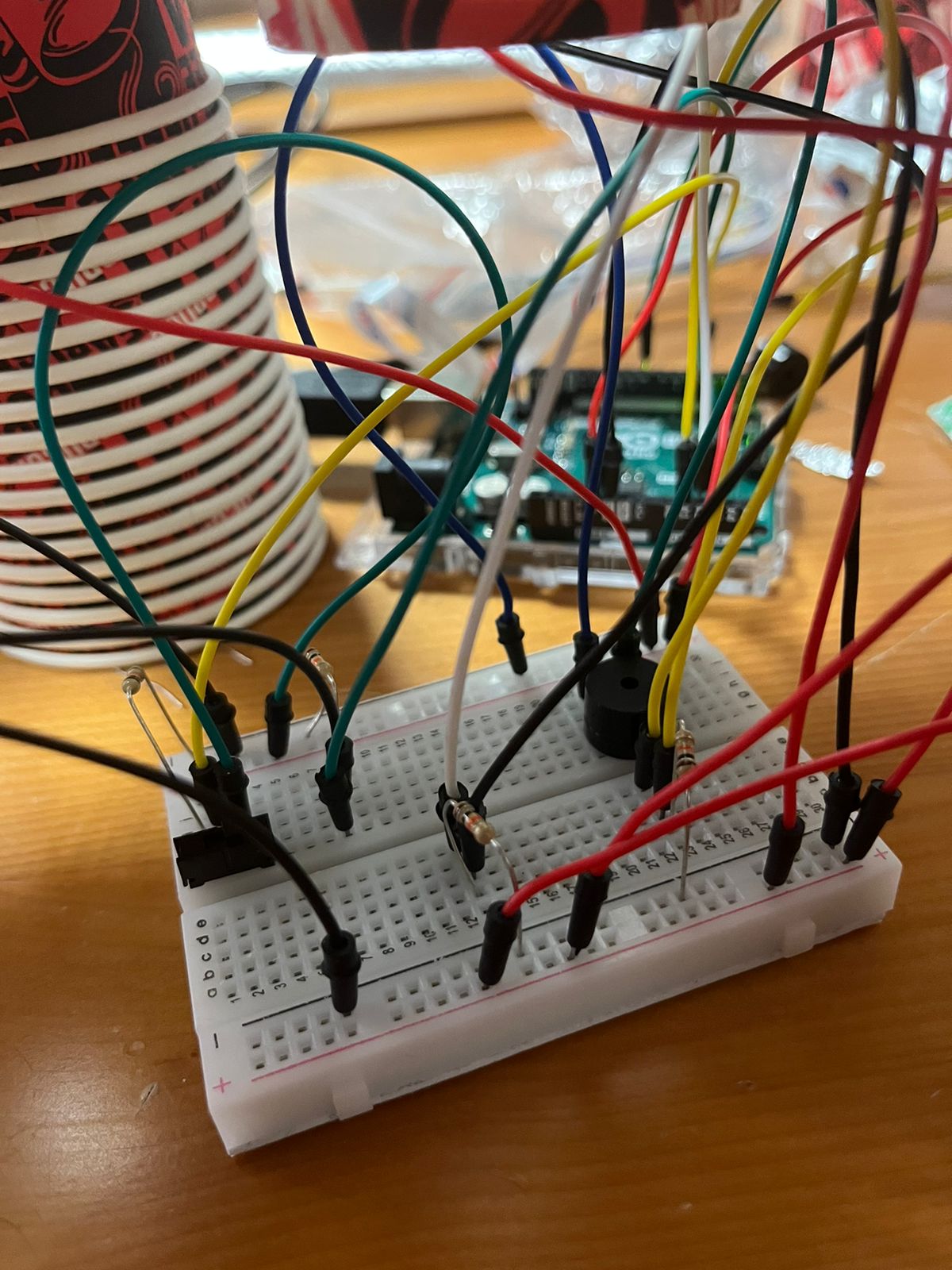
In this project, we faced multiple challenges that slowed down and hindered our development. For starters, because of the circuit that we built, being able to sustain the structure of the instrument was a big challenge we had to face. To solve this problem, we utilized a cardboard base, supported by the same paper cups we used to cover the light for the photoresistors.

Improvements:

In this case, the improvements would be related to polishing the implementation of the photoresistor detection. One of the biggest improvements we could apply would be to place all sensors at the same angle, in such a way that all of them captured the same light level initially. By doing this, the hand movements could be more streamlined and straightforward. Because we  utilized

Another possible improvement would be to solder the photoresistors and the cables together in order to provide a more solid connection and avoid some connection problems that happen every once in a while.

WEEK 10 Reflection


A Brief Rant on the Future of Interaction Design:

Main points

  • We take for granted the importance of touch and how much we rely on our hands. Touch is one of the, if not the most important sense out of all five of our senses. 
  • Interactivity shouldn’t be confined to the press of a finger, but rather engage our entire bodies. Only then will we be able to progress into an era of true interactivity.

Follow up article:

  • From what I could gather in the response article, the author was emphasizing the importance of further developing the technology already at our disposal. Technology cannot remain stagnant, it needs to develop and advance with us. 
  • Again the author highlights that we must NOT neglect our bodies, allowing ourselves to create a future of total immobility. We should engage all aspects of our being and ensure that we give ourselves the chance to experience true interactivity. 

Personally, I find myself extremely scared of our future. The author mentions the possibility of complete immobility in the future due to our lives becoming too heavily reliant on external technologies. To me this is so dystopian to even think about. I don’t want every aspect of my life to be consumed by technology. I want to feel HUMAN and be HUMAN.

Week 10: Reading reflection

The portrayal of advanced and seemingly magical technologies in movies, such as those in the Marvel cinematic universe, often sparks fascination and a desire to bring such innovations into reality. The way characters interact with sophisticated devices, particularly through hand gestures, presents a captivating vision of the future. These depictions emphasize the incredible capabilities of the human hand, showcasing it as an organ with immense potential beyond its conventional functions. Hands become channel for unlocking extraordinary powers and controlling cutting-edge technologies, blurring the line between science fiction and reality. The realization of such innovations would not only revolutionize our daily interactions but also underscore the profound importance of the hand as a tool for both mundane tasks and, potentially, for accessing a realm of possibilities that were once considered purely imaginative. The fusion of technology and human anatomy serves as a testament to the boundless creativity and innovation that continues to drive our collective imagination.

The example of child can’t tie his shoelaces, but can use the iPad, depicts an analogy between the way tools are designed for adults and children and the complexity of literature aimed at different age groups. The comparison highlights the notion that tools designed for adults should leverage the full capabilities of mature minds and bodies, just as literature for adults delves into deeper complexities compared to children’s literature. The reference to Shakespeare and Dr. Seuss serves to exemplify this point, suggesting that while a child may not grasp the nuances of Shakespearean works, they can easily understand the simplicity of Dr. Seuss. The analogy extends to tools, emphasizing that limiting interaction to a single finger, as seen in some interfaces, is akin to restricting literature to a basic vocabulary. The argument suggests that such simplified tools might be accessible to children or individuals with certain disabilities, but fully functional adults deserve and can benefit from more sophisticated and nuanced interfaces that make use of their developed cognitive and physical capacities. It prompts a consideration of the balance between accessibility and the potential richness of interaction in the design of tools for adults.

WEEK 10 ASSIGNMENT (PIERRE & DIANA) PIANO/SYNTHESIZER


CONCEPT:

For this project, our goal was to craft a musical instrument within the constraints of limited resources available. Despite the restricted options, we brainstormed various concepts and ultimately settled on developing a hybrid piano/synthesizer. To accomplish this, we repurposed buttons as keys by integrating two types of sensors, analog and digital. Using a breadboard, we configured the keys and delved into the coding phase. Each button was programmed to generate distinct notes, connected to a borrowed speaker from the IM lab for clearer and better sound quality.


As we progressed with the initial setup, the need for an analog sensor arose. We incorporated a potentiometer, not to alter the current, but as a knob to modulate the notes produced by the four buttons. The potentiometer’s range was segmented into three sections, and within the programming loop, an ‘if-else’ construct acted akin to cases, adjusting the notes played in response to the potentiometer’s adjustments.


Code:
#include "pitches.h"


const int speaker = 12;


const int tone_G = 2;
const int tone_A = 3;
const int tone_B = 4;
const int tone_C = 5;
const int tone_D = 9;
const int tone_E = 10;
const int tone_F = 11;


int buttonState_G = 0;
int buttonState_A = 0;
int buttonState_B = 0;
int buttonState_C = 0;
int buttonState_D = 0;
int buttonState_E = 0;
int buttonState_F = 0;


int potPin = A0;
int potVal = 0;


void setup() {
 // iterate over the notes of the melody:
 pinMode(tone_G, INPUT);
 pinMode(tone_A, INPUT);
 pinMode(tone_B, INPUT);
 pinMode(tone_C, INPUT);
 pinMode(tone_D, INPUT);
 pinMode(tone_E, INPUT);
 pinMode(tone_F, INPUT);
 
 }


void loop() {
 // no need to repeat the melody.


 potVal = analogRead(potPin);


 buttonState_G = digitalRead(tone_G);
 buttonState_A = digitalRead(tone_A);
 buttonState_B = digitalRead(tone_B);
 buttonState_C = digitalRead(tone_C);
 buttonState_D = digitalRead(tone_D);
 buttonState_E = digitalRead(tone_E);
 buttonState_F = digitalRead(tone_F);


if (potVal < 341)  // Lowest third of the potentiometer's range (0-340)
 {   
 if (buttonState_G == HIGH) {
   // play the sound
   tone(speaker,NOTE_G4);
 }
 else if (buttonState_A == HIGH) {
   // play the sound
   tone(speaker,NOTE_AS4);
 }
 else if (buttonState_B == HIGH) {
   // play the sound
   tone(speaker,NOTE_F4);
 }
 else if (buttonState_C == HIGH) {
   // play the sound
   tone(speaker,NOTE_C3);
 }


 else
  {
   noTone(speaker);
   }
 }


 else if (potVal < 682)  // Lowest third of the potentiometer's range (0-340)
 {
   if (buttonState_G == HIGH) {
   // play the sound
   tone(speaker,NOTE_A4); //random note not matching the name
 }
 else if (buttonState_A == HIGH) {
   // play the sound
   tone(speaker,NOTE_B4); //random note not matching the name
 }
 else if (buttonState_B == HIGH) {
   // play the sound
   tone(speaker,NOTE_C4); //random note not matching the name
 }
 else if (buttonState_C == HIGH) {
   // play the sound
   tone(speaker,NOTE_D4); //random note not matching the name
 }


 else
  {
   noTone(speaker);
   }


 }


 else
 {
   if (buttonState_G == HIGH) {
   // play the sound
   tone(speaker,NOTE_AS4);
 }
 else if (buttonState_A == HIGH) {
   // play the sound
   tone(speaker,NOTE_FS4);
 }
 else if (buttonState_B == HIGH) {
   // play the sound
   tone(speaker,NOTE_GS4);
 }
 else if (buttonState_C == HIGH) {
   // play the sound
   tone(speaker,NOTE_CS3);
 }


 else
  {
   noTone(speaker);
   }
 }
  
 }


Week 10: Musical Instrument

Team members: Javeria and Nafiha

For our assignment, we drew inspiration from a synthesizer and a sampler to create our own musical instrument. Our instrument incorporates three buttons, a piezo buzzer, a potentiometer, and a bunch of wires and resistors. It is designed such that each button triggers a distinct melody, and by adjusting the potentiometer, the pitch is modified, consequently altering the played melodies.

In terms of improving our instrument, one potential feature could be incorporating additional sound effects through the use of the potentiometer. However, overall, working on this assignment was really fun, and we’re pretty pleased with the outcome.