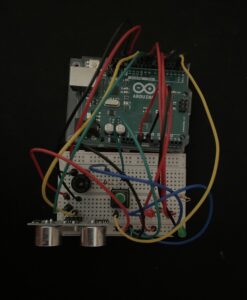
For the week 9 assignment I have used a switch that turns a digital LED on and a photoresistor as an analog sensor for the other LED. The photoresistor is powered by a 5V jumper wire and a GRN jumper wire.
All Posts
Reading Reflection – Week 10
A Brief Rant on the Future of Interaction Design
Watching the video of Microsoft’s Productivity Vision mainly invoked one emotion in me: apprehension. I quite agree with the author that taking “Pictures Under Glass”, magnifying them, making them 3D, and making them part of all household appliances/human interactions really is not the answer. The author comments on how our hands do so many wonderful things, like grabbing, sensing texture, and feeding us information that we take for granted. There are many more things that our brains also do, actions which would be stifled by the Vision Of The Future. For example, in the video clip, the woman arrives in an airport in Germany, taps her glasses, and immediately hears a translated version of everything around her. Firstly, phones already do this kind of work, so transferring to glasses is the sort of “meaningless step up from the status quo” the author refers to. Secondly, if someone were to go through a foreign country with all relevant information perfectly translated and projected in a hologram in front of them in real time, they would lose so much of the experience of traveling — asking what a word means, sharing a laugh over some funny mispronunciation, finding an amazing spot after getting lost, etc. It seems like these future technologies are designed to minimize mistakes, whether by finishing your sentence for you, or telling you exactly what is in your fridge, when we actually learn a lot from our mistakes. Okay, maybe it would be useful to know when something in your fridge has gone bad, but we are already able to do that with our senses of smell, touch, taste, and sight, again proving the author’s point.
Responses: A Brief Rant on the Future of Interaction Design
The paragraph that stood out to me most from this reading was:
“We’ve almost given up on the body already. We sit at a desk while working, and sit on a couch while playing, and even sit while transporting ourselves between the two. We’ve had to invent this peculiar concept of artificial “exercise” to keep our bodies from atrophying altogether… Why do you want this future? Why would this be a good thing?”
This reminded me of a reading about how the education system is not designed to encourage learning and creativity. Kids naturally learn through moving their bodies, and yet after a certain age, all knowledge is expected to be obtained by sitting at a desk, only engaging the senses of sight and hearing. The ironic thing was, I was doing this reading, learning about the failings of sitting and reading to learn by sitting and reading.
I think the author’s suggestion for truly revolutionary kinesthetic interfaces might alleviate this problem. I don’t know what form it would take, but it sounds like a good opportunity to introduce natural curiosity and bodily feedback back into our daily lives and learning processes.
Week 10 – Reading response
I found the author’s examples to be exceptionally thought-provoking. The illustration of playing the piano on a screen, like an iPad, particularly caught my attention. It led me to question the necessity of such technology. Why should we replicate complex tactile experiences on a two-dimensional surface? It highlighted the gap between the potential of human capabilities and the constraints imposed by current technological paradigms.
At its core, it seems the author is urging people to break free from traditional norms and cease restricting their thinking. There’s a profound call for a paradigm shift, a departure from the familiar and the comfortable.
The idea that technology doesn’t simply happen but is a result of choices, research, and inspired individuals resonated with me. The call to be inspired by the untapped potential of human capabilities struck a chord. It’s a call to action, urging us to reconsider the choices we make in technology development and funding. The historical reference to Alan Kay’s visionary leap serves as a powerful reminder that groundbreaking ideas often emerge from unconventional thinking.
The notion that we’ve become a generation tethered to desks, couches, and sedentary modes of transportation, necessitating artificial interventions like exercise to stave off bodily atrophy, struck a resonant chord. It not only underscores the physical implications of our evolving relationship with technology but also leads to a broader question about the increasing automation permeating every facet of our lives.
As we integrate technology into more aspects of our daily existence, there’s a palpable risk of creating a future where convenience comes at the cost of mobility and physical engagement. The critique of sitting as a prevailing posture for work, leisure, and transit raises concerns about the potential consequences of an increasingly automated lifestyle. Are we inadvertently designing a future where the need for bodily movement diminishes, contributing to a sedentary existence mediated by screens and devices?
The Future of Interaction Design and Responses: A Brief Rant on the Future of Interaction Design
In this reading, Bret Victor’s critique of the mainstream vision for future technological advancements in interactive design sheds light on the limitations of current technologies in fostering genuine interaction. Victor challenges the prevailing emphasis on touch-screen efficiency and advocates for a more hands-on approach, rooted in his perspective shaped by a different technological era. He questions the seamless integration of physical and digital experiences, emphasizing the importance of tactile engagement. Victor also expresses concerns about children’s overreliance on digital devices, foreseeing potential risks to their healthy development. Together, these perspectives, juxtaposed in order, highlight the collective call for a more thoughtful and inclusive approach in shaping the future landscape of interaction design.
The author underscores the duty of interactive designers to prioritize accessibility, especially for those lacking specific capabilities. While admiring the remarkable potential of human abilities, the author confronts the difficulty of finding equilibrium between harnessing these capabilities and rectifying inherent inequalities. The imperative for continuous research, particularly in domains such as tangible interfaces, is highlighted.
Week 9 Reading Reflection
This week’s reading has given me a lot to think about regarding the position of interactive artwork. In a way, I agree with Tigoe that interactive artworks are more like performances. The artist sets up a stage for the interactors, who essentially become the performers in this theater. This reminds me of another class I am taking on installation art, where most successful interactive pieces do not explicitly explain what the piece is about. Instead, they focus on evoking sensory reactions and exploring them in depth, aiming to elicit an emotional response from the performer or “viewers” that prompts further contemplation of the interaction and its significance. Even Andrew Schnieder’s piece, though it may seem like a fixed narrative from a distance, offers different interactions in each group setting, which I find more rewarding than a singular interpretation of paintings in a museum.
The reading on the greatest hits and misses adds another layer to this. Even a seemingly simple and commonly used interaction, such as an LED lighting up when approached, has the potential for further development. It is not an unoriginal idea if the context in which this system is set up provides a feeling that is more contextualized and open to interpretation, which I find appealing. I kinda wanna make a more contextualized theremin now if that’s possible.
Week 9 Assignment : Color Dial
Concept: After seeing what my peers had already done with the assignment guidelines, I wanted to try something different that I hadn’t seen before. Initially, I had the idea of using a color-changing crossroads with an ultrasonic proximity sensor. However, since someone had already done that, I attempted to replicate it using a potentiometer instead. The prototype includes a button that turns on an LED light, and the potentiometer determines the color.
Prototype: During the prototyping phase, I tried to find the most efficient way to minimize the amount of wiring for the three LEDs I wanted. However, I realized that in order to have different LEDs light up for different scenarios, I needed to create separate digital output circuits.
To visualize this, I mapped out the design on TinkerCad, as shown in the following image:
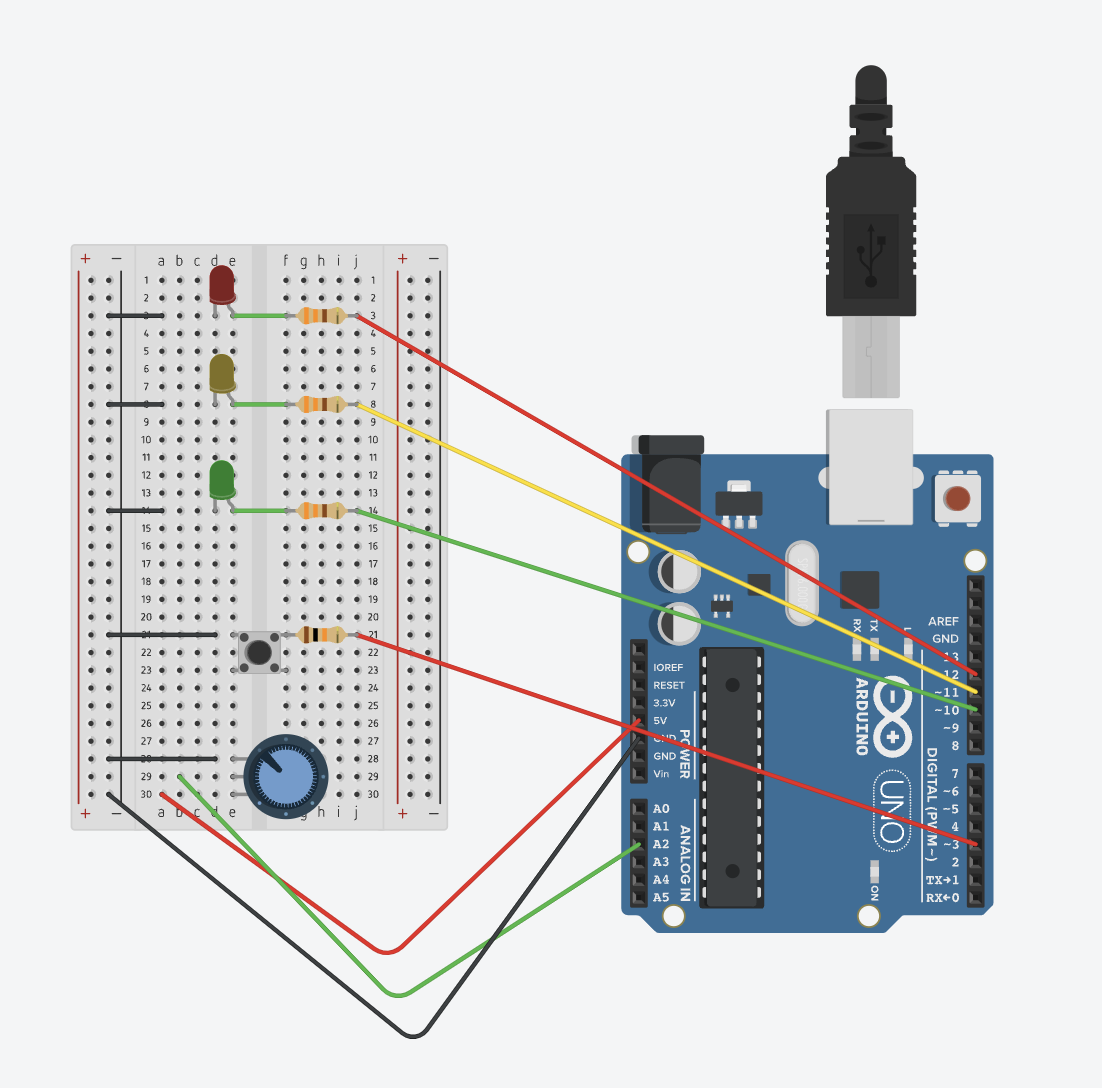
After completing the circuit, I proceeded to the coding part. It took me some trial and error to create a nested loop that worked with the button and potentiometer setup I desired. Since the potentiometer values range from 0 to 1023, I implemented if-else statements for the Red, Yellow, and Green colors based on approximate ranges of 0-300, 300-700, and 700-1000, respectively.
The following is the code:
int buttonState = 0;  // variable for reading the pushbutton status


// the setup routine runs once when you press reset:
void setup() {
  // initialize serial communication at 9600 bits per second:
  Serial.begin(9600);
  pinMode(10, OUTPUT); //Green
  pinMode(11, OUTPUT); //Yellow
  pinMode(12, OUTPUT); //Red
  pinMode(3, INPUT_PULLUP); //Button
}

// the loop routine runs over and over again forever:
void loop() {

  buttonState = digitalRead(3);


  int sensorValue = analogRead(A2);
  Serial.println(sensorValue);

if (buttonState == LOW) {
  if (sensorValue < 300) {
    digitalWrite(12, HIGH);
    digitalWrite(11, LOW);
    digitalWrite(10, LOW);

  } else if (sensorValue < 700) {
    digitalWrite(12, LOW);
    digitalWrite(11, HIGH);
    digitalWrite(10, LOW);

  } else if (sensorValue < 1023){
    digitalWrite(12, LOW);
    digitalWrite(11, LOW);
    digitalWrite(10, HIGH);
  }
} else if (buttonState == HIGH) {
   digitalWrite(12, LOW);
    digitalWrite(11, LOW);
    digitalWrite(10, LOW);
}

  delay(30);  // delay in between reads for stability
}
Reading Response – Week 9
Physical Computing’s Greatest Hits (and Misses) & Making Interactive Art: Set the Stage, Then Shut Up and Listen
Both readings provided me with valuable information and insights regarding physical computing and the concept of interactive art. They share a common theme centered around originality and interpretation. The article on physical computing illustrates how even seemingly commonplace projects possess a unique touch each time different individuals recreate them. In my view, a person’s subtle influences, expressions, intentions, and interpretations of their project imbue it with a distinct originality and authenticity. Each creator infuses the project with passion, interest, and a personal story, though not always evident to the audience. This unique narrative provides value to the project unless it is an exact copy without any differences, purpose, or clear story.
Transitioning to the second article on interactive art, I concur with the author’s stance that artists should not fully disclose their interpretation and explanation of their artwork. Allowing the audience to form their own interpretations enhances the art’s impact. However, I disagree with the author’s assertion that art is solely a statement and not an expression. I firmly believe that the beauty of art lies in the story behind it, not necessarily the artist’s interpretation, but their experiences, as the author emphasizes, the art “sets the stage”; meaning that you give some insight of your experience, life, or just some context for the audience and give them a chance to interpret it on their own, since that is also one of the factors that prove the quality of an art work.
From my perspective, interactive art encompasses various fields, ranging from intricately detailed works with rich narratives to visually appealing, randomized creations. Regardless of the project type, it invariably reflects the artist’s expression. Even if the final result involves intentional or unintentional randomness, this randomness is infused with a story, emotions, and connections between perspectives, ideas, and life experiences. Even when the artist is not consciously deliberate in their production, they make decisions based on their interpretation of their own art. In some cases, the result may simply be visually appealing but still open to interpretation. Thus, I believe art can indeed make a statement, but it will always carry an expression to varying extents.
Week 10 | Creative Reading Reflection: A Brief Rant on the Future of Interaction Design
Creative Reading Reflection – A Brief Rant on the Future of Interaction Design :
week 9 – Assignment
Ready.. Set.. Go..
Concept:
“Ready Set Go” is a project that lets you control 4 LEDs with just one button. you press the button, and the LEDs light up one after the other like a countdown – it’s like creating your own mini light show!

Challenges:
The most challenging part of the code is likely the button debouncing mechanism. Even when I’ve pressed the button once the LEDs would rapidly change without a bounce or delay
if (digitalRead(5) == HIGH) {
  newcount = count + 1;
  if (newcount != count) {
    // ... (LED control logic)
    count = newcount;
  }
}
Then I had to find the perfect timing. The delay between consecutive state checks (delay(100)) provides a basic form of debouncing. However, finding the right delay duration was a bit hard because too short, it wouldn’t effectively debounce, and if it was too long, it just felt unresponsive.
Areas for Improvement:
For future projects, I’d wish to maybe design the code and circuit in a way that makes it easy to add more LEDs or buttons or add one more idea to which pressing the button a certain number of times can show like a mini light show.
Week 9: Parking sensor
THE Parking sensor
For this project, we had only two sensor options: the LDR or the ultrasonic sensor. Since we’d already used the LDR before, I wanted to try out something new. So, I looked into the ultrasonic sensor and started working with it. While brainstorming, I came up with various game ideas that used the sensor, but they needed a screen, which wasn’t allowed for this assignment. After more research on ultrasonic sensors, I found they could work well as a car parking alarm to help drivers avoid hitting obstacles. I started writing the code and set up a variable called “time_delay” to control how fast the LED blinks. To make it more like a real parking sensor, I decided to add a buzzing sound and found out how to connect a buzzer to the setup. With these changes, I made a working parking sensor. To meet the assignment’s requirements for a switch and a second LED, I made a switch that, when pressed, turns on a bulb that matches its color.
THE CODE:
const int trigPin = 9;
const int echoPin = 10;

int led = 5;

long duration;
int distance;

const int buzzer = 13;

const int buttonPin = 2;  // the number of the pushbutton pin
const int ledPin = 8; // the second light

int buttonState = 0; // button bool

void setup() {
  // put your setup code here, to run once:
  pinMode(trigPin, OUTPUT);
  pinMode(echoPin, INPUT);

  pinMode(led, OUTPUT); //light
  pinMode(buzzer, OUTPUT); // buzzer


  pinMode(ledPin, OUTPUT); // initialize the LED pin as an output
  pinMode(buttonPin, INPUT);  // initialize the pushbutton pin as an input


  Serial.begin(9600);


}

void loop() {
  //sending the audio pulses
  digitalWrite(trigPin, LOW);
  delayMicroseconds(2);
  digitalWrite(trigPin, HIGH);
  delayMicroseconds(10);
  digitalWrite(trigPin, LOW);
//calculating distance
  duration = pulseIn(echoPin, HIGH);
  distance= duration*0.034/2;

//the warning rate
  float time_delay= (distance *3) +30;

  buttonState = digitalRead(buttonPin);

  // check if the pushbutton is pressed. If it is, the buttonState is HIGH:
  if (buttonState == HIGH) {
    // turn LED on:
    digitalWrite(ledPin, HIGH);
  } else {
    // turn LED off:
    digitalWrite(ledPin, LOW);
  }

  if(distance < 50)
  {
    //the warning / buzzing rate
    digitalWrite(buzzer, HIGH);
    analogWrite(led,0);
    delay(time_delay);
    digitalWrite(buzzer,LOW);
    analogWrite(led,255);

  }

  else{
    digitalWrite(led, LOW);
    noTone(buzzer);
  }

  //for feedback
  Serial.print("Distance: ");
  Serial.println(distance);


}
This is how it looked like
Video: