All Posts

Music Box (Khaleeqa and Rujul Week 10 Assignment)

Concept:

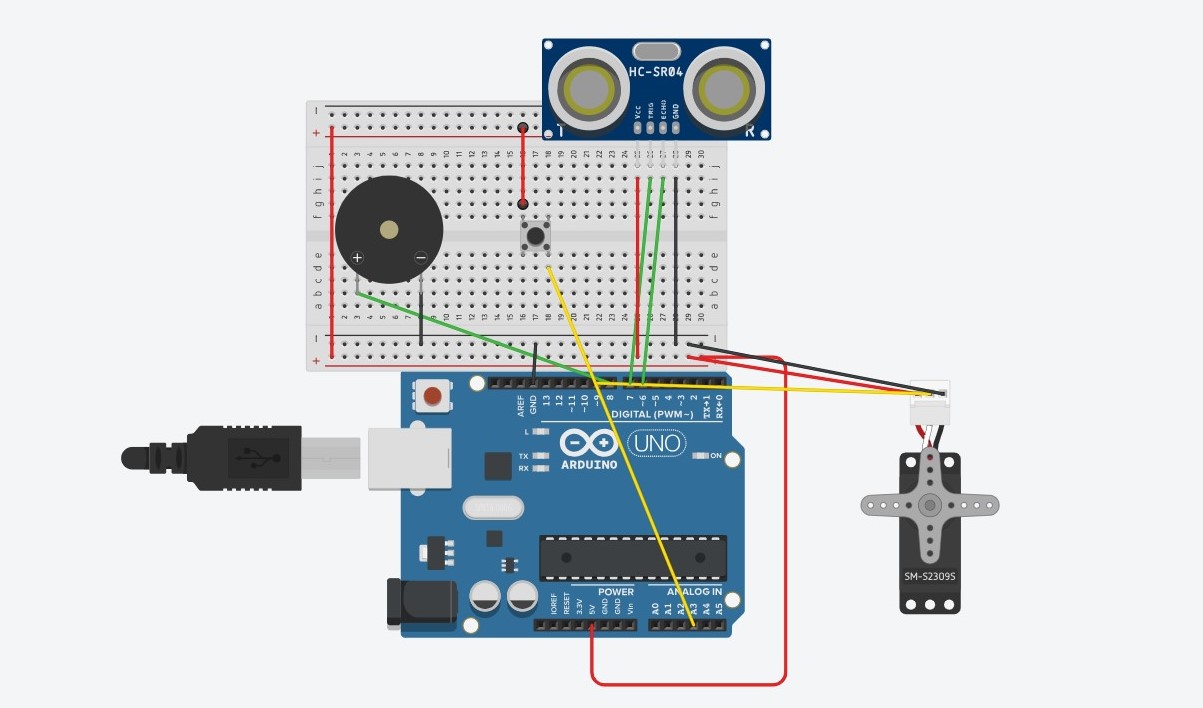
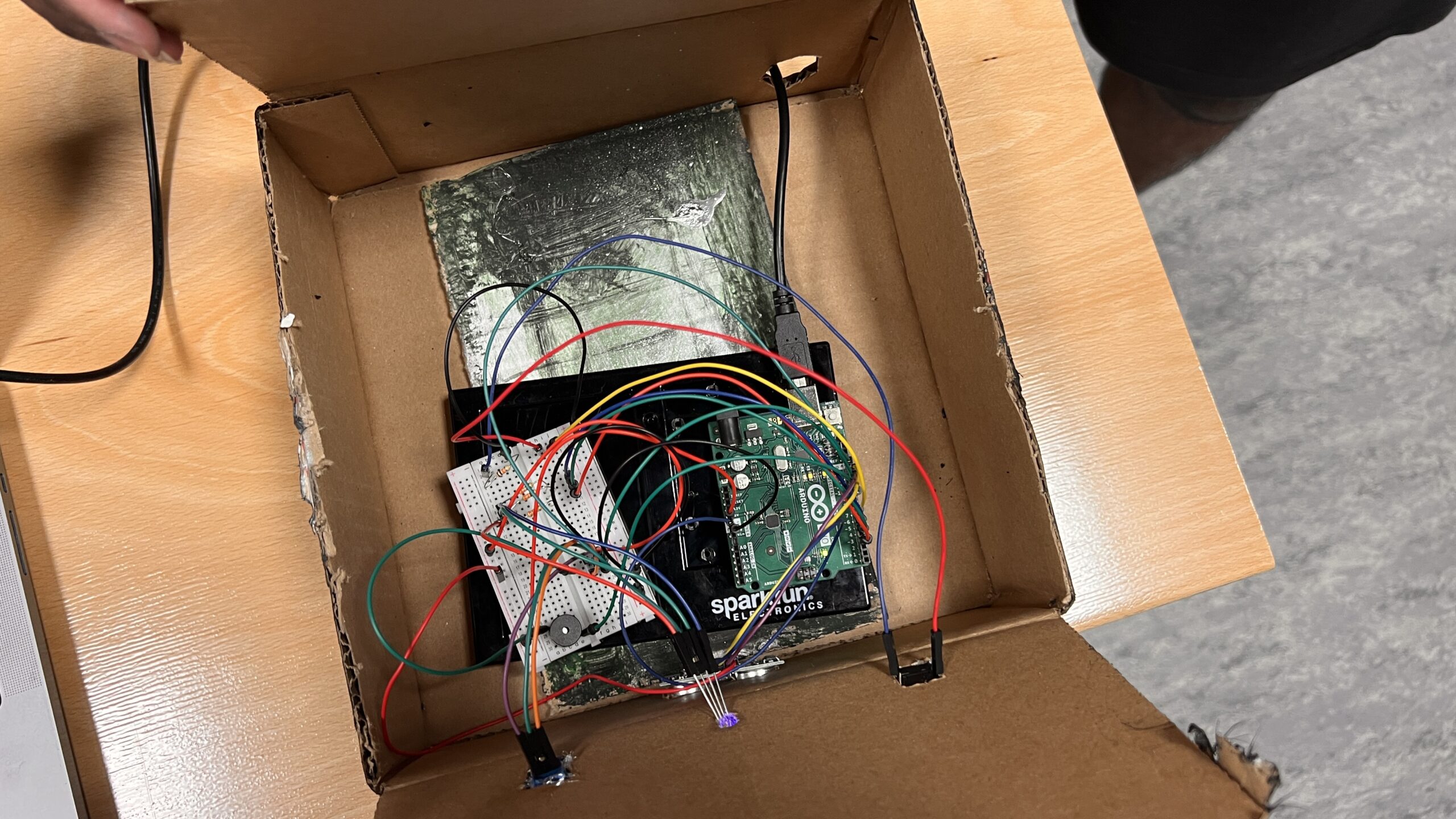
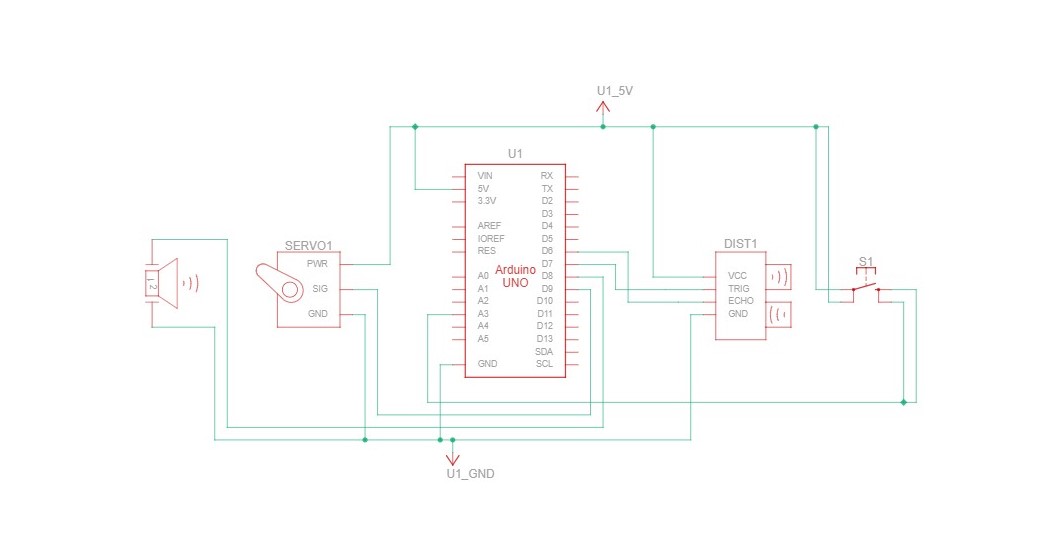
Rujul and I collaborated on our Week 10 assignment, centered on crafting a musical instrument. Our initial concept revolved around utilizing the ultrasonic sensor and piezo speaker to create a responsive system, triggering sounds based on proximity. However, we expanded the idea by incorporating a servo motor to introduce a physical dimension to our instrument. The final concept evolved into a dynamic music box that not only moved but also emitted sound. The servo motor controlled the music box’s rotation, while the ultrasonic sensor detected proximity, prompting different tunes to play. To reset the music box, we integrated a button to return the servo motor to its initial position.

Modelling and Schematic:


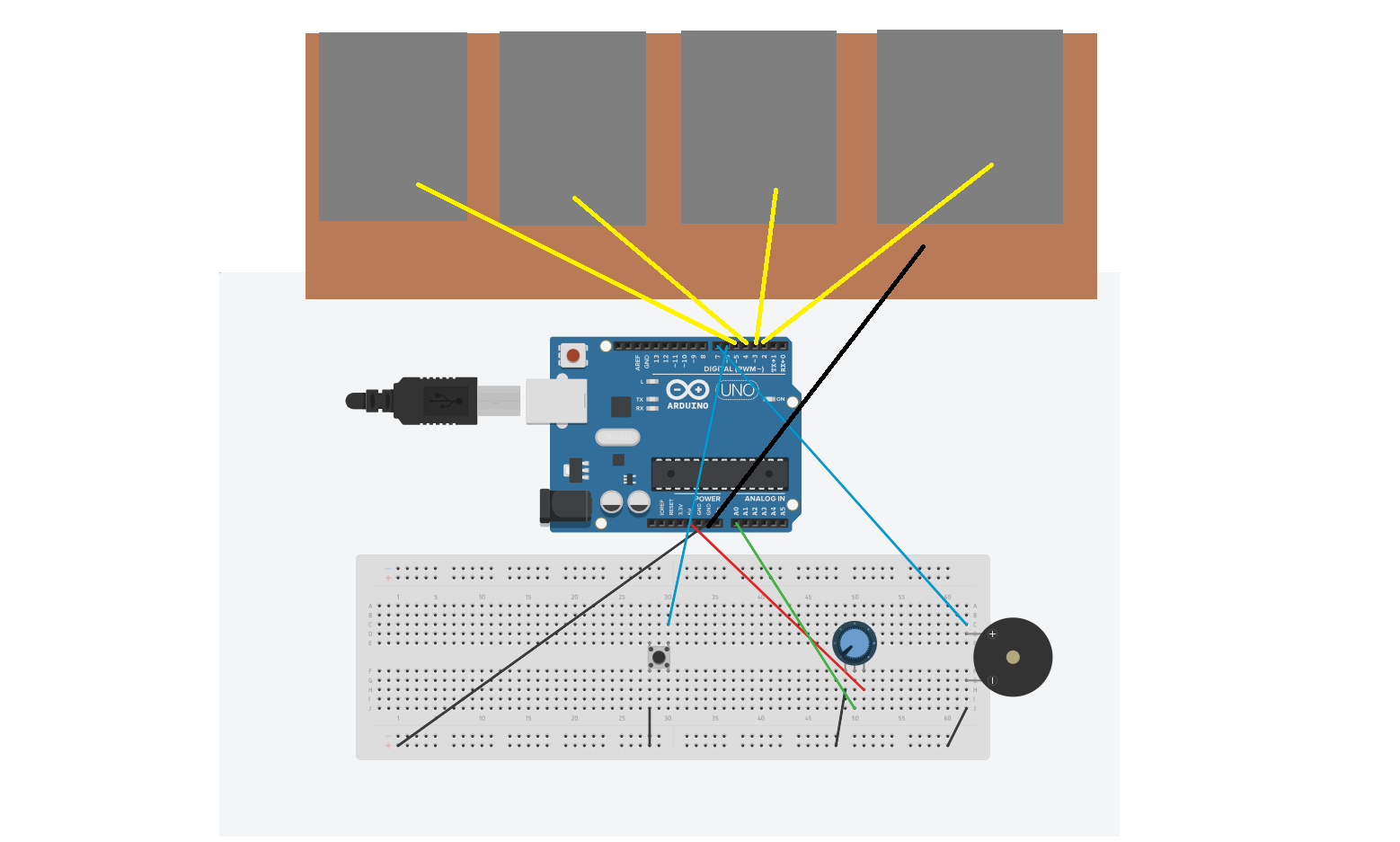
Prototype:
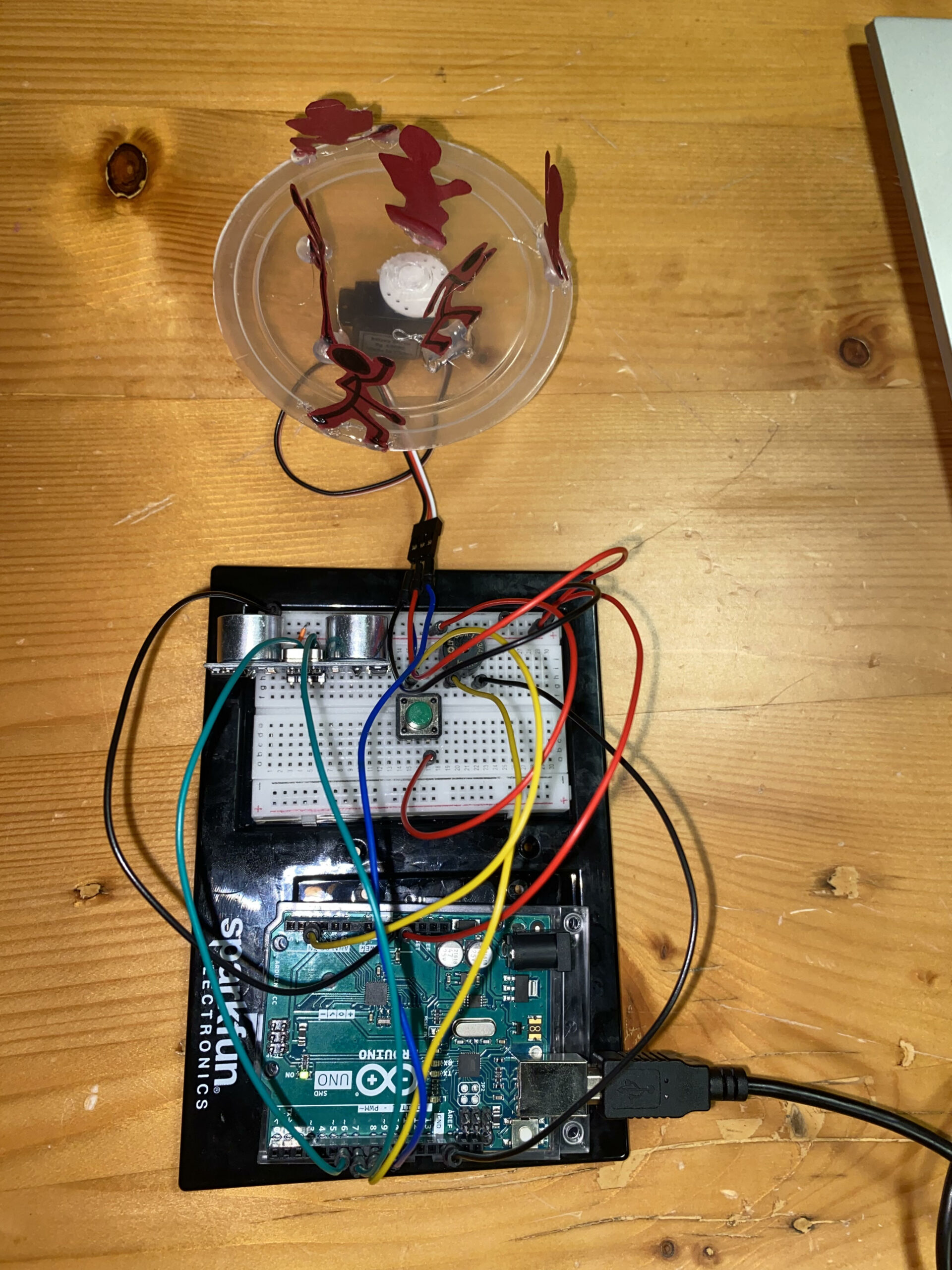
IMG_4312

Code:

Our prototype took shape seamlessly, and the coding aspect proved relatively straightforward. One particularly intriguing segment involved establishing thresholds for distinct melodies based on the object’s position within the carousel.

void checkDistanceAndSound() {
  int duration, distance;

  digitalWrite(TRIG_PIN, LOW);
  delayMicroseconds(2);
  digitalWrite(TRIG_PIN, HIGH);
  delayMicroseconds(10);
  digitalWrite(TRIG_PIN, LOW);

  duration = pulseIn(ECHO_PIN, HIGH);
  distance = (duration * 0.0343) / 2;

  // Play different melodies for different distance ranges
  if (distance > 0 && distance <= 5 && !soundProduced) {
    playMelody1();
    soundProduced = true;
    delay(2000); // Adjust delay as needed to prevent continuous sound
  } else if (distance > 5 && distance <= 10 && !soundProduced) {
    playMelody2();
    soundProduced = true;
    delay(2000); // Adjust delay as needed to prevent continuous sound
  } else if (distance > 10 && distance <= 20 && !soundProduced) {
    playMelody3();
    soundProduced = true;
    delay(2000); // Adjust delay as needed to prevent continuous sound
  } else {
    noTone(SPEAKER_PIN);
    soundProduced = false;
  }
}

void playMelody1() {
  int melody[] = {262, 294, 330, 349, 392, 440, 494, 523}; // First melody
  int noteDurations[] = {250, 250, 250, 250, 250, 250, 250, 250};

  for (int i = 0; i < 8; i++) {
    tone(SPEAKER_PIN, melody[i], noteDurations[i]);
    delay(noteDurations[i]);
  }
}

void playMelody2() {
  int melody[] = {392, 440, 494, 523, 587, 659, 698, 784}; // Second melody
  int noteDurations[] = {200, 200, 200, 200, 200, 200, 200, 200};

  for (int i = 0; i < 8; i++) {
    tone(SPEAKER_PIN, melody[i], noteDurations[i]);
    delay(noteDurations[i]);
  }
}

void playMelody3() {
  int melody[] = {330, 330, 392, 392, 440, 440, 330, 330}; // Third melody
  int noteDurations[] = {500, 500, 500, 500, 500, 500, 1000, 500};

  for (int i = 0; i < 8; i++) {
    tone(SPEAKER_PIN, melody[i], noteDurations[i]);
    delay(noteDurations[i]);
  }
}

Reflection:

Reflecting on our project, I believe enhancing it with LEDs synchronized to specific sounds could offer a more comprehensive understanding of the ultrasonic sensor’s functionality. Each LED would correspond to a particular sound, demonstrating the sensor’s operations more visibly. Additionally, considering a larger-scale implementation for increased interactivity might further elevate the project’s engagement potential.
Reading Reflections – week 10!

“The only reason your mind doesn’t explode every morning from the sheer awesomeness of your balletic achievement is that everyone else in the world can do this as well.” I think this reading made so much sense after the previous reading, Physical computing greatest hits(and misses). After seeing pieces like video mirrors and the body-as-a-cursor, or after actively using facial recognition on phones where our body is at command and not just our fingers, I definitely think the future of interaction goes way beyond the capacities of our hands. 

The first in-class assignment we had for the physical computing part of the class, where we had to make a creative switch that did not use hands, it was very hard to think of something to make. This does highlight the challenge that we need to break away from established norms and thinking beyond the limitations of familiar interaction methods. 

A question that stuck with me was how do we manipulate things? But how I perceive his explanation on this and think about it is, how do we manipulate them into a way that they are intuitive? Will the dynamic mediums Bret Victor talks about, be intuitive right from the start or will they take years of trials, feedbacks and usage to finally be called familiar and usable by ‘common sense’. I also appreciate the follow up article with his responses to the comments. His reply to the brain interfaces comment is quite nice and reassuring in a world where people believe automating all the work is way more efficient since humans are way more prone to making errors. I also like the insight on the psychological and cognitive aspects but not fully clear on the Matti Bergstrom quote about finger blindness.

My takeaway from this reading would be that our interaction with digital media and devices should not have consequences to our physical body and the idea of everything we do mediated by a computer might not be a good one.

Reading reflection week 10

A breif Rant on the Future of interactive media

The reading on future interfaces was mind-blowing! It was like someone suddenly turned on a light in a room I’d been sitting in for ages, and suddenly, everything made sense in a completely new way.

The author of this reflection, wow, they had been in the thick of designing future interfaces. Real prototypes, not just concepts. That’s a level of hands-on experience few people get. It’s like being backstage at a magic show and seeing how the tricks are really done.

Their beef with the video wasn’t about nitpicking interactions but about the vision itself. It wasn’t bold enough, not enough of a leap from the mess we’re dealing with in the present. And I get that! Visions should inspire, not just be a ho-hum “yeah, that’ll do” kind of thing.

But what really hit me was the talk about our hands. Hands are amazing! I mean, we use them constantly, but do we ever really think about how intricate they are? They’re like the Swiss Army knives of our bodies. Feeling things, manipulating objects—our hands are our interface with the world.

The idea of “Pictures Under Glass” really got to me. It’s like we’re willingly giving up the richness of touch for the sake of a fancy visual. The comparison to tying shoelaces with closed eyes hit home. We’re prioritizing sight over touch, but in reality, touch is the real MVP in how we interact with things.

The rant about the gestures we use with our fingers blew my mind. The fact that we switch between different grips without even thinking about it—opening a jar, for instance—showed how intuitive our interactions really are. Our hands are built for a three-dimensional world, for manipulating objects in ways that no other creature can. It’s like a superpower we take for granted every day!

And the call to action at the end was so powerful. The future isn’t predetermined; it’s a choice. It’s up to us to push for better interfaces, ones that harness the full potential of what our bodies can do. Why settle for a single finger when we have this incredible body that can do so much more?

What do I think about the Follow up

It’s like the author just dropped a knowledge bomb and left me reeling with thoughts and arguments ricocheting around my head.

The responses they received were a mix of understanding and misconceptions. The author wasn’t seeking to solve the problem outright; they wanted to spark curiosity and inspire researchers to delve into unexplored territories. The idea was to lay down the issue and hope it would catch the eye of the right people who could initiate the necessary research. That’s a pretty bold move!

The analogy about technology evolution using Kodak’s camera was spot on. The iPad, like the black-and-white camera, is groundbreaking, but it’s clear something’s missing. The push should be towards a dynamic tactile medium, not just a flat, glassy screen with minimal haptic feedback.

Their take on voice interfaces was refreshing. While acknowledging the importance of voice, especially for certain tasks, they stressed the limitations when it comes to creation and deep understanding. Explorable environments, where you can physically manipulate things, seem like the real deal.

The exploration of gestural interfaces was intriguing. From discrete abstract gestures to waving hands in the air, each had its pros and cons, but none seemed to fully harness the potential of our hands and bodies in a three-dimensional world.

The part about brain interfaces hit hard. Why are we trying to bypass our bodies altogether? It’s like saying our bodies are inadequate for the digital age. It’s a bold reminder to adapt technology to suit our natural capabilities rather than forcing ourselves to adapt to it.

The quote about fingertips and their importance for development resonated deeply. It’s like saying if we don’t use certain faculties, we lose them. The comparison to limiting literature to Dr. Seuss for adults is both humorous and thought-provoking.

And the clever redirect about the length of the rant with the book recommendation at the end was a nice touch!

Week 10: Make a musical instrument

For our assignment, Nafiha and I drew inspiration from a synthesizer and a sampler to create our own musical instrument. Our instrument incorporates three buttons, a piezo buzzer, a potentiometer, and a bunch of wires and resistors. It is designed such that each button triggers a distinct melody, and by adjusting the potentiometer, the pitch is modified, consequently altering the played melodies.

Video:

link:https://drive.google.com/file/d/1zvd5qZeavfn0oTLdWGMqWOIxTLay6gbp/view?usp=sharing

Code:

const int switch1Pin = 12;
const int switch2Pin = 8;
const int switch3Pin = 7;
const int potentiometerPin = A0;
const int buzzerPin = 3;

int currentMelody[8];//array to store the current melody
int melodyIndex = 0;// keep track of the current note in the melody
int isPlaying = 0;//to indicate whether a melody is currently playing

//melodies for each button
int melody1[] = {262, 330, 392, 523, 392, 330, 262, 196};//melody for switch 1
int melody2[] = {330, 392, 523, 392, 330, 262, 196, 262};//melody for switch 2
int melody3[] = {392, 523, 659, 523, 392, 330, 262, 330};//melody for switch 3

void setup() {
  pinMode(switch1Pin, INPUT_PULLUP);
  pinMode(switch2Pin, INPUT_PULLUP);
  pinMode(switch3Pin, INPUT_PULLUP);
  pinMode(potentiometerPin, INPUT);
  pinMode(buzzerPin, OUTPUT);
}

void loop() {
  //potentiometer value for pitch control
  int pitch = analogRead(potentiometerPin);

  //if switch 1 is pressed
  if (digitalRead(switch1Pin) == HIGH && !isPlaying) {
    playMelody(melody1, pitch);
  }

  //if switch 2 is pressed
  if (digitalRead(switch2Pin) == HIGH && !isPlaying) {
    playMelody(melody2, pitch);
  }

  //if switch 3 is pressed
  if (digitalRead(switch3Pin) == HIGH && !isPlaying) {
    playMelody(melody3, pitch);
  }

  //check if any switch is pressed and a melody is currently playing
  if ((digitalRead(switch1Pin) == HIGH || digitalRead(switch2Pin) == HIGH || digitalRead(switch3Pin) == HIGH) && isPlaying) {
    noTone(buzzerPin);//stop playing the melody
    isPlaying = 0;//set the flag to indicate no melody is playing
  }
}

void playMelody(int melody[], int pitch) {
  //map the potentiometer reading to adjust the pitch
  int adjustedPitch = map(pitch, 0, 1023, 50, 255);

  //copy the melody to the currentMelody array
  memcpy(currentMelody, melody, sizeof(currentMelody));

  //play each note in the melody
  for (int i = 0; i < sizeof(currentMelody) / sizeof(currentMelody[0]); i++) {
    tone(buzzerPin, currentMelody[i], adjustedPitch);
    delay(250);
    noTone(buzzerPin);
  }

  //set the flag to indicate a melody is currently playing
  isPlaying = 1;
}

In terms of improving our instrument, one potential feature could be incorporating additional sound effects through the use of the potentiometer. However, overall, working on this assignment was really fun, and we’re pretty pleased with the outcome.

Week 10: Reading Response

In his reading, Bret Victor discussed the Vision of the Future, sharing his observation about the central role of hands in interactions with future technology, or as he defined them, tools. Hands in the physical world serve various activities and possess numerous senses. Through just a touch or lifting objects, we can tell so much about them, making hands our primary means of understanding the world. However, in technological contexts, especially when we envision the future, hands primarily slide across glass screens. We can only sense the glass screen and manipulate the displayed content. His main point emphasizes the need to consider other interactions beyond hands— we also have our bodies! We should start considering other forms of interaction.

As he further discussed the two main functions of our hands—feeling and manipulation—I began to wonder: If we excessively use interactions solely via the glass screen, limiting our interaction with the real world and physical objects, would we lose some of our capabilities? He defined a tool as addressing human needs by amplifying human capabilities. If this were to happen, technology would become less of a tool.

Later, his response to some of the readers’ comments, and one indeed answered my questions. Victor citing a neuroscientist’s quote about the development of “finger-blindness” caused by underutilizing hands in childhood. And it is even worse than a simple blindness that a blind person cannot locate things, but a finger blind person cannot understand the meaning and value of things. What if, just what if in the far far future maybe, we start to use only the interaction of the sliding or tapping on the screen and start to develop this kind of “finger-blindness”? Though it might seem far in the future, we’re already experiencing some changes. For instance, some people have become so accustomed to typing that they feel less comfortable writing with pen and paper. What if we no longer remember how it feels like to turn a page of a book.

What he suggests is that as we choose the future, we also choose to shape our future through our actions. For that, he suggests thinking of different types of interactions beyond just using our hands, aiming for a “dynamic medium that we can see, feel, and manipulate.” And I do think such interactions might be somewhat expensive, considering that every kind of technology has its strengths and weaknesses. Take VR, for example—indeed, we can see things in 3D, but it remains a visionary illusion where we cannot physically touch and feel things around us. What I am suggesting now aligns with what he pointed out: we need to start thinking about diverse types of interactivity to balance the excessive use of one.

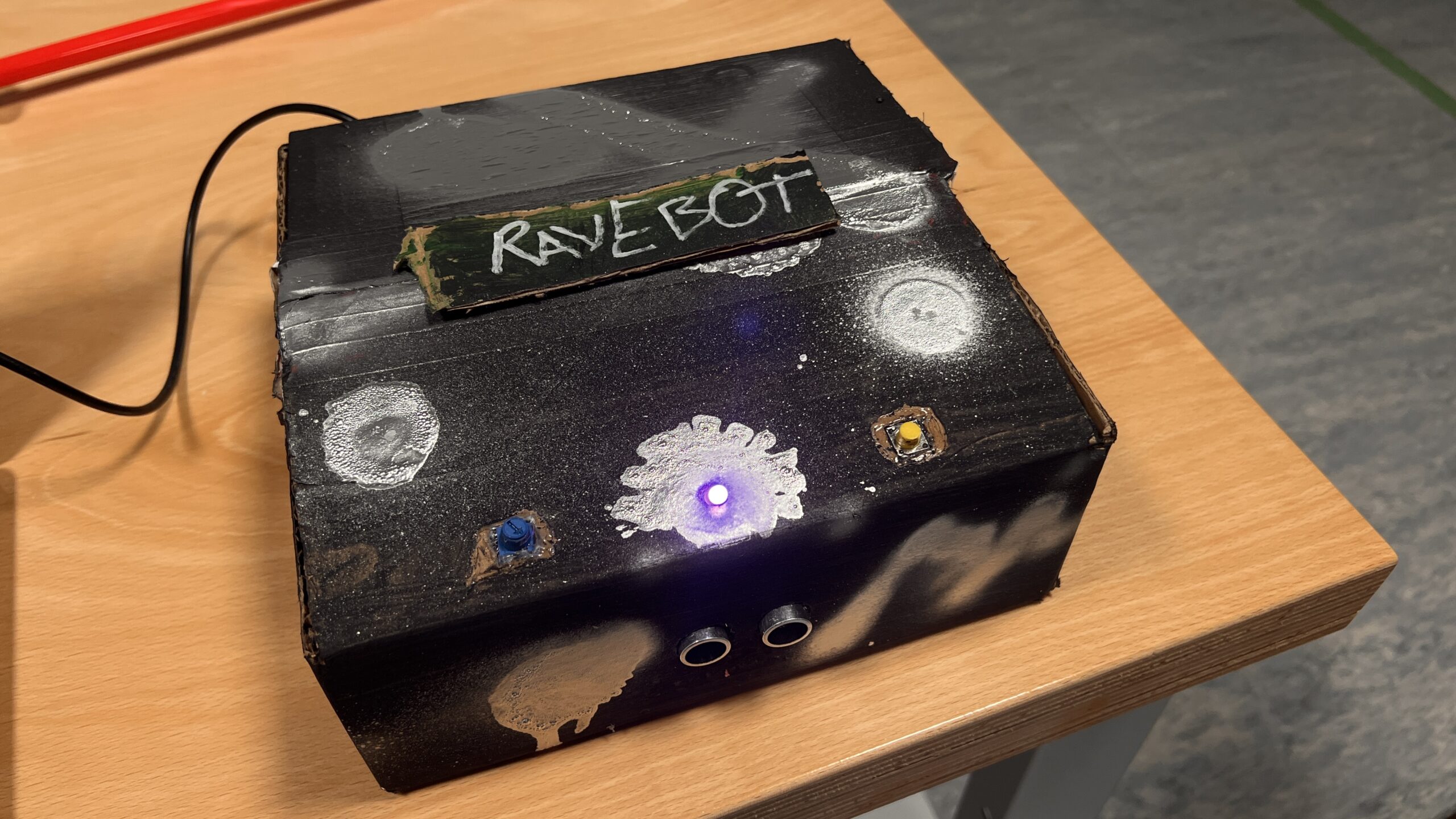
Saiki and Elora Week 10 Assignment: RaveBot


Concept:

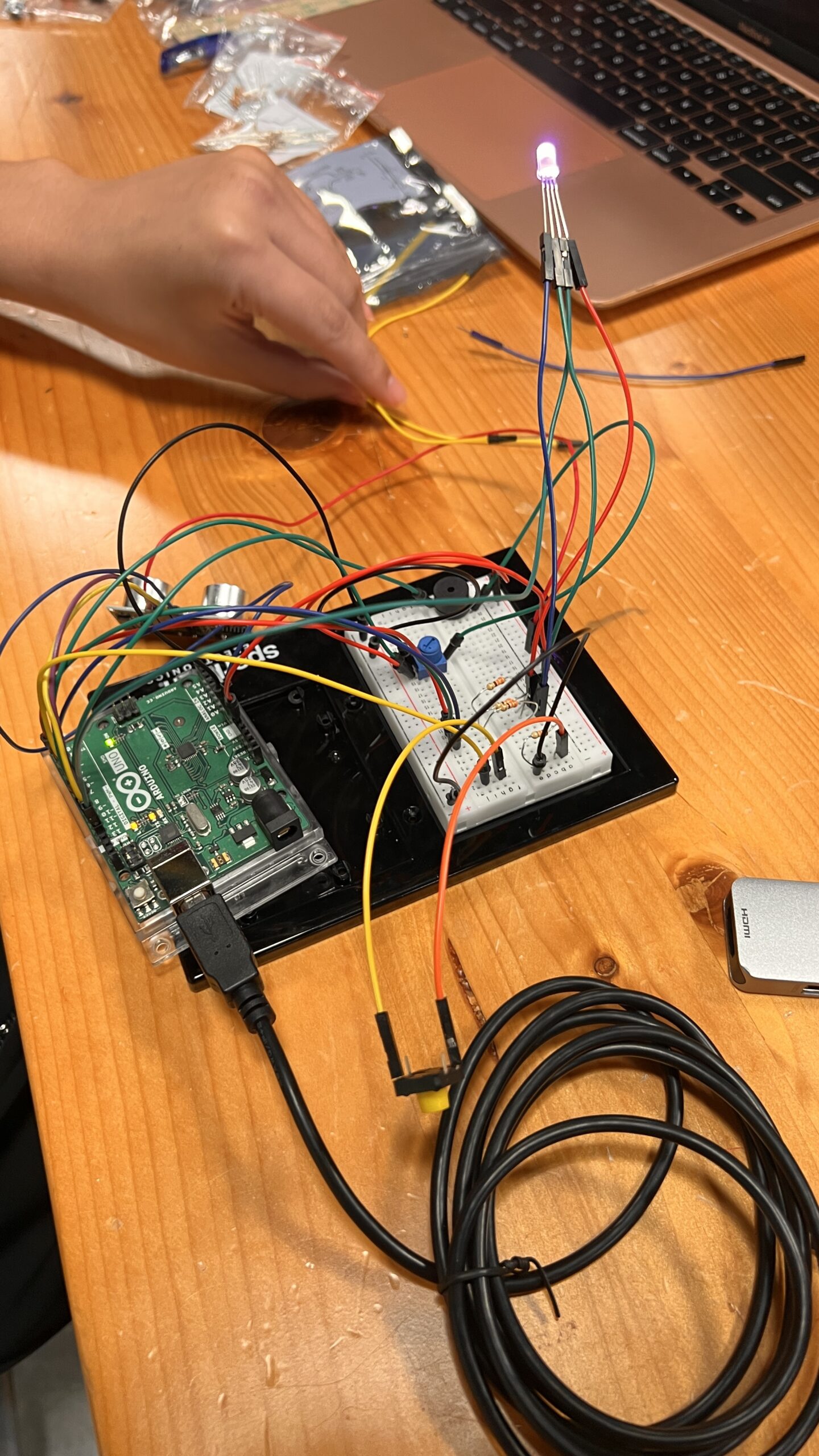
Our concept was to create an industrial DJ bot called the Rave Bot. Using an ultrasonic sensor, we aimed to create a metallic, grungy music box with a theremin-like instrument. Given its rave theme, we wanted to incorporate a strobing light effect to enhance the energetic vibe.For the theremin sound, we chose a haunted eerie techno sound, similar to the actual theremin sound.

Prototype and Modelling:

Code:

const int PIN_RED = 3;    //Red LED on pin 9
const int PIN_GREEN = 5;  //Green LED on pin 10
const int PIN_BLUE = 6;   //Blue LED on Pin 11

//variables to hold our color intensities and direction
//and define some initial "random" values to seed it

int red = 254;
int green = 1;
int blue = 127;
int red_direction = -1;
int green_direction = 1;
int blue_direction = -1;
int buttonState = 0;  // variable for reading the pushbutton status


/* This function "Set Color" will set the color of the LED
   rather than doing it over and over in the loop above. */
void setColor(int R, int G, int B) {
  analogWrite(PIN_RED, R);
  analogWrite(PIN_GREEN, G);
  analogWrite(PIN_BLUE, B);
}


#include <Ultrasonic.h>
#include <toneAC.h>

Ultrasonic ultrasonic(12, 13);

#define TONE_VOLUME 5  // 1-20 //output sound pin(positive of speaker)
int distance;

void setup() {
  pinMode(7, INPUT_PULLUP);

  Serial.begin(9600);
  //set all three pins to output mode
  pinMode(PIN_RED, OUTPUT);
  pinMode(PIN_GREEN, OUTPUT);
  pinMode(PIN_BLUE, OUTPUT);
}

void loop() {
  buttonState = digitalRead(7);

  red = red + red_direction;  //changing values of LEDs
  green = green + green_direction;
  blue = blue + blue_direction;
  if (buttonState == LOW) {

    //now change direction for each color if it reaches 255
    if (red >= 255 || red <= 0) {
      red_direction = red_direction * -100;
    }
    if (green >= 255 || green <= 0) {
      green_direction = green_direction * -10;
    }
    if (blue >= 255 || blue <= 0) {
      blue_direction = blue_direction * -150;
    }
    setColor(random(red), random(green), random(blue));

  } else if (buttonState == HIGH) {
    analogWrite(PIN_RED, 10);
    analogWrite(PIN_GREEN, 251);
    analogWrite(PIN_BLUE, 100);
  }

  distance = ultrasonic.read();  //reads the distance from the sensor
  if (distance < 120)            //range is about 120 cm
  {
    int freq = 1500 - distance * 10;  //calculates a corresponding freqeuncy
    toneAC(freq, TONE_VOLUME);        //plays the sound!(output through speaker- pin10)

    Serial.println(distance);  //just for monitoring if required
  } else {
    noToneAC();  //out of range
  }
}


Reflection:

We kept improvising on the theme we wanted to go for, and it turned out great for us. One thing we would have definitely liked is to have a better sounding or louder speaker. Currently, due to the power being split across multiple buttons, LEDs, and the speaker, the full range of volume is lost, especially once we close the box. However, we were really happy with the design of the box. We colored it black and spray painted chrome silver on it to give it an industrial look, which we thought a ravebot deserves. All in all, it was a super fun experience.

Week 10 – Reading Response

In this reading, Bret Victor gives a problem that widely exists in the current visionary design for future interactions. He believes that all these visionary designs for the future have ignored the human capabilities and specifically omit millions of possible things our hands can do. The future interaction vision of the Picture Under Glass is, according to Bret, a retrograde of technology and interactions.

I think that Bret indeed makes a valid point in pointing out that future interaction designs do not make the use of the full potential capabilities of human bodies. And I can imagine that once we have the designs that enable us to interact with daily objects with our full capabilities, there will be so much more things that currently are not even imaginable becoming possible and accessible. However, as the question goes in the follow-up article, Bret does not provide a solution and he just can’t give a solution.  Even when reading this article, I actually nodded in agreement with Bret’s argument, but I couldn’t personally imagine what the ideal world for Bret would be. Will we be interacting with physical objects then? But it’s obviously not a progress in terms of interactions and technology. But again, I am in line with Bret and truly look forward to the day when our fully capabilities could be achieved in interaction designs.

This article makes me think of a recent invention I saw online. It was like a physical embodiment of Siri. This physical virtual assistant can be interacted with different modes and is capable of dealing daily affairs for its users. This virtual assistant could be activated via voice control or tapping and is powered by AI. Will this be the future given the fact that it does make our life easier?

Link to this machine introduction: https://www.youtube.com/watch?v=5fQHAZWOUuY

Week 10- Reading Response Post

This week’s reading about the future of interaction design made me stop and think. It talked about how designs confined under glass aren’t great for the future of how we interact with stuff. The author had some strong thoughts about a video showcasing future interactions. They were skeptical about the interactions presented in the video because they had experience working with real prototypes, not just computer-generated animations. But surprisingly, that wasn’t the main issue for them. What bothered them the most was that the video didn’t offer anything truly groundbreaking from an interaction standpoint. They felt it was just a small step forward from what’s already there, which, according to them, isn’t that great to begin with. They stress how crucial it is to have visionary ideas that truly revolutionize how we interact with technology and the world around us. It got me pondering, but honestly, I don’t fully buy into that idea.

Sure, our bodies have a ton of complex ways we handle things, how we touch, hold, and interact with everything around us. But saying that designs restricted to “pictures under glass” are all bad? I’m not on board with that. Take something as simple as a PDF file versus printing out a reading. That PDF might be called “numb” in terms of design, but let’s be real, it’s way easier to handle and interact with than dealing with a printed paper. It’s about usability and convenience, isn’t it? If it’s not convenient or easy to use, is it even really interaction?

I believe interaction goes beyond just physically touching something. It’s about how easy and helpful it is to use. Some things will always need to be tangible. There’s magic in touching, feeling textures, estimating weights, and seeing how things respond to us. Like a couch that adjusts slightly to fit you but still does its job of being a comfy place to sit. That’s something you can’t replicate behind glass.

I think it’s crucial to know what can be behind glass and what can’t. Some folks might prioritize convenience in the future, but there are things you just can’t replicate virtually. I mean, you can’t virtually brush your teeth, right?

For me, I don’t see the connection or agree with that rant about interaction design. Maybe it’s just me, though. Everyone’s got their take on things, and that’s cool.

Week 10 – Musical Instrument

For this assignment, we wanted to make a hovering keyboard. We used the ultrasonic distance measuring sensor to set specific distance ranges to specific notes. As the user would move their hand through different ranges, different notes would play. We also added a button to turn off the instrument completely in addition to implementing a maximum range beyond which the instrument doesn’t produce any sound.

Video:

#include "pitches.h"
// defines pins numbers
const int trigPin = A0;
const int echoPin = A1;
const int speakerPin = 8;
const int pushButton = A2;
// defines variables
long duration;
int distance;
void setup() {
  pinMode(trigPin, OUTPUT);  // Sets the trigPin as an Output
  pinMode(echoPin, INPUT);   // Sets the echoPin as an Input
  pinMode()
  Serial.begin(9600);  // Starts the serial communication
  
}
void loop() {
  int buttonState = digitalRead(pushButton);
  // print out the state of the button:
  Serial.println(buttonState);
  delay(1);  // delay in between reads for stability
  // Clears the trigPin
  digitalWrite(trigPin, LOW);
  delayMicroseconds(2);
  // Sets the trigPin on HIGH state for 10 micro seconds
  digitalWrite(trigPin, HIGH);
  delayMicroseconds(10);
  digitalWrite(trigPin, LOW);
  // Reads the echoPin, returns the sound wave travel time in microseconds
  duration = pulseIn(echoPin, HIGH);
  // Calculating the distance
  distance = duration * 0.034 / 2;
  // Prints the distance on the Serial Monitor
  Serial.print("Distance: ");
  Serial.println(distance);
  // Playing outside distance range or the instrument is turned off
  if (distance >= 40 || buttonState == 1) {
    noTone(speakerPin);
  }
  // Play C4 in first 10cm
  else if (distance >= 0 && distance <= 10) {
    tone(speakerPin, NOTE_C4, 1000 / 4);
  }
  // Play G4 in next 10cm
  else if (distance >= 11 && distance <= 20) {
    tone(speakerPin, NOTE_G4, 1000 / 4);
  }
  // Play A4 in next 10cm
  else if (distance >= 21 && distance <= 30) {
    tone(speakerPin, NOTE_A4, 1000 / 4);
  }
  // Play F4 in next 10cm
  else if (distance >= 31 && distance <= 40) {
    tone(speakerPin, NOTE_F4, 1000 / 4);
  }
}

Future Applications:

I think for future applications, the number of keys could be expanded to have 12 keys, and buttons to move up or down an octave so it could be a complete hovering piano with all possible keys present on a keyboard.

Week 10 Assignment: 4 Tabs Mini Piano

Concept:

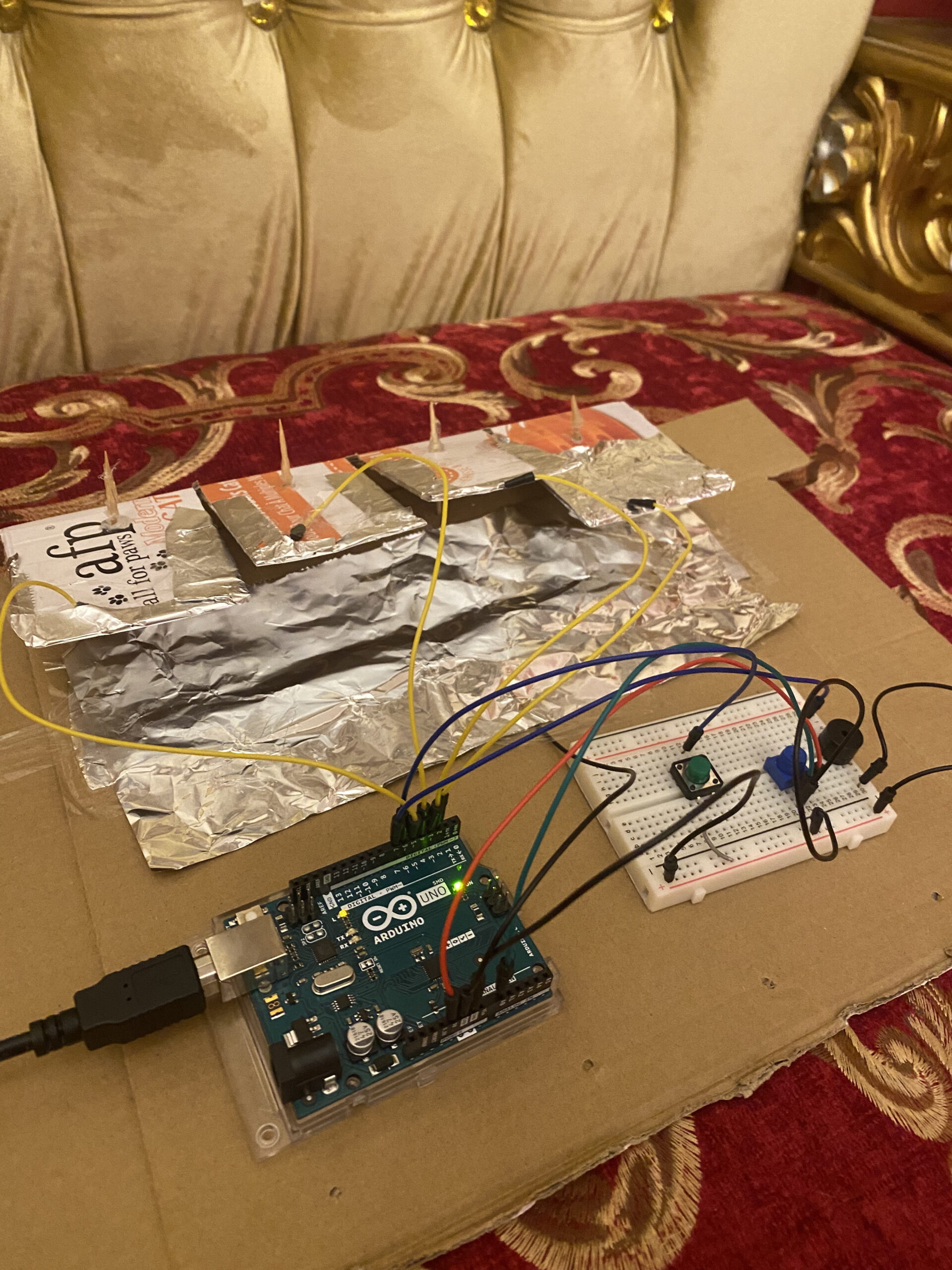
In this week’s assignment, I decided to create a piano on a much smaller scale. As the title suggested, it is composed of 4 tabs. Its motivation is to make a piano that can be carried anywhere and played easily. The piano has multiple different tones to it, which can be adjusted with the use of a potentiometer. While there are digital applications where people can easily play piano, as this week’s text suggested- the importance of touch and expression when performing tasks compared to just touching a flat screen- I realized how a physical piano can bring forth a better experience than a digital one.

Prototype:

https://youtube.com/shorts/p7VoEhPxomk

Code:

#include "pitches.h"

//setting up various pins, numkeys is the number of keys on the piano, TABPins are the digital pins
const int numKeys = 4;                
const int TABPins[numKeys] = {2, 3, 4, 5}; 
const int pushButton = 6;            
const int speakerPin = 7;             

//variable to store the last pressed tab in it
int lastTAB = -1;                  
int pitch;                         
//variable for flagging system as open or close   
bool systemEnabled = false;           


void setup() {
  //set each buttonPin as input 
  for (int i = 0; i < numKeys; i++) {
    pinMode(TABPins[i],  INPUT);
  }
  //set the button as input 
  pinMode(pushButton, INPUT);
  Serial.begin(9600);
}

void loop() {
  // Check the state of the push button
  int buttonState = digitalRead(pushButton);

  // Toggle the system on/off when the button is pressed
  if (buttonState == LOW) {
    delay(50); 
    //when the button is pressed, invert the systemEnabled variable
    if (digitalRead(pushButton) == LOW) {
      systemEnabled = !systemEnabled;

      // If the system is now enabled, reset the lastTAB variable
      if (systemEnabled) {
        lastTAB = -1;
      }

      // Wait for the button to be released
      while (digitalRead(pushButton) == LOW) {
        delay(10);
      }
    }
  }

  // If the system is enabled, read the potentiometer value and play notes
  if (systemEnabled) {
    int potValue = analogRead(potentiometerPin);
    // Map potentiometer value to a pitch range
    pitch = map(potValue, 0, 1023, 200, 4000);  

    for (int i = 0; i < numKeys; i++) {
      int TABValue = digitalRead(TABPins[i]);

      // Play a note if the TAB is pressed and it's not the same TAB as the last one
      if (TABValue == LOW && i != lastTAB) {
        // note variable that stores a value from the loswet Note + the addition of the pitch which changes according to potentiometer
        int note = NOTE_B0 + pitch + i * 100;  
        // output the speaker with that note value for 1 second
        tone(speakerPin, note, 1000);
        delay(100);  

        // Update the lastTAB variable
        lastTAB = i;
      }
    }
  }
}

Reflection:

This was a fun hands-on exercise. One aspect of the project that took the most time was building the prototype which replicates the piano. The hard part on the other hand was most probably the setting up of the push button to flag the system as open or closed since I had to input in multiple delays to prevent various errors. As for future improvements, more tabs can be added within the piano to make it more feasible to produce multiple notes in one go. Also, the overall look of the piano can most probably be much better than this.