All Posts

Week 5: reading response

Seal and puppy lookalikes


When I look at this photo of a seal and a puppy that somehow look like long-lost twins, my human brain gets the joke instantly. I can tell they’re two different animals, and I also get why they’re being compared. There’s context, humor, and visual nuance involved. But for a computer, that kind of recognition isn’t simple. Computer vision doesn’t work like human vision. We interpret meaning and emotion, while a computer just sees pixels, shapes, and patterns. Golan Levin’s essay really drove that home. Computers are not seeing the world, they’re processing data through whatever narrow lens we’ve given them.

To help computers understand what we want them to track, we use things like face detection, color tracking, optical flow, and trained models. These tools help narrow the field and make the computer’s “guess” more accurate. But still, it’s guessing. A puppy that looks like a seal might completely throw it off if the system wasn’t trained on edge cases like this. That’s part of what makes working with computer vision both fascinating and fragile.

In interactive art, computer vision opens up exciting possibilities. We can create responsive environments, playful installations, and performances that react to motion and presence. But the same tools are also used in surveillance and monitoring. There’s a tension between creativity and control that we can’t ignore. As an artist, I think it’s important to design with awareness. Just because the system can track someone doesn’t mean it should. I want to create interactions that feel intentional and thoughtful, not invasive. At the end of the day, I want the system to respond with care, not just accuracy.

Week 4: Data Visualization

For this week’s production assignment on data visualization and generative artwork, I wanted to capture a very real and very dramatic part of my daily life: my cat Pieni’s obsession with food. Even when she’s been fed every single time she still manages to ask for more like she hasn’t eaten in centuries.

So I thought, why not visualize her lies?

Concept:

This project is a simple, animated bar chart that compares two things across a typical day:

  • How many times I actually fed Pieni

  • How many times she asked for food anyway

How It Works

Each time slot (from 8AM to 8PM) has two bars:

  • A light blue bar representing the single time I fed her (yep, I did my part).

  • A dark blue bar that pulses with animation to show how many times she pretended to be starving during that same period.

I added a slight pulsing animation to the begging bars to reflect how annoyingly persistent and dramatic her pleas are—even when her bowl is full.

Challenges & Decisions

While this project wasn’t technically hard, the main challenge was design clarity. I didn’t want it to look like a boring spreadsheet. I wanted it to be:

  • Aesthetic and cat-meme friendly

  • Easy to understand at a glance

  • Somewhat interactive (through animation)

I spent a bit of time tweaking:

  • The color scheme (cool blues)

  • Bar spacing and layout

  • Centering and visual alignment

  • The legend—cleanly placed in the top-right instead of labeling every bar

What I Learned

This week helped reinforce how storytelling and humor can make even simple data visualizations fun and engaging. It also helped me practice:

  • Pulse animation with sin() for movement

  • Using clean design principles in p5.js

  • Balancing simplicity with personality

Week 4: Reading Response

After reading Norman, I kept thinking about how often I’ve felt genuinely embarrassed, not because I did something wrong, but because something was so badly designed that it made me look like I didn’t know what I was doing. I’ve blamed myself so many times for design failures, but Norman makes it clear that it’s not me, it’s the object. One thing that still annoys me is the sink setup at Dubai Airport. The soap, water, and dryer are all built into one sleek bar, with no sign telling you which part does what. You just keep waving your hands around and hope something responds. Sometimes the dryer blasts air when you’re trying to get soap, or nothing works at all. To make things worse, some mirrors have Dyson hand dryers built in, others have tissues hidden somewhere off to the side, and there’s no way to know without ducking and peeking like a crazy person. Norman’s point about discoverability and signifiers felt especially real here. One simple label could fix all of it.

In my interactive media work, I’m starting to think more about how people approach what I build. Norman’s ideas about system image and mental models stuck with me. If someone doesn’t know what they’re supposed to do when they see my sketch, I’ve already failed as a designer. In my  work, I try to make interactive elements obvious and responsive. If something is clickable, it should look like it. If something changes, the feedback should be clear. The goal is to make users feel confident and in control, not confused or hesitant. Good design doesn’t need to explain itself. It should just make sense.

Week 3: Reading Response on What Makes Interaction Strong?

After going through this week’s reading, I realized how often the word “interactive” gets thrown around. Chris Crawford makes a sharp distinction between reaction and interaction. Just because something responds doesn’t mean it’s truly interactive. For him, strong interaction happens only when a system “listens, thinks, and responds thoughtfully,” like a real conversation. He emphasizes that true interaction requires both sides to be active participants. That stuck with me, especially since we often label anything that reacts to input as interactive, even when it’s really just one-sided. I liked how Crawford stripped the term down to something clear. It’s not about bells and whistles, it’s about actual communication.

Looking back at my own p5.js sketches, I was intentional about making them gamified because I wanted them to feel interactive, not just look interactive. I wanted them to look more like a game than a GIF because only by interacting with an artwork do you really get to sense what went behind it and what it stands for. I love the effect of something actually happening because of a user’s input. It gives users a sense of presence, like they’re not just observing but actively shaping what unfolds. That moment of response makes people feel like they’re part of the piece, not just pressing buttons on the outside. It’s rewarding for both the user and the creator, and it’s the kind of experience I want to keep building on. To me, interactivity is a back-and-forth communication.

Week 2 : Reading Reflection on Casey Reas’ Talk

When I first watched Casey Reas’ talk on chance operations at the beginning of the semester, I wasn’t entirely sure how to feel. Honestly, I was just ready to absorb whatever perspectives were being offered through different narratives. I’ve always been someone who likes control when I’m creating and knowing what’s going to happen, having a plan, getting things “right.” So the idea of building randomness into a project felt a little chaotic, maybe even risky. But Reas broke that tension down. He walked us through how he uses systems, chance, and instruction-based art to remove the artist’s ego from the process and let the artwork evolve in ways he couldn’t fully predict. The way he referenced John Cage and connected those ideas to computational art made it all click: randomness doesn’t mean lack of intent, it just shifts where the intent is. Reas isn’t just throwing things into the void and hoping for the best, he’s setting up a structure where randomness can still move freely. That clicked with me. It’s not about losing control entirely, it’s about creating a space where unexpected things can happen without everything falling apart. That made the idea of randomness feel a lot less intimidating and a lot more useful.

Since I’m writing this reflection a bit later in the semester, I’ve had more time to think about my own relationship to randomness—and honestly, I like randomness I can control. Total chaos just ends up looking like a muddy mess. I prefer when randomness happens within boundaries, where the outcome is still cohesive and intentional, even if it’s unpredictable. That’s the balance I’m drawn to: letting go a little, but not so much that the work loses meaning or direction. It’s about creating space for surprise, but still being able to call the final result your own.

Week 12 — Final Progress Report

Final Idea

After lots of thought (in which initially, I wanted it to be a I’ve settled on a concept for a game titled “Did You Eat My Chips?”. The premise is a semi-thriller, played in a lighthearted tone, where the objective is to consume chips surreptitiously while avoiding detection by your slime sibling. My aim was to strike a balance, creating an experience that is engaging without being overtly frightening, yet distinct from typical game scenarios. This approach was driven by the desire to incorporate a pulse sensor, using it to gauge a player’s physiological response during time-sensitive, high-pressure(?) situations within the game and observe the impact of these moments on their state. This was largely inspired by my experience growing up with my sister where we would sneakily eat each other’s food; it always felt like a thriller movie.

Progress

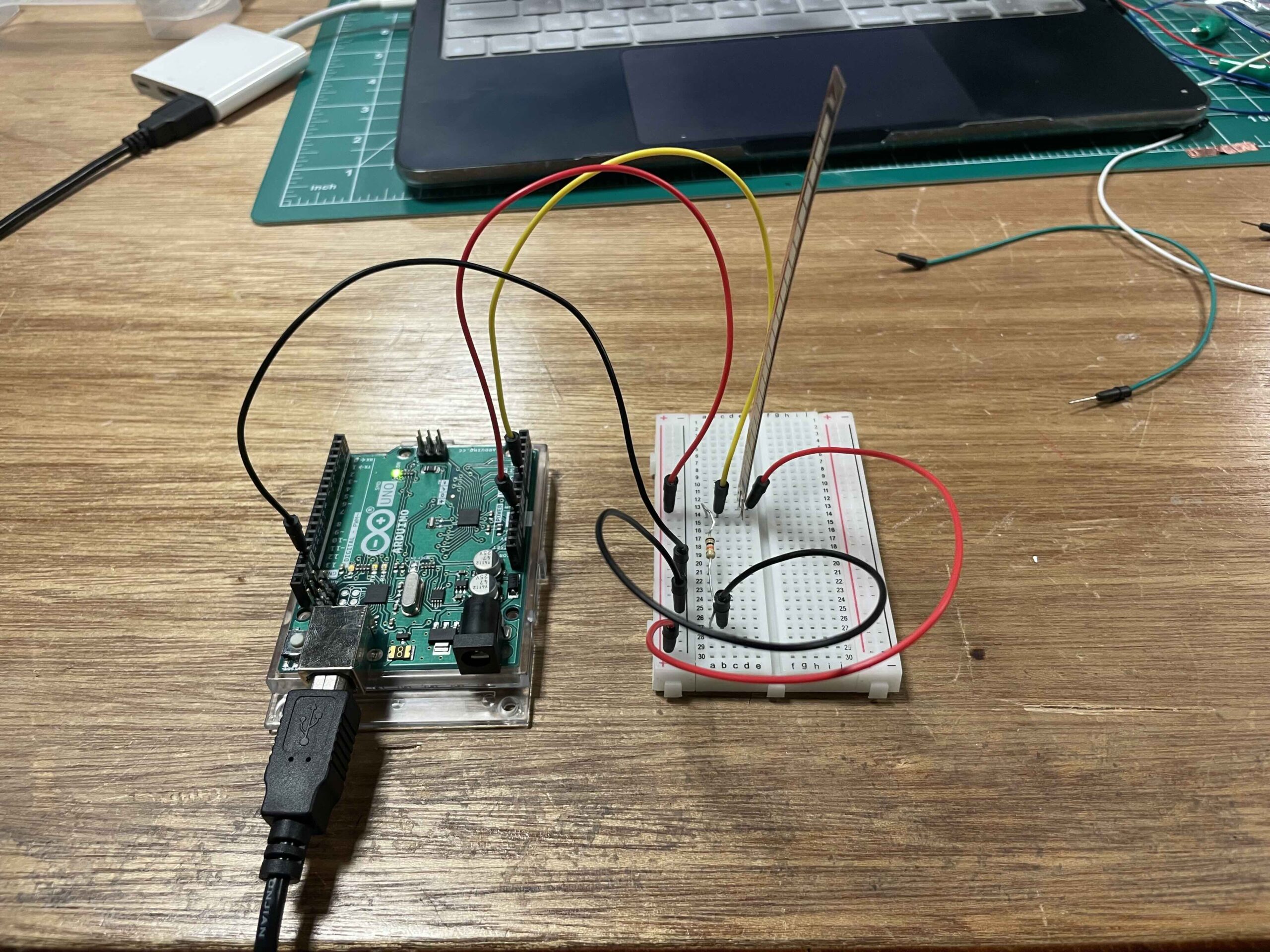
So far, I’ve been busy sketching out some ideas for how the game will look. I’ve been doing some image drafts in Figma and Procreate to get a feel for the design style and what I want to aim for when I start building things in p5.js. On the hardware side, I’ve also been playing around with the flex sensor. That’s going to be the main way you control the game, so I’m just getting the hang of how it works and how to use it.

Visuals

What is left?

I still have to test the pulse sensor and see how to interact with the game. I have to borrow it from the IM lab so I’ll be testing that out today.

Week 12: Final Project Proposal

After a lot of deliberation and brainstorming, I am happy to report that I have solidified my final project concept. I will be producing an interactive piece of art that aims to tell the story of international students in the US who are being targeted by the current political situation.

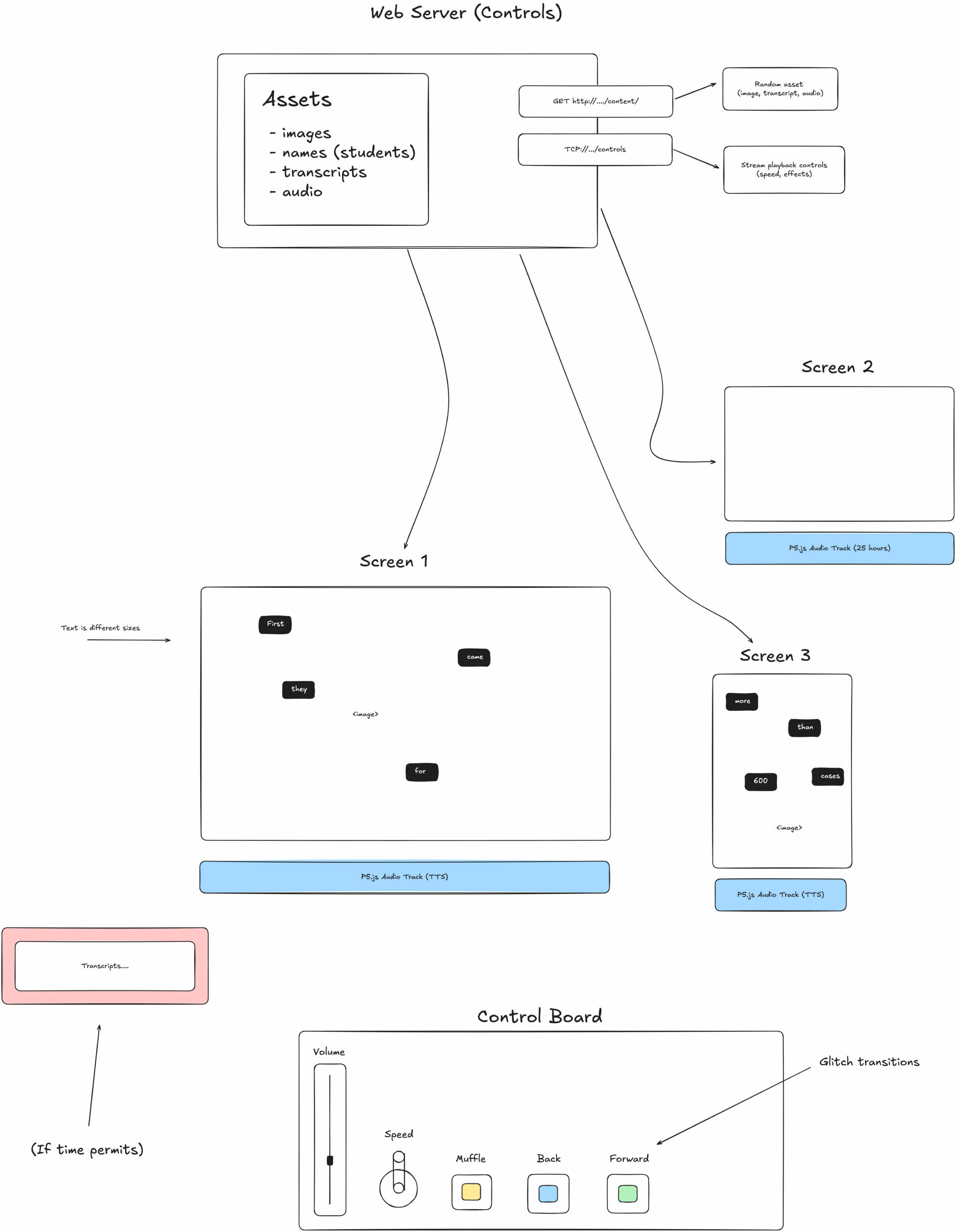
My work will allow anyone to participate by scanning a QR code, which will direct them to my p5.js sketch which shuffles through images–coordinated real-time with text on screen transcribing details. The p5.js sketch will connect to a websocket running on my server, which provides control information for the piece.

Finally, a panel at the front of the installation will include controls, which allow viewers to adjust the playback of the art, including speed and effects. A diagram of the architecture is attached below.


Final project finalized concept | Handdrawn shape guessing using AI

Let me walk you through my journey of planning an Arduino integration for my existing Python-based drawing application. TBH the Arduino implementation isn’t complete yet, but the documentation and planning phase has been fascinating!

The Current State: A Digital Drawing Assistant

Before diving into the Arduino part, let me elabroate about the current state of the application. My app is built with Python and PyQt5, featuring:

      • A digital canvas for freehand drawing
      • Color selection and brush size options
      • An AI assistant that can recognize what you’ve drawn (with a fun, playful personality)
      • The ability to save, load, and organize drawings

The AI assistant is my favorite part—it has this quirky personality that makes drawing more entertaining. It’ll say things like “That’s obviously a circle! Van Gogh would approve!” or “I’m as lost as a pixel in a dark room. Can you add more detail?” of course the hardest part was to actually come up with those lines.


The Arduino Part

The next phase of development involves adding physical controls through an Arduino. Here’s what I’m planning to implement:

      • Joystick control for moving the digital cursor and drawing
      • Physical buttons for clearing the canvas, changing colors, and triggering the AI assistant
      • Visual and audio feedback to enhance the experience

The beauty of this integration is how it bridges the digital-physical gap.  I am trying to reach the peak of interactivity that I can think of, and I think having an interactive AI system is as far as I can, with my current knowledge, achieve and implement.

Vision of the structure

app,py/

├── main.py (needs to be updated)
├── arduino_integration.py (not yet there)
├── test_arduino.py (not yet there)
├── config.py

├── core/
│ ├── __init__.py
│ ├── conversation.py
│ ├── drawing_manager.py
│ ├── recognition.py
│ ├── tts.py
│ └── arduino_controller.py (not yet there)

├── data/
│ ├── __init__.py
│ ├── database.py
│ ├── history.py
│ └── user_settings.py

├── ui/
│ ├── __init__.py
│ ├── main_window.py
│ ├── canvas.py
│ ├── toolbar.py
│ ├── settings_dialog.py
│ └── training_dialog.py

├── Arduino/
│ └── DrawingAI_Controller.ino (not yet there)

└── sounds/ (not set, only palceholders)
├── connect.wav
├── disconnect.wav
├── clear.wav
├── color.wav
└── guess.wav

Challenges

I want to have the joystick and buttons on a  plain wooden plank and in a container to hold it in place, and the buttons not on a breadboard but actually on a physical platform that makes everyting looks nicer, to be honest i am so lost with that, but we will see how things go.

Very very late assignment 11 submission


Sorry for my late submission , I was facing a lot of problems that I was not aware how to solve, apparently my browser (Opera GX) does not support p5 – arduino communication, it took me ages to realize, and I compensated with putting extra effort into my assignment.

1)


2)

3)

// bounce detection and wind control
// pin setup
const int potPin = A0;  // pot for wind control
const int ledPin = 9;   // led that lights up on bounce

// vars
int potValue = 0;       // store pot reading
float windValue = 0;    // mapped wind value
String inputString = ""; // string to hold incoming data
boolean stringComplete = false; // flag for complete string
unsigned long ledTimer = 0;      // timer for led
boolean ledState = false;        // led state tracking
const long ledDuration = 200;    // led flash duration ms

void setup() {
  // set led pin as output
  pinMode(ledPin, OUTPUT);
  
  // start serial comm
  Serial.begin(9600);
  
  // reserve 200 bytes for inputString
  inputString.reserve(200);
}

void loop() {
  // read pot val
  potValue = analogRead(potPin);
  
  // map to wind range -2 to 2
  windValue = map(potValue, 0, 1023, -20, 20) / 10.0;
  
  // send wind value to p5
  Serial.print("W:");
  Serial.println(windValue);
  
  // check for bounce info
  if (stringComplete) {
    // check if it was a bounce message
    if (inputString.startsWith("BOUNCE")) {
      // turn on led
      digitalWrite(ledPin, HIGH);
      ledState = true;
      ledTimer = millis();
    }
    
    // clear string
    inputString = "";
    stringComplete = false;
  }
  
  // check if led should turn off
  if (ledState && (millis() - ledTimer >= ledDuration)) {
    digitalWrite(ledPin, LOW);
    ledState = false;
  }
  
  // small delay to prevent serial flood
  delay(50);
}

// serial event occurs when new data arrives
void serialEvent() {
  while (Serial.available()) {
    // get new byte
    char inChar = (char)Serial.read();
    
    // add to input string if not newline
    if (inChar == '\n') {
      stringComplete = true;
    } else {
      inputString += inChar;
    }
  }
}


Week 12 – Finalized Idea

Concept:

My project explores the fascinating intersection between physical interaction and emergent systems through a digital flocking simulation. Inspired by Craig Reynolds’ “Boids” algorithm, I’m creating an interactive experience where users can manipulate a flock of virtual entities using both hand gestures and physical controls. The goal is to create an intuitive interface that allows people to “conduct” the movement of the flock, experiencing how simple rules create complex, mesmerizing patterns.

The simulation displays a collection of geometric shapes (triangles, circles, squares, and stars) that move according to three core flocking behaviors: separation, alignment, and cohesion. Users can influence these behaviors through hand gestures detected by a webcam and physical controls connected to an Arduino.

Arduino Integration Design

The Arduino component of my project will create a tangible interface for controlling specific aspects of the flocking simulation:

  1. Potentiometer Input:
    • Function: Controls the movement speed of all entities in the flock
    • Implementation: Analog reading from potentiometer (0-1023)
    • Communication: Raw values sent to P5 via serial communication
    • P5 Action: Values mapped to speed multiplier (0.5x to 5x normal speed)
  2. Button 1 – “Add” Button:
    • Function: Adds new entities to the simulation
    • Implementation: Digital input with debouncing
    • Communication: Sends “ADD” text command when pressed
    • P5 Action: Creates 5 new boids at random positions
  3. Button 2 – “Remove” Button:
    • Function: Removes entities from the simulation
    • Implementation: Digital input with debouncing
    • Communication: Sends “REMOVE” text command when pressed
    • P5 Action: Removes 5 random boids from the simulation

The Arduino code will continuously monitor these inputs and send the appropriate data through serial communication at 9600 baud. I plan to implement debouncing for the buttons to ensure clean signals and reliable operation.

P5.js Implementation Design

The P5.js sketch handles the core simulation and multiple input streams:

  1. Flocking Algorithm:
    • Three steering behaviors: separation (avoidance), alignment (velocity matching), cohesion (position averaging)
    • Adjustable weights for each behavior to change flock characteristics
    • Four visual representations: triangles (default), circles, squares, and stars
  2. Hand Gesture Recognition:
    • Uses ML5.js with HandPose model for real-time hand tracking
    • Left hand controls shape selection:
      • Index finger + thumb pinch: Triangle shape
      • Middle finger + thumb pinch: Circle shape
      • Ring finger + thumb pinch: Square shape
      • Pinky finger + thumb pinch: Star shape
    • Right hand controls flocking parameters:
      • Middle finger + thumb pinch: Increases separation force
      • Ring finger + thumb pinch: Increases cohesion force
      • Pinky finger + thumb pinch: Increases alignment force
  3. Serial Communication with Arduino:
    • Receives and processes three types of data:
      • Analog potentiometer values to control speed
      • “ADD” command to add boids
      • “REMOVE” command to remove boids
    • Provides visual indicator of connection status
  4. User Interface:
    • Visual feedback showing connection status, boid count, and potentiometer value
    • Dynamic gradient background that subtly responds to potentiometer input
    • Click-to-connect functionality for Arduino communication

Current Progress

So far, I’ve implemented the core flocking algorithm in P5.js and set up the hand tracking system using ML5.js. The boids respond correctly to the three steering behaviors, and I can now switch between different visual representations.

I’ve also established the serial communication framework between P5.js and Arduino using the p5.webserial.js library. The system can detect previously used serial ports and automatically reconnect when the page loads.

For the hand gesture recognition, I’ve successfully implemented the basic detection of pinch gestures between the thumb and different fingers. The system can now identify which hand is which (left vs. right) and apply different actions accordingly.

Next steps include:

  1. Finalizing the Arduino circuit with the potentiometer and two buttons
  2. Implementing proper debouncing for the buttons
  3. Refining the hand gesture detection to be more reliable
  4. Adjusting the flocking parameters for a more visually pleasing result
  5. Adding more visual feedback and possibly sound responses

The most challenging aspect so far has been getting the hand detection to work reliably, especially distinguishing between left and right hands consistently. I’m still working on improving this aspect of the project.

I believe this project has exciting potential not just as a technical demonstration, but as an exploration of how we can create intuitive interfaces for interacting with complex systems. By bridging physical controls and gesture recognition, I hope to create an engaging experience that allows users to develop an intuitive feel for how emergent behaviors arise from simple rules.