Week 4 Reading Response

Prompt:

  • What’s something (not mentioned in the reading) that drives you crazy and how could it be improved?
  • How can you apply some of the author’s principles of design to interactive media?

Response:

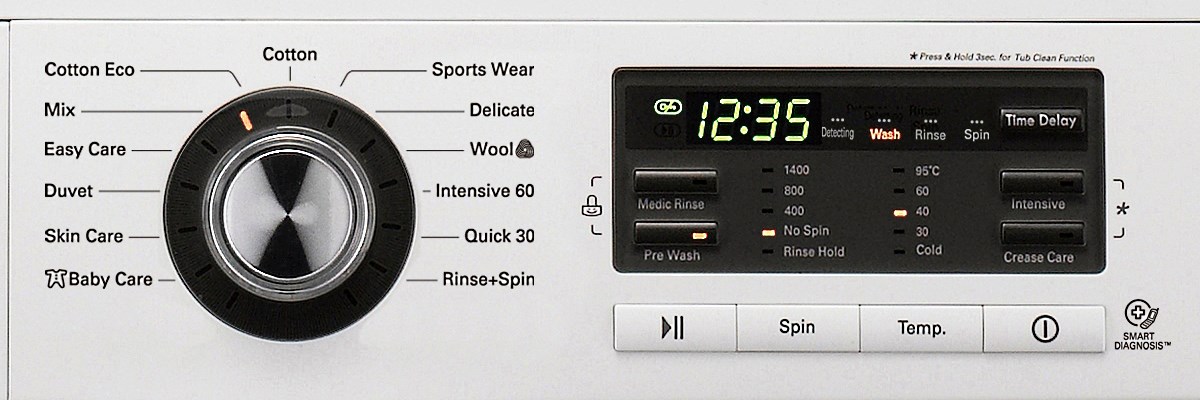
One of the inventions that drives me crazy on weekly basis is the washing machine. When I tried to do laundry, I am always confused on multiple options that are provided on the panel.

As demonstrated by the picture above, I am confused by the information presented. What is easy care? what is its difference with skin care? when should I choose easy care? When choosing the temperature, how will different temperature affect the washing effect? As a result, I need to go through multiple websites to look for my answer. To improve on this process, I believe the machine could be more interactive. For example, using a display screen to ask users to choose what type of clothes are they washing and then asking how long would they want to wait, etc.. To save the machine from asking repeated question, the screen could provide a default option for users if users have found the best washing mode.

I want to focus on HCD later on for my interactive media works. I always admire how Steve Jobs design the iPad. He successfully incorporated the touch screen technology with very intuitive human interaction as he stated that a 6-year-old could start playing games on iPad without any instruction(visual, text, etc.) (https://www.forbes.com/sites/michaelnoer/2010/09/08/the-stable-boy-and-the-ipad/). Everything should be intuitive and audience could receive very clear feedback after they interact.

Assignment 4 – Generative text output

Concept

For this project, I wanted to challenge myself and experiment with generative text output. I thought it would be interesting to create a program that builds short messages by mixing different pieces of text together. I wrote sentence templates with placeholders and then filled those placeholders with random words from lists of activities, places, events, and more. This approach makes every message different, even though they all follow a similar style. Each click shows a new message, so the text keeps changing and never feels the same. After eight messages, the conversation refreshes and starts again, so it feels like a brand-new chat every time. I also made the layout look like a chat screen, with colored message bubbles and a date at the top, so it feels like you are reading a conversation.

Highlight of the code I am proud of

The part I am most proud of is making the messages switch sides and look like a real chat conversation. As a beginner, figuring out how to alternate the chat bubbles between the left and right side was tricky, but using nextMessageIndex %2 to alternate sides worked perfectly.

// Interaction: add new message when mouse is pressed

function mousePressed() {
  if (nextMessageIndex === 0) {
    messages = [];  // clear canvas after 8 messages
  }
  let side;
  if (nextMessageIndex%2==0){ // Alternate sides
    side = 'left';
  } 
  else{
    side= 'right';
  }
  messages.push({
    text: generateMessage(),
    side: side
  });

  nextMessageIndex+=1;
  if (nextMessageIndex >= 8) { // Reset counter after 8 messages
    nextMessageIndex = 0; 
  }
}

Another thing I am proud of is the way I handled text wrapping. At first, I didn’t know how to make long messages fit inside the bubbles, but I learned how to split the text into words and build lines that stay within the bubble’s width. It made the conversation look clean and easy to read.

// Text wrapping into lines

let words = m.text.split(" ");  // Split message into words
let lines = [];
let tempLine = "";
for (let w of words) {
  
   // Check if adding word exceeds bubble width
  if (textWidth(tempLine + w + " ") < bubbleMaxWidth - 20) { 
    tempLine += w + " ";  // Add word to current line
  } else {
    lines.push(tempLine); // Save current line
    tempLine = w + " ";  // Start new line with current word
  }
}
lines.push(tempLine); // Add last line

Sketch

Click the mouse to add a new message

Reflection

While making this project, I wanted to experiment with generative text output and see how random combinations of words could create a conversation. I am proud of how the messages alternate between left and right, making it feel like a real chat, and how the text wrapping keeps the messages neat inside the bubbles. For the improvements, I would like to add more templates and word lists to make the conversations even more interesting, maybe even including images in the chat bubbles. Also, one of the improvements would be adding a typing animation to make it feel more like a real conversation, and make it mobile-friendly so it works on smaller screens.

Week 4 – Reading Response

Don Norman’s ‘The Design of Everyday Things’ touches very important aspect of proper design that is both convenient and understandable to the user. He talks about engineer making clever decisions, but they don’t properly communicate how to use what they have developed and blames all of it on bad design. I fully agree that good design should have signifiers and have a simple conceptual model, so that in user’s head everything connects easily.

What’s something (not mentioned in the reading) that drives you crazy and how could it be improved?
I suppose most of it is done purposefully, but I hate how some website pop-ups hide the dismiss button. It is either tiny, camouflaged, or doesn’t exist. I do usually press top right corner and try to guess it’s location, and sometimes it works, but most of the time I’m redirected to a random website. I believe that such websites prioritize business over user needs, and they are not following the principles of human-centered design. The design intentionally hides the way to escape, and it is a false affordance, and in simple words a trap. Solution is quite simple, but again I don’t think companies want to respect user rights: 1. Create a clear and easy-to-click ‘X’ or ‘Close’ button. 2. Respect user’s initial goal, giving full access to the content they came for, and offer in a smaller window their additional services.

How can you apply some of the author’s principles of design to interactive media?
My friend lent me a book by William Lidwell ‘The Universal Principles of Design’, and I like how author there talks about very specific concepts, and some of the topic from there overlap with Don Norman’s ideas of simple user interface. I think for my future p5js sketches if I’m using preload() function I will be using loading indicator of a spinner to provide a feedback to the user that system is working. Also, when hovering over the button, it will change color slightly also a form of feedback, meaning that the button can be clicked. Overall, I want to create genuine and very simple system that will not confuse the user and at the core of it will be human-centered design.

Week 4 – Reading Reflection

In The Design of Everyday Things, Norman highlights the importance of feedback and conceptual models in making technology understandable. What struck me is his insistence that people should not have to “fight” with design in order to use it. If a product requires trial and error to figure out its basic functions, then the design has already failed. This perspective made me think about how often digital interfaces ignore human expectations and force us to adapt to them, instead of the other way around.

Something that really draws me crazy is poorly designed spaces, and while reading, I thought of examples from our campus. The automatic doors at building entrances are heavy and only open one way, which makes it difficult to get in, especially when carrying books or bags. In large study rooms, the motion-sensitive lights often turn off unexpectedly because the sensors are placed in strange spots, leaving people sitting in the dark until the lights turn back on. These everyday problems perfectly show what the author means: poor design is everywhere, and it affects our daily life in ways we often do not even notice. It makes simple tasks harder and reminds us how much thoughtful design matters.

For me, applying Norman’s principles to interactive media means designing in a way that anticipates misunderstandings before they happen. People should not feel embarrassed or incompetent because of poor interface decisions. I want to create digital experiences where the actions are transparent, the feedback is immediate, and the user feels in control. When design gets this right, it not only avoids frustration but also builds trust between people and technology.

Week 4 – Displaying Text

Concept
As always I just kept on with the concept of doing my assignment related to Dexter. He is part of Miami Metro Homicide division. So, I thought maybe text displaying randomly through .csv file would be a nice integration. A bit delusional, but Dexter would make a report of his killings of other bad people in a Miami Metro Case Files. It would consist of Observation, Target, Method, Justification, and Disposal rows.

Highlight of the code

// Get Observation: Go to the first row (OBSERVATION_ROW), split it, and pick one random part.  

  let observationOptions = split(strings[OBSERVATION_ROW], ',');
  let observation = random(observationOptions);

  let targetOptions = split(strings[TARGET_ROW], ',');
  let target = random(targetOptions);

  let methodOptions = split(strings[METHOD_ROW], ',');
  let method = random(methodOptions);

  let justificationOptions = split(strings[JUSTIFICATION_ROW], ',');
  let justification = random(justificationOptions);

  let disposalOptions = split(strings[DISPOSAL_ROW], ',');
  let disposal = random(disposalOptions);

Assigning each row to values from 0 to 4, using preload() function and this part of the code is the main functionality of the sketch. The code above is essential in order to split and then randomly pick a word from each row in .csv. After, by calling text() function I can easily display the randomly picked words inside the draw() function. One of the things I learnt during the class and implement is noLoop() and inside the mouseClicked() function loop() so that only when clicking the words would shuffle.

Sketch

Reflection
I like that my works are very conceptual in a sense that they follow the same storyline and are logically connected. For example, this one – it is about Dexter Morgan’s life as a blood spatter analyst at Miami Metro PD, so he has to fill out some reports on case files. Randomizing his victims, his way of killing them, justifications is a funny way to learn new concept and at the same time be interested in the work I’m doing. In the future, even though maybe not very connected to this one, I would love to learn how to do something similar to wavy patterns of blood using sin or cos functions, representing the world of Dexter Morgan. I think such patterns could be like an intro animation to the Dexter TV series with beautiful red patterns over white background.

Week 3 Code Assignment

Here’s the final output:

For this program I want users to interact with balls on the screen to check how fast they can click on the ball that randomly appears on the screen.

To control the ball instance, I created a ball.js class in the files and part of the code that I am proud of is

isExpired(now) {
    return now - this.bornAt >= this.lifespan;
  }

  contains(px, py) {
    return dist(px, py, this.x, this.y) <= this.r;
  }

this code control the ball disappearing time as users will fail to click on the ball if they move their mouse slow.

To control which ball to disappear in a sequential manner, I use array to control the sequence of spawning and disappearing the ball

for (let i = balls.length - 1; i >= 0; i--) {
    let b = balls[i];
    b.draw();

    // remove if expired
    if (b.isExpired(now)) {
      balls.splice(i, 1);
    }

Future Improvements:

I could add a score board somewhere so that user know how they well they perform in this “clicking the ball game.”


Week3 Reading Reflection

Prompt: What do you consider to be the characteristics of a strongly interactive system? What ideas do you have for improving the degree of user interaction in your p5 sketches?

Based on the reading, a strong interactive system would involve several cycles of listening, thinking, and speaking processes. He denied movie as interactive as the content does not alter based on audiences’ reactions. However, I strongly disagree his opinion as audiences choose to attend this movie to listen the expressions by the movie directors expressed through images and sounds, during the watching experience, movies would alter audience emotion along and this process, in my opinion, is interactive. i believe interactivity should be defined as a media’s ability alter the state of its audiences. And therefore a strong interactivity would be medias that have really strong ability to affect the audience whether it is through responding audiences’ input or itself would be strong enough to affect audience regardless of their reaction. There are several ways of affect audiences and we don’t have to limit the ways of interactivity like the author did.

To improve the degree of user interaction, I believe there are two aspects that I should consider most. First, the design itself should be full of aesthetics and would emotionally change the audiences’ states. Second, the design would change based on the user input to improve the level of engagement or concentration of the audiences.

Week 3: Reading Reflection

For a long time creating art was a linear process, with a clear beginning and end points, they were made to be viewed and attract reactions from their target audience. This was until we introduced interactivity into works, since then many have adopted a more ‘cyclic’ approach where the beginning is set in stone and the journey to end is more adaptive and influenced by the viewer. But what is that interactivity that is capable of affecting the path of a work that much? Crawford defines true interactivity as not merely participation or response but as an endless, two-way cycle of listening, thinking, and speaking by both the user and the system. Both sides must look, process, and respond, influencing each other in some manner. Without this exchange, even if there is a significant input from the audience, the experience remains linear at its very core.

Now that I look back, I realize that creating interactive art is not just having buttons, choices, or answers, I realized that it’s about creating a system where it can actually respond to the user and have the user’s actions change the experience. The challenge is to do that two-way effect without breaking the cohesiveness of the story or the aesthetic, similar to the challenge that was discussed last reading about randomness.  Balancing things such as interactivity and randomness while maintaining a logical flow that the user can follow is quiet a difficult task. To me, this idea holds possibility for my own work, the user is not anymore a passive receiver but an active participant whose decisions and actions construct a unique experience each time. After reading the text, in my future works I’d like to now create a conversation between the user and the works where they both respond to each other’s cues creating a work that it truly interactive.

Week 3: OOP

Concept & Inspiration

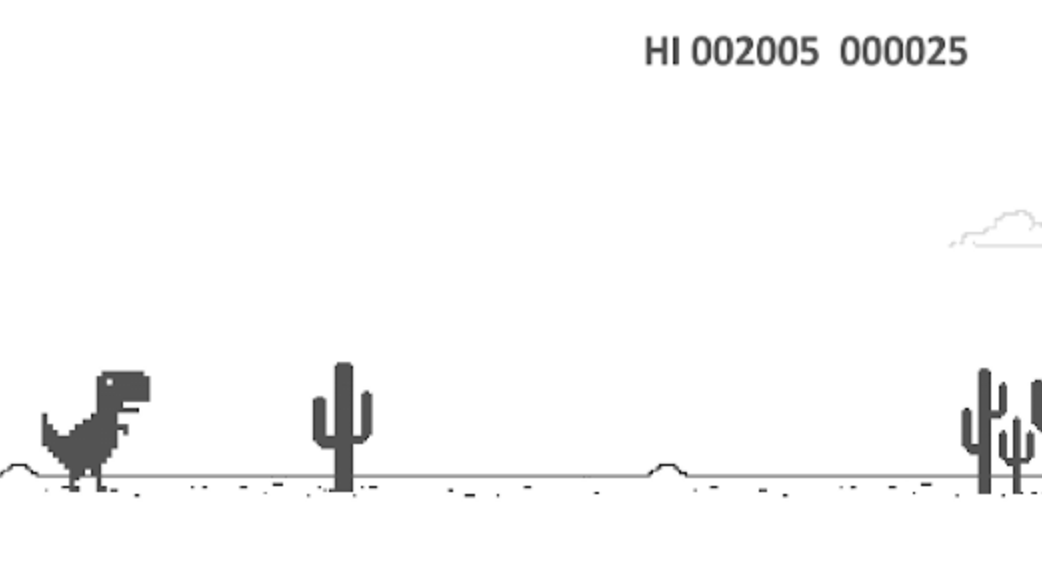
When I first started working on this project, the Wi-Fi didn’t work and I was welcomed with the familiar Google Dinosaur game on my screen that appears when there is no connection. That simple little dinosaur planted the idea in my mind for a playful take, a prisoner committing an escape through a pixelated desert. The prisoner is guided by the player as he jumps over cacti with rolling tumbleweeds in the background adding to the atmosphere as he attempts to outrun the inevitable collision that make the game end. I aimed to add some gamification to the work, so it is interactive in a way that directly affects the narrative, the user decides whether the prisoner escapes or not. The desert is dramatized with gradient skies giving it depth and atmosphere without breaking up gameplay. To make the character interesting and match the aesthetic of the original game, I added a pixelated body, clothing, and even simple facial features, so every dodge and every jump feels dynamic and personal. In retrospect on the project, I enjoyed taking a fundamental, well-known mechanic and making it something more story-based and visual. My objective was to make the user more in control of the narrative compared to my previous work, making each playthrough a lighthearted and engaging choice-based experience.
Code that I am Proud of

display() {
    rectMode(CENTER);
    noStroke();

    //Legs
    fill(255, 120, 0);
    rect(this.x - 10, this.y - this.legHeight / 2, this.legWidth, this.legHeight); //left leg
    rect(this.x + 10, this.y - this.legHeight / 2, this.legWidth, this.legHeight); //right leg

    //Feet
    fill(0);
    rect(this.x - 10, this.y, this.legWidth + 2, 5); //left foot
    rect(this.x + 10, this.y, this.legWidth + 2, 5); //right foot

    //Body (torso)
    fill(255, 120, 0);
    rect(this.x, this.y - this.legHeight - this.bodyHeight / 2, this.bodyWidth, this.bodyHeight); //torso

    //Arms
    fill(255, 120, 0);
    rect(this.x - this.bodyWidth / 2 - this.armWidth / 2, this.y - this.legHeight - this.bodyHeight / 2, this.armWidth, this.armHeight); //left arm
    rect(this.x + this.bodyWidth / 2 + this.armWidth / 2, this.y - this.legHeight - this.bodyHeight / 2, this.armWidth, this.armHeight); //right arm

    //Head
    fill(255, 220, 180);
    rect(this.x, this.y - this.legHeight - this.bodyHeight - 15, 20, 20); //pixel head

    //Prisoner beanie
    fill(255, 140, 0);
    rect(this.x, this.y - this.legHeight - this.bodyHeight - 25, 20, 8);//beanie band
    rect(this.x, this.y - this.legHeight - this.bodyHeight - 30, 16, 5);//top of beanie

    //Facial features
    fill(0); //eyes
    rect(this.x - 5, this.y - this.legHeight - this.bodyHeight - 20, 3, 3); //left eye
    rect(this.x + 5, this.y - this.legHeight - this.bodyHeight - 20, 3, 3); //right eye

    fill(150, 0, 0); //mouth
    rect(this.x, this.y - this.legHeight - this.bodyHeight - 10, 6, 2); //simple mouth
  }
}

With a goal of focusing more on the artistic and creative aspects of this assignment, I’d say I am most proud of the design of the prisoner for the game. I wanted to go for a more pixilated look to match the aesthetic of the original game and gave the design of the prisoner a lot of focus. I am proud of this code merging visual creativity with functional interactivity, the arms, legs, beanie, facial features were all carefully positioned to give personality, while integrating the goal look of the character. Through this code I learnt the importance of the visuals in determining the feel of the game.

Embedded Sketch

Reflection

The main challenge I ran into while creating this game I’d say was balancing the focus on visual design as well as on the functional side of the work. For example, designing the prisoner to be pixelated yet still have recognizable features required careful positioning. So I had to constantly test and adjust the sizes so that the character didn’t interfere with collision detection. However, at the same time it was a learning experience where I went more in depth into the possibilities that come with this program. Next time I’d like to focus more on creating a more detailed visual world where more elements are integrated to create an immersive work.

Reading Reflection – Week 3

Before reading The Art of Interactive Design, I used to think that once we receive a reaction from another thing, that automatically defines the concept of interactivity. When I came across the example of the Nintendo refrigerators on page 11, I immediately felt that it was an example of interactivity. Crawford, however, raised the idea of whether interactivity is subjective or a fixed concept of its absence or presence. After giving his argument careful thought, I believe that interactivity is subjective because it depends on how engaged the user is with the system. The same design might feel highly interactive to one person and mostly reactive to another, depending on how much input and attention they give. Drawing from his analysis and interpretation of interactivity in conversation, both parties must play their part to have a meaningful exchange. This is what I believe is the characteristic of a strongly interactive system: “input, process, and output from both ends must be very strong.”

Comparing that to the interactivity of a design, one user might find a design not interactive based on a low level of engagement on their part, while another user might find it highly interactive. Crawford really got me thinking when he highlighted the subtle difference between reaction and interaction. I have now realized that my p5.js sketches are mostly reactive and not interactive, since they respond to pre-programmed rules without requiring meaningful input from the user. Moving forward, I want to experiment with ways to make my sketches more interactive, such as allowing users to influence patterns, colors, or motion in real time, so the system becomes a collaborative experience rather than just a reactive one.